Problem with single Wireless Interface as Station & AP

Sorry if the subject a little bit weird.
Untitled.png
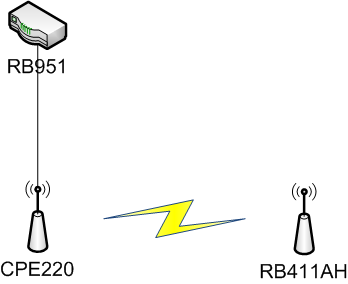
I have RB411AH + XR2 Card configured as Station (wlan1) and AP (wlan2 / VAP), then i connect wlan1 to CPE220 configured with WPA2 security. Both device connected and can share internet.
The problem is no device can connect to wlan2 ( AP ), then i remove security ( WPA2 ) from CPE220 and i can connect to wlan2 ( AP ). I tried with another device like RB951 or Groove and it still the same, i think the problem because wlan1 connected to secured AP.
wlan1 and wlan2 is not bridged, wlan1 configured as gateway and wlan2 configured as hotspot. Is there any setting need to change?

Thanks

The problem is no device can connect to wlan2 ( AP ), then i remove security ( WPA2 ) from CPE220 and i can connect to wlan2 ( AP ).

The CPE220 security has nothing to do with the possibility to connect to the RB411AH-WLAN2.
WLAN1 as “station-bridge” receives interface parameters (band, channel, bandwidth, etc etc), that is also used by WLAN2, when connecting to the CPE220.
However SSID and security profile can be completely different. (As anything you can still define in the slave WLAN2)
Your “hotspot” might need internet access via WLAN1. Depends on your hotspot config.

WLAN2 interface will not function if WLAN1 is not connected !!!

Just set WLAN2 as “AP-bridge”, define SSID and security profile, define a DHCP server on WLAN2 , and see if you can connect to that SSID with a client device.
Set default route to the CPE220 (or DHCP client on WLAN1) , and default firewall rules including the NAT rule for access to the WAN interface list.
WLAN1 should be in the WAN list, WLAN2 in the LAN list.
This WLAN2 subnet is not reachable from the CPE220 side.

When you use fixed frequencies (no-DFS, not auto) you can swap the AP-bridge/station-bridge function on the RB411AH.
Set the freq identical as the CPE220 (may not be auto, or a DFS channel in 5 GHz) on the RB411AH, and make WLAN1 the “AP-bridge”.
Virtual WLAN2 the “station-bridge”, will connect to CPE220 if the channel of WLAN1 and security settings of WLAN2 are correct.
WLAN1 will work also when WLAN2 is not connected.

PS: I suspect the security on WLAN1 was not correct for the CPE220, to accept the connection.

Everything like your suggestion, RB411AH can connect to internet via WLAN1, hotspot run on WLAN2 including DHCP Server.
The only thing i didn’t understand is, i can’t connect to WLAN2 ( tried with Phone, Laptop, and PC ) if WLAN1 connected to secured SSID/AP ( WPA2-AES ).
I can connect to WLAN2 if WLAN1 connected to non-secured SSID/AP or SSID/AP secured with MAC Filtering. Everything is worked, hotspot show login page, successful login with RADIUS and access internet only if WLAN1 connected to non secured SSID/AP.

My Complete setup is :

  • RB411AH
  • ROS 6.47.6
  • Ubiquity XR-2 → MMCX to N-Female → N-Male to N-Male → Stock RB Groove A52Hn Antenna

Is something wrong with my hardware setup ?

Step by step …

  1. Can the RB411 (or Groove) itself connect to the internet when the WLAN1 is secured with WPA2-AES.? (I assume it can with no AES security)
  2. What comes in the log when devices can/cannot connect to WLAN2.? Extend the logging by setting ‘system/logging + topics=wireless’
  3. Anything different in the Radius?
  1. Yes, RB411 can connect to internet, i can ping google, my modem IP address or sync time using SNTP.
  2. Log show nothing, all devices tried to connect to WLAN2 only show “Cannot Connect To ” and MT not showing any information.
  3. Disabled radius not solving the problem.

I think the problem related with WLAN1 connected to secured SSID

Post your config please: in terminal: “/export file=yourfilename hide-sensitive”

No information in log? Add wireless logging under system → Logging → + → topics=wireless.

And one very special consideration … http://forum.mikrotik.com/t/v7-0beta8-development-is-released/140169/1

Just tried several option, but still not work. Even tried to reset several time, but no luck.
Capture.PNG
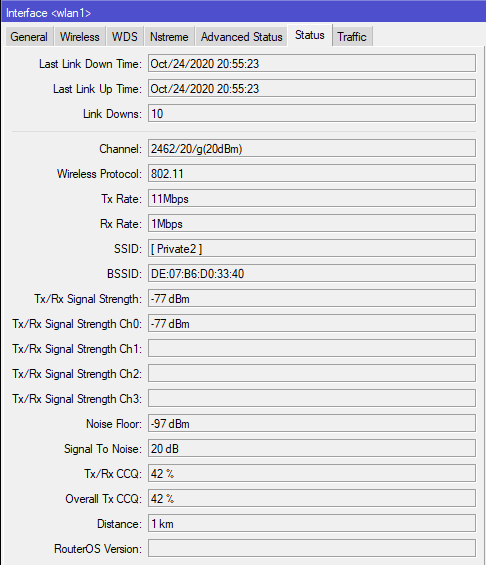
As we can see, RB411AH WLAN1 is connected to CPE220 with Private2 SSID successfully. I can connect to internet or ping another subnet on CPE220 network. But WLAN2 is fail to accept any connection, nothing out of log about wireless. The last line on the log tell me if WLAN1 established on 2462000, SSID [ Private2 ]. I attached my backup file
RB411Test.rsc (1.04 KB)

Your client will not get an IP address.
DHCP server is missing on WLAN2.
Firewall NAT rule is missing.

“station/AP-bridge” config is OK, but this is a “CPE router” configuration. Requiring a WAN/LAN handling. That needs a fully supported LAN on WLAN2.
You can start from a default setup in Quickset on some devices (https://help.mikrotik.com/docs/display/ROS/Default+configurations)
It will give you the LAN required components and Firewall rules. You could edit from there.

Or look at the default config and add the elements as wanted and needed.

WLAN1 usually is a DHCP client setup. You did it manually, that’s OK
WLAN2 needs to support a subnet : WLAN2 IP address and DHCP server needed.(Button “DHCP setup”)
Traffic to WLAN1 must be NATted in the firewall.

/ip firewall nat
add action=masquerade chain=srcnat comment="masquerade"  out-interface=WLAN1

Only a Mikrotik AP-bridge/Station-bridge and a WDS network can be used in bridging the network.
To connect to a non Mikrotik AP, you will need “station-pseudobridge” to get client IP addresses from the non-Mikrotik AP. (The “Wireless Table” has a button “Setup Repeater” to do the work)
Your configuration is the 3th option: CPE station, with local LAN network. Either you need NAT or there must be a route defined at the gateway to this local LAN.

I will explain more detailed about my network, because now i’m a little bit confused.
Untitled.png

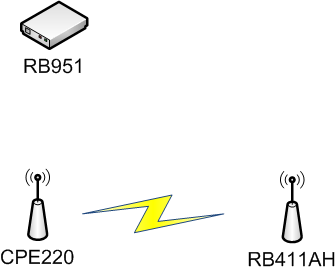
  • CPE220 has 2 SSID, first is [ Public ] which is connected to VLAN 20 to RB951, second is [ Private2 ] which is connected to VLAN 21 to RB951 and it has WPA2-PSK security.
  • I set RB411AH WLAN1 connect to CPE220 and it success, including internet connection.
  • I’m not bridging any interface in RB411AH, because i will use RB411AH itself as hotspot server using WLAN2. So, WLAN2 has hotspot and dhcp server.
  • My goal is using a single wireless interface as Client & AP.

The problem is, i can’t connect to WLAN2 if WLAN1 connected to [ Private2 ] which has security. Meanwhile if i connect WLAN1 to [ Public ] or other SSID without security i can connect to WLAN2 using any devices i have. There is no log if i fail to connect to WLAN2. I attached my new config.
rb411.rsc (1.39 KB)

I understand your configuration very well. It is clear and correct. But the fact that you cannot connect to a SSID when WPA2 security is used on the WLAN1 connection is a total mystery.

Two things to try : 1. wild guess and 2. systematic search

  1. Wild guess

It is not in the 802.11 standards, and I didn’t find it in Mikrotik context, limitations on the usable character set, but there are cases known where spaces in the SSID or in the password generate the wrong WPA/WPA2 key for the connection.
https://bttn.freshdesk.com/support/solutions/articles/5000529141-firmware-201412-wi-fi-ssid-and-password-cannot-have-spaces-or-special-characters
Suppose now that CPE220 and RB411 have a different outcome (one is correct one is wrong) then you will not have a valid connection.
It’s a wild guess. But I have seen spaces and square brackets in your SSID. I don’t know what you have in the password.
But I still expect to see ‘something’ in the log, if the “wireless” topic was added to the “system/logging” topics.

  1. Systematic search

Can I see the information of the registration in the RB411 when connected to the CPE220. Preferably both cases: Public and Private
terminal:

 interface wireless registration print stats

.
And also the log at that moment you make the connection with WLAN1. And also the client connection to WLAN2.
terminal:

 log print

I know that is a lot of work, but I might read something between the lines. I can’t hint what until I see the log lines.

In case it has problem with space and another character, i changed SSID to Private2.

  1. Connect to Private2
/interface wireless registration print stats

0 interface=wlan1 mac-address=DE:07:B6:D0:33:40 ap=yes wds=no bridge=no rx-rate="48Mbps" 
   tx-rate="36Mbps" packets=114,207 bytes=9428,22939 frames=114,243 frame-bytes=9892,25954 
   hw-frames=393,243 hw-frame-bytes=44625,35642 tx-frames-timed-out=0 uptime=20m27s 
   last-activity=14s890ms signal-strength=-77dBm@1Mbps signal-to-noise=21dB 
   signal-strength-ch0=-77dBm 
   strength-at-rates=-77dBm@1Mbps 40ms,-76dBm@11Mbps 27s980ms,-71dBm@24Mbps 20m4s590ms,-
                  72dBm@36Mbps 20m2s700ms,-72dBm@48Mbps 19m57s690ms,-72dBm@54Mbps 20m740ms 
   tx-ccq=63% p-throughput=7769 distance=46 last-ip=172.16.5.3 802.1x-port-enabled=yes 
   authentication-type=wpa2-psk encryption=aes-ccm group-encryption=aes-ccm 
   management-protection=no wmm-enabled=no tx-rate-set="CCK:1-11 OFDM:6-54" 

/log print

21:19:20 system,info router rebooted 
21:19:23 wireless,debug wlan1: must select network 
21:19:23 wireless,debug CC:2D:E0:39:76:1F: on 2412 AP: yes SSID [ 0-0 ] caps 0x421 rates 0xOFDM
:6-54 BW:1x SGI:1x HT:0-15 basic 0xOFDM:6 MT: yes 
21:19:23 wireless,debug D8:07:B6:D0:33:40: on 2412 AP: yes SSID [ KopiSusu2 ] caps 0x421 rates 
0xCCK:1-11 OFDM:6-54 BW:1x-2x SGI:1x-2x HT:0-15 basic 0xCCK:1-11 MT: no 
21:19:23 wireless,debug DE:07:B6:D0:33:40: on 2412 AP: yes SSID  caps 0x431 rates 0xCCK:1-11 OF
DM:6-54 BW:1x-2x SGI:1x-2x HT:0-15 basic 0xCCK:1-11 MT: no 
21:19:23 wireless,debug 24:58:6E:FC:B8:32: on 2417 AP: yes SSID Kios Shura HotSpot caps 0x1c11 
rates 0xCCK:1-11 OFDM:6-54 BW:1x HT:0-15 basic 0xCCK:1-11 MT: no 
21:19:23 wireless,debug D4:CA:6D:25:BB:63: on 2452 AP: yes SSID [ Private1 ] caps 0x421 rates 0
xOFDM:6-54 BW:1x-2x SGI:2x HT:0-7 basic 0xOFDM:6 MT: yes 
21:19:23 wireless,debug D6:CA:6D:25:BB:63: on 2452 AP: yes SSID [ KopiSusu ] caps 0x421 rates 0
xOFDM:6-54 BW:1x-2x SGI:2x HT:0-7 basic 0xOFDM:6 MT: yes 
21:19:23 wireless,debug wlan1: no network that satisfies connect-list,  by default choose with 
strongest signal 
21:19:23 wireless,debug wlan1: failed to select network 
21:19:26 wireless,debug wlan1: must select network 
21:19:26 wireless,debug CC:2D:E0:39:76:1F: on 2412 AP: yes SSID [ 0-0 ] caps 0x421 rates 0xOFDM
:6-54 BW:1x SGI:1x HT:0-15 basic 0xOFDM:6 MT: yes 
21:19:26 wireless,debug D8:07:B6:D0:33:40: on 2412 AP: yes SSID [ KopiSusu2 ] caps 0x421 rates 
0xCCK:1-11 OFDM:6-54 BW:1x-2x SGI:1x-2x HT:0-15 basic 0xCCK:1-11 MT: no 
21:19:26 wireless,debug DE:07:B6:D0:33:40: on 2412 AP: yes SSID Private2 caps 0x431 rates 0xCCK
:1-11 OFDM:6-54 BW:1x-2x SGI:1x-2x HT:0-15 basic 0xCCK:1-11 MT: no 
21:19:26 wireless,debug 24:58:6E:FC:B8:32: on 2417 AP: yes SSID Kios Shura HotSpot caps 0x1c11 
rates 0xCCK:1-11 OFDM:6-54 BW:1x HT:0-15 basic 0xCCK:1-11 MT: no 
21:19:26 wireless,debug D4:CA:6D:25:BB:63: on 2452 AP: yes SSID [ Private1 ] caps 0x421 rates 0
xOFDM:6-54 BW:1x-2x SGI:2x HT:0-7 basic 0xOFDM:6 MT: yes 
21:19:26 wireless,debug D6:CA:6D:25:BB:63: on 2452 AP: yes SSID [ KopiSusu ] caps 0x421 rates 0
xOFDM:6-54 BW:1x-2x SGI:2x HT:0-7 basic 0xOFDM:6 MT: yes 
21:19:26 wireless,info DE:07:B6:D0:33:40@wlan1 established connection on 2412000, SSID Private2

Try connecting my laptop, it show
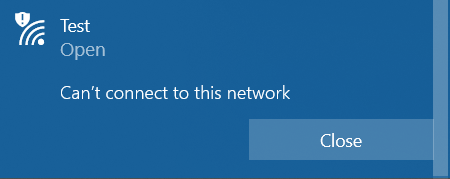
Untitled.png
Nothing out of the log

  1. Connect to [ Public ] ( I just change it to [ KopiSusu2 ] )
/interface wireless registration print stats

0 interface=wlan1 mac-address=D8:07:B6:D0:33:40 ap=yes wds=no bridge=no rx-rate="48Mbps" 
   tx-rate="36Mbps" packets=141,196 bytes=19793,36587 frames=141,205 frame-bytes=18947,36851 
   hw-frames=207,205 hw-frame-bytes=39674,41771 tx-frames-timed-out=0 uptime=1m21s 
   last-activity=7s310ms signal-strength=-75dBm@1Mbps signal-to-noise=23dB 
   signal-strength-ch0=-75dBm 
   strength-at-rates=-75dBm@1Mbps 100ms,-75dBm@11Mbps 1s960ms,-77dBm@24Mbps 29s330ms,-
                  78dBm@36Mbps 8s310ms,-78dBm@48Mbps 7s310ms,-76dBm@54Mbps 57s510ms 
   tx-ccq=80% p-throughput=23257 distance=1 last-ip=172.16.51.136 802.1x-port-enabled=yes 
   management-protection=no wmm-enabled=no tx-rate-set="CCK:1-11 OFDM:6-54" 

/log print

21:49:32 wireless,debug wlan1: must select network 
21:49:32 wireless,debug D8:07:B6:D0:33:40: on 2412 AP: yes SSID [ KopiSusu2 ] caps 0x421 rates 
0xCCK:1-11 OFDM:6-54 BW:1x-2x SGI:1x-2x HT:0-15 basic 0xCCK:1-11 MT: no 
21:49:32 wireless,debug CC:2D:E0:39:76:1F: on 2412 AP: yes SSID [ 0-0 ] caps 0x421 rates 0xOFDM
:6-54 BW:1x SGI:1x HT:0-15 basic 0xOFDM:6 MT: yes 
21:49:32 wireless,debug DE:07:B6:D0:33:40: on 2412 AP: yes SSID  caps 0x431 rates 0xCCK:1-11 OF
DM:6-54 BW:1x-2x SGI:1x-2x HT:0-15 basic 0xCCK:1-11 MT: no 
21:49:32 wireless,debug 24:58:6E:FC:B8:32: on 2417 AP: yes SSID Kios Shura HotSpot caps 0x1c11 
rates 0xCCK:1-11 OFDM:6-54 BW:1x HT:0-15 basic 0xCCK:1-11 MT: no 
21:49:32 wireless,debug D4:CA:6D:25:BB:63: on 2452 AP: yes SSID [ Private1 ] caps 0x421 rates 0
xOFDM:6-54 BW:1x-2x SGI:2x HT:0-7 basic 0xOFDM:6 MT: yes 
21:49:32 wireless,debug D6:CA:6D:25:BB:63: on 2452 AP: yes SSID [ KopiSusu ] caps 0x421 rates 0
xOFDM:6-54 BW:1x-2x SGI:2x HT:0-7 basic 0xOFDM:6 MT: yes 
21:49:32 wireless,info D8:07:B6:D0:33:40@wlan1 established connection on 2412000, SSID [ KopiSu
su2 ] 
21:49:33 dhcp,info dhcp-client on wlan1 got IP address 172.16.51.140 
21:49:35 wireless,debug wlan2: C8:3D:DC:D3:52:3C attempts to associate 
21:49:35 wireless,debug wlan2: C8:3D:DC:D3:52:3C not in local ACL, by default accept 
21:49:35 wireless,info C8:3D:DC:D3:52:3C@wlan2: connected, signal strength -39 
21:49:36 dhcp,info dhcp1 assigned 192.168.50.254 to C8:3D:DC:D3:52:3C
Hi, I see absolute nothing wrong in these Mikrotik logs and registrations (ok ok the wpa2 encrypted variant needed 393 frames to send 114 frames, where the public variant only needed 207 frames to send 141 frames.) But that should not stop the working form the client device to the AP in any way. It is not the spaces in the SSID.

I don’t see it. I don’t understand. Maybe sometime later I’ll get it, but not now.

It’s probably wrong, but I don’t really trust RouterOS 6.47.4. A ROS 6.45.9 is known to have no issues in that area. So downgrade could just be one extra action, to exclude RouterOS as cause.

For the rest it all sits between the Windows client and the AP. But you changed nothing on WLAN2 to my knowledge, so how can it be influenced?
Nevertheless these might be desperate trials: https://helpdeskgeek.com/networking/fix-windows-is-unable-to-connect-to-the-selected-network/

EDIT: one detail, the first experiment with the security connection : is this line missing there or just not copied? " 21:49:33 dhcp,info dhcp-client on wlan1 got IP address 172.16.51.140"
This comes before WLAN2 gets a connection attempt. If there is no DHCP handshake for WLAN1 then the connection to internet will be problematic for the client as well.

I just tried to connect to RB411 to RB951 and Groove, both using WPA2-PSK security and same problem still exist.
Downgrade to 6.45.9 not solve the issue, all device failed to connect to WLAN2 even if WLAN1 has connected, get an IP and connected to internet. I just ordered another MiniPCI and RB to check if the same issue still exist. For now, i’m using MAC Filtering to prevent another device connected to my CPE220. But i still curious about this problem and want to check again with another RB.

UPDATE!

Just received 2 used mini PCI, R52 and PW-MN561 (120mW, G/N ). Test both card with RB411AH and same configuration with XR2, the result:

  1. R52 ( B/G ) WLAN1 connected to CPE220 ( B/G/N ), but client can’t connect to R52 WLAN2.
  2. R52 ( B/G ) WLAN1 connected to CPE220 ( B/G ), but client can’t connect to R52 WLAN2.
  3. PW-MN561 (G/N ) WLAN1 connected to CPE220 ( B/G/N ), client can connect to PW-MN561 WLAN2 ( with Single or Dual chain ).
  4. PW-MN561 ( B/G ) WLAN1 connected to CPE220 ( B/G ), client can connect to PW-MN561 WLAN2 ( with Single or Dual chain ).

I’m not find the reason why B/G card have problem with secured SSID, but for now i will use PW-MN561 because it working with my setup.