Problems with SFP link on Hex S 2025

Hi All,

This is my first post in this forum, and I hope that someone will be able to help me or point me in the right direction.

I received the Hex S 2025 a few days ago, and I’m having problems with the SFP link. Currently, I have a Hex S (previous model) running for 2 years with no issues. I’m using PPPoE to connect to my ISP via SFP1 interface.

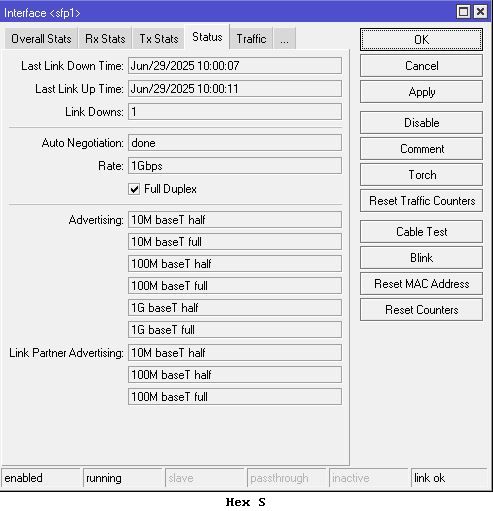
When I tried to do the same on the new Hex S, I had problems initiating a connection. At first, I thought it had something to do with the PPPoE discovery (can’t find the ISP AC), but this led me to the SFP interface itself, and I noticed that under the status tab (or the CLI) there is no partner link advertising at all. When checking with my working Hex S, I can see the advertising fields with no issues, and the PPPoE session is up in 2 seconds.

I’ve tried almost everything that I know of: disabling the auto negotiation, setting various speeds based on the speeds that I see from my working Hex S, replacing the cable, testing all the supported RouterOS versions (since it’s new there aren’t many of them), resetting the configuration, etc.

In addition, to verify that it’s something with the new Hex S, I’ve connected the SFP module (Nokia G-010-A ONT) to my spare EdgeRouter SFP+ and even a media converter - it works like a charm.

I’ve created a ticket with Mikrotik support, and I’m waiting for their response. But in the meanwhile, I hope that someone here might point me in the right direction or maybe


suggest something that I didn’t try yet.

Attached are the screenshots from my working Hex S and the new one.

Thanks!

At first sight I would say to check advertising part on Hex S 2025 side.

From the screenshots I see Hex S 2025 is only advertising 1G BaseX whereas old Hex S is using 1G Base T half and full.
Add those two on new Hex S (maybe even the rest of the missing entries as well).

Otherwise you need to compare config on both ends.
Export config and then use text editor to put them side by side to see where the differences are.
Maybe that can help to spot the missing part.

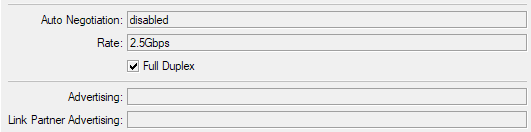
I have a G-010S-P, which should be similar enough to your G-010S-A, that works best if you turn off Auto Negotiation and set the Rate to 2.5G baseX.

image

HI @CGGXANNX

it looks the same, but it’s not working. i’ve set it to every speed, starting from 10M to 2.5G, half and full, still - the link in most configurations is up, the green light is steady, but it doesn’t work.

Thanks

Hi @holvoetn

Already tried that, with export import, going over each field, speed advertising parameters, but i’m afraid it didn’t help.

Thanks

What RouterOS and firmware version are you running?

since it's a new router, the minimum version is 7.18.2, so i've tested all versions from 7.18.2 to 7.20 Beta8.

Any updates on this topic?

I'm having the same issue with my hEX S (2025) in combination with the GPON-ONT-SFP modules Zyxel PMG3000-D20B and FS.com GPON-ONU-34-20BI.
The SFPs are configured for auto-neg and are working flawlessly in the old hEX S.

When using with the hEX S (2025) I can only see a couple of incoming "RX jabber" frames.

Have you tried 7.20rc?

Yes, I already tried a couple of firmware-versions including 7.20rc3 (latest in testing channel).

There is always the alternative way to test the next work in progress: https://box.mikrotik.com/d/4dbe3789cd8349b6b89d/

HI All,

after a few months, i received a confirmation from MT support that there is a problem with various SFP, and it's related to the RouterOS.

in any case, they provided a solution, which at first looks absurd (like reboot your PC), but it was tested by them with the exact SFP module that i have (Nokia G-010S-A). I've followed the instructions below, and it worked! my SFP has resurrected! connected via PPPoE, tested download speeds, tested several reboots to the router, including power cycle - still works!

please follow the instructions as provided by MT, and i would love to here if it fixed your problem too.

Note that this was tested with v7.20rc1, but it should work with future releases too.

"Hello,

After testing with the 7.21_ab434 and the current 7.20rc1 we managed to rule out configuration issues and got "Nokia/Alcatel G-010S-A" GPON SFP module working on the E60iUGS.

Indeed, forced 1G speed settings are required on the E60UiGS, the auto-negotiation on the SFP interface will not work with this module:

/interface ethernet set sfp1 auto-negotiation=no speed=1G-baseX

And there is a need for power-cycling the E60UiGS or replugging the SFP module after the interface speed settings are changed.
Also please note that it may take longer (up to 90 seconds) for SFP ONU module to initialize after insertion or device startup.
Please recheck power-cycling or replugging with ~90s waiting at least few times if it is not working right away.
Normally, you will not need to repeat it once the module is working."

2 Likes

Thanks for sharing this workaround! It worked with my Zyxel PMG3000-D20B as well.

Probably if you change the rate to 2.5G-baseX, and do that power-cycling as recommended by MikroTik, then it would work at 2.5Gbps too instead of 1Gbps. As I wrote above, mine G-010S-P works well at that rate.

Yes, but my specific SFP module requires manual reconfiguration to 2.5G via SSH after every SFP boot before I can switch the hEX S SFP cage to 2.5G. I’m fine with that, as I wrote a small script that toggles between 1G-BaseX and 2.5G-BaseX whenever sfp1 is down.

I can confirm this also worked for my Leox LXT-010S-H that stopped working after upgrading to 7.20.x Thanks!