Programming mode button on hap ax3 via script - not working

Hey guys,

New to Mikrotik so still learning how it all works

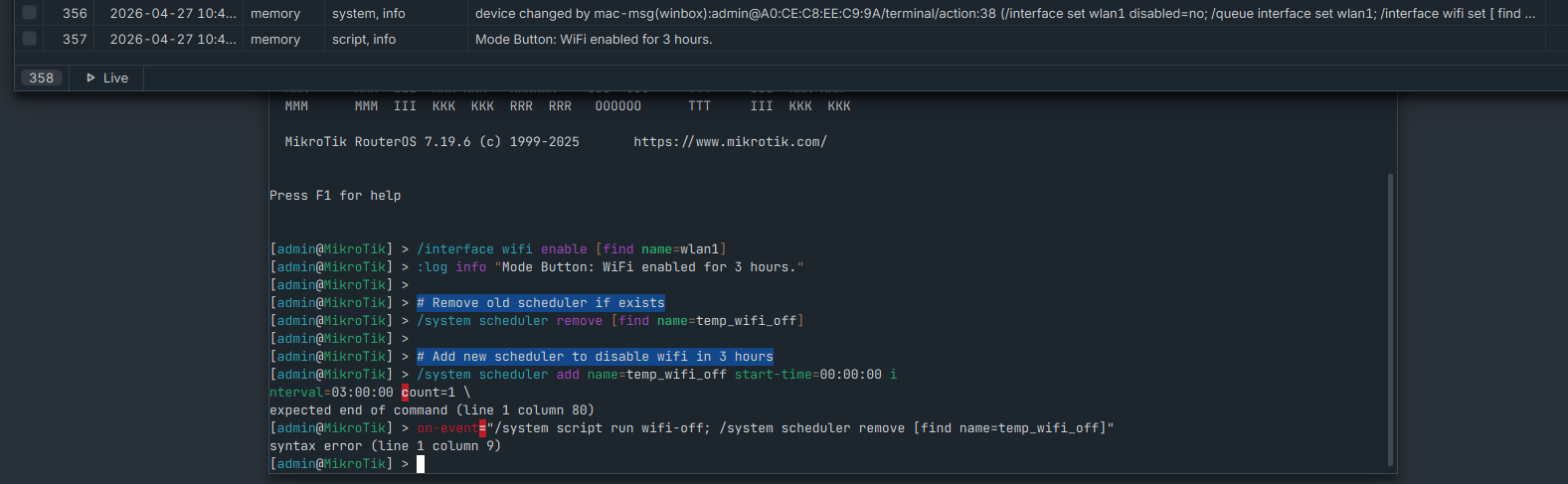
I’m trying to program the mode button on my hap ax3 to turn wifi on for 3 hours (I already have a script working to disable wifi at night) I have got a script which appears to work fine in terminal however when I put it in the script and run it, it fails. This is the message I get in the log

error message

Then when I run it on the terminal this is what I get

The script I’m using is:

/interface wifi enable [find name=wlan1]

:log info "Mode Button: WiFi enabled for 3 hours."

# Remove old scheduler if exists

/system scheduler remove [find name=temp_wifi_off]

# Add new scheduler to disable wifi in 3 hours

/system scheduler add name=temp_wifi_off start-time=00:00:00 interval=03:00:00 count=1 \

on-event="/system script run wifi-off; /system scheduler remove [find name=temp_wifi_off]"

Any ideas? I’m assuming I’m getting something wrong with the format or the order but I’m struggling to figure it out.

Any help would be much appreciated

Thanks

It works so well that it gives you two errors... Great...


Stop using Artificial Deficency, it won't even let you think with your own brain,
which doesn't notice that it clearly states there's an error at character 80 on that line: expected end of command (line 1 column 80).

I don't correct AI-generated bullshit.

If I were you I would re-start from the basics:

"count" is not a listed property.

"on-event" argument should be the name of the script to be executed, not a set of commands.

False.

You can write the script directly without wasting time calling another script.

It's always been that way.

In fact, I often wonder why we needlessly complicate our lives.
Then again, the people who write the documentation often seem like they don't even know RouterOS.
And besides, it would be terribly programmed...
if that were the case: Why not just add a drop-down menu?
For CLI can be used <TAB> but pressing F1:

[@] /system/scheduler> set 0 on-event=        

Script -- Script name or the script algorithm to execute on the event

Script -- string value

Press F1 for general console usage help

Would it work if done according to documentation?
Yes.

Can it be done in other ways?
Yes.

Basics =! Advanced

The documentation MUST be complete.
Or if there is such a distinction, where is the "Advanced" section for scheduler?

Obviously it's clear that both us we do NOT write the documentation...

In a perfect world, but even in ours far from perfect one, it SHOULD.
https://datatracker.ietf.org/doc/html/rfc2119

It is more a state of mind than an actual written doc :wink:.

Let's imagine for a moment that ALL we had was the ROS (script) documentation, no forum, no rextended's examples, no nothing else.

People would try (and fail) and try again and finally learn.

But we do have AI, and have the shortcut to fail directly, without even trying (let alone learn).

First of all they have to learn to read... error messages!!! :rofl: :rofl: :rofl:

Or just "read" instead of "watch&listen".