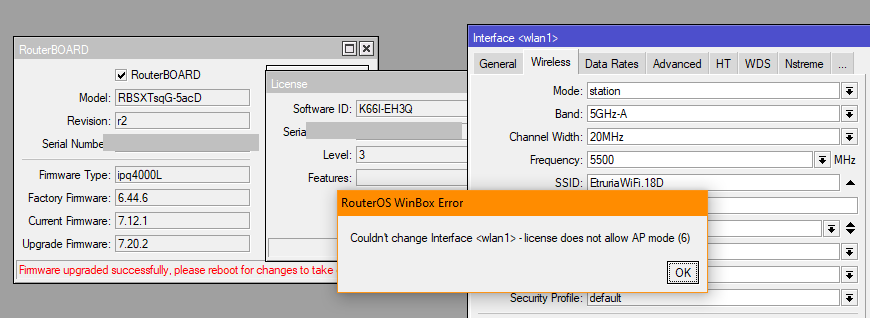
But in 7 ap-bridge doesn't exist anymore, it is just ap:
It is confusing.
In case the LHG XL can only be setup as station-bridge (CPE), which device should go on the "other" side and be an AP?
But in 7 ap-bridge doesn't exist anymore, it is just ap:
It is confusing.
In case the LHG XL can only be setup as station-bridge (CPE), which device should go on the "other" side and be an AP?
v6 ap-bridge = AP with bridge or not as separate option, require Level 4
v6 bridge = particular ptp case for L3 licence for accept only one unique connection
v6 station = ......
So, on v7 "ap" is "ap-bridge", but till now with comments on various forum Topics is like that, L3 devices lost "bridge" mode from v6...
Unfortunately, without even a v7 peripheral with L3 that goes with the new "wifi" package, I can't do any tests...
It was my understanding that the “wifi” driver (the replacement for “wireless”) has a bridge mode, but it is incompatible with the old wireless bridge mode. So it would not be possible to bridge a LHG ax with a LHG old model.
However, the “wireless wire” (a 60 GHz solution), which is also a License level 3 device, does offer the wireless bridge. Probably also with the wireless driver.
When you want to make a transparent ethernet bridge you can of course configure a point-to-point link for IP in the usual way (possible with License level 3 when you have only one peer) and then run a transparent protocol like EoIP or “L2TP ethernet” on top of that. When you only need IP bridging some other protocols (IPIP, GRE, L2TP) could be used as well.
Of course it would be a more complicated configuration than you would really want to have…
Done some test on SXTsq ac, not ax, but whith wifi driver.
Master:
/interface bridge
add name=bri-lan protocol-mode=none
/interface bridge port
add bridge=bri-lan interface=ether1
add bridge=bri-lan interface=wifi1
/interface wifi
set [ find default-name=wifi1 ] \
    channel.frequency=5180-5240:20 \
           .skip-dfs-channels=disabled \
           .width=20mhz \
    configuration.antenna-gain=16 \
                 .chains=0,1 \
                 .country="United States" \
                 .mode=ap \
                 .ssid=TEST \
                 .tx-chains=0,1 \
                 .tx-power=30 \
    datapath.client-isolation=no \
    disabled=no \
    security.authentication-types=wpa2-psk \
            .disable-pmkid=yes \
            .encryption=ccmp \
            .group-encryption=ccmp \
            .group-key-update=1h \
            .passphrase=password \
            .wps=disable
Slave:
/interface bridge
add name=bri-lan protocol-mode=none
/interface bridge port
add bridge=bri-lan interface=ether1
add bridge=bri-lan interface=wifi1
/interface wifi
set [ find default-name=wifi1 ] \
    channel.frequency=5180-5240:20 \
           .skip-dfs-channels=disabled \
           .width=20mhz \
    configuration.antenna-gain=16 \
                 .chains=0,1 \
                 .country="United States" \
                 .mode=station-bridge \
                 .ssid=TEST \
                 .tx-chains=0,1 \
                 .tx-power=30 \
    datapath.client-isolation=no \
    disabled=no \
    security.authentication-types=wpa2-psk \
            .disable-pmkid=yes \
            .encryption=ccmp \
            .group-encryption=ccmp \
            .group-key-update=1h \
            .passphrase=password \
            .wps=disable
Which is also a level 3 licensed device, so it does take the ap mode (and of course the other one the station-bridge mode).
Yes, on purpose, I don't have any ax with Level 3 license... SXTsq ax is Level4...
So, to recap, the licensing levels remain an unintelligible mess, but seemingly a PtP link between two identical level 3 licensed devices is possible in v7.x (which is what the OP is trying to do).
And you just published a suitable "cookbook".
@satman1w
The three key points in my previous post:
Are explicited/exemplified in the configuration snippets rextended just posted.
O.K.let’s recap.
The link worked with the configuration sent by rextended!
I've been dealing with Mikrotik since version 1.1 or something like that, when ROS came on 7 floppy disks and I've raised more fans than I can count, I was at the first MUM in Prague and so on... I've made at least fifty of the links I'm talking about, but all on ROS versions before 7.x
The damn WiFi package they brought in the latest versions is such garbage that after 20 years I'll switch to ... I don't know ... Ubiquiti, D-link or something similar that I've always hated.
The problem I had with this configuration is somewhere in the choice of country and frequency, which is an extreme pain in the ass. Why do I have to choose both the country and the frequencies when I can choose whatever I want anyway??? What kind of nonsense is this??
Let me remind you of the story from a MUM... We had at our disposal "specialists" who wrote all these packages and create menus with a million boxes. We asked about some specific things related to the wireless configuration and got the answer - We have no idea, the chip manufacturer defined that THAT parameter can be changed, so we inserted it into the configuration.
That's sick!
Just look at the above configuration, upload it to the router and count in winbox how many fields are left unfilled - and the link works!!!
Anyway, now that I've located the problem, I'll try to understand some of the details about establishing this link and then I'll move on to something else. Since I have to learn from scratch, let it have a different name.
Thanks to everyone who took the time to respond, especially "rextended" for the solution. Best regards to allks to everyone who took the time to respond, especially "rextended" for the solution.
Best regards to all
Let me answer you about Quickset…
BTW CGGXANNX I know where it is I just don't use it 
Quickset is also one of those stupid things stuck on a beautiful and fully functional ROS.
For example, you say it offers some ready-made configurations depending on the device you have (if I understood correctly)
Do you know what he offered me on the LHG XL with a 27 dbi antenna??
He offered me to configure (QUICK) Home AP ?!?!?!
Yea, that is really my first choice when it comes to Home AP.... disaster...
Anyway, thank you for all the answers and the effort you put in
Best regards
I know, rest assured.
Check Rule #4 of the Mikrotik Club: