Bandwidth test with RB5009 and Zaram SFP+ module on a 1 Gb internet subscription.

Bandwidth test with RB5009 and Zaram SFP+ module on a 1 Gb internet subscription.
nice
It is a good thing to see that when an ISP sells a 1 Gb internet subscription - that the customer can actually measure speeds to/from the Internet at 1 Gb internet subscription speeds. Where were you testing from ?
Testing took place from Arnhem in the Netherlands. Provider is Delta.
Dec 26. 2023
Moments ago , I updated the btest server I manage.
Was CHR ROS ver 7.12.1
Now CHR ROS ver 7.13
All btest time based access lists /address lists were cleared during the upgrade/reboot
North Idaho Tom Jones
ISP just upgraded me to what they claimed was 1.6gbps …
Thanks to your server i was able to test that !
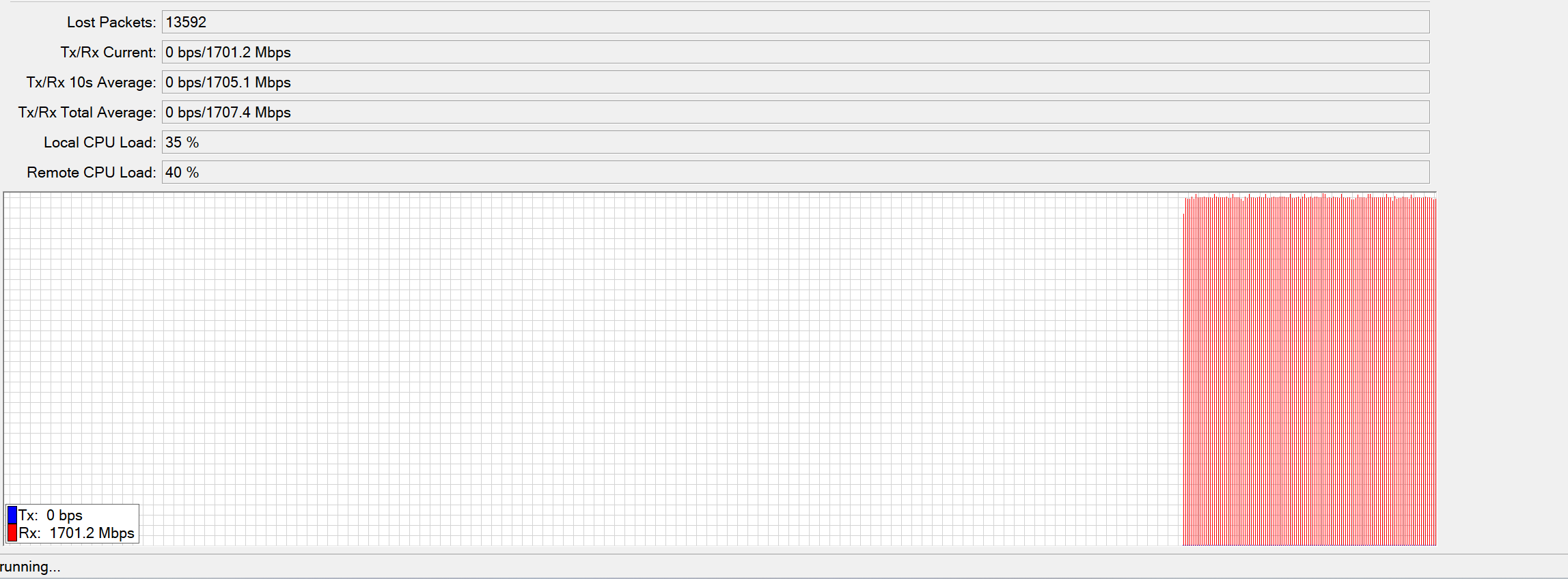
I like your ISP , they say they are selling you a 1.6 Gig account and-however you are able to speedtest/measure 1.7 Gig — nice. Many ISPs over sell what they can deliver.
Im having problems reaching your server it might be a regional problem
i did a traceroute from 2 locations still couldnt reach the servers ip the last ip it reached from both was 23.162.144.1 (probably the main router of your server)
Im from greece central macedonia
both locations use the same isp they’re also using the same isp data center in skg
the btest CHR ROS speedtest server I maintain was just now updated
If you are able to traceroute to 23.162.144.1 , then you made it to my networks.
Try it now , I just rebooted the btest server.
I did try it from both its working again
The main reason i used it was to test if i did my queues wrong i had low speeds for some reason when using the speedtest app on windows 11
I didnt use your server for like a week so i dont think i had a ban
ip address is in the range 94.68.0.0/16 otenet greece ASN:6799
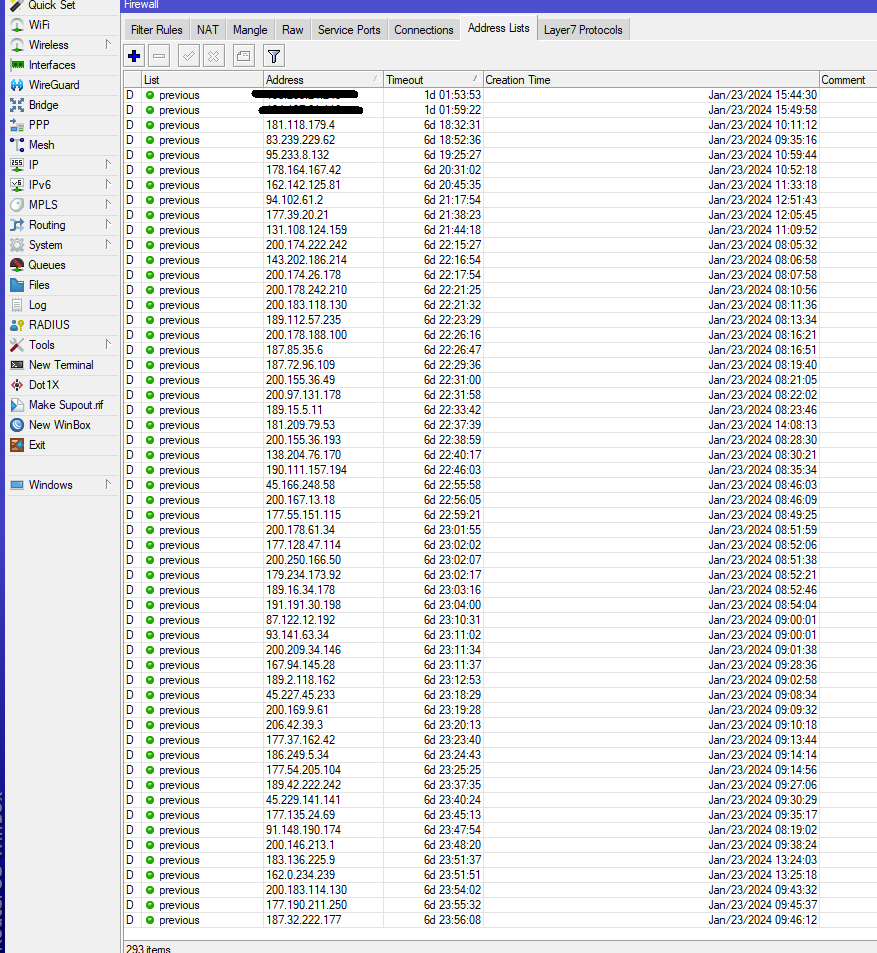
OK - If you see your IP address list in the image below - and you continue to btest to my btest server without waiting 24 hours between btests, I am going to place your IP address on a 1-year block.
All of the IP addresses listed below were supposed to wait 24 hours - but did not wait the required 24-hours. Which then automatically placed them on a 1-Week waiting list b4 they can btest again.
Soo , if this continues ( not waiting 24 hours between btest(s) to the btest server I manage , I will add an auto 1-year address list. Where if you are on the 1-week waiting list and you btest again , then you are then auto placed on a 365-day waiting list.
Using the test server in the first post I was able to verify the connection bandwidth provided by my ISP. Results are 2.2/1Gbps, which is good given a SLA speed of 2.5/1Gbps.
This was recorded using the UDP test. For newcomers, remember that depending on your firewall configuration, you might have to create a new rule allowing incoming UDP traffic for the duration of the test.
Thanks to TomjNorthIdaho from Northern Italy.
the btest CHR ROS speedtest server I maintain was just now updated
I do apologize for running 3 tests last night before reading the rules  . I will be sure not do that again. Also since this is the first time I have done one I didn’t pay attention to the fact that you can set a duration flag. I sincerely appreciate the service you are providing.
CHR on Vultr
500 up
830 down
I will screen snip next time to share with the community.
you’re good. I just now cleared out the counters on the btest server. So at this moment , nobody is in btest jail. However , those who perform multiple tests without the proper waiting period will again automatically go back on the btest jail list.
North Idaho Tom Jones
From Greece
Provider Inalan
1G/1G
Mikrotik 5009 7.14 beta 8
Thank you
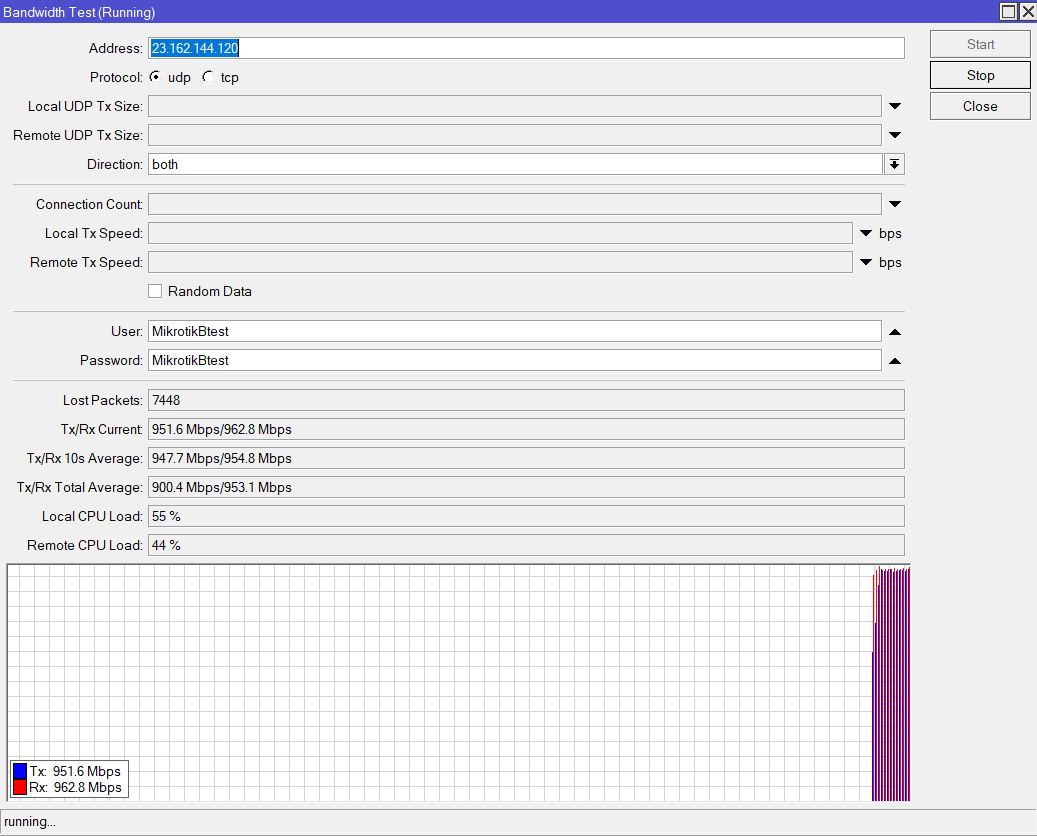
Hello all, testing from São Paulo, Brazil, Vivo 200mbps fiber link:
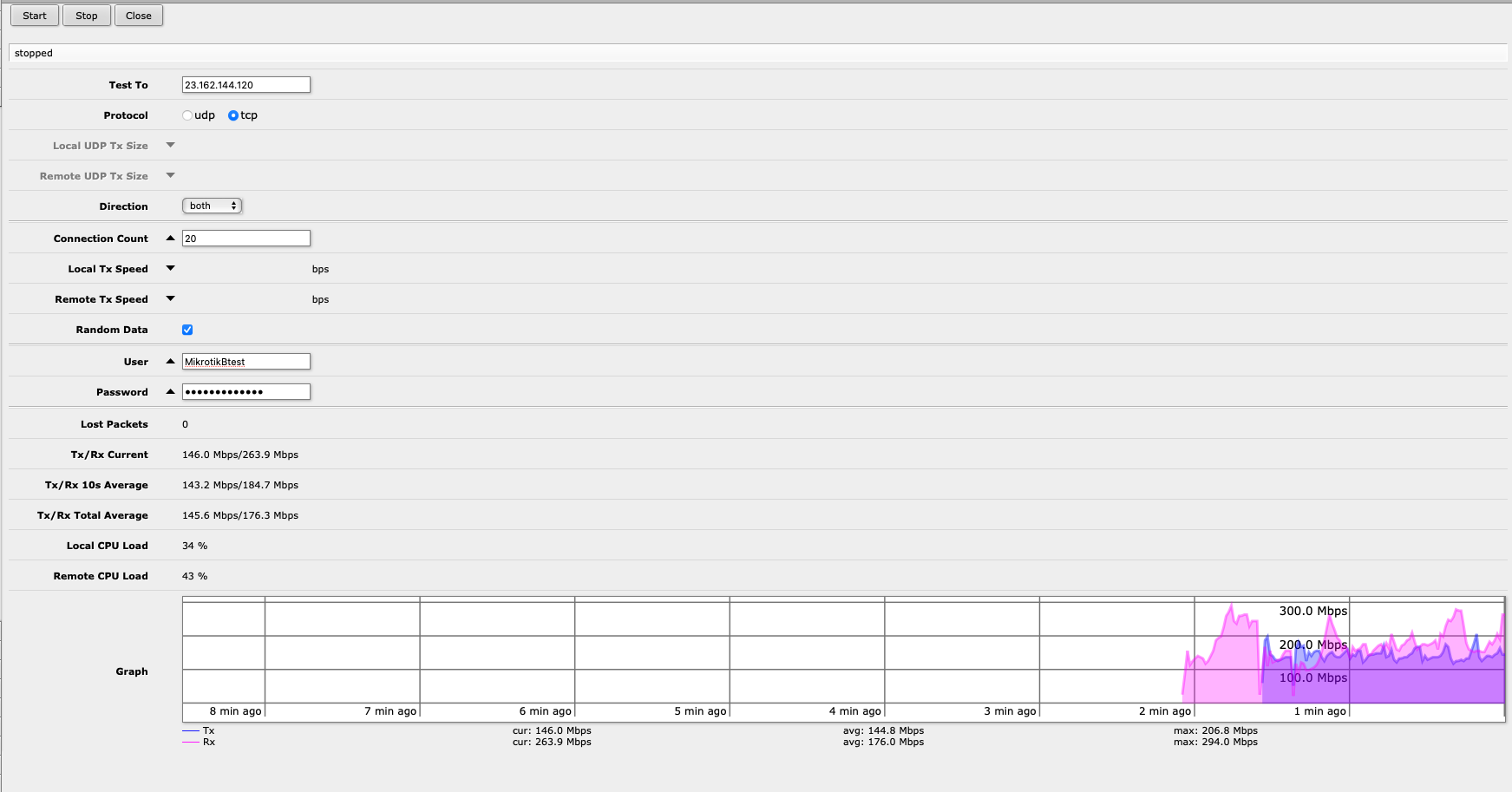
I would love to know the reason for this see-saw behavior…
re: … I would love to know the reason for this see-saw behavior… …
You were testing using TCP. TCP is a protocol that sends a packet and then waits for a received ACK packet ( ACK is a return message that a packet was received ). This send , then wait for an ACK then send the next packet and wait loop is designed verify packets are being received and sent without packet loss. Also , when an ACK packet is not received , the sending packet is then re-transmitted and a received ACK packet needs to be received b 4 the next new packet is sent.
This works well. This can be pretty fast for near-by network communications - however from Brazil to North Idaho , I would guess there are all kinds of issues to slow down the time from when a packet was sent and the time to receive an ACK packet. Some of those issues include distance ( packets are not moving at the speed of light - instead packets are moving at the speed of what each switch-hop can reliably run at , and the time of how fast all of the routers can run , and how congested each switch/router is and the link speed between every switch and router.
Sometimes - I’m amazed the Internet even works - whewwww
Note - UDP is sometimes a better test for network speed because it is a send send send send protocol , there are no received ACK packages and there is no verification that a UDP packet was received or lost.
Next time , try a UDP speedtest to my server and you might see a performance increase. However, both TCP and UDP are used/needed to make the Internet work.
Note - I just now cleared out and reset all of the btest jail counters for everybody - so you can test again without waiting the normal time-out waiting period.
North Idaho Tom Jones
Hey Tom,
Thank you for the very good explanation! Makes total sense. I tried again this morning, with the first minute with UDP and the second minute with TCP:
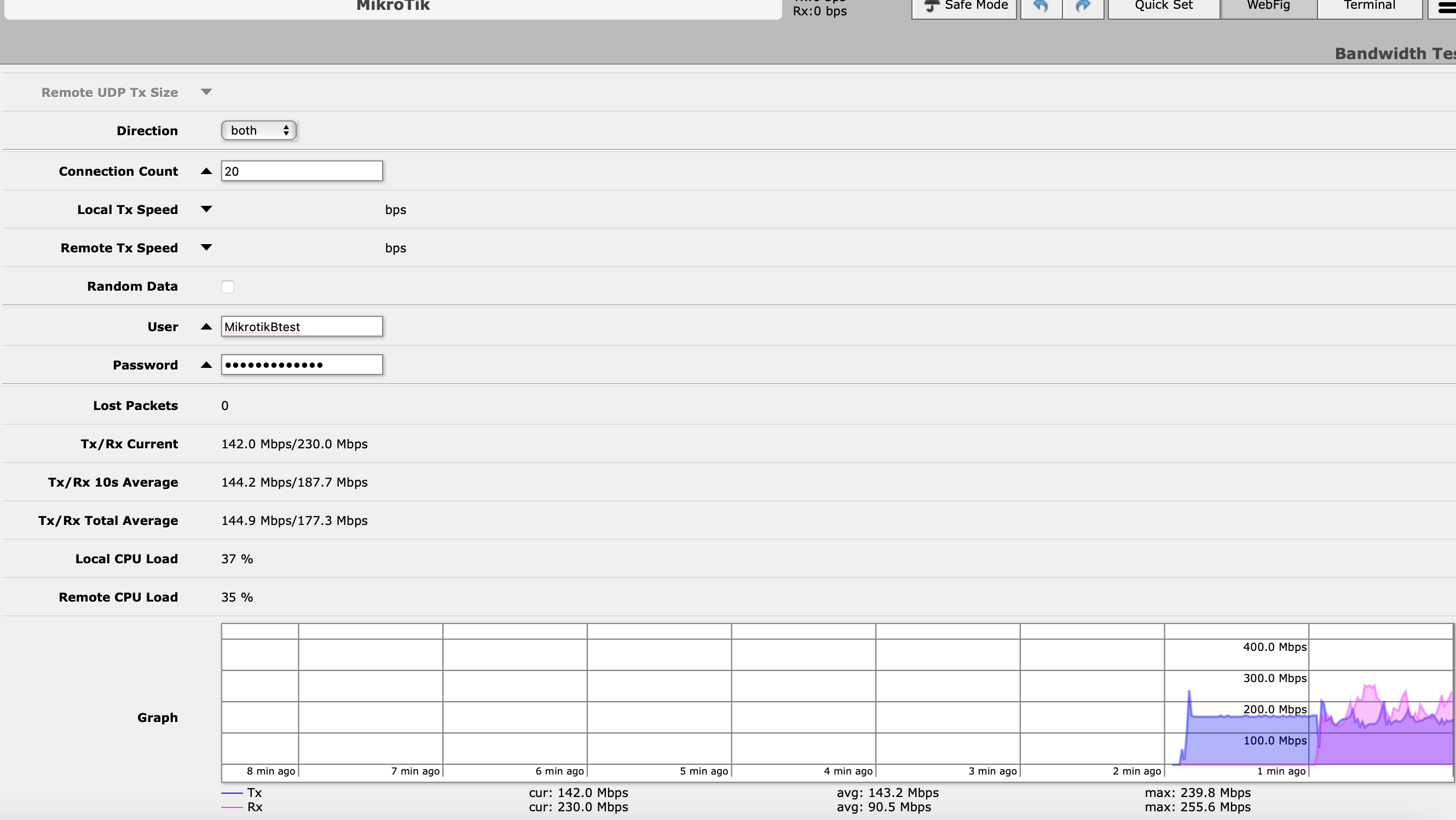
This is very interesting. With UDP, my download speed is close to the nominal, but the upload is ridiculous, 1mbps. With TCP the upload speed surpasses the download speed, way above what is contracted (my link is supposed to be 200mbps down/100mbps up). Is this something that may be wrong with my setup, or is something else, like shenanigans played by my ISP? Thanks again!
Hi,
I’m new to mikrotik.
I’ve seen last year an IT performing a bandwith test from another router mikrotik from another fiber line that I own but I can’t remember the IP. He was telling me it was the official bandwith test from mikrotik. But As I read more and more from this forum there does not seem to be an official speedtest or bandwidth test from mikrotik…
Also I tried the north Idaho server from Tom and I can’t ping it nor do the test…
IS there a problem ?
Thanks for any answers I might get