He’s a storyteller or you probably misunderstood.
About ping:
Is the first line of the first post.
Do you read what’s written on the topic before writing anything?
He’s a storyteller or you probably misunderstood.
About ping:
Is the first line of the first post.
Do you read what’s written on the topic before writing anything?
He’s a storyteller or you probably misunderstood.
No I clearly not misunderstood, then it means that he really believes that’s the official bandwith test server from mikrotik.
Is the first line of the first post.
Do you read what’s written on the topic before writing anything?
Yes and that’s why I’m writing here because it is the most updated topic on a possible bandwith test server operational from the forum. I must have missed that part about the ping then. Sorry about that.
I totally get that it was a personal server so yeah I did read it or I would not have understood that → logic.
And through the ping it is my first reflex since I’m part of the scholar part of IT that consider that we should let ICMP running, not all of them but some of them, plus there are other means to prevent a possible ICMP overflow and ban the IP doing so. So that was my first reflex since the bandwith test was not running out of the box, it was to ping it.
But apparently I was asking too much or it is considered as rude, I don’t know.
So sorry for the misunderstanding.
Thank you for your answer tho

ZERO DAYS on MikroTik bandwidth-test server
Stop exposing your “MikroTik bandwidth-test server” on the internet, there is a zero days which allows any attacker to spam (mail) the entire world with spam via these machines open on the internet (example on: https:// www.shodan.io/host/38.49.159.122)
38.49.159.122:2000
@mdadmin, what are you trying to imply and what source(s) are you relying on? Check https://multirbl.valli.org/dnsbl-lookup/23.162.144.120.html
Hi! Appreciate the test server, super helpful for testing our bandwith 
Testing from Sydney, Australia (AS136582)
Was able to pull 1.7G/1G Symettrical, 2.5G Tx and 2G Rx

Mikrotik Speed Test
I recently spotted this selection on one of my Mikrotik CHRs ( must be something that recently came out with a newer ROS version ).
*** fyi - my network is allowed to do anything to my btest server ***
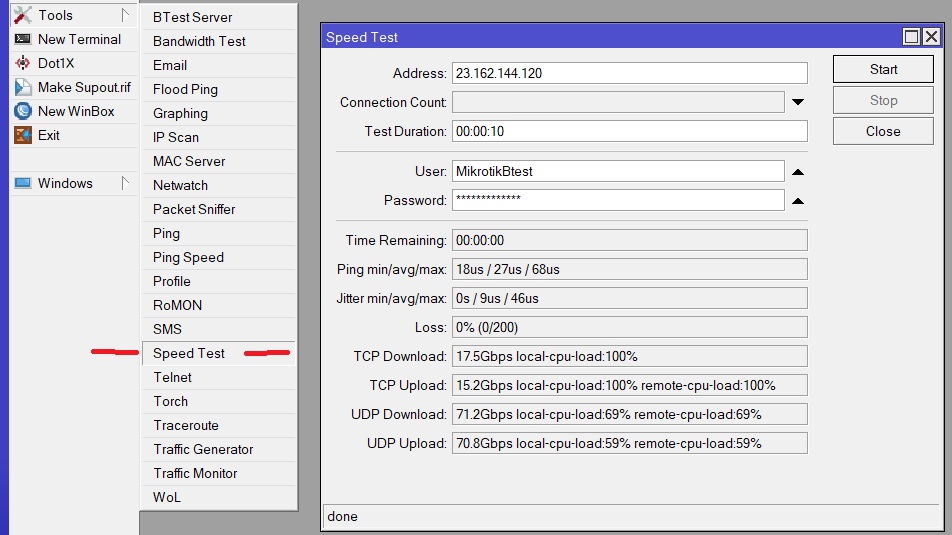
Tools → Speed Test
Today ( 3/21/2024 ) I performed the following on my public-access Mikrotik btest server I host.
IPv4: 23.162.144.120
IPv6: 2605:6340:0:1b::4
btest username: MikrotikBtestServer
btest password: MikrotikBtestServer
\
ROS upgrade/update
From: 7.13.5
To: 7.14.1
I also changed the btest username and passoword
From: MikrotikBtest
To: MikrotikBtestServer
I also moved this Mikrotik CHR ROS btest server to a different hypervisor
From: VmWare ESXi
To: Proxmox
During the migration from VmWare ESXi to Proxmox , I changed the Ethernet interfaces
From VmWare ESCi : vmxnet3
To Proxmox: VirtIO ( paravirtualized )
Note: I may be having some IPv6 connectivity to this btest server. (( I am rebuilding everything IPv6 at the ISP I manage ))
Please let me know if you experience any issues not that I have made some changes to this server.
Quick notes - limit total testing time to less than 10 minutes.
You must wait 27 hours until you can btest again.
If you attempt to btest more than 10 minutes , then you go to btest jail for 7+ days until you can btest again
If you attempt to btest without waiting 27 hours , then you go to btest jail for 7+ days until you can btest again.
If you attempt to btest and you are in 7-day btest jail , then you reset 7-day btest jail back to 7+ days.
No automatic btest scripts on a timed schedule are permitted.
All btest must be manually performed by a human.
Repeated login failures using the old btest/btest user/password may auto place your IP address in a 7-Day btest jail.
Note: Please read all of my conditions prior to using my btest server.
North Idaho Tom Jones
Grateful for these very useful services. I had a problem from the first authentication attempt since on the first attempt it told me that it could not connect.
I have no connection to the server. Is the service operational?
@TomjNorthIdaho - thank you for continuing to host this public btest server after so many years.
Per your optional terms, this morning I tested from two IP addresses in western Wisconsin with the following results:
68.65.62.x: 217.0 Mbps/138.4 Mbps TCP Tx/Rx Total Average
64.33.160.x: 56.6 Mbps/121.5 Mbps TCP Tx/Rx Total Average
Hi all,
Thanks @TomjNorthIdaho for the service!
I did a test today 20 April 2024, ~12:19 CET. Ran it for 2 minutes.
Mikrotik model: RB4011iGS+5HacQ2HnD
Firmware: 6.49.10
Source IP: 51.154.X.X
Locaiton: Switzerland
ISP: Salt CH
Bandwith: 10Gbps symetric (home fiber connection)
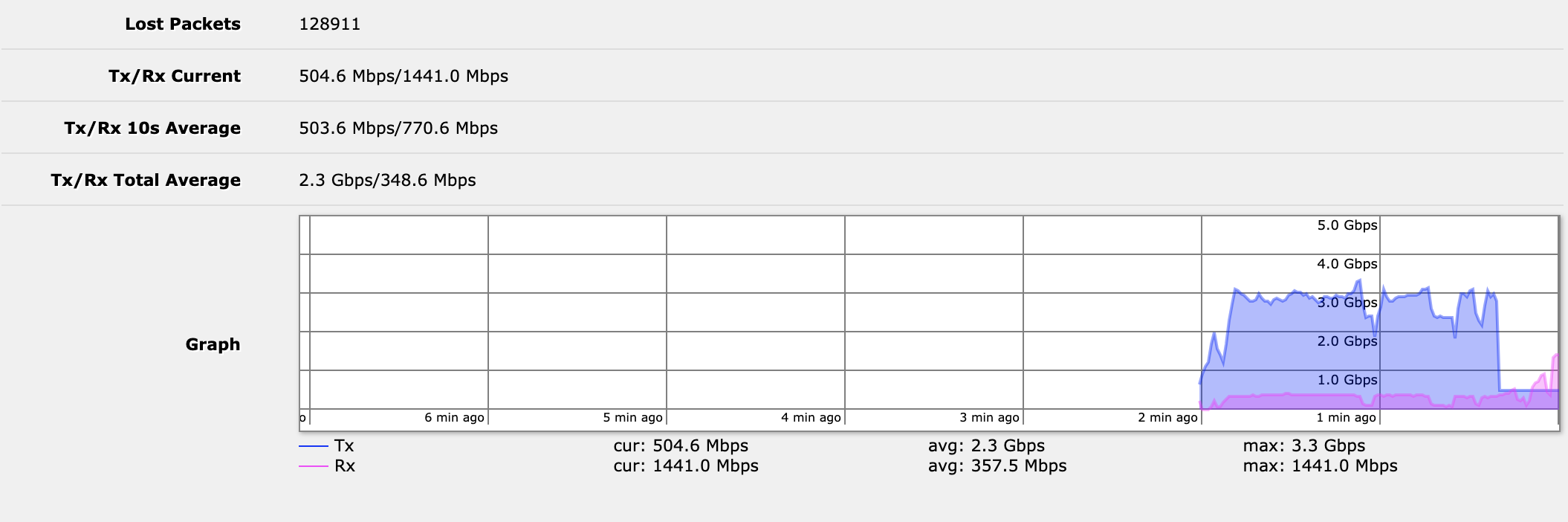
Hey Tom,
Thanks for providing the btest server.
For some strange reason I cannot access it from x.158.1.25. I have accessed it before probably 2 days ago.
traceroute here
https://imgur.com/a/Y29k1ZA
Any idea?
Hello MikroTik Member
I would like to do a speed test. Could I get the IP address and user name and password from Salt Switzerland please
IPv4: 23.162.144.120
btest username: MikrotikBtestServer
btest password: MikrotikBtestServer
Oh ?
That’s the same as on the first post ?


re: … That’s the same as on the first post ? …
correct
damn I tried to connect before reading the new credentials and I think I’m in jail now, can’t connect 
Thanks for your wonderful service @TomJNorthIdaho!
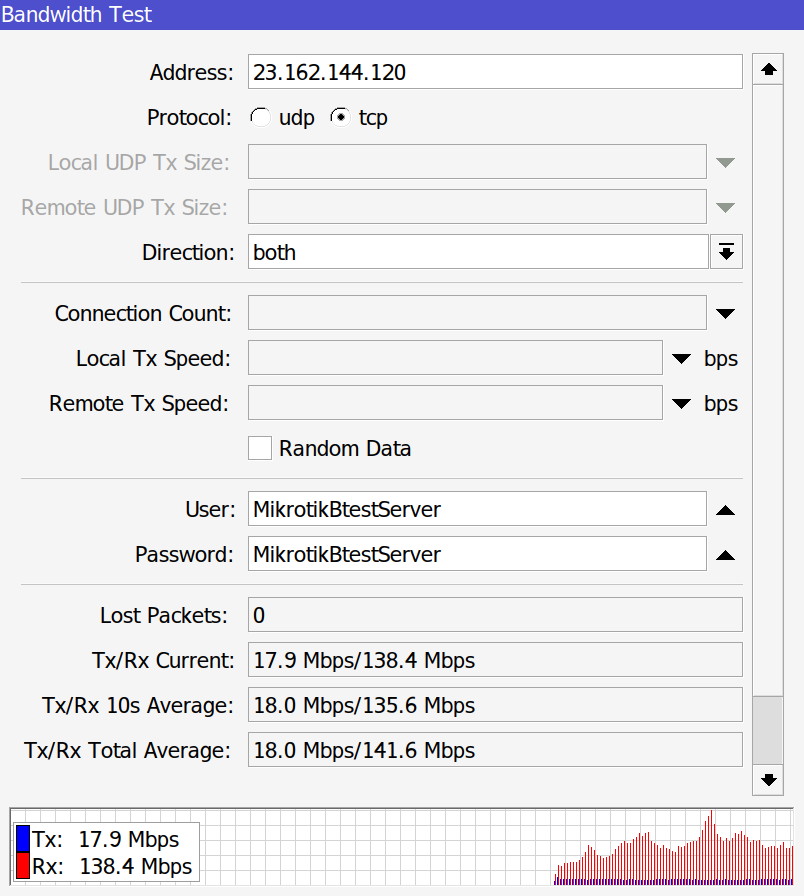
Location: Budapest/Hungary
Provider Telekom, over Cable, Docsis 3
Trying most recent credentials and it won’t connect. My public IP I’m connecting from is 66.213.68.133. Did I get blocked?
Hi, I’ve also tried with 23.162.144.120 and get 100% of packets lost, maybe it’s down?
Thanks
Hi,
1 GB.
Test carried out in Brazil, state of São Paulo.