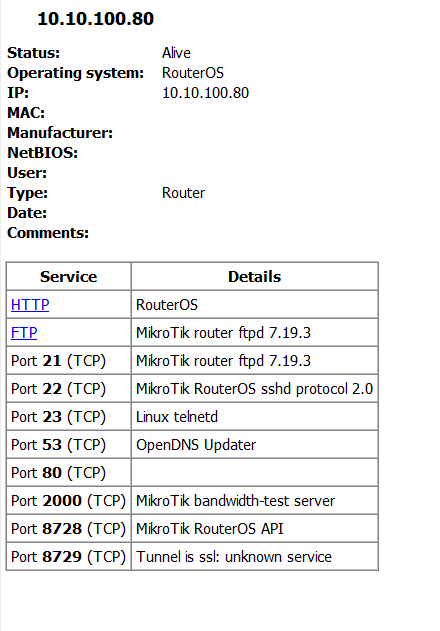
So I have a little quiet time (first time in a long, long time) and thought I would explore ROS to find topics to learn more deeply.
After watching the first several minutes of poor and/or incomprehensible tutorial videos, I went ahead and uploaded a sanitized version of a config to ChatGPT (this is where the chopping block comes in).
It says my config is excellent (thank you everyone, in particular, anav!), but had an interesting suggestion.
ChatGPT noted that my config does not have any "/ip services" entries, and then suggested:
Harden services: disable telnet/ftp/www/api, restrict Winbox to mgmt/WG subnets.
I've seen plenty of mention of disabling services, but never explored it.
If my firewall rules are all good, is there any benefit or need to disabling IP services?
It feels like disabling them might actually be counter-productive and prevent me from utilizing them if and when I wanted or needed to.
PS: You betcha I have in my config:
/tool mac-server mac-winbox
set allowed-interface-list=TRUSTED
Firewall rules are typically directed out toward the WAN, not in toward the LAN. If another host on the LAN becomes infected, it may attack a service you were expecting to be protected by the firewall.
ChatGPT noted that my config does not have any "/ip services" entries
…which means you're accepting the defaults, which do things like allow the mondo-insecure telnet protocol. You can see this with /ip/service/export verbose.
Yes, and worse, they can play ARP spoofing games and similar to intercept passwords, which then likely work for the “secure” services as well.
None of this is hypothetical. It’s been industry practice to disable Telnet for decades. It’s so basic OWASP doesn’t cover it, even though it hits five of the OWASP Top Ten.
I wasn't trying to be funny. LLMs are trained on the content of the Internet, with greater weight going to the most common strings of text, so when an "AI" tells you a thing, chances are that it is because that is what it is seeing most often. It doesn't make it more true, just more common. In this case, it's reflecting the fact that everyone says "Disable Telnet!" It isn't being brilliant, merely demonstrating its ability to regurgitate common advice.
Here's my common config for this:
/ip service
set ftp disabled=yes
set telnet disabled=yes
set www disabled=yes
set www-ssl certificate=GW-TLS-2025-08 disabled=no tls-version=only-1.2
set api disabled=yes
set api-ssl certificate=GW-TLS-2025-08 tls-version=only-1.2
Any other service that screams out to be disabled?
FTP is as bad as Telnet from a security standpoint, plus having other well-known design issues. In the context of RouterOS, you should be using SFTP instead.
defense should always be proportional to plausible risk of attacks.
if "they" are after you, "they" already got you
BUT:
what isn't there won't break
Besides the theoretical hypothesis or fantasies of security researchers and (often self-proclaimed) experts a correctly configured firewall is usually enough in most cases.
It is a barrier to prevent access from the outside, so it won't do anything for "local" attacks.
These latter can have mainly two kinds of origin:
strangers getting physical access to your network (after having somehow got physical access to your premises)
someone with allowed physical access to your premises, an unfaithful employee (or relative if at home), or the so called evil maid attack
In both cases having physical access doesn't automatically mean getting access to a device, there are still credentials (user and password) that protect the device, which, in the first case bring us to the classical xkcd: https://xkcd.com/538/
In my case, I frequently have guests or strangers with wifi access to the LAN, so the possibility of a local attack might be small, but much larger than typical.
I began a process of converting my sites to use VLANs, and have 1 site working as such, but the process stalled behind more urgent projects.
Would it be wise to add the following to all configs:
/ip service
set ftp address="" disabled=yes max-sessions=20 port=21 vrf=main
set ssh address="" disabled=no max-sessions=20 port=22 vrf=main
set telnet address="" disabled=yes max-sessions=20 port=23 vrf=main
set www address="" disabled=yes max-sessions=20 port=80 vrf=main
set www-ssl address="" certificate=none disabled=yes max-sessions=20 port=443 tls-version=any vrf=main
set winbox address="" disabled=no max-sessions=20 port=8291 vrf=main
set api address="" disabled=yes max-sessions=20 port=8728 vrf=main
set api-ssl address="" certificate=none disabled=no max-sessions=20 port=8729 tls-version=any vrf=main
Yes, because the same cause that breaks one is likely to break others of similar nature. Telnet isn’t different enough from SSH to count as a backup, nor is HTTP for HTTPS.
Proper backups differ in major ways so that one error cannot break them all at once. A better backup for broken SSH is MAC-WinBox, and better still is a serial console cable.
The only misconfiguration that can take all those out at once is a fat-fingered password change, for which we have a factory reset/NetInstall for a remedy.
I'm so used to immediately disabling services first,
that I forgot that the default configuration has telnet, ftp, api, and so on enabled.
I thought it was the user who enabled them...