Hi
How Can Using a Mikrotik router to PXE Boot?
Thank you
- setup DHCP server with the required options for your client
- add storage to your router for the required bootfiles (USB stick, SD card, M.2 card, whatever fits your router)
- put required bootfiles on the storage
- configure TFTP service with these files
I did it
But Error Number 0 is displayed in the Mikrotik log!
Hello,
Really interested in a solution. Trying to setup a PXE boot server. For initial testing I’ve setup a standalone network on a CCR1009. OS 6.40.8.
4 ports in a bridge to a DHCP server for a single LAN 192.168.0.0/24. DHCP lease scope 192.168.0.10-50. Options set for PXE boot, but this doesn’t really matter yet since I’m first just trying to get the tftp to work… There’s no firewall or routing.
Used the CCR to format an SD card fat32. Used the FTP protocol to copy the files from another working PXE server. The files are located in disk1/tftpboot . (again need to focus on tftp first)
I’ve used several dozen versions of the syntax to setup the tftp server. (Also MS Windows native tftp client, and a third party download).
/ip tftp add allow-rollover=yes real-filename=disk1/tftpboot/ req-filename=.*
Just to try and get some success I tried
/ip tftp add allow-rollover=yes real-filename=disk1/tftpboot/pxelinux.0 req-filename=pxelinux.0
Sometimes I specify the 192.168.0.0/24 for allowed. Sometimes I specify 0.0.0.0 Most of the time I leave this blank.
There are three result…
ERROR code;0 string:permission denied!
or
ERROR code:1 string: file no found (typically when I deliberately GET something invalid like a file I know isn’t there)
ERROR code: 8 (no other text after this. (This occurs when I boot a NUC on this LAN, which indicates DHCP is working.).
When I specify a req-filename (specific or wildcard) the tftp GET fails immediately (usually with permission denied)
If I don’t specify any req-filename the GET command has to time out or exhaust all retries.
Ultimately I would like a blank (or wildcard) req-filename parameter, and a real-filename parameter that sets disk1/tftpboot folder as the TFTP root…
This shouldn’t be hard.
Anyone out there have any success with this.
Thanks
Kevin
Well, I consider it brave to try that. Good luck!
I have some experience with making a PXE server work, to install Windows from the network starting with a PXE
boot (and then starting a dialog with pxelinux, user selects and enters some options, finally setup is loaded and started).
This all without using Microsoft’s tools that work only on Windows Server (which we don’t have).
I got it all working (on a Linux server) but there so many small details and tricks that I would not even think of implementing
this on RouterOS…
When you want to use it to install Windows I also wonder how you implement the Boot Information Negotiation Layer?
(I use a Python program called binlsrv2.py for that, but I would not know how to do that on RouterOS)
Easy solution: do it on a Raspberry Pi.
Still not working in ROS 7.10. The error is still the same “permission denied!”, in the log it appears as:
ERROR code:0 string:permission denied!
If i increase the logging to DEBUG, an additional line appears before:
requested file(binary): pxeboot access: denied
this is strange as there is no permission setting in the router.
I i use a different external tftp server there is no problem to get the boot file, but this SHOULD work on ROS.
I tried removing the IP address parameter as this is like an ACL, but now the error is: Error 8 (no more info)
tftp error code explained:
hope this helps.
/ip dhcp-server option
add code=66 name=boot-server value="IP_of_PXE_Server"
add code=67 name=boot-file value="pxelinux.0"
Hello all,
I would like to contribute to this discussion what it is I found necessary to get TFTP network boot to work for those struggling. I hope this helps out.
Best
As a foundation, I am using a server w/ Proxmox 8.0.4. I’ve set up a LXC container running Docker and the netboot.xyz image to serve as my TFTP Server. Then I can configure a VM to network boot. It works just as well for bare metal hardware client.
For reference to the netboot.xyz: Linuxserver.io
RouterOS Config:
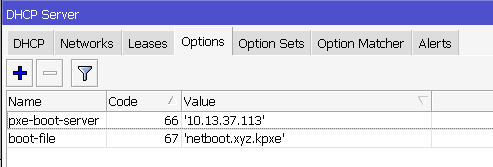
As @jonnes86 pointed out, you need to set some DHCP Options. Notice, though, you have to be specific in the value formats or RouterOS will complain it’s not a valid entry with
"... Unknown data type"
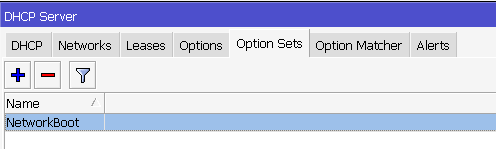
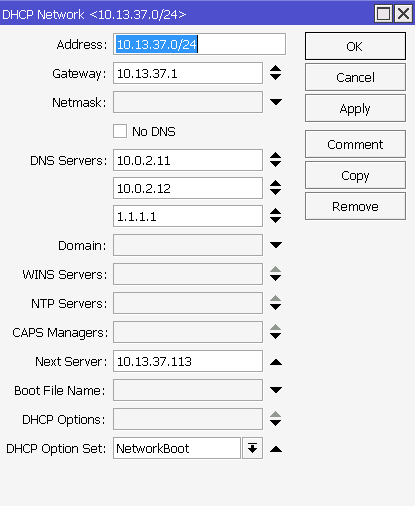
Notice the double quote around a single quoted string. You then configure an Option Set to include both of the Options defined. Then, you need to update one, any or all of your Networks to include a Next Server, which points to your PXE server IP and select the DHCP Option Set you configured. Alternatively, you can skip the Option Set and select the DHCP Options themselves. I don’t understand why it’s necessary to select a Next Server when it’s already been defined in an Option Set and by virtue of the fact that you’ve set the DHCP Open Set (or DHCP Options) it should already know you’re configuring the Network to point to a TFTP Server, but oh well.
CLI method:
/ip dhcp-server option
add code=66 name=pxe-boot-server value="'10.13.37.113'"
add code=67 name=boot-file value="'netboot.xyz.kpxe'"

/ip dhcp-server option sets
add name=NetworkBoot options=pxe-boot-server,boot-file
Set the needed changes to the network(s) entry to include next-server and dhcp-option-set (or dhcp-option alternatively)
/ip dhcp-server network
add address=10.13.37.0/24 dhcp-option-set=NetworkBoot dns-server=10.0.2.11,10.0.2.12,1.1.1.1 gateway=10.13.37.1 \
    next-server=10.13.37.113
GUI Method:
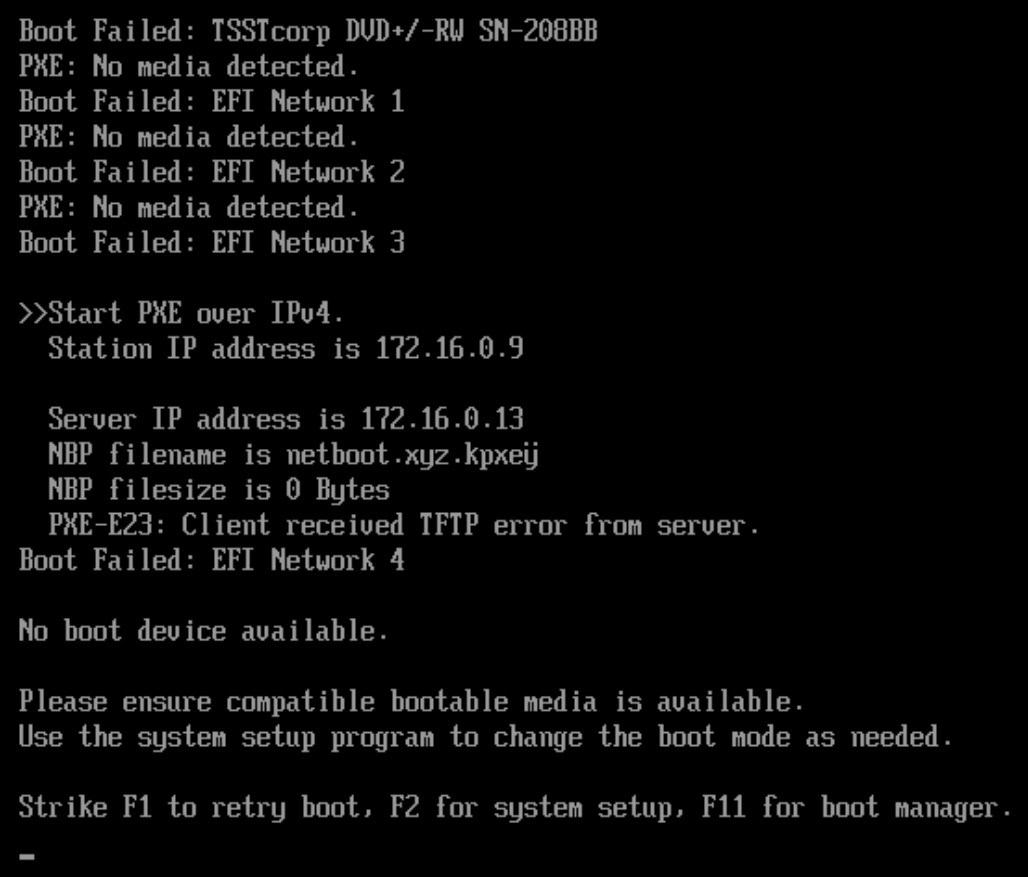
I seem to be having a similar issue. My router is set up the way it’s described here and yet, I get:
Start PXE over IPv4.
Station IO address is 172.16.0.9
Server IP address is 172.16.0.13
NBP filename is netboot.xyz.kpxe ← here it adds an ‘y’ with umlauts that I am unable to retype here (see screenshot)… why???
NBP filesize is 0 Bytes
PXE-E23: Client received TFTP error from server
What am I doing wrong?
Any ideas are more than welcome!!
yet no y with umlauts in the config:
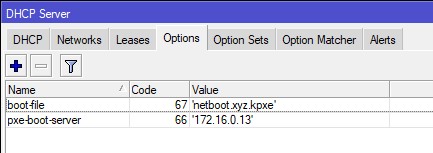
Did you try from the CLI to set the DHCP Option? I suppose it’s possible winbox/webfig used ߵsmartquoteߴ or some unknown Windows locale/code-page/keyboard thing in winbox…
This will explicitly update any existing entry, if any unicode was present the CLI will strip it.
/ip dhcp-server option set [find code=67 name=boot-file] value="'netboot.xyz.kpxe'"
’ (apostrophe) in AltCODE is entered as 0255 (4 digits) but German ÿ is Unicode 00FF so IMHO if there is an apostrophe in the filename then it becomes y umlat in Unicode as 255 = 0xFF and 0 is just 0. Seems that it could be an error but maybe the “consumer” side misunderstands the received data.
I’ve set up everything from the CLI originally, I just did the screenshots from the GUI.
I thought about that as the y with umlaut is Alt-0255 as I’ve learned 
Still, it seems as it’s not finding the appropriate file (length = 0). What could be wrong?
Not to mention that based on the matchers, the selected file should be the efi file, not the kpxe…
I’m redoing the whole config based on a working example… we’ll see.
Ok, well the error is still the same with the brand new config. The only thing that is seemingly working now is that the matcher finally selects the right file so the error is now:
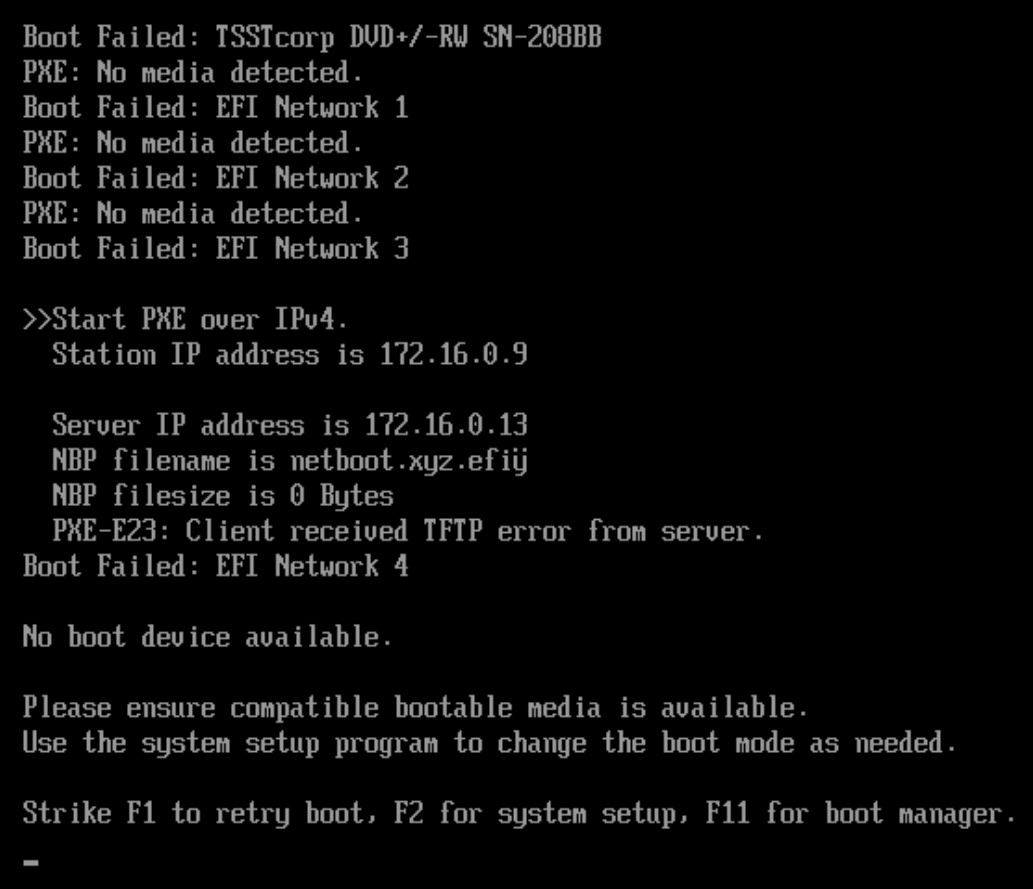
I’m really lost.
Client is a DELL PowerEdge R720… maybe that is the culprit?
Looks like if I create a new VM on my Proxmox server and set it to netboot with SeaBIOS (not uefi), that works.
So the question I guess becomes why the DELL is refusing to netboot?
Sorry for being this problematic 
Semi-random thought, but do you really need a “multidot” filename?
I know that the (good ol’) ‘90’s are long gone, but (still good ol’) 8.3 filename can some times help.
Only for the record, in the (again good ol’) days of BartPe, XP USB booting, etc. it was a common saying “oh noes, it’s a Dell!” as Dell PC’s had their own non- standard behaviours both at BIOS and Windows drivers levels.
The strange y can Indeed be a parsing error of some kind of the single quote/apostroph, but I have no idea if there Is a way to workaround It.
I actually didn’t touch the filename, that’s literally the default in netboot.xyz
It works in UEFI mode with the Proxmox VM. Pfff
I first got an error, but that was a setting on the Proxmox side (“Pre-Enroll Keys” had to be disabled in System/Advanced when creating the VM).
I’m also starting to suspect it’s a DELL thang
I stumbled across a very similar issue today while trying to network boot an old LGA775 Gigabyte motherboard.
I kept getting the “ERROR code:0 string:permission denied!” message, while in fact there was no issue within RouterOS.
To troubleshoot, I decided to enable logging from the “tftp” log topic in the router.
Here are two PXE boot attempts, one successful from a newer UEFI-based Gigabyte board, and one from the older LGA775 board:
With newer MoBo:

 03:18:54 dhcp,info server1 deassigned 192.168.1.36 for FC:AA:14:70:FE:C2
 03:18:58 dhcp,info server1 assigned 192.168.1.36 for FC:AA:14:70:FE:C2
 03:18:58 tftp,packet recieved   type: 1 size: 24
 03:18:58 tftp,packet   read filename: netboot binary: 1
 03:18:58 tftp,packet   option: tsize value: 0
 03:18:58 tftp,debug tftpd incoming connection from 192.168.1.36:2070 on 192.168.1.1
 03:18:58 tftp,debug     requested (binary) file: netboot access: allowed
 03:18:58 tftp,debug     opened 192.168.1.1:57783
 03:18:58 tftp,packet sending   type: 6 size: 15
 03:18:58 tftp,packet   option: tsize value: 374433
 03:18:58 tftp,packet recieved   type: 5 size: 17
 03:18:58 tftp,packet   error: 0
 03:18:58 tftp,error  ERROR: code 0
 03:18:58 tftp,debug closing connection to 192.168.1.36:2070
 03:18:58 tftp,packet recieved   type: 1 size: 29
 03:18:58 tftp,packet   read filename: netboot binary: 1
 03:18:58 tftp,packet   option: blksize value: 1456
 03:18:58 tftp,debug tftpd incoming connection from 192.168.1.36:2071 on 192.168.1.1
 03:18:58 tftp,debug     requested (binary) file: netboot access: allowed
 03:18:58 tftp,debug     opened 192.168.1.1:42375
 03:18:58 tftp,packet sending   type: 6 size: 15
 03:18:58 tftp,packet   option: blksize value: 1456
 03:18:58 tftp,packet recieved   type: 4 seq: 0 size: 4
 03:18:58 tftp,packet sending   type: 3 seq: 1 size: 1460


With older MoBo:

 03:26:32 dhcp,info server1 deassigned 192.168.1.32 for 00:1A:4D:46:C6:58
 03:26:34 dhcp,info server1 assigned 192.168.1.32 for 00:1A:4D:46:C6:58
 03:26:34 tftp,packet recieved   type: 1 size: 25
 03:26:34 tftp,packet   read filename: netbootFF binary: 1
 03:26:34 tftp,packet   option: tsize value: 0
 03:26:34 tftp,debug tftpd incoming connection from 192.168.1.32:2070 on 192.168.1.1
 03:26:34 tftp,debug     requested (binary) file: netbootFF access: denied
 03:26:34 tftp,error     ERROR code:0 string:permission denied!
 03:26:34 tftp,packet sending   type: 5 size: 23
 03:26:34 tftp,packet   error: 0
 03:26:34 tftp,packet recieved   type: 1 size: 30
 03:26:34 tftp,packet   read filename: netbootFF binary: 1
 03:26:34 tftp,packet   option: blksize value: 1456
 03:26:34 tftp,debug tftpd incoming connection from 192.168.1.32:2071 on 192.168.1.1
 03:26:34 tftp,debug     requested (binary) file: netbootFF access: denied
 03:26:34 tftp,error     ERROR code:0 string:permission denied!
 03:26:34 tftp,packet sending   type: 5 size: 23
 03:26:34 tftp,packet   error: 0
The requested (binary) file logs as “netbootFF” from the old board. In the WinBox log viewer, it shows as " read filename: netboot˙ binary: 1".
The “˙” character is U+02D9 “DOT ABOVE” (https://www.fileformat.info/info/unicode/char/02d9/index.htm).
It’s interesting that it shows up as a two byte character in WinBox, while the log tells us that the whole packet was only one byte longer than the one received from the newer motherboard, which booted fine.
I tried experimenting with the TFTP request filename and DHCP option 67 to make this old board boot, but it might be impossible with how these components of RouterOS are designed. I think the old board just has badly implemented PXE boot.
The problem is that in DHCP the fields have a length, so a filename is in the DHCP packet e.g. as 03 41 42 43 to indicate the filename ABC with length 3.
This is not understood by some programmers who assume that such a filename would be stored as 41 42 43 00 with 00 being the terminator byte for a string.
In the DHCP reply, when the filename is the last option, the next byte would be FF which means “end of options” after which there will probably be a 00 byte by accident (as it is stored in a buffer that was all 00).
So what you now get is a name like 41 42 43 FF 00 which in some context is interpreted as ABCÿ and in other context some other invalid name.
It is always a pain to get it right. While I feel with the poster above complaining about Dell (the Dell BIOS people are d*ckh**ds that refuse to admit their bugs), in the current Dell machines with current BIOS versions it works OK. I regularly netboot Dell machines.
However, when you have an old unsupported machine and no available BIOS updates you may well be in trouble.
For other manufacturers, it might be the same. It appears features like this are often not really tested.