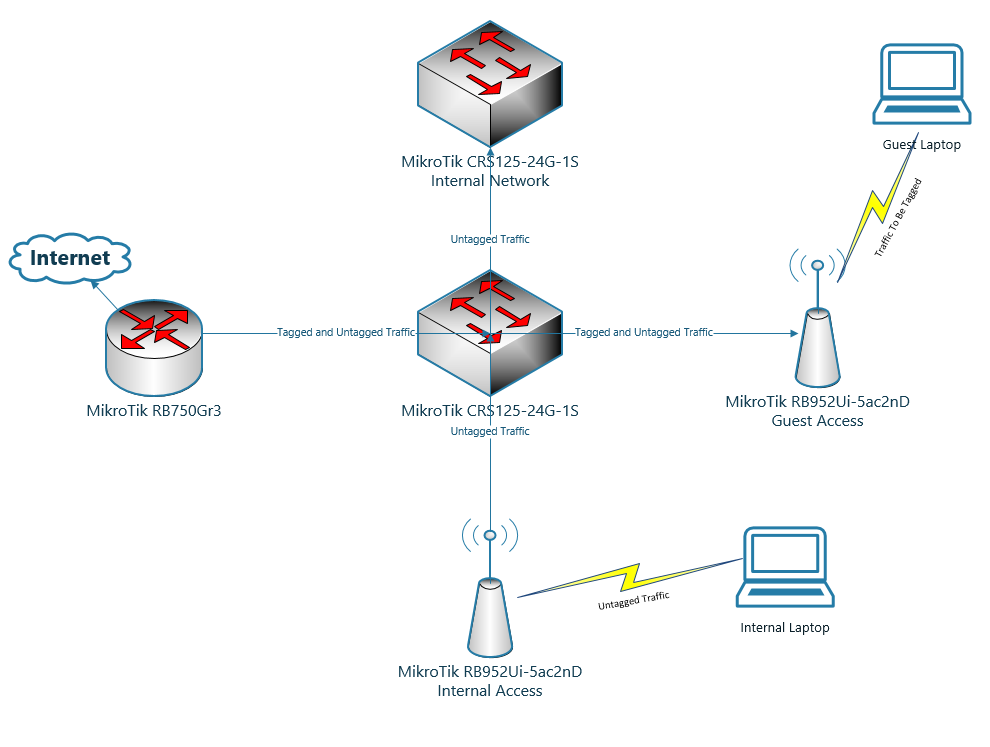
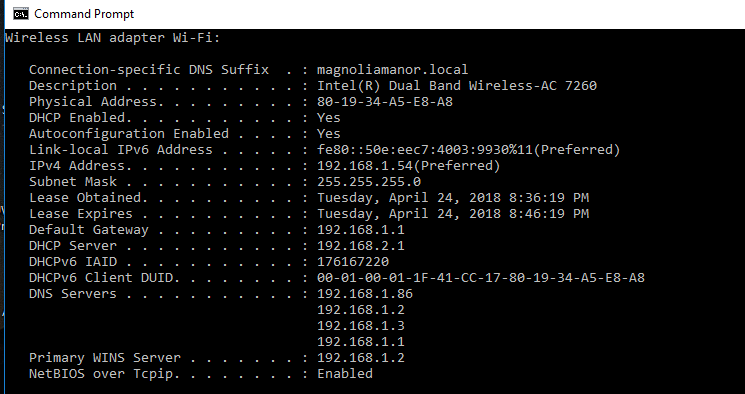
Here is the configuration for my wireless node, cloud switch, and router – any thoughts on what I have set up incorrectly?
Wireless Access Point
[admin@MikroTik-Pixiedust] > export hide-sensitive
# apr/22/2018 20:19:47 by RouterOS 6.41.4
# software id = UIM0-1XCU
#
# model = RouterBOARD 952Ui-5ac2nD
# serial number = 66590271236A
/interface bridge
add admin-mac=D4:CA:6D:B7:E0:B7 auto-mac=no comment=defconf name=bridge
add fast-forward=no name=bridge-vlan pvid=10 vlan-filtering=yes
/interface wireless
set [ find default-name=wlan1 ] band=2ghz-b/g/n channel-width=20/40mhz-Ce \
    country="united states" disabled=no distance=indoors frequency=auto mode=\
    ap-bridge ssid=pixiedust vlan-id=10 wireless-protocol=802.11 wps-mode=\
    disabled
set [ find default-name=wlan2 ] band=5ghz-a/n/ac channel-width=\
    20/40/80mhz-Ceee country="united states" disabled=no distance=indoors \
    frequency=auto mode=ap-bridge ssid=pixiedust5 wireless-protocol=802.11
/interface vlan
add interface=ether1 name=ether1-vlan10 vlan-id=10
add interface=bridge-vlan name=vlan10 vlan-id=10
add interface=wlan1 name=wlan1-vlan10 vlan-id=10
add interface=wlan2 name=wlan2-vlan10 vlan-id=10
/interface list
add comment=defconf name=WAN
add comment=defconf name=LAN
/interface wireless security-profiles
set [ find default=yes ] authentication-types=wpa2-psk eap-methods="" mode=\
    dynamic-keys supplicant-identity=MikroTik
/ip hotspot profile
set [ find default=yes ] html-directory=flash/hotspot
/ip pool
add name=default-dhcp ranges=192.168.2.10-192.168.2.254
/ip dhcp-server
add address-pool=default-dhcp disabled=no interface=vlan10 name=dhcp1
/interface bridge port
add bridge=bridge comment=defconf interface=ether2
add bridge=bridge comment=defconf interface=ether3
add bridge=bridge comment=defconf interface=ether4
add bridge=bridge comment=defconf interface=ether5
add bridge=bridge interface=ether1
add bridge=bridge-vlan interface=wlan1-vlan10 pvid=10
add bridge=bridge-vlan interface=wlan2-vlan10 pvid=10
add bridge=bridge-vlan interface=vlan10 pvid=10
add bridge=bridge-vlan interface=wlan1 pvid=10
add bridge=bridge-vlan interface=wlan2 pvid=10
add bridge=bridge-vlan interface=ether1-vlan10 pvid=10
/ip neighbor discovery-settings
set discover-interface-list=LAN
/interface bridge vlan
add bridge=bridge-vlan tagged=\
    bridge-vlan,ether1-vlan10,wlan1-vlan10,wlan2-vlan10,vlan10 untagged=\
    wlan1,wlan2 vlan-ids=10
/interface list member
add comment=defconf interface=bridge list=LAN
add interface=ether1 list=LAN
add interface=ether2 list=LAN
add interface=ether3 list=LAN
add interface=ether4 list=LAN
add interface=ether5 list=LAN
add interface=wlan2 list=LAN
/ip address
add address=192.168.2.3/24 interface=vlan10 network=192.168.2.0
/ip dhcp-client
add comment=defconf dhcp-options=hostname,clientid disabled=no interface=\
    ether1
/ip dhcp-server network
add address=192.168.2.0/24 dns-server=8.8.8.8,4.4.4.4 gateway=192.168.2.1 \
    netmask=24
/ip dns
set allow-remote-requests=yes
/ip dns static
add address=192.168.88.1 name=router.lan
/system clock
set time-zone-name=America/Chicago
/system identity
set name=MikroTik-Pixiedust
/system ntp client
set enabled=yes
/tool mac-server
set allowed-interface-list=LAN
/tool mac-server mac-winbox
set allowed-interface-list=LAN
[admin@MikroTik-Pixiedust] >
Cloud Switch:
[admin@MikroTik-CRS-1] > export hide-sensitive
# apr/22/2018 20:26:43 by RouterOS 6.41.4
# software id = FKTL-Q3K4
#
# model = CRS125-24G-1S
# serial number = 7445069FC387
/interface bridge
add fast-forward=no name=bridge-vlan10 pvid=10 vlan-filtering=yes
add admin-mac=6C:3B:6B:8E:8B:FA auto-mac=no comment="created from master port" name=bridge1 protocol-mode=none
/interface vlan
add interface=ether1 name=ether1-vlan10 vlan-id=10
add interface=ether6 name=ether6-vlan10 vlan-id=10
add interface=bridge-vlan10 name=vlan10 vlan-id=10
/interface list
add name=LAN
/interface wireless security-profiles
set [ find default=yes ] supplicant-identity=MikroTik
/interface bridge port
add bridge=bridge1 interface=ether2
add bridge=bridge1 interface=ether3
add bridge=bridge1 interface=ether4
add bridge=bridge1 interface=ether5
add bridge=bridge1 interface=ether7
add bridge=bridge1 interface=ether8
add bridge=bridge1 interface=ether9
add bridge=bridge1 interface=ether10
add bridge=bridge1 interface=ether11
add bridge=bridge1 interface=ether12
add bridge=bridge1 interface=ether13
add bridge=bridge1 interface=ether14
add bridge=bridge1 interface=ether15
add bridge=bridge1 interface=ether16
add bridge=bridge1 interface=ether17
add bridge=bridge1 interface=ether18
add bridge=bridge1 interface=ether19
add bridge=bridge1 interface=ether20
add bridge=bridge1 interface=ether21
add bridge=bridge1 interface=ether22
add bridge=bridge1 interface=ether23
add bridge=bridge1 interface=ether24
add bridge=bridge1 interface=sfp1
add bridge=bridge1 interface=ether1
add bridge=bridge1 interface=ether6
add bridge=bridge-vlan10 interface=ether1-vlan10 pvid=10
add bridge=bridge-vlan10 interface=ether6-vlan10 pvid=10
add bridge=bridge-vlan10 interface=vlan10 pvid=10
/interface bridge vlan
add bridge=bridge-vlan10 tagged=bridge-vlan10,vlan10,ether1-vlan10,ether6-vlan10 vlan-ids=10
/interface list member
add interface=ether2 list=LAN
add interface=ether3 list=LAN
add interface=ether4 list=LAN
add interface=ether5 list=LAN
add interface=ether6 list=LAN
add interface=ether7 list=LAN
add interface=ether8 list=LAN
add interface=ether9 list=LAN
add interface=ether10 list=LAN
add interface=ether11 list=LAN
add interface=ether12 list=LAN
add interface=ether13 list=LAN
add interface=ether14 list=LAN
add interface=ether15 list=LAN
add interface=ether16 list=LAN
add interface=ether17 list=LAN
add interface=ether18 list=LAN
add interface=ether19 list=LAN
add interface=ether20 list=LAN
add interface=ether21 list=LAN
add interface=ether22 list=LAN
add interface=ether23 list=LAN
add interface=ether24 list=LAN
add interface=ether1 list=LAN
add interface=sfp1 list=LAN
/ip address
add address=192.168.1.62/24 comment=defconf interface=bridge1 network=192.168.1.0
add address=192.168.2.2/24 interface=vlan10 network=192.168.2.0
/ip dns
set servers=192.168.1.86,192.168.1.2,192.168.1.3,192.168.1.1
/lcd
set read-only-mode=yes
/lcd interface
add interface=bridge1
/lcd interface pages
set 2 interfaces=sfp1
/system clock
set time-zone-name=America/Chicago
/system identity
set name=MikroTik-CRS-1
/system ntp client
set enabled=yes primary-ntp=192.168.1.89
[admin@MikroTik-CRS-1] >
Router:
[admin@MikroTik-Sparticus] > export hide-sensitive
# apr/22/2018 20:29:14 by RouterOS 6.41.4
# software id = RSDH-S827
#
# model = RouterBOARD 750G r3
# serial number = 6F3907B4A3C0
/interface bridge
add admin-mac=64:D1:54:82:B5:F4 auto-mac=no comment=defconf name=bridge
add fast-forward=no name=bridge-vlan pvid=10 vlan-filtering=yes
/interface vlan
add interface=ether1 name=ether1-vlan10 vlan-id=10
add interface=ether2 name=ether2-vlan10 vlan-id=10
add interface=bridge-vlan name=vlan10 vlan-id=10
/interface list
add comment=defconf name=WAN
add comment=defconf name=LAN
add name=GUEST
/interface wireless security-profiles
set [ find default=yes ] supplicant-identity=MikroTik
/ip dhcp-server option
add code=66 name=tftp-server-address value="'192.168.1.8'"
/ip hotspot profile
set [ find default=yes ] html-directory=flash/hotspot
/ip pool
add name=dhcp ranges=192.168.1.1-192.168.1.254
add name=guest_pool ranges=192.168.2.10-192.168.2.254
/ip dhcp-server
add address-pool=dhcp disabled=no interface=bridge name=magnolia-network
add address-pool=guest_pool interface=vlan10 name=guest-network
/interface bridge port
add bridge=bridge comment=defconf interface=ether2
add bridge=bridge comment=defconf interface=ether3
add bridge=bridge comment=defconf interface=ether4
add bridge=bridge-vlan interface=ether1-vlan10 pvid=10
add bridge=bridge-vlan interface=ether2-vlan10 pvid=10
add bridge=bridge-vlan interface=vlan10 pvid=10
/interface bridge settings
set use-ip-firewall=yes use-ip-firewall-for-vlan=yes
/ip neighbor discovery-settings
set discover-interface-list=LAN
/interface bridge vlan
add bridge=bridge-vlan tagged=bridge-vlan,ether1-vlan10,ether2-vlan10,vlan10 vlan-ids=10
/interface list member
add comment=defconf interface=bridge list=LAN
add comment=defconf interface=ether1 list=WAN
add interface=ether5 list=GUEST
/ip address
add address=192.168.1.1/24 comment=defconf interface=bridge network=192.168.1.0
add address=192.168.2.1/24 interface=vlan10 network=192.168.2.0
/ip dhcp-client
add comment=defconf dhcp-options=hostname,clientid disabled=no interface=ether1
/ip dhcp-server lease
/ip dhcp-server network
add address=192.168.1.0/24 comment=defconf dhcp-option=tftp-server-address dns-server=192.168.1.86,192.168.1.2,192.168.1.3,192.168.1.1 domain=magnoliamanor.local gateway=192.168.1.1 netmask=24 ntp-server=192.168.1.89 wins-server=192.168.1.2
add address=192.168.2.0/24 dns-server=8.8.8.8,4.4.4.4 domain=pixiedust.local gateway=192.168.2.1 netmask=24
/ip dns
set allow-remote-requests=yes servers=192.168.1.86,192.168.1.2,192.168.1.3
/ip dns static
add address=192.168.1.1 name=router.lan
/ip firewall filter
add action=reject chain=input dst-address=192.168.1.0/24 in-interface-list=GUEST reject-with=icmp-network-unreachable src-address=192.168.2.0/24
add action=reject chain=input dst-address=192.168.2.0/24 in-interface-list=LAN reject-with=icmp-network-unreachable src-address=192.168.1.0/24
add action=reject chain=forward dst-address=192.168.1.0/24 in-interface-list=GUEST out-interface-list=LAN reject-with=icmp-network-unreachable   src-address=192.168.2.0/24
add action=reject chain=forward dst-address=192.168.2.0/24 in-interface-list=LAN out-interface-list=GUEST reject-with=icmp-network-unreachable   src-address=192.168.1.0/24
add action=accept chain=input comment="defconf: accept established,related,untracked" connection-state=established,related,untracked
add action=drop chain=input comment="defconf: drop invalid" connection-state=invalid
add action=accept chain=input comment="defconf: accept ICMP" disabled=yes protocol=icmp
add action=drop chain=input comment="defconf: drop all not coming from LAN" in-interface-list=!LAN
add action=accept chain=forward comment="defconf: accept in ipsec policy" disabled=yes ipsec-policy=in,ipsec
add action=accept chain=forward comment="defconf: accept out ipsec policy" disabled=yes ipsec-policy=out,ipsec
add action=fasttrack-connection chain=forward comment="defconf: fasttrack" connection-state=established,related
add action=accept chain=forward comment="defconf: accept established,related, untracked" connection-state=established,related,untracked
add action=drop chain=forward comment="defconf: drop invalid" connection-state=invalid
add action=drop chain=forward comment="defconf:  drop all from WAN not DSTNATed" connection-nat-state=!dstnat connection-state=new in-interface-list=WAN
/ip firewall nat
add action=masquerade chain=srcnat comment="defconf: masquerade" ipsec-policy=out,none out-interface-list=WAN
add action=dst-nat chain=dstnat comment="Plex Server port access from outside so Plex.Tv can access Zodiac" dst-port=32400 protocol=tcp to-addresses=192.168.1.94 to-ports=32400
/ip service
set telnet disabled=yes
set ftp disabled=yes
set api disabled=yes
set api-ssl disabled=yes
/system clock
set time-zone-name=America/Chicago
/system identity
set name=MikroTik-Sparticus
/system ntp client
set enabled=yes primary-ntp=192.168.1.89
/tool mac-server
set allowed-interface-list=LAN
/tool mac-server mac-winbox
set allowed-interface-list=LAN
[admin@MikroTik-Sparticus] >