I have a CCR2004-1G-12S+2XS. I am going to use this in my lab to connect all my Mikrotik devices via fiber SFP+ modules. I have 109 Mikrotik devices to connect on seperate vlans to individual SFP+ ports on the CCR. I assume I will need to setup 10 VLANS, 1 per port. Port 11 will be spare and port 12 will be my fiber connection from my ISP. I will use the Management port for out of band management.
Can anyone help me get started with the proper setup of all the VLANS? This is a new adventure on my part so I don’t have a config to post yet.
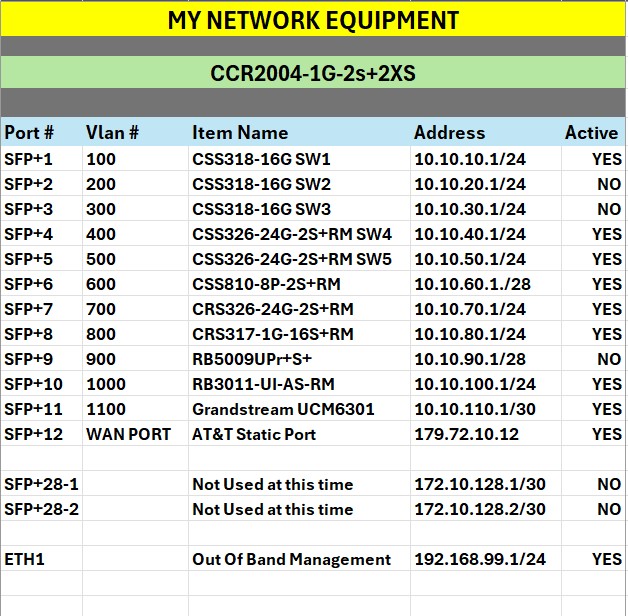
Here is my equipment list.
CCR2004-1G-2s+2XS
BRIDGE PORTS 1 through 11
SFP+1 VLAN 100 CSS318-16G Switch 1 176.100.10.1/24
SFP+2 VLAN 200 CSS318-16G Switch 2 10.10.20.1/24
SFP+3 VLAN 300 Phone Sys 172.16.30.1/24
SFP+4 VLAN 400 CRS 317-1G-16S+RM 225.40.40.1/24
SFP+5 VLAN 500 CSS810-8P-2S+RM 125.50.50.1/24
SFP+6 VLAN 600 CRS326-24G-2S+RM 125125.60.60.1/24
SFP+7 VLAN 700 CSS326-24G-2S+RM 125.70.70.1/24
SFP+8 VLAN 800 RB3011-UI-AS-RM 125.80.80.1/24
SFP+9 VLAN 900 HAP ax3 Wireless 125.90.90.1/24
SFP+10 VLAN 1000 CSS326-24G-2S+ RM 125.100.100.1/24
SFP+11 VLAN 1100 SPARE 125.110.110.1/24
SFP+12 WAN Static Address 192.168.1.100
ETH 1 Management Port 10.0.0.99/27
SFP+28 Ports 1&2 Not Used at This Time
The device doesn’t have a switch chip so using bridge based VLANs will end up going through the CPU.
I’m open to correction on this but I think it’s probably best not to bridge any ports at all and instead assign an IP address relevant to each port. That is to say L3 routing only and no VLANs on the CCR.
For example SFP+1 with IP address 176.100.10.1/24 is connected to a port on a switch that is tagged for VLAN 100 and so on. SFP+2 with IP 10.10.20.1/24 is connected to a switch port that is tagged for VLAN 200 and so on for the others.
Your CCR is just a router and doesn’t need to be configured for tagging and can do what it was designed for and just route.
As @elobob2002 said, it’s not clear why you want vlans. Your description is that all devices connected though any specific SFP will all be using the same subnet, and no two CCR SFP ports will have the same subnet, so no need for a bridge either.
I wouldn’t have used @elobob2002’s terminology for the switch connection, I would have used “access port for vlan X”.
But there other “oddities” in the proposal, for example “I assume I will need to setup 10 VLANS, 1 per port”. Also it isn’t clear how you are going to connect the hAP ax3 to the SPF+ with a fiber connection. “connect all my Mikrotik devices via fiber SFP+ modules. I have 109 Mikrotik devices to connect on seperate vlans”
There isn’t much point in making suggestions until you understand what you really want to do. But for a non-vendor specific description of what vlans are and when they are a good solution, see Virtual Local Area Networks (VLANs) by Ed Harmoush.
Thanks to you all. I am going to just apply seperate IP addresses to each port and elimate the bridge thought. I will design a network per ANAV. As I tried to state this is a task that I have taken on because I have all this Mikrotik equipment and would like to see if I can accomplish this.
I will post a network design as soon as I get the bugs worked out. This is why I love the forum for eye opening answers.
Are you stating that there is no port with more than one vlan going through it???
At a minimum there should be two vlans per port if all are trunk ports going to smart devices, one being the management vlan which all smart devices should get their IP address from.
OK, I have decided to start over from scratch on my new CCR. This is my personal goal that I have set for myself, I intend to use all my new Mikrotik equipment in a strictly lab application. My configuration will start with this idea.
I would like to know if I need to set addresses on each SFP+ ports or add VLANS along with the addresses. This is where I am confused.
Any pointers will be appreciated. I don’t want anyone to think I am looking for configuration by anyone else. I am just trying to educate myself on Mikrotik configurations.
I will post a total network drawing for my lab setup. Thank you all for any help for my task. I am very hopefull to get the needed pointers from the tallented members of this group.
Why do you want vlans? There is no need, there is never a duplication of any subnet over a single port?
In reality, every device would be on a managed vlan, so every device would have at least two vlans coming in a trunk port.
No I said,
a. if you only have one vlan per port then you dont really need vlans.
b. also since this is a lab environment then you dont need any security.
c. if you are trying to practice for real world setups then it would be nutso to have to manage 10 or more devices (config them) using all the different subnets.
much easier to managed each device via single trusted interface, that of the management vlan and thus you would need at least two vlans per etherport,
one being the managment vlan and one being the traffic vlan you want going to the switch or next device.
All the devices get their IP address from the management vlan.
Observation: You also dont really need all those managed switches since they are one flat network per switch and you could do it more cheaply with unmanaged switches but understand this is a lab playground.
Thank you for the clarification. I am going to work on a method to use the equipment I have on hand and see how it turns out. I knew that I could depend on this forum to help me get pointed in the right direction.