Hello,
I have a small issue with mikrotik(or im not even sure if it can be done).
To show the problem i will first list out what ips i have:
main public ip:
ip: 1.1.1.105/32
gateway: 1.1.1.104
additional public ip:
ip: 2.2.2.66-2.2.2.70
mask: 255.255.255.248
gateway: 2.2.2.65
network: 2.2.2.64
local network(dhcp):
ip: 3.3.3.10-3.3.3.99
gateway: 3.3.3.1
I have a mikrotik and small LAN with around ~12 devices (mostly PCs and pritners)
I also have a fortigate device that creates a vlan over public ip.
Attach to this post is “visualization” of the network (sorry for my paint skills)
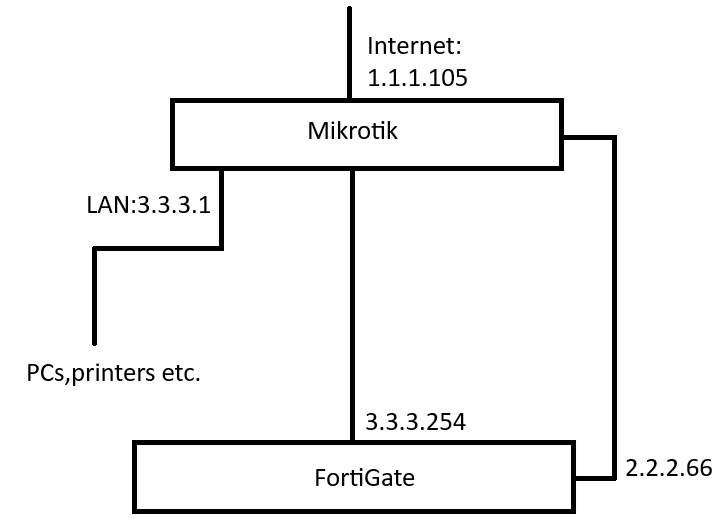
What happens is mikrotik routes the network through fortigate device and then it uses vlan to connect with another location through public ip.
The issue is i dont know how (or if its possible) to disable nat for the 2.2.2.66 address since it just goes through the 1.1.1.104 gateway on the way out of mikrotik and fortigate doesnt work properly
Or another way of implementing this to make it work (two routers instead of one?)
Similar setup worked fine on our old ISP but we had two public ips in the same subnet. Now i just cant make it to work.
For now I have standard setup and access to internet through the 1.1.1.105 address but we cant use fortigate to access a system that is shared through that vlan.
I don’t understand your layout.
It seems like the fortigate is a LAN device like any other (with IP 3.3.3.254, belonging to the 3.3.3.0/24 network) that is “fed” from the mikrotik via a public IP 2.2.2.66 (but is it the fortigate ip or the mikrotik one?) the whole thing seems a loop, I had expected that you have two ways to the internet, one with gateway 1.1.1.105 and one with gateway 2.2.2.65.
BTW you probably have a typo, 1.1.1.104 is nowhere to be found in the layout.
Anyway, sure you can disable NAT for a given interface, but it depends on how you have setup NAT right now, if you used the usual Mikroitk categorization of interfaces as LAN and WAN you need to change that.
Best thing would be if you could review (don’t worry about the form, the paint sketch is good enough) the layout and description, and post an export of your Mikrotik “as is”, instructions here:
http://forum.mikrotik.com/t/forum-rules/173010/1
Below is the settings:
# 2025-05-09 08:39:04 by RouterOS 7.18.2
# software id = abc-1234
#
# model = RB850Gx2
# serial number = abc-1234
/interface bridge
add name=bridge_EZD
add admin-mac=00:00:00:00:00:00 auto-mac=no comment=defconf name=bridge_LAN
/interface list
add comment=defconf name=WAN
add comment=defconf name=LAN
add name=EZD
/interface wireless security-profiles
set [ find default=yes ] supplicant-identity=MikroTik
/ip dhcp-server
add disabled=yes interface=bridge_EZD name=defconf
/ip pool
add name=server_LAN ranges=3.3.3.10-3.3.3.99
/ip dhcp-server
add address-pool=server_LAN interface=bridge_LAN name=server_LAN
/port
set 0 name=serial0
/disk settings
set auto-media-interface=bridge_LAN auto-media-sharing=yes auto-smb-sharing=\
    yes
/interface bridge port
add bridge=bridge_EZD comment=defconf interface=ether2
add bridge=bridge_EZD comment=defconf interface=ether3
add bridge=bridge_LAN comment=defconf interface=ether4
add bridge=bridge_LAN comment=defconf interface=ether5
/ip neighbor discovery-settings
set discover-interface-list=LAN
/interface list member
add comment=defconf interface=bridge_LAN list=LAN
add comment=defconf interface=ether1 list=WAN
add interface=bridge_EZD list=EZD
/ip address
add address=2.2.2.65/29 comment=defconf interface=bridge_EZD network=\
    2.2.2.64
add address=1.1.1.105 interface=ether1 network=1.1.1.104
add address=3.3.3.1/24 interface=bridge_LAN network=3.3.3.0
/ip dhcp-client
add comment=defconf disabled=yes interface=ether1
/ip dhcp-server network
add address=2.2.2.64/29 comment=defconf dns-server=2.2.2.65 \
    gateway=2.2.2.65 netmask=29
add address=3.3.3.0/24 dns-server=3.3.3.1 gateway=3.3.3.1 \
    netmask=24
/ip dns
set allow-remote-requests=yes servers=8.8.8.8,8.8.4.4
/ip dns static
add address=2.2.2.65 comment=defconf name=router.lan type=A
/ip firewall filter
add action=accept chain=input comment=\
    "defconf: accept established,related,untracked" connection-state=\
    established,related,untracked
add action=drop chain=input comment="defconf: drop invalid" connection-state=\
    invalid
add action=accept chain=input comment="defconf: accept ICMP" protocol=icmp
add action=accept chain=input comment=\
    "defconf: accept to local loopback (for CAPsMAN)" dst-address=127.0.0.1
add action=drop chain=input comment="defconf: drop all not coming from LAN" \
    in-interface-list=!LAN
add action=accept chain=forward comment="defconf: accept in ipsec policy" \
    ipsec-policy=in,ipsec
add action=accept chain=forward comment="defconf: accept out ipsec policy" \
    ipsec-policy=out,ipsec
add action=fasttrack-connection chain=forward comment="defconf: fasttrack" \
    connection-state=established,related hw-offload=yes
add action=accept chain=forward comment=\
    "defconf: accept established,related, untracked" connection-state=\
    established,related,untracked
add action=drop chain=forward comment="defconf: drop invalid" \
    connection-state=invalid
add action=drop chain=forward comment=\
    "defconf: drop all from WAN not DSTNATed" connection-nat-state=!dstnat \
    connection-state=new in-interface-list=WAN
/ip firewall nat
add action=masquerade chain=srcnat comment="defconf: masquerade" \
    ipsec-policy=out,none out-interface-list=WAN
/ip route
add disabled=no dst-address=4.4.4.71/32 gateway=3.3.3.254 \
    routing-table=main suppress-hw-offload=no
/ipv6 firewall address-list
add address=::/128 comment="defconf: unspecified address" list=bad_ipv6
add address=::1/128 comment="defconf: lo" list=bad_ipv6
add address=fec0::/10 comment="defconf: site-local" list=bad_ipv6
add address=::ffff:0.0.0.0/96 comment="defconf: ipv4-mapped" list=bad_ipv6
add address=::/96 comment="defconf: ipv4 compat" list=bad_ipv6
add address=100::/64 comment="defconf: discard only " list=bad_ipv6
add address=2001:db8::/32 comment="defconf: documentation" list=bad_ipv6
add address=2001:10::/28 comment="defconf: ORCHID" list=bad_ipv6
add address=3ffe::/16 comment="defconf: 6bone" list=bad_ipv6
/ipv6 firewall filter
add action=accept chain=input comment=\
    "defconf: accept established,related,untracked" connection-state=\
    established,related,untracked
add action=drop chain=input comment="defconf: drop invalid" connection-state=\
    invalid
add action=accept chain=input comment="defconf: accept ICMPv6" protocol=\
    icmpv6
add action=accept chain=input comment="defconf: accept UDP traceroute" \
    dst-port=33434-33534 protocol=udp
add action=accept chain=input comment=\
    "defconf: accept DHCPv6-Client prefix delegation." dst-port=546 protocol=\
    udp src-address=fe80::/10
add action=accept chain=input comment="defconf: accept IKE" dst-port=500,4500 \
    protocol=udp
add action=accept chain=input comment="defconf: accept ipsec AH" protocol=\
    ipsec-ah
add action=accept chain=input comment="defconf: accept ipsec ESP" protocol=\
    ipsec-esp
add action=accept chain=input comment=\
    "defconf: accept all that matches ipsec policy" ipsec-policy=in,ipsec
add action=drop chain=input comment=\
    "defconf: drop everything else not coming from LAN" in-interface-list=\
    !LAN
add action=fasttrack-connection chain=forward comment="defconf: fasttrack6" \
    connection-state=established,related
add action=accept chain=forward comment=\
    "defconf: accept established,related,untracked" connection-state=\
    established,related,untracked
add action=drop chain=forward comment="defconf: drop invalid" \
    connection-state=invalid
add action=drop chain=forward comment=\
    "defconf: drop packets with bad src ipv6" src-address-list=bad_ipv6
add action=drop chain=forward comment=\
    "defconf: drop packets with bad dst ipv6" dst-address-list=bad_ipv6
add action=drop chain=forward comment="defconf: rfc4890 drop hop-limit=1" \
    hop-limit=equal:1 protocol=icmpv6
add action=accept chain=forward comment="defconf: accept ICMPv6" protocol=\
    icmpv6
add action=accept chain=forward comment="defconf: accept HIP" protocol=139
add action=accept chain=forward comment="defconf: accept IKE" dst-port=\
    500,4500 protocol=udp
add action=accept chain=forward comment="defconf: accept ipsec AH" protocol=\
    ipsec-ah
add action=accept chain=forward comment="defconf: accept ipsec ESP" protocol=\
    ipsec-esp
add action=accept chain=forward comment=\
    "defconf: accept all that matches ipsec policy" ipsec-policy=in,ipsec
add action=drop chain=forward comment=\
    "defconf: drop everything else not coming from LAN" in-interface-list=\
    !LAN
/system clock
set time-zone-name=
/system note
set show-at-login=no
/tool mac-server
set allowed-interface-list=LAN
/tool mac-server mac-winbox
set allowed-interface-list=LAN
i wanted to use ether 1 for WAN port
then interfaces 2-3 for the 2.2.2.66-70 public ips
and interfaces 4-5 for the 3.3.3.x - LAN
Originaly in our previous ISP we had router from the ISP itself that automatically routed the correct addresses. So mikrotik had for example 5.5.5.105 address and fortigate 5.5.5.106. Thats why i thought to use first mikrotik as “isp router” and another mikrotik for LAN stuff
Also 1.1.1.104 is the gateway for the 1.1.1.105 public ip address
PS. 4.4.4.71 in the config is the device on the other side of the fortigate vlan
PS2. The new ISP wrote to us to use 1.1.1.105 as main ip address for mikrotik and then use 2.2.2.65 as local network in settings, then turn off nat and/or masquerade without dhcp and use 2.2.2.66-70 public ip addresses for “LAN” and it will work, but then i assume i need another router to use for local network (and give it for example 2.2.2.66 address and setup nat/masquerade on it instead)
Also i apologize if i dont make a lot of sense, just also trying to make sense of it
You can edit this rule in the IP → Firewall → NAT table:
/ip firewall nat
add action=masquerade chain=srcnat comment="defconf: masquerade" \
    ipsec-policy=out,none out-interface-list=WAN
and change it into:
/ip firewall nat
add action=masquerade chain=srcnat comment="defconf: masquerade" \
    ipsec-policy=out,none out-interface-list=WAN src-address=!2.2.2.64/29
by adding src-address=**!**2.2.2.64/29.
If you want to allow incoming connections to that address range from the internet too, then add this rule to the Filter table.
/ip firewall filter
add action=accept chain=forward in-interface-list=WAN out-interface-list=EZD
and move that rule above the “defconf: drop all from WAN not DSTNATed” rule.
As it turned out the problem were also ip addresses, there was a typo and we were given wrong ones (think 23.1.1.1 instead of 22.1.1.1).
After changing ips and setting firewall as CGGXANNX adviced, everything worked as intended.