Hi,
I'm using a MikroTik hEX S (2025, E60iUGS) running RouterOS 7.24 (stable). I noticed a display/sync bug in the Quick Set (Ethernet) window:
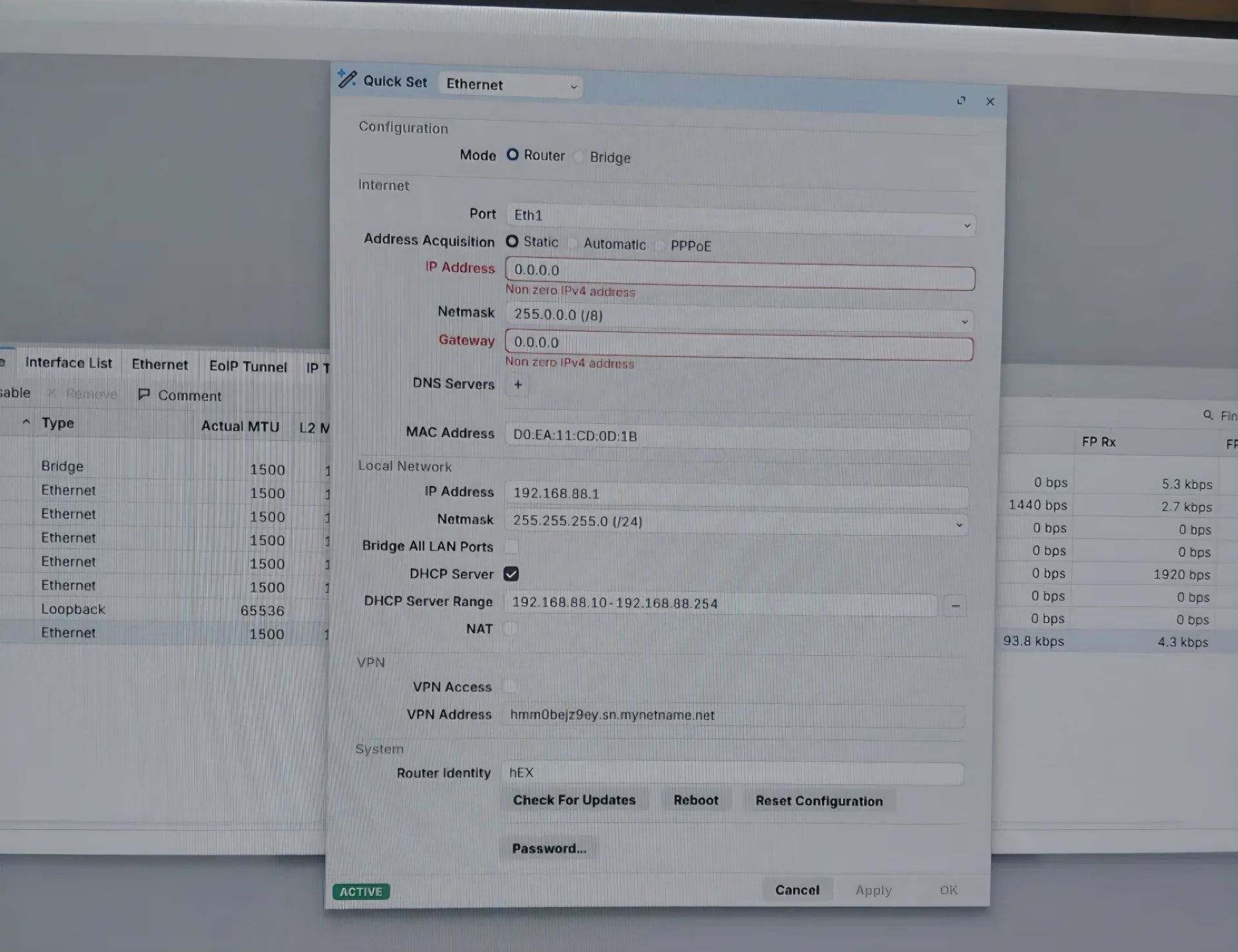
After adding the WAN interface to the bridge and then removing it again, Quick Set continues to show Address Acquisition as "Static", even though the actual setting is "Automatic" and the DHCP client is working correctly.
The IP Address and Gateway fields show "0.0.0.0" in red with the error "Non zero IPv4 address", even though the DHCP lease is active and traffic is flowing normally on ether1.
The Local Network IP Address field is sometimes shown blank, even though the actual configuration is correct.
This issue appeared on both RouterOS 7.20.8 and 7.24, so it doesn't seem version-specific. The actual configuration (verified via IP > DHCP Client, IP > Addresses, IP > Routes, etc.) is correct — this appears to be purely a Quick Set UI display/sync issue, which caused significant confusion during initial setup, as it looks like something is broken when everything is actually working fine.
Could this be looked into? Happy to provide more details or screenshots if useful.
Thanks!