R11l-LTE7 modem not starting with RouterOS 7.25beta3 or 7.24.2

Hi,

I have been having a persistent startup problem with the LTE7 modem in my MikroTik wAP ax LTE7 kit for quite some time.

With RouterOS 7.23.3, after a reboot or complete power cycle, the LTE modem usually did not initialize properly. The LTE interface would alternate between states such as:

radio off
modem not ready

The modem capabilities would also periodically disappear from WebFig. In the LTE debug log I repeatedly saw:

lte1: sent ATE0

approximately every 30–60 seconds, apparently without the modem completing initialization.

Interestingly, with 7.23.3, if I left the router powered on long enough, the modem would usually eventually start working by itself, typically within 1–2 hours. Occasionally disabling/enabling lte1 also seemed to help. Once the modem actually initialized, LTE worked normally and I have measured approximately 40/40 Mbps, so the cellular connection itself seems fine.

I have now upgraded to RouterOS 7.25beta3, partly because of the LTE7-related fixes in newer RouterOS releases.

Unfortunately, the behaviour now seems worse: after upgrading to 7.25beta3 and performing a complete power cycle, the LTE7 modem has not initialized at all for approximately 24 hours.

The log continues to show repeated:

lte1: sent ATE0

but the modem never reaches a usable state.

The problem therefore existed already with 7.23.3, but with that version the modem would eventually initialize after enough time. With 7.25beta3 it has so far failed to initialize completely.

Has anyone seen similar behaviour with the R11l-LTE7? Is there additional LTE/USB/modem debug logging I could enable to determine whether the modem is resetting, disappearing from the bus, or simply not responding to the initial ATE0 command?

I can provide a supout.rif and detailed LTE debug logs if useful.

Thanks!
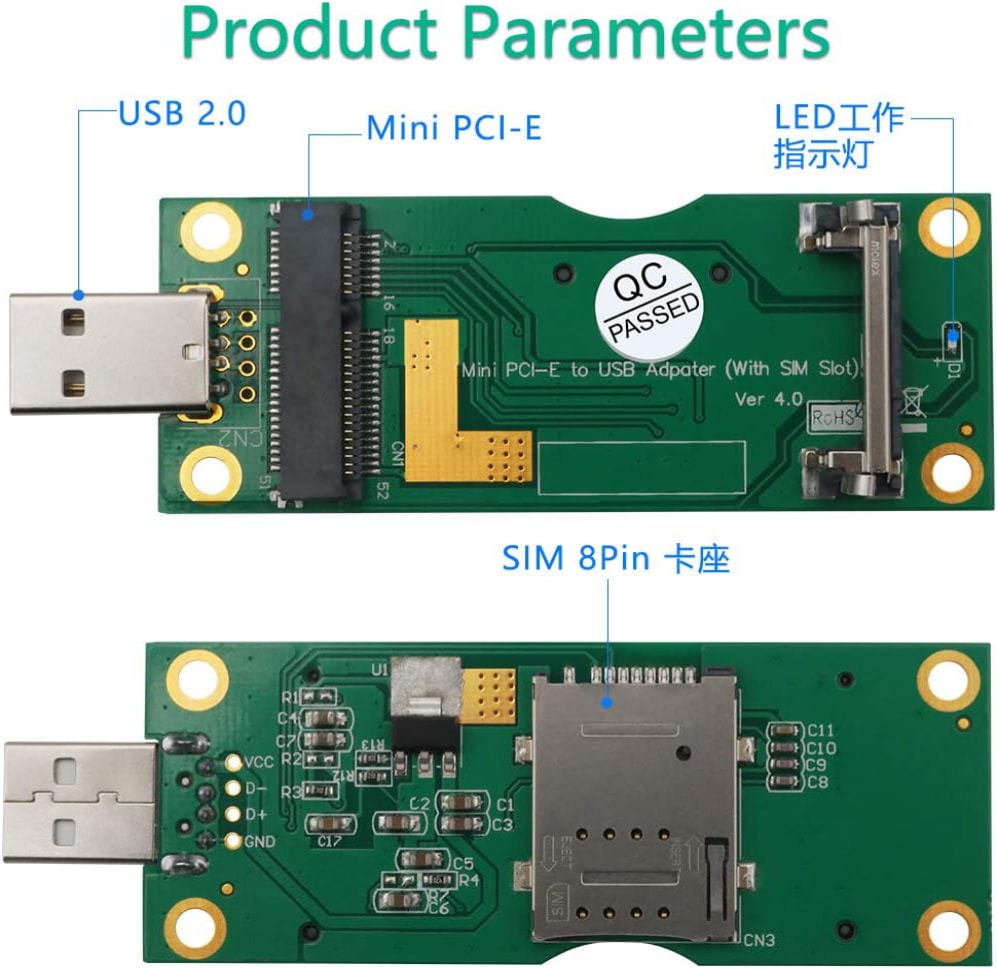
You could put the modem card into such an adapter board and try it on a PC.

These adapter boards cost about 10...15$

This would tell you if the modem card is the problem or the router. This decides where to look further.

Same issue here with brand new WAP LTE device, LTE won't initialise, ATE0 in logs. Thought I'd fixed it by upgrading to latest firmware and ROS versions but still doing it, will occasionally initialise and works with no SIM card in the slot - get lots of modem comunication saying no SIM Detected etc!! But with the sim card in doesn't work and tried swapping SIM with another LHG device and fault stayed with WAP unit... so not a SIM issue. Tempted to try and swap to an ESIm but that seems to be another nest of problems...

After 2 days of struggling I went back to 7.23.3. It didnt wake up in 48h so then i cold resetted and toggled LTE enable & disable few times + changed detect internet settings few times too. I dont know if this has anything to do resolving anything but after few hours It suddenly woke up...

Just seen this in latest changelog..

*) lte - prevent the modem firmware from being deleted for RBSXTLTE3-7, EC25-EU&KNe, EG25-G&KNe, EC25-EU&SXTsq, EG25-G&SXTsq (introduced in 7.23.6);

                 If you have already upgraded to 7.23.6 or 7.24.3, follow these steps to restore LTE functionality on affected devices:                              
                                                                                                                                                                     
                 1\. Upgrade RouterOS to version 7.23.7 or 7.24.4                                                                                                     
                                                                                                                                                                     
                 2\. Update the modem firmware:                                                                                                                       
                 /interface/lte/firmware-upgrade \[find\] upgrade=yes                                                                                                  
                                                                                                                                                                     
                 3\. Reboot the router.                                                                                                                               
                                                                                                                                                                     
                 For more details, see:                                                                                                                              
                 https://forum.mikrotik.com/t/warning-lte-interface-stops-working-after-upgrade-to-7-23-6-7-24-3

Well it didn't fix mine but worth a try?

Well I've rolled back to 7.21.5 with no change.... wAPGR-5HaxD2HaxD

Yes, im running older LTE firmware
Installed: R11-LTE7_V005
Latest: R11-LTE7_V006
Link is now up so maybe I'll update when I must visit the site and hope i can get it up again.

I've rolled the wAPGR back to factory firmware 7.20.8 and it seems to be working - aprt form lots of 'unsolicited AT received from modem'...

and now it isn't after a reboot...

I am also having problems with Chateau LTE7. Factory resetted. Latest stable RouterOS and modem version. Lights on front panel keeeps turning off every minute or so.

This is some of the tests i did:

[admin@S53UG] > /system/resource/print
uptime: 53s
version: 7.24.4 (stable)
build-time: 2026-09-16 11:32:21
minimum-version: 7.20.3
free-memory: 660.4MiB
total-memory: 1024.0MiB
cpu: ARM64
cpu-count: 4
cpu-frequency: 1608MHz
cpu-load: 3%
free-hdd-space: 52.2MiB
total-hdd-space: 128.0MiB
write-sect-since-reboot: 30
write-sect-total: 47512
bad-blocks: 0%
architecture-name: arm64
board-name: S53UG+5HaxD2HaxD
platform: MikroTik
[admin@S53UG] > /interface/lte/print detail

Flags: R - RUNNING
0 R default-name="lte1" name="lte1" mtu=1500 apn-profiles=default allow-roaming=yes sms-read=no sms-protocol=auto network-mode=3g,lte band=""
[admin@S53UG] > /interface/lte/monitor lte1 once
status: registered
pin-status: ok
registration-status: registered
manufacturer: MikroTik
model: R11l-LTE7
revision: R11l-LTE7_V006
current-operator: MOBITEL
lac: 6
current-cellid: 51891212
enb-id: 202700
sector-id: 12
phy-cellid: 437
data-class: LTE CA
session-uptime: 18s
imei: *
imsi: *
iccid: *
primary-band: B1@20Mhz earfcn: 400 phy-cellid: 437
ca-band: B20@10Mhz earfcn: 6201 phy-cellid: 435
cqi: 0
ri: 1
rssi: -66dBm
rsrp: -101dBm
rsrq: -14.5dB
sinr: -15dB
[admin@S53UG] > /ip/route/print detail where dst-address="0.0.0.0/0"
Flags: D - DYNAMIC; A - ACTIVE; m - MODEM
DAm dst-address=0.0.0.0/0 routing-table=main gateway=lte1 immediate-gw=lte1 distance=2 scope=30 target-scope=10
[admin@S53UG] > /ping 1.1.1.1 count=20 size=56
SEQ HOST SIZE TTL TIME STATUS
0 1.1.1.1 56 58 34ms154us
1 1.1.1.1 56 58 34ms397us
2 1.1.1.1 56 58 39ms997us
3 1.1.1.1 56 58 37ms707us
4 1.1.1.1 timeout
5 1.1.1.1 56 58 167ms663us
6 1.1.1.1 timeout
7 1.1.1.1 timeout
8 1.1.1.1 timeout
9 1.1.1.1 56 58 886ms207us
10 1.1.1.1 timeout
11 1.1.1.1 timeout
12 1.1.1.1 timeout
13 1.1.1.1 timeout
14 1.1.1.1 56 58 222ms102us
15 1.1.1.1 56 58 45ms829us
16 1.1.1.1 56 58 94ms353us
17 1.1.1.1 56 58 120ms361us
18 1.1.1.1 56 58 35ms968us
19 1.1.1.1 56 58 47ms318us
sent=20 received=12 packet-loss=40% min-rtt=34ms154us avg-rtt=147ms171us max-rtt=886ms207us

[admin@S53UG] > /ping 8.8.8.8 count=20 size=56
SEQ HOST SIZE TTL TIME STATUS
0 8.8.8.8 56 115 51ms136us
1 8.8.8.8 56 115 46ms833us
2 8.8.8.8 56 115 48ms42us
3 8.8.8.8 56 115 47ms800us
4 8.8.8.8 56 115 47ms922us
5 8.8.8.8 timeout
6 8.8.8.8 timeout
7 8.8.8.8 timeout
8 8.8.8.8 timeout
9 8.8.8.8 timeout
10 8.8.8.8 timeout
11 8.8.8.8 timeout
12 8.8.8.8 timeout
13 8.8.8.8 timeout
14 8.8.8.8 56 115 545ms735us
15 8.8.8.8 56 115 136ms451us
16 8.8.8.8 timeout
17 8.8.8.8 timeout
18 8.8.8.8 timeout
19 8.8.8.8 56 115 132ms156us
sent=20 received=8 packet-loss=60% min-rtt=46ms833us avg-rtt=132ms9us max-rtt=545ms735us

15:00:34 echo: system,critical,info cloud change time Sep/20/2026 14:49:09 => Sep/20/2026 15:00:34
[admin@S53UG] > /ping 193.189.160.23 count=20 size=56
SEQ HOST SIZE TTL TIME STATUS
0 193.189.160.23 56 251 25ms214us
1 193.189.160.23 56 251 184ms858us
2 193.189.160.23 56 251 38ms134us
3 193.189.160.23 56 251 30ms823us
4 193.189.160.23 56 251 27ms951us
5 193.189.160.23 56 251 26ms817us
6 193.189.160.23 56 251 29ms45us
7 193.189.160.23 56 251 26ms930us
8 193.189.160.23 56 251 15ms783us
9 193.189.160.23 56 251 31ms285us
10 193.189.160.23 56 251 103ms983us
11 193.189.160.23 56 251 27ms840us
12 193.189.160.23 56 251 34ms952us
13 193.189.160.23 56 251 29ms693us
14 193.189.160.23 56 251 28ms89us
15 193.189.160.23 56 251 28ms731us
16 193.189.160.23 56 251 27ms905us
17 193.189.160.23 56 251 26ms927us
18 193.189.160.23 56 251 28ms848us
19 193.189.160.23 56 251 26ms866us
sent=20 received=20 packet-loss=0% min-rtt=15ms783us avg-rtt=40ms33us max-rtt=184ms858us

[admin@S53UG] > /ping 1.1.1.1 count=20 size=1200 do-not-fragment
SEQ HOST SIZE TTL TIME STATUS
0 1.1.1.1 1200 58 40ms23us
1 1.1.1.1 1200 58 80ms785us
2 1.1.1.1 1200 58 43ms706us
3 1.1.1.1 1200 58 41ms115us
4 1.1.1.1 1200 58 53ms317us
5 1.1.1.1 1200 58 41ms386us
6 1.1.1.1 1200 58 63ms727us
7 1.1.1.1 timeout
8 1.1.1.1 timeout
9 1.1.1.1 1200 58 265ms696us
10 1.1.1.1 1200 58 56ms971us
11 1.1.1.1 1200 58 39ms849us
12 1.1.1.1 1200 58 31ms963us
13 1.1.1.1 1200 58 44ms211us
14 1.1.1.1 1200 58 56ms851us
15 1.1.1.1 1200 58 286ms925us
16 1.1.1.1 1200 58 59ms69us
17 1.1.1.1 1200 58 54ms192us
18 1.1.1.1 1200 58 58ms429us
19 1.1.1.1 1200 58 50ms3us
sent=20 received=18 packet-loss=10% min-rtt=31ms963us avg-rtt=76ms12us max-rtt=286ms925us

[admin@S53UG] > /ping 8.8.8.8 count=20 size=1400 do-not-fragment
SEQ HOST SIZE TTL TIME STATUS
0 8.8.8.8 1400 115 70ms379us
1 8.8.8.8 1400 115 59ms877us
2 8.8.8.8 1400 115 70ms903us
3 8.8.8.8 1400 115 64ms814us
4 8.8.8.8 1400 115 67ms938us
5 8.8.8.8 1400 115 67ms991us
6 8.8.8.8 1400 115 67ms905us
7 8.8.8.8 1400 115 59ms879us
8 8.8.8.8 1400 115 912ms768us
9 8.8.8.8 timeout
10 8.8.8.8 1400 115 64ms788us
11 8.8.8.8 1400 115 54ms878us
12 8.8.8.8 1400 115 77ms783us
13 8.8.8.8 1400 115 69ms838us
14 8.8.8.8 1400 115 69ms596us
15 8.8.8.8 1400 115 57ms698us
16 8.8.8.8 1400 115 65ms536us
17 8.8.8.8 1400 115 75ms891us
18 8.8.8.8 1400 115 61ms704us
19 8.8.8.8 1400 115 57ms643us
sent=20 received=19 packet-loss=5% min-rtt=54ms878us avg-rtt=110ms411us max-rtt=912ms768us

[admin@S53UG] > /ip/dns/print
servers:
dynamic-servers: 193.189.160.23
193.189.177.55
use-doh-server:
verify-doh-cert: no
doh-max-server-connections: 5
doh-max-concurrent-queries: 50
doh-timeout: 5s
allow-remote-requests: yes
max-udp-packet-size: 4096
query-server-timeout: 2s
query-total-timeout: 10s
max-concurrent-queries: 100
max-concurrent-tcp-sessions: 20
cache-size: 2048KiB
cache-max-ttl: 1w
address-list-extra-time: 0s
vrf: main
mdns-repeat-ifaces:
cache-used: 64KiB
[admin@S53UG] > :put [:resolve "www.google.com"]
142.251.157.119
[admin@S53UG] > :put [:resolve "www.speedtest.net"]
104.17.148.22
[admin@S53UG] >

And this is test with the same SIM card on the same table with HapAXLite LTE6

[admin@hAP] > /system/resource/print
uptime: 57s
version: 7.24.2 (stable)
build-time: 2026-09-03 09:57:14
minimum-version: 7.8
free-memory: 54.5MiB
total-memory: 256.0MiB
cpu: ARM
cpu-count: 2
cpu-frequency: 800MHz
cpu-load: 3%
free-hdd-space: 2580.0KiB
total-hdd-space: 128.0MiB
write-sect-since-reboot: 1118
write-sect-total: 358983
bad-blocks: 0%
architecture-name: arm
board-name: hAP ax lite LTE6
platform: MikroTik
[admin@hAP] > /interface/lte/print detail
Flags: I - INACTIVE
0 I default-name="lte1" name="lte1" mtu=1500 apn-profiles=default
operator="29341" allow-roaming=no sms-read=no sms-protocol=auto
network-mode=lte band=""
[admin@hAP] > /interface/lte/monitor lte1 once
status: running
model: FG621-EA
revision: 16121.1034.00.01.01.10
current-operator:
current-cellid: 51891402
enb-id: 202700
sector-id: 202
phy-cellid: 435
data-class: LTE
session-uptime: 2s
imei: *
imsi: *
iccid: *
primary-band: B20@10Mhz earfcn: 6201 phy-cellid: 435
ca-band: B3@20Mhz earfcn: 1657 phy-cellid: 435
ri: 1
rssi: -64dBm
rsrp: -99dBm
rsrq: -19.5dB
sinr: -3dB
[admin@hAP] > /ip/route/print detail where dst-address="0.0.0.0/0"
Flags: D - DYNAMIC; I - INACTIVE, A - ACTIVE; s - STATIC, m - MODEM
DAm dst-address=0.0.0.0/0 routing-table=main gateway=lte1 immediate-gw=lte1
distance=2 scope=30 target-scope=10

0 Is dst-address=0.0.0.0/0 routing-table=*400 gateway="" immediate-gw=""
distance=1 scope=30 target-scope=10

[admin@hAP] > /ping 1.1.1.1 count=20 size=56
SEQ HOST SIZE TTL TIME STATUS
0 1.1.1.1 56 58 36ms89us
1 1.1.1.1 56 58 34ms559us
2 1.1.1.1 56 58 39ms714us
3 1.1.1.1 56 58 38ms864us
4 1.1.1.1 56 58 29ms865us
5 1.1.1.1 56 58 39ms783us
6 1.1.1.1 56 58 39ms971us
7 1.1.1.1 56 58 29ms386us
8 1.1.1.1 56 58 44ms157us
9 1.1.1.1 56 58 24ms547us
10 1.1.1.1 56 58 29ms255us
11 1.1.1.1 56 58 39ms416us
12 1.1.1.1 56 58 27ms366us
13 1.1.1.1 56 58 26ms411us
14 1.1.1.1 56 58 38ms164us
15 1.1.1.1 56 58 37ms353us
16 1.1.1.1 56 58 25ms214us
17 1.1.1.1 56 58 62ms238us
18 1.1.1.1 56 58 34ms185us
19 1.1.1.1 56 58 37ms287us
sent=20 received=20 packet-loss=0% min-rtt=24ms547us avg-rtt=35ms691us
max-rtt=62ms238us

[admin@hAP] > /ping 8.8.8.8 count=20 size=56
SEQ HOST SIZE TTL TIME STATUS
0 8.8.8.8 56 116 51ms953us
1 8.8.8.8 56 116 54ms245us
2 8.8.8.8 56 116 40ms451us
3 8.8.8.8 56 116 39ms257us
4 8.8.8.8 56 116 53ms388us
5 8.8.8.8 56 116 56ms170us
6 8.8.8.8 56 116 55ms735us
7 8.8.8.8 56 116 49ms464us
8 8.8.8.8 56 116 40ms915us
9 8.8.8.8 56 116 54ms177us
10 8.8.8.8 56 116 47ms934us
11 8.8.8.8 56 116 48ms761us
12 8.8.8.8 56 116 56ms429us
13 8.8.8.8 56 116 40ms788us
14 8.8.8.8 56 116 54ms156us
15 8.8.8.8 56 116 47ms785us
16 8.8.8.8 56 116 47ms785us
17 8.8.8.8 56 116 47ms681us
18 8.8.8.8 56 116 53ms750us
19 8.8.8.8 56 116 51ms399us
sent=20 received=20 packet-loss=0% min-rtt=39ms257us avg-rtt=49ms611us
max-rtt=56ms429us

[admin@hAP] > /ping 193.189.160.23 count=20 size=56
SEQ HOST SIZE TTL TIME STATUS
0 193.189.160.23 56 251 26ms8us
1 193.189.160.23 56 251 27ms362us
2 193.189.160.23 56 251 27ms413us
3 193.189.160.23 56 251 15ms302us
4 193.189.160.23 56 251 27ms483us
5 193.189.160.23 56 251 30ms421us
6 193.189.160.23 56 251 26ms368us
7 193.189.160.23 56 251 36ms231us
8 193.189.160.23 56 251 28ms499us
9 193.189.160.23 56 251 17ms142us
10 193.189.160.23 56 251 16ms313us
11 193.189.160.23 56 251 16ms302us
12 193.189.160.23 56 251 28ms340us
13 193.189.160.23 56 251 28ms486us
14 193.189.160.23 56 251 31ms149us
15 193.189.160.23 56 251 28ms602us
16 193.189.160.23 56 251 15ms432us
17 193.189.160.23 56 251 50ms258us
18 193.189.160.23 56 251 30ms810us
19 193.189.160.23 56 251 20ms384us
sent=20 received=20 packet-loss=0% min-rtt=15ms302us avg-rtt=26ms415us
max-rtt=50ms258us

[admin@hAP] > /ping 1.1.1.1 count=20 size=1200 do-not-fragment
SEQ HOST SIZE TTL TIME STATUS
0 1.1.1.1 1200 58 51ms660us
1 1.1.1.1 1200 58 42ms194us
2 1.1.1.1 1200 58 58ms470us
3 1.1.1.1 1200 58 42ms363us
4 1.1.1.1 1200 58 47ms230us
5 1.1.1.1 1200 58 53ms338us
6 1.1.1.1 1200 58 36ms310us
7 1.1.1.1 1200 58 49ms144us
8 1.1.1.1 1200 58 43ms365us
9 1.1.1.1 1200 58 43ms743us
10 1.1.1.1 1200 58 45ms523us
11 1.1.1.1 1200 58 36ms341us
12 1.1.1.1 1200 58 44ms310us
13 1.1.1.1 1200 58 42ms773us
14 1.1.1.1 1200 58 43ms321us
15 1.1.1.1 1200 58 50ms293us
16 1.1.1.1 1200 58 43ms353us
17 1.1.1.1 1200 58 41ms822us
18 1.1.1.1 1200 58 47ms274us
19 1.1.1.1 1200 58 49ms339us
sent=20 received=20 packet-loss=0% min-rtt=36ms310us avg-rtt=45ms608us
max-rtt=58ms470us

[admin@hAP] > /ping 8.8.8.8 count=20 size=1400 do-not-fragment
SEQ HOST SIZE TTL TIME STATUS
0 8.8.8.8 1400 116 70ms127us
1 8.8.8.8 1400 116 52ms147us
2 8.8.8.8 1400 116 70ms162us
3 8.8.8.8 1400 116 69ms478us
4 8.8.8.8 1400 116 59ms397us
5 8.8.8.8 1400 116 51ms327us
6 8.8.8.8 1400 116 65ms187us
7 8.8.8.8 1400 116 50ms275us
8 8.8.8.8 1400 116 64ms169us
9 8.8.8.8 1400 116 58ms406us
10 8.8.8.8 1400 116 58ms101us
11 8.8.8.8 1400 116 56ms622us
12 8.8.8.8 1400 116 58ms126us
13 8.8.8.8 1400 116 48ms966us
14 8.8.8.8 1400 116 47ms526us
15 8.8.8.8 1400 116 47ms133us
16 8.8.8.8 1400 116 64ms396us
17 8.8.8.8 1400 116 57ms397us
18 8.8.8.8 1400 116 71ms60us
19 8.8.8.8 1400 116 49ms880us
sent=20 received=20 packet-loss=0% min-rtt=47ms133us avg-rtt=58ms494us
max-rtt=71ms60us

[admin@hAP] > /ip/dns/print
servers:
dynamic-servers: 193.189.160.23
193.189.177.55
use-doh-server: https://dns.controld.com/*
verify-doh-cert: no
doh-max-server-connections: 5
doh-max-concurrent-queries: 50
doh-timeout: 5s
allow-remote-requests: yes
max-udp-packet-size: 4096
query-server-timeout: 2s
query-total-timeout: 10s
max-concurrent-queries: 100
max-concurrent-tcp-sessions: 20
cache-size: 2048KiB
cache-max-ttl: 1w
address-list-extra-time: 0s
vrf: main
mdns-repeat-ifaces:
cache-used: 73KiB
[admin@hAP] > :put [:resolve "www.google.com"]
142.251.150.119
[admin@hAP] > :put [:resolve "www.speedtest.net"]
104.17.147.22
[admin@hAP] >


I have exactly the same model and the same problems... Did you manage to solve the issue?

Me too, on a new wAP ax LTE7 (R11l-LTE7), and I can confirm the "works without SIM, fails with SIM" result from post 3.

  • Timeline: it ran fine for about 4 hours on 7.23.5 (EE UK, LTE passthrough). Then I upgraded the modem firmware to V006 from WinBox, and it has never started properly since. It cycles inactive / radio off / modem not ready, the modem drops off /system resource hardware and comes back, and at-chat fails. Upgrading RouterOS to 7.24.5 changed nothing. So for me it fails on both the long-term and stable trains.
  • Didn't help: reboot, a 15-minute usb power-reset, 10 minutes of PoE off at the switch, toggling LTE disable/enable the moment the modem reappears on USB.
  • SIM out, cold boot: the modem comes up and stays up for over an hour. at-chat works and it reports R11l-LTE7_V006, "SIM not inserted", CFUN: 4. So the modem and its firmware look healthy.
  • SIM back in, cold boot: back in the loop within 2 minutes. The same SIM worked in the same unit that morning.
  • Firmware-upgrade tip: while it's looping, firmware-upgrade says "Device must be in running state or disabled!". With the LTE interface disabled, it reports "unknown current version" and won't flash. That's a dead end for reflashing, but it shows the firmware itself isn't what's broken.

I've opened a support ticket with a supout and will post here if I get anything useful back. @MikroTik, there are now several of us with an identical signature on 7.20.8 through 7.25beta3. Any update?

OS 7.23.3
modem R11-LTE7_V005
I did about 20 sequential succesfull reconnects with my wAP ax LTE7 in remote location. I did script to

  1. boot
  2. wait for 5mins
  3. try to ping 8.8.8.8 if false disable lte
  4. wait for 3 mins and enable LTE
  5. wait 30 mins and goto 3

i got offline times from 5 to 50 mins quite randomly. If i just cold booted without the script usually LTE did not wake up. So now i got 20 sequential succesfull boots altough getting online did take a while...

/system script add name=lte-watchdog policy=read,write,test source={
:log info "LTE watchdog: waiting 5 minutes after boot"
:delay 5m

:while (true) do={

    :local replies [/ping 8.8.8.8 count=3 interval=1s]

    :if ($replies = 0) do={
        :log warning "LTE watchdog: ping failed - disabling LTE for 4 minutes"

        /interface lte disable lte1
        :delay 3m

        :log warning "LTE watchdog: enabling LTE"
        /interface lte enable lte1
    } else={
        :log info "LTE watchdog: internet OK"
    }

    :delay 30m
}

}

and

/system scheduler add name=lte-watchdog-start start-time=startup on-event="/system script run lte-watchdog"

I lost boat battery so i need to go back there for charging to continue testing.