Good morning from the Central Coast of Ca,
I have a freeradius implementation that sits off a local bridged interface of a CCR1009-8G-1S running 6.31. Radius server is pingable, service is up. If I use the traceroute tool in ROS and specify radius server IP and udp 1812 I can see the traffic on the radius server interface. When I try to auth against this host (winbox or ssh) it never sends traffic to the radius server. I added specific fw rules and turned on radius debugging and nothing, just authentication failed for the radius user. The radius configuration tool says the radius traffic is timing out. I’m a little new to ROS but have been debugging issues like this on IOS/NXOS/Freebsd & Linux for a long time. Is there a nuance in ROS that I am missing to get this working? Any help would be great, losing it a little with what seems to be a very basic issue. I can provide any configs or logs needed, thanks all.
Good morning and thanks so much for the reply,
----start-----
[nope@Edge DW] > /radius export
jun/28/2017 09:41:59 by RouterOS 6.31
software id = YS5S-E7TL
/radius
add address=10.100.3.120 secret="abc123" service=login
src-address=10.100.3.1
[nope@Edge DW] >
-----end------
The tool I was using inside of winbox was the traceroute tool
Thanks for the feedback,
I was running a packet capture;
tcpdump -nnvvXSs 1514 -i eth0 port 1812 -w /home/nope/RadiusCapNew6-28-2017.cap
and no traffic hit the interface. Yes the source address is the router interface facing the client. I have tried with and without a source address. I have not tried NTradping or radclient but I do have 6.38.5 running in my lab that can authenticate against this radius server (successful auth screenshot attached). The only difference is that the source of my radius traffic (and all traffic) is natting to a public IP whereas all the failing radius traffic is sourced from my client’s 10/8 space.
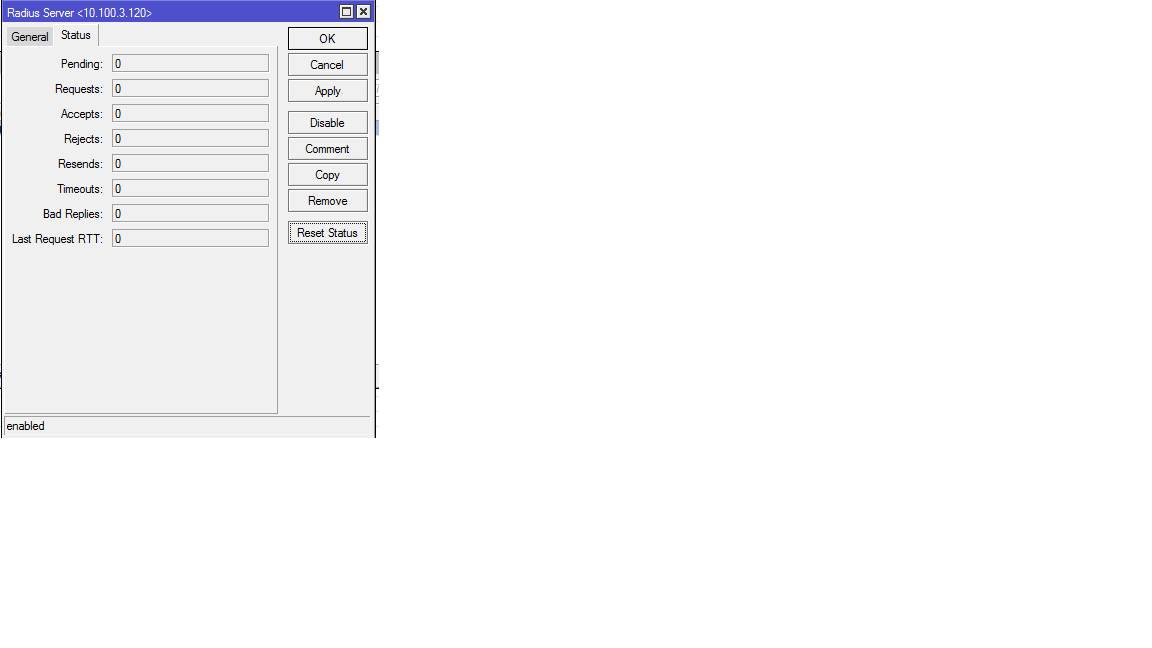
I can attach the nat rules as well if you think it would shed some light. My apologies on the late reply.Radius reset stats attached. No mangle but src-nat, dst-nat and masquerade are all being used. I don’t believe the requests are being natted and if they were the source “should” appear as the locally attached interface to the radius server and thus the responses “again should” be directed back towards that interface in ever circumstance. L3 is pointed at this interface as the default gateway and L2 should be a GARP/arp away from success but not so. I’m not convinced I have a good handle on the NAT in Mikrotik. I come Cisco Land and it appears to function a bit differently. After several failed attempts at authenticating the counters remain at zero. Not sure if the refresh for that is on a cron or real time. Please advise, thanks so much!
First thing I’d do is upgrading to 6.38.7 (Latest bugfix), checking System > Routerboard Current vs Upgrade firmware afterwards, upgrading if needed and rebooting.
Check that you have enabled:
login ticked on Radius > radius server entry
System > Users, [AAA] button, Use Radius should be enabled
because the router is not sending any radius requests (0 Requests).
These stats are close to real time, if the router were using radius for login auth you’ll see the Requests counter increasing; if there were any problem contacting the radius server, both Resends and Timeouts counters would increase too.
You configured ROS to use 10.100.3.1 as a src-address for radius requests, yet, the packet dump indicates that the request is originating from 10.100.3.120 (the local ethernet interface address).
That would indicate to me that 10.100.3.1 is not assigned to the router. Do you have a loopback iterface, with that IP assigned to it? Can you ping from the loopback to the FR server, and visa versa? Export /interfaces, /ip address, and /ip route.
The reason the radius is rejecting the request (ignoring it), is presumably because you have the client configured in radius with a src of 10.100.3.1, but the request is coming from 10.100.3.120. If you check the FR logs, or run FR in debug mode, you’d also notice big fat warnings and errors generated in the logs because it is receiving requests from an unknown client.
True, yes. But given his post, “Radius reset stats attached” it’s also understandable to presume that he’s reset the statistics, and then attached a image of it I’ve seen stranger things before…
Thanks all and good morning from the West Coast,
I’ll look into the settings mentioned. The source hasn’t been set to 10.100.3.120 as that is the destination for the auth traffic though I will re-check the FR log and see if it’s complaining. It hasn’t been in fact the traffic never even made it to the host. I have 40+ devices exhibiting the same behavior and consistently the radius traffic, specifically, stops at this host which is directly attached to the radius server. More coffee and I’ll look at the settings and logs and report back. Thanks all.
Traceroute for the directly connected radius server below using icmp then udp on 1812;
[uh-nope@Edge DW] /tool> traceroute 10.100.3.120 protocol=icmp
 # ADDRESS                          LOSS SENT    LAST     AVG    BEST   WORST
 1 10.100.3.120                       0%   15   0.6ms     0.6     0.5     0.8

[uh-nope@Edge DW] /tool> traceroute 10.100.3.120 protocol=u
 # ADDRESS                          LOSS SENT    LAST     AV
 1                                  100%    2 timeout
 2                                  100%    1 timeout
 3                                  100%    1 timeout
 4                                  100%    1 timeout
 5                                  100%    1 timeout
To be clear running radius is debug mode and performing capture in the server interface shows the traffic never hits the server, it dies on this RouterOS device. It looks like it’s being black holed.
Traceroute in udp mode it’s not doing what you think, only another router is going to show as reachable, is not suitable for testing services reachability, but an alternative route/path tracing transport when e.g. icmp cannot be used because is filtered.
Post
/interface export
/ip export
From the radius directly connected router, to double check:
1.- Interface facing the radius server is the right one
2.- IP on such interface is the right one
3.- Proper routes
(all this looks like is fine as there’s ping, but we’d better make sure…)
4.- No Firewall filters messing with radius traffic
5.- No Firewall nat hosing radius traffic
Let me insist on using the latest bugfix, 6.38.7, along with latest firmware.
If this radius was working fine previously, and suddenly started to misbehave due to this router, I would save an export and a backup (or manually backup any certs, etc) of its config and netinstall it to 6.38.7 straight away.
Thanks so much for the reply,
The information requested is attached. I did some scrubbing but the bones are there. I’m, 99% certain the linux host is not the problem. I think the issue is buried in the NAT table, if I had to guess. int-ipexport.txt (68.1 KB)
I doubt first rule is going to be applied as per the criteria you set; we’re working on the forward chain even when dst-natting, so I would change first rule to:
If is there anyone can help me setting up user manager as I have already configure but with voucher can not log in, says,‘‘invalid username or password’’.


 I’ve seen stranger things before…