Random packet-loss between CHR and HAP AX S

Hi hope my explanation is enough. If anybody is willing to help it would be much appreciated.

I am running two Router-OS instances. One HAP AX S and one Cloud Hosted Router (VPS). Both are running 7.22.3(stable) and are connected over wireguard as S2S VPN with each other.
CHR - wg1 - 192.168.15.1/24
HAP - wg1 - 192.168.15.2/24

In generell the tunnels are up and connected with a keepalive configured 00:00:25.

When I just ping from the cloud-router towards the homerouter I get between 20-30% packet-loss.
When I ping from the home-router towards the cloudrouter I get 0% packet-loss.

Things I already tried:

  • ping 192.168.15.2 do-not-fragment size=1200 (1000) > same result of packet-loss
  • disable FastTrack rule on Homerouter > same result (CHR does not have FastTrack)
  • disable DROP rule for invalid and untracked connections (forward and input)
  • also checked CPU on both devices and on both devices it is just on idle between 1-5% usage
  • AI suggested to check IP > Settings > RP Filter > no (was already set on both sites)
  • I have a Masquerade configured on the hap ax s site (src: 192.168.15.0/24 dst-address-list: !ALL_LAN action: masquerade

If anybody has some additional ideas what else to check it is highly appriciated. I am out of ideas.

Thanks in advance.
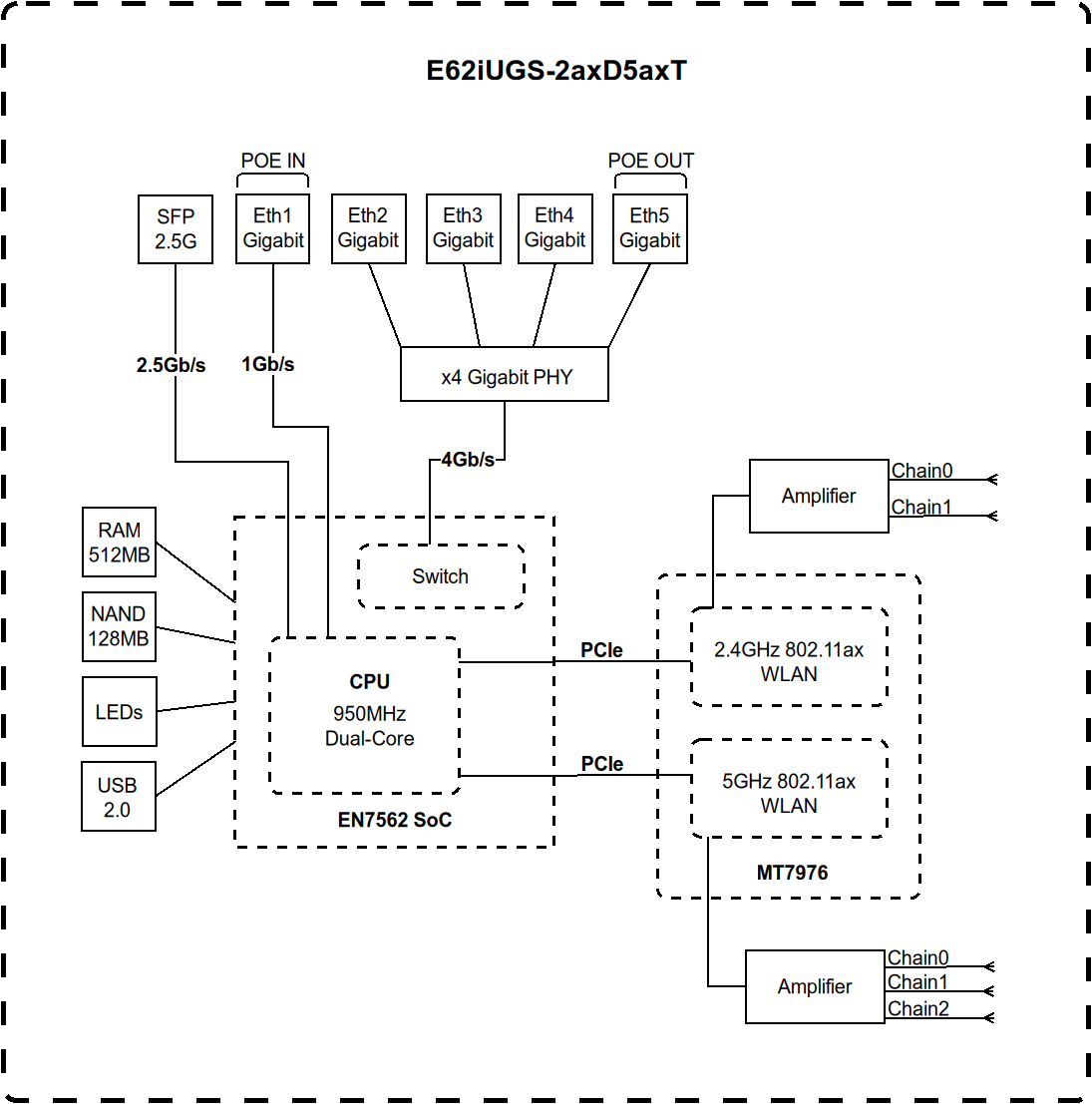
Is your uplink on AX S ether1 as WAN ?
Can you move WAN port to another port, ether2-ether5 ?

There is something different with ether1 on AX S since it has a direct link to CPU, not using switch chip.
Some discussions are ongoing here which might indicate quite a lot of upload issues for AX S have something to do with flow control for that ether1 port.
If you move your WAN port from ether1 to another port, this might confirm or rule out that theory.

Thanks for your reply. Nope I am using the SFP Port with an https://mikrotik.com/product/S-RJ01 adapter to copper. Did not experience any Upload-Issues until now.

SFP or ether1 are in the same boat on hAP AX S. Direct connection to CPU.

But why would you use S-RJ01 as SFP instead of ether1 ? No added benefit (except from gaining an extra ether port).

I had the S-RJ01 laying around and thought to myself, cool one more port available and I mean for me it feels like the obvious choice to use the SFP Port as Uplink. Sorry if I am wrong about it.

In the context of trying to circumvent your current problem, can you at least try to move WAN port to another port (ether2-ether5) ?

Yes I will try it later since I am busy at the moment but I will Update the thread for sure as soon as I get to it.