Ubuntu on local computer
Raspberry pi running Raspbian GNU/Linux 12 (bookworm) Architecture: arm
Mikrotik sxt assigned ip in 10.0.0.0 range by a community mesh network but local raspberry pihole assigned 192.168.60.xx range.
I can’t get them to work together.
The pihole runs dns querries for the local network in 192.168.60.xx range.
It was suggested to not change the internal local network to the 10.0.0.0 range because bad actors in the 10.0.0.0 range could potentialy gain access to internal network.
Suggestions on how to make them play nice together?
Duh!
Forgot to mention the most obvious and important piece of information: the mikrotik is not connected to the home network router - duh! and that’s why I’m in the beginner’s basic.
Clearly the mikrotik and pihole can’t play nice because they don’t know about each other. When I want to use the Mikrotik I hardwire the cable from the SXT on the roof to the computer - bypassing router. Whereas, the pihole is plugged into the router and the computer is plugged into the router when I do use the pihole succesfully.
Router: 192.168.20.1
Pihole: 192.168.20.2
When computer is plugged into roof cable:
10.101.24.142 netmask 255.255.255.192 broadcast 10.101.24.162
In Rouer:
I can Manually Assigned IP around the DHCP and manually assign dns servers.
I can manually enable NAT on/off
I can Enable DNSSEC support
I can forward local domain queries to upstream DNS
I can Enable DNS Rebind protection
I can enable on/off Validate unsigned DNSSEC replies
I can enable/disable DNS Privacy Protocol
I don’t think anyone can understand fully your current setup from your description of it.
If you could post a simple network diagram (even a picture of a hand drawn one would do) and a copy of your current configuration on the MIkrotik, someone may be able to help you.
To post the configuration follow this: http://forum.mikrotik.com/t/forum-rules/173010/1
Is the SXT the only Mikrotik device involved?
Is there a switch (managed or unmanaged) involved?
Which make/model is the device you call “router”?
Did I say I was not interested. I asked for more information to better understand what you attempted to describe.
Now that jaclaz is on the case, I am sure he will attempt to resolve your query. I tried, and was ignored.
Moving on to help others.
I think jaclaz is merely attempting to understand the problem and setup, from that to attempting to solve it there is a long way.
The risk of appearing ultracrepidarian[1] is not to be underestimated.
[1] You know, I’ve always liked that word… ‘ultracrepidarian’… so rarely have an opportunity to use it in a sentence.
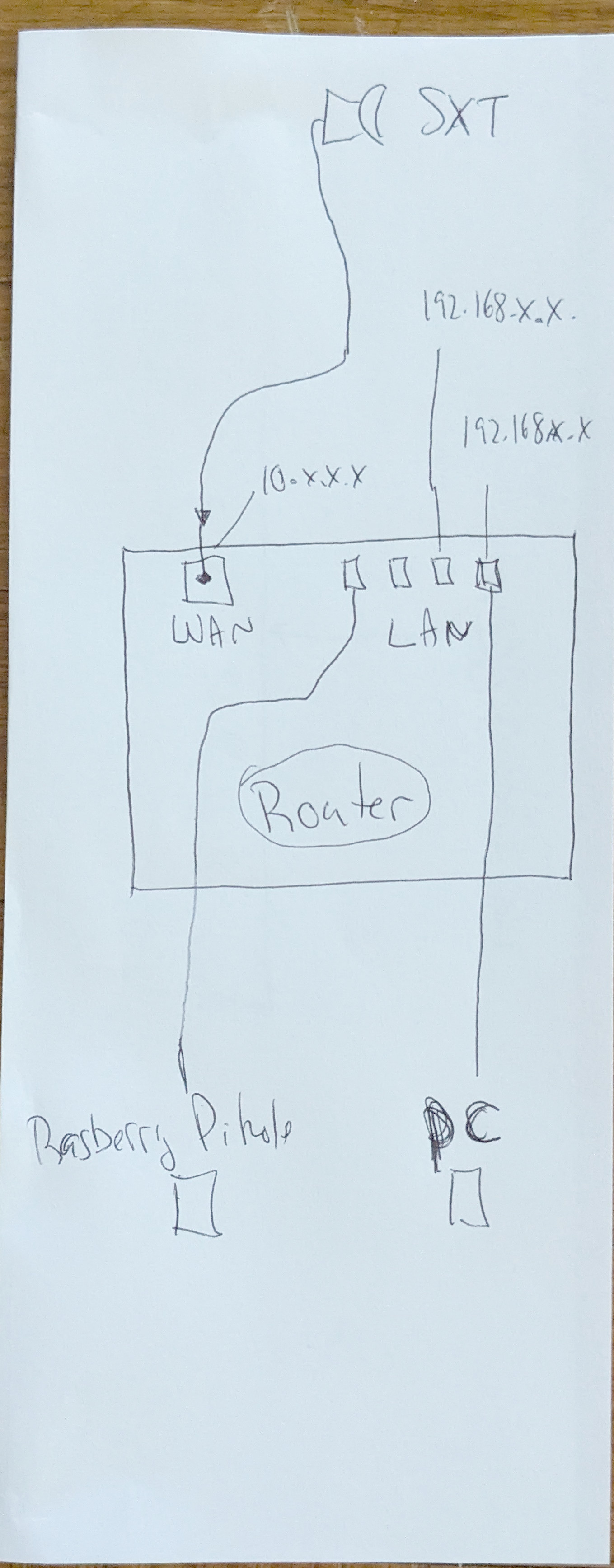
See attached image. The 10.x.x.x mikrotik range cannot be changed and I prefer not to change the router ip assignet as I use it to go back and forth between two sources of internet connectivity.
Good, now your setup is more clear.
The Sxt is basically setup as a switch/bridge, right?
The device “router” is where the “magic” should happen if you cannot or don’t want to change configuration on the Sxt.
So, which make/model is the “router”?
Which device is running the DHCP server on the LAN (192.168.x.x) and which DNS address is provided?
Maybe the problem lies with this PC network manager, then?
Or the pihole getting its address from the Asus DHCP server?
AFAIK normally the running DHCP server on the LAN would provide the pihole address as DNS and the pihole would have a static IP configured.
If the router was a Mikrotik there could be more options, see: http://forum.mikrotik.com/t/how-to-configure-mikrotik-for-pi-hole-with-automatic-failover/175498/1
But I think you have only option 1 available in your setup with the Asus.
From what I understand, in a situation like yours it would be possible (if we are freed of the limitation/costraints) and simpler to use the Sxt as a router and the Asus as a switch (or replace it with a switch) still it should work also “as is” with an appropriate configuration of the Asus and of the pihole.
wouldn’t the problem be that you have two different networks using one router.
I haven’t yet tried to see if pluging the 192.x.x.x. network (which has the pihole) into the router TOGETHER WITH the 10.x.x.x sxt plugged into the router simultaneously knowing that they are seperate asisgnments/IPs ranges. . . and therefore will not communicate - isn’t that so?
Re: current pihole settings - I have to input into the network manager that my dns is the pihole device otherwise it won’t ad block. And if I do, then revert the network manager back to say 1.1.1.1 I still get working connections just with the advertisments. So network manager seems to be doing it’s job.
Then I am completely missing what the problem is.
You have a 10.x.x.x network which is WAN and a 192.168.x.x which is LAN connected to a router, which should allow LAN to access WAN and internet (i.e. route between the two) It seems normal to me.
Good.
It would be interesting to know how it was solved, but the main thing is that it works now.
As a side and more generic note , for anyone coming here in search of a solution for similar problems, sometimes even the mere acts of downloading (and checking) the configuration, drawing a network schematics and describing the setup, explaining and discussing it, are enough to understand where an issue might be.