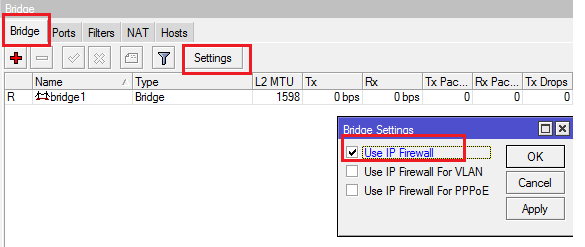
Hi, I have a RB2011L level 4. Mikrotik adventure of just getting started. I want to configure it in the following way:
Port 1, 2 - WAN (bridge_WAN, NAT, DHCP client) - works
Port 3, 4, 5, 6, 7, 8 - LAN (bridge_LAN, dhcp server) - works
Port 9, 10 - LAN GUEST (bridge_GUEST, dhcp server) works
Lock connections between LAN and LAN GUEST - does not work, please help in setting up.
I tried in this way:
/ip firewall filter
add chain=forward in-interface=bridge_GUEST out-interface=bridge_LAN action=drop
/ip firewall filter
add chain=forward in-interface=bridge_LAN out-interface=bridge_GUEST action=drop
and
/ip firewall address-list
add list=LAN address=192.168.66.0/24
add list=GUEST address=192.168.77.0/24
/ip firewall filter
add chain=forward src-address-list=LAN dst-address-list=GUEST action=drop
add chain=forward src-address-list=GUEST dst-address-list=LAN action=drop
My Settings
[admin@MikroTik] > interface print detail
Flags: D - dynamic, X - disabled, R - running, S - slave
 0  R  name="ether1_WAN" type="ether" mtu=1500 l2mtu=1598 max-l2mtu=4074

 1     name="ether2_WAN2" type="ether" mtu=1500 l2mtu=1598 max-l2mtu=4074

 2     name="ether3" type="ether" mtu=1500 l2mtu=1598 max-l2mtu=4074

 3     name="ether4" type="ether" mtu=1500 l2mtu=1598 max-l2mtu=4074

 4     name="ether5" type="ether" mtu=1500 l2mtu=1598 max-l2mtu=4074

 5     name="ether6" type="ether" mtu=1500 l2mtu=1598 max-l2mtu=2028

 6     name="ether7" type="ether" mtu=1500 l2mtu=1598 max-l2mtu=2028

 7     name="ether8" type="ether" mtu=1500 l2mtu=1598 max-l2mtu=2028

 8     name="ether9_GUEST" type="ether" mtu=1500 l2mtu=1598 max-l2mtu=2028

 9  R  name="ether10_GUEST" type="ether" mtu=1500 l2mtu=1598 max-l2mtu=2028

10  R  name="bridge_LAN" type="bridge" mtu=1500 l2mtu=65535

[admin@MikroTik] > ip address print detail
Flags: X - disabled, I - invalid, D - dynamic
 0   address=192.168.66.1/24 network=192.168.66.0 interface=bridge_LAN actual-interface=bridge_LAN

 1   address=192.168.77.1/24 network=192.168.77.0 interface=bridge_GUEST actual-interface=bridge_GUEST

 2 D address=192.168.10.200/24 network=192.168.10.0 interface=bridge_WAN actual-interface=bridge_WAN

[admin@MikroTik] > ip route print detail
Flags: X - disabled, A - active, D - dynamic, C - connect, S - static, r - rip, b - bgp, o - ospf, m - mme,
B - blackhole, U - unreachable, P - prohibit
 0 ADS  dst-address=0.0.0.0/0 gateway=192.168.10.1 gateway-status=192.168.10.1 reachable via  bridge_WAN
        distance=1 scope=30 target-scope=10 vrf-interface=bridge_WAN

 1 ADC  dst-address=192.168.10.0/24 pref-src=192.168.10.200 gateway=bridge_WAN
        gateway-status=bridge_WAN reachable distance=0 scope=10

 2 ADC  dst-address=192.168.66.0/24 pref-src=192.168.66.1 gateway=bridge_LAN
        gateway-status=bridge_LAN reachable distance=0 scope=10

 3 ADC  dst-address=192.168.77.0/24 pref-src=192.168.77.1 gateway=bridge_GUEST
        gateway-status=bridge_GUEST reachable distance=0 scope=10

[admin@MikroTik] > ip firewall export
# jan/02/1970 01:14:41 by RouterOS 5.22
# software id = EPFB-FE90
#
/ip firewall address-list
add address=192.168.77.0/24 disabled=no list=LAN
add address=192.168.66.0/24 disabled=no list=LAN
/ip firewall connection tracking
set enabled=yes generic-timeout=10m icmp-timeout=10s tcp-close-timeout=10s tcp-close-wait-timeout=10s \
    tcp-established-timeout=1d tcp-fin-wait-timeout=10s tcp-last-ack-timeout=10s tcp-syn-received-timeout=\
    5s tcp-syn-sent-timeout=5s tcp-syncookie=no tcp-time-wait-timeout=10s udp-stream-timeout=3m \
    udp-timeout=10s
/ip firewall nat
add action=masquerade chain=srcnat disabled=no out-interface=bridge_WAN
/ip firewall service-port
set ftp disabled=no ports=21
set tftp disabled=no ports=69
set irc disabled=no ports=6667
set h323 disabled=no
set sip disabled=no ports=5060,5061 sip-direct-media=yes
set pptp disabled=no
Thank you for your help.