Does the RB3011 have hardware encryption ability and is it enabled?
Thanks,
-tp
Does the RB3011 have hardware encryption ability and is it enabled?
Thanks,
-tp
It has this in CPU but it’s not enabled AFAIK - http://wiki.mikrotik.com/wiki/Manual:IP/IPsec#Hardware_encryption
Is there any plan to implement it?
It will great to have it in the next release.
Regards.
As it was mentioned in other topics, there will be no HW acceleration in ROS v6.
How much IPSEC throughput can it do currently (software only)?
Curious myself…
bugger all.
I’m seeing about 16Mb over the internet at about 7 or 8% cpu over all. The internet the other end is limited at 20Mb upload so I cannot physically receive any faster anyway.
What’s new in 6.43.1 (2018-Sep-17 06:53):
Changes in this release:
*) rb3011 - added IPsec hardware acceleration support;
Great!
Is there any example about how to configure a IPSec tunnel between 2 RB3011 devices?
Kind regards.
Really? 
There is nothing specific for the case of two RB3011, simply use the setup for any two Mikrotik devices mentioned in the manual. If hardware support for the authentication and encryption algorithms chosen is available on the device, it is activated automatically - it does not need to be switched on, and it cannot be switched off. Which algorithms enjoy hardware support can be found in this table in the same manual.
I’ve install 6.43.1 on a 3011 but the IPSEC HW accelartion does not seem to work, it works fine on 750r3 an 1100ahx2.
Installed SAs of the 3011

Installed SAs of the 1100
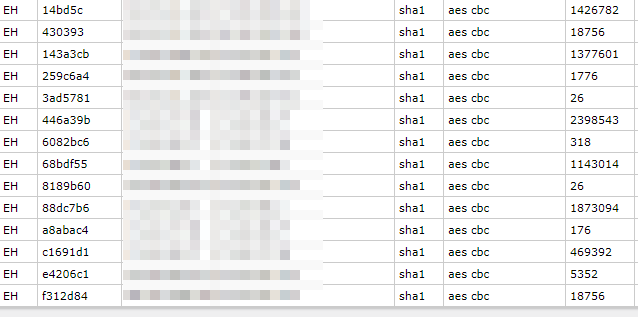
One of the conexion is between the 1100 and 3100. On the 1100 side has EH, but on the 3011 has only E.
Any ideas?
Thanks
For first sight might the problem is:
On your captured picture is see 192 bit size encription keys.
In the table in the manual, there is a * reference in the row for RB3011, which says
In your installed-sa list, I can see “192” in “Encryption Key Size” column. So change the aes key size to either 128 or 256 bits and try again.
Thanks!! Setting the default ipsec proposal only to allow 128 or 256 worked.
What’s new in 6.44beta14 (2018-Oct-01 12:01):
*) rb3011 - implemented multiple engine IPsec hardware acceleration support;
IPsec throughput table for RB3011UiAS-RM on our products page is updated too.
https://mikrotik.com/product/RB3011UiAS-RM#fndtn-testresults
If you experience any stability related issues when running hardware offloaded IPsec on RB3011UiAS-RM, please let us know at support@mikrotik.com