Not fixed in v7.5
[admin@RB3011] > system resource cpu print
Columns: CPU, LOAD, IRQ, DISK
#  CPU   LOAD  IRQ  DISK
0  cpu0  99%   97%  0%
1  cpu1  0%    0%   0%
This is a measly 100 Mbit/s internet connection with Codel.
Not fixed in v7.5
[admin@RB3011] > system resource cpu print
Columns: CPU, LOAD, IRQ, DISK
# CPU LOAD IRQ DISK
0 cpu0 99% 97% 0%
1 cpu1 0% 0% 0%
This is a measly 100 Mbit/s internet connection with Codel.
Read reply #3. v7 will always be slower, especially when you test with a single connection rather than a spread workload of different addresses, that will not be “fixed”.
Yes everyone knows there is a small performance hit for all devices when upgrading to v7.
However there is a massive performance hit when upgrading the RB3011 to v7.
Read the rest of the thread, you picked the one non-relevant answer.
When you have significantly lower performance with a bridge, I would recommend to make a bridge with only switchports from a single switch chip.
E.g. use port 1 for your internet, ports 6-10 for your LAN. Put those in the bridge. Disable ports 2-5 or use them for other purposes like a second internet.
I put ports 6-10 in the bridge and deleted the rest.
Unfortunately the degraded performance persists.
If you need v7 features the RB3011 is just a mess atm.
I wish there was a statement from Mikrotik if they even recognize the problem.
Will it get fixed? If it will not get fixed why is the unit still sold?
@normis hello?
Maybe it is best to remain on v6 for the RB3011. It was designed for and delivered with v6. However, the website entry currently points to RouterOS v7.
Most router manufacturers do not even support upgrading of the OS to another major revision… it is a bit like installing a new Windows version on your PC. It may work, but it is often discouraged.
At least it would be fair to add performance data for v7 to all specification sheets previously released for products with v6, so users can see and review the numbers before they decide to upgrade.
This doesnt sound good… but for the guy who said cant use fasttrack, what is forcing you to mangle??
RB3011 is a unique device, no other Router-board uses the same SOC (system on chip) because of that is very possible to have a problem exclusive for this platform
i hope the problem will be fixed soon
Moderator note: do not quote preceding posts. Use “Post reply”
Yes you are right. Looks like Ros7 has a problem with low-level MAC driver. But Mikrotik hasn’t done anything for over a year.
I don’t see fixes in the patch list. Does anyone know if there is any hope of seeing a fix for 3011 in a long term release of ROS7?
+1 same here
replaced 12 ipsec site-to-site connections with wireguard today due to the performance decrease after upgrading to ros7. unfortunately it’s hardly better with the current setup 
Same problem here when upgrading from 6.48.6 to 7.8 on my RB3011UiAS. Massive performance drop when routing from a vlan to another vlan. I’ve seen that with a proxmox vm backup to a SMB server located on another vlan.
The connection speed was not stable, i got around 950 mbps before upgrade, and around 100 Mbps after upgrade, with some rare rises to 500 mbps.
Seems like there is a problem with the RB3011. CPU 1 rise to 100% load and 100% IRQ during those backups.
This does not seem related to the routing engine, because a simple UDP Btest from the router to a PC on the same vlan / subnetwork show a maximum bandwith of 170 Mbps with 90 % CPU load on 1 CPU. Where it should be around 950 Mbps.
Perhaps it is a Bridge problem, or simply a firmware or hardware compatibility problem with the new kernel.
Hopefully this will be corrected soon. I wanted to use Ros 7 for Wireguard and the new DHCP matcher that gives iPXE compatibilty with older PXE Bios thanks to the possibility to match according to infrastructure class and user class (options 77 and 93). Using Ros 7 would avoid another linux machine running a ProxyDHCP for iPXE booting.
.
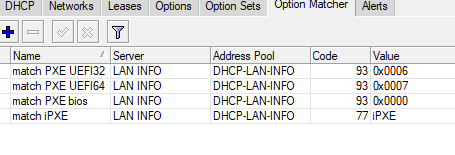
Just wondering, has anyone seen any response from MikroTik about this at all? I mean, on support case, here on forum, anywhere, since problem exists and is reported for well over year, and nothing?
Would be nice to know if they at least acknowledge blatant obvious problem that so many people report. Or maybe they just put head in sand and hope problem “goes away”? Or don’t want to tell customer “sorry, this is horribly bad and we obviously don’t care”?
I could understand losing some throughput due to newer, more complicated software version… but from 1Gbps/900 Mbps down to 100 Mbps?? That is ridiculous.
If anyone from MikroTik support sees this can you please just give us some kind of update? “Yes we are aware”, “yes we will fix it”, “no we will not fix it and don’t care anymore about still sold RB3011”, or something?
Maybe also at least update here with actual performance values for v7?
https://mikrotik.com/product/RB3011UiAS-RM#fndtn-testresults
And if you can’t do that, perhaps update test results to reflect that performance is only obtainable under v6, so that people do not buy expecting 10x performance but only end up with 1x on ROSv7?
Thank you in advance.
@MikroTik: Is there any update / fix upcoming? I’m planning to buy a RB3011 due to the LCD-screen and this would be a real showstopper especially when the device is not EOL / discontinued.
If you are buying a router and do not get the RB5009 and instead get a 2015 router, the RB3011 because of an LCD screen… would be the definition of insanity.
Thank you for your opinion. But the topic is not about buying a router, but about a specific problem.
Well, you are saying “I’m planning to buy a RB3011” and that is just a bad idea in general, independently from this or another problem.
Why reply to a post after almost 3 months and claim that it is off-topic when you can’t be bothered to read the question preceding said post ?
Does anyone have any updates yet regarding this? SUP-80186? Has anyone heard from MikroTik?
Original post now almost two years old. Is RB3011 just permanently hobbled when running v7?
Would be nice to know if fix is ever forthcoming or if I should spend capital to remove and replace existing RB3011, and advise all customers to do same and not purchase any more of these lemons.
There is no fix and there won’t be. Routers, like any other embedded device, have a limited lifespan. They worked as described in 2015 and weren’t lemons under v6. Why anyone would buy this model new at the end of 2023 is beyond reason. If these units are “hobbled” for your use case, then upgrades or staying on v6 are the only solutions. The RB5009 is a very reasonably priced replacement, but since it was released a few years ago, it might not last another decade either.
If you check all the numerous performance issues reported after ROS 7 was released (here and on Reddit), you will see that the main performance loss is tied to the updated Linux kernel. The route cache was removed more than a decade ago for security reasons, and it can’t be reimplemented by anyone without bypassing it (think closed-sourced solutions not available on MT). It isn’t a MikroTik issue. Most router manufacturers use the kernel provided with the SDK for the SoC used (never updated) and the products become EOL when updates can no longer be back ported. You may be disappointed, but 8 years is a very good run for a router.
https://docs.kernel.org/networking/ip-sysctl.html
https://en.wikipedia.org/wiki/Linux_kernel_version_history
https://community.fortinet.com/t5/FortiGate/Troubleshooting-Tip-Route-cache-is-removed-from-FortiGates/ta-p/265370
https://unix.stackexchange.com/questions/207535/routing-cache-in-latest-linux-kernels