Hello!
I have an RB4011 (ARM Cortex-A15). The device won't boot, and I want to update RouterBOOT via XMODEM.
I only see RouterOS .npk packages on the website.
Could you tell me where I can get the routerboot-arm-<version>.fwf file for the RB4011, or how to properly restore the bootloader?
The .fwf file can be found inside the main .npk package. You can download the current 7.22.1 arm package from:
https://download.mikrotik.com/routeros/7.22.1/routeros-7.22.1-arm.npk
And use a tool like 7-zip to open it as archive. Navigate to the /etc folder, and the corresponding .fwf file for the RB4011 should be the one named al2-7.22.1.fwf:
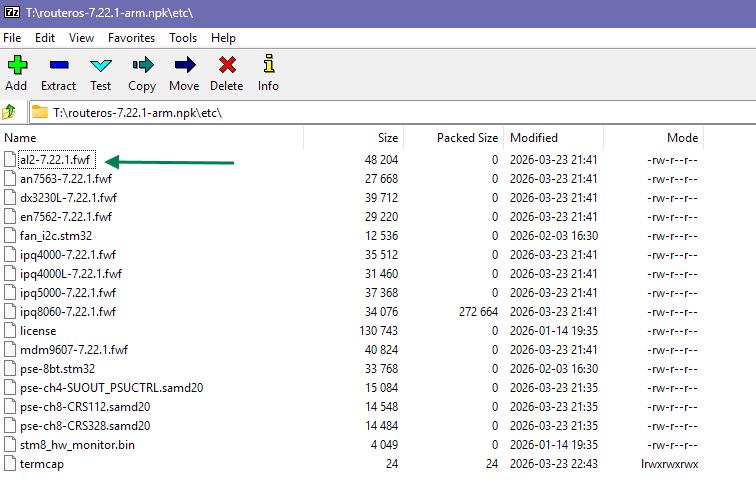
You can use 7-zip to extract it. But I don't know whether the file will be usable for your purpose.
Thanks again, it really helped.
The goal was to flash a Mikrotik with a broken firmware on board.
Each MT device has two routerboots, one "main" which gets regularly upgraded from within ROS (admin action required though). The other one is "backup routerboot" and normally doesn't get upgraded at all and hence chances of breaking it are tiny.
When powering device on, there's a procedure to select which routerboot is loaded ...
From ROS manual:
Yes, I had a problem with a Mikrotik device. When I turned it on, it wouldn't boot at all. Port 1, the SFP, and the power light were all on. After a while, it would go into a reboot loop, and I spent several days trying to get it back up and running.
With the help of some forum members, I managed to fix it. It's now working fine after a firmware update. I had no idea about the backup copy at all.