All very doable, the hex connects to the RB4011 as a wireguard client and that tunnel then allows local users at the RB to reach the HEX as well as any users reaching the RB via wireguard.
Hi Mesquite,
existing IPSEC connections, both users can connect with each other without problem. And hEX users has RB4011 internet browsing.
Can you please explain how to do this? RB4011 as WG server + hEX as WG client - now how to get internet browsing from users on RB4011 pass through hEX?
I feel like I’m taking crazy pills. Anav I don’t understand why you’re being difficult. The OP has said repeatedly he wants to stick with IPSEC if possible. What he wants is not possible via routed IPSEC. So no, it isn’t all very doable given the constraints the OP keeps setting. Discussion of Wireguard is fair but if outside the set-up the OP has repeatedly said he wants. I’ve recommended Wireguard myself multiple times.
OP - if you are flexible ( and you really should be as wireguard is much better for your use case and easier to configure) then Mesquite/Anav is your man. He’ll get you set up. You need to decide what you want to do.
The OP could setup IPsec road warriors on the RB and use a similar configuration to the one that is described in the following topic I attached to reroute their traffic through the IPsec tunnel:
http://forum.mikrotik.com/t/route-all-traffic-for-a-specific-ip-via-nordvpn-ikev2/160587/1
I’m not going to intervene in the rest of the discussion but …
Why not ?
You only need ONE public IP (doesn’t even have to be static, dynamic is also possible using small script to catch changes) with capable router which you can use as pivot point (Hex going out, building up the tunnel) and then you come back in via that same tunnel.
I’ve done it for years with SXT LTE this way.
@holvoetn is correct. Whatever configuration they choose, it would be possible because there is atleast one public IP that is de facto static and could be used for whatever VPN they want
You are LOL.
The OP stated early on… Quote:"I want to take advantage of wireguard VPN.. " unquote.
Then cat interjected incorrectly stating the OP had to use BTH and nevermind normal wireguard VPN, further the hex cannot do BTH not being arm/arm64 etc..
Then you stated incorrectly, that the HEX would not work with a standard setup due to cgnat, missing completely the hex was to be solely a client.
Thus a comedy of errors from well intentioned people. 
@Quantam Alfa, its time you did some work here… I provided very clear instructions on what needed to be setup on both routers. I also provided links to good videos.
Take the configs you have now, pulled from both routers, and work on them in notepadd++ and then present here for review. I understand you cant start changing them willy nillly due to distance etc. but you can work on the configs on paper, so to speak, so that when you apply them for real, you will have a solid experience.
Mesquite,
As suggested, I’m going to work on WG set-up. It’s steep learning curve for me but with help of your and others posts/guidance, it’s doable.
Time difference between A & B is 10.50 hrs. & I don’t want do changes without someone presence at B. At least, I will setup road-worrier set on RB today.
Thanks again everyone. I will keep posting progress.
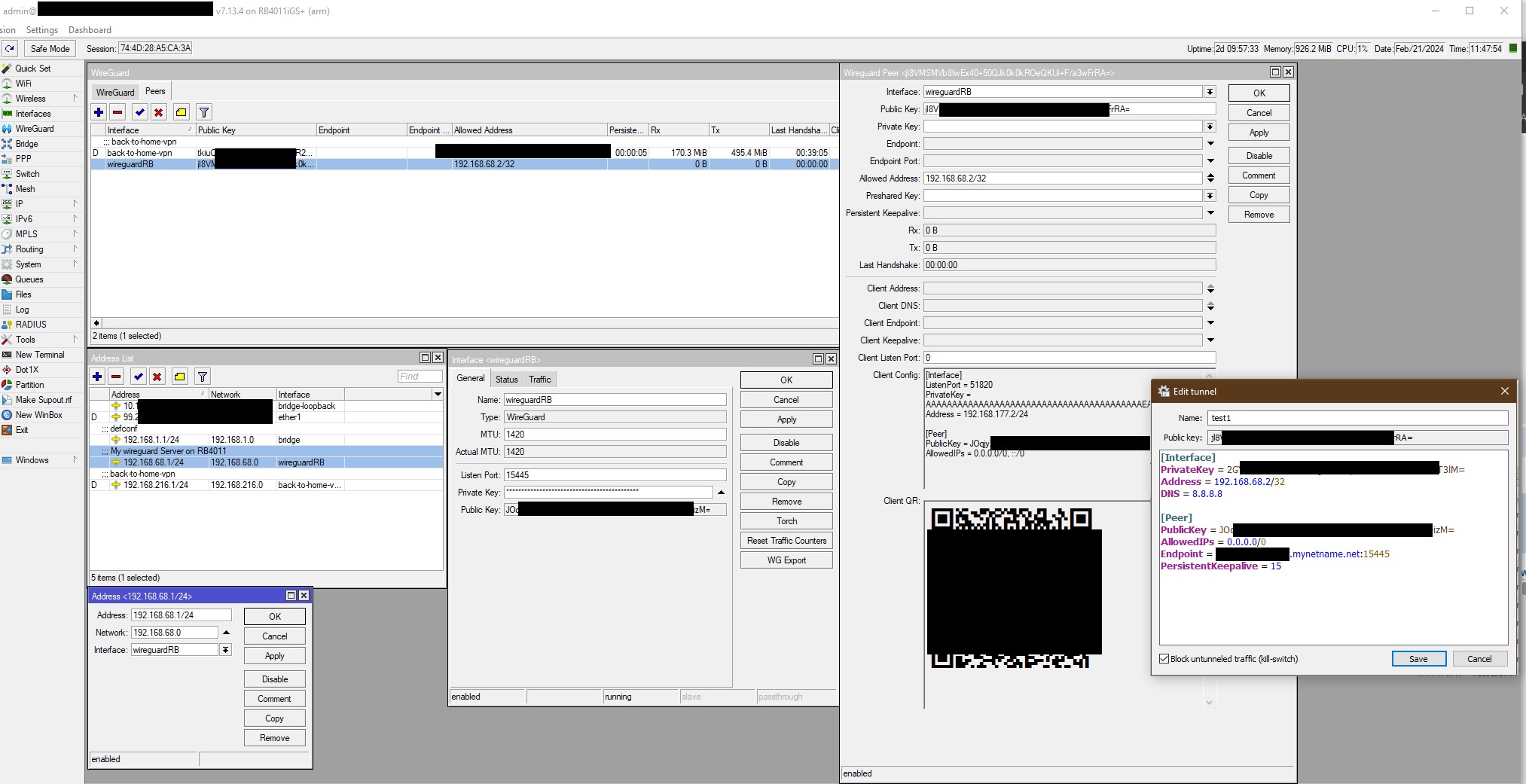
I followed your guide & youtube videos but WG server setup NOT successful on RB4011. Watched all videos - non required to make changes in firewall in RB4011 for Windows 10 laptop or cell phone. I tried again and again but no connection.
See attached screen shot:
Post the complete config ( less public WANIP info, router serial number, any KEYS ) to see what is going on.
Hi Mesquite,
I exported config file with command : /export file=config hide-sensitive
But has all sensitive info… too many to edit or I may miss it
Don’t use hide sensitive.
Default ROS7 is to hide most (not all) sensitive info.
Just use /export file=anynameyouwish
Edit that file. There shouldn’t be too much sensitive info in there.
Oh holy crap! I went back and read and wow. I’ve got no excuse other than I’m an idiot. Clearly my guidance would have been different, and in line with yours, had I had the literacy of a 2 yr old. I’ll administer a self beating that would make a Canadian like you proud Mesquite.
Concur, remove router seriaal number, any keys public private etc, any public WANIP info or WAN gateway IP info, long assed dhcp lease lists
My unofficial job is to keep you in line I get bonus pay for that!
Hi,
please find requested config file.
my config.rsc (15.4 KB)
Lets look at the facts.
-
Defining wg interface - great!
add comment=“My wireguard Server on RB4011” listen-port=15445 mtu=1420 name=
wireguardRB -
Defining peer client device - great!
( currently only one, could be phone, could be laptop, phone is easier to check with cellular connection as the external remote in path )
/interface wireguard peers
add allowed-address=192.168.68.2/32 interface=wireguardRB public-key=
“jl8XXXXXXXXXXXXXXXXXXXXXXXXXXXXXXXXxxrRA=” -
Define IP address - great!
add address=192.168.68.1/24 comment=“My wireguard Server on RB4011”
interface=wireguardRB network=192.168.68.0 -
( as an aside, your block DNS rules in input chain are half baked, you dont cover ISP2 - ether10 at all…
-
( as an aside, big no no in general to allow winbox access from external WAN…Most would NEVER do this..
add action=accept chain=input comment=“Accept Winbox From WAN” dst-port=XXXX
in-interface-list=WAN protocol=tcp -
( as an aside fw rules are horrible IMHO )
-
MISSING - input chain rule to allow wireguard handshake!!!
From:
add action=accept chain=input comment=“Allow IPSec Authentication ISKAMP”
dst-port=500 protocol=udp
add action=accept chain=input comment=“Allow IPSec Nat Traversal” dst-port=
4500 protocol=udp
TO:
add action=accept chain=input dst-port=15445 protocol=udp comment=“wireguard handshake”
add action=accept chain=input comment=“Allow IPSec Authentication ISKAMP”
dst-port=500 protocol=udp
add action=accept chain=input comment=“Allow IPSec Nat Traversal” dst-port=
4500 protocol=udp
- Whether or not the incoming user will be able to get to subnet devices, WAN, or config the router will be determined by the firewall rules and had no stomach to look through them.

Thanks for quick reply:
Item # 4 - ISP2 - ether10 - Not in use anymore. But planning get again. Pl help me to revise it.
Item # 5 - winbox excess from WAN - I disabled it now. like this:
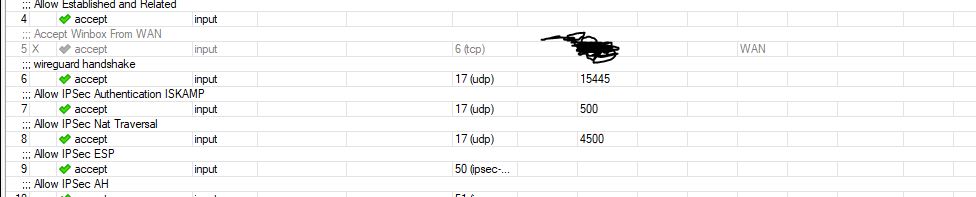
is that OK or I need to delete that line?
Item # 6 - ??
Item # 7 - added wireguard handshake - see abobe snap
Item # 8 - ??
update:
Greetings… WG connected & working on android ph
Accept winbox from the LAN only and if you know which IPs, use a source address list to narrow it down.
The LAN users still need access for DNS services by the way.
Also if you need remote access add the wireguard address to the allowed source address list noted above.