RB4011 / hEX routers upgrade & VPN connections

My first first post.. please be kind & help me:

Background:
I have two Mikrotik Routers and connected with IPsec VPN with IKEY2 certificate. Both are 12000 kms away.

Home A :
Router : RB4011iGS+
firmware : v6.49.10
Internet : Dynamic public IP - but stays same for months unless I turn off modem for 3 - 4 days
Act as IPSec VPN server
DHCP Server range : 192.168.1.1 to 192.168.1.100

Home B:
Router : hEX RB750Gr3
firmware : v6.49.10
Internet : CGNAT - public IP not available
DHCP Server range : 10.10.10.50 to 10.10.10.100
Act as IPSec VPN client. Only three computers 10.10.10.51, 52 & 53 - full tunnel go through VPN server - 100% of time - whenever they are on.

Everything works fine. No issue at all.

Now Questions:
Is it safe to keep ROS on v6.49.XX?
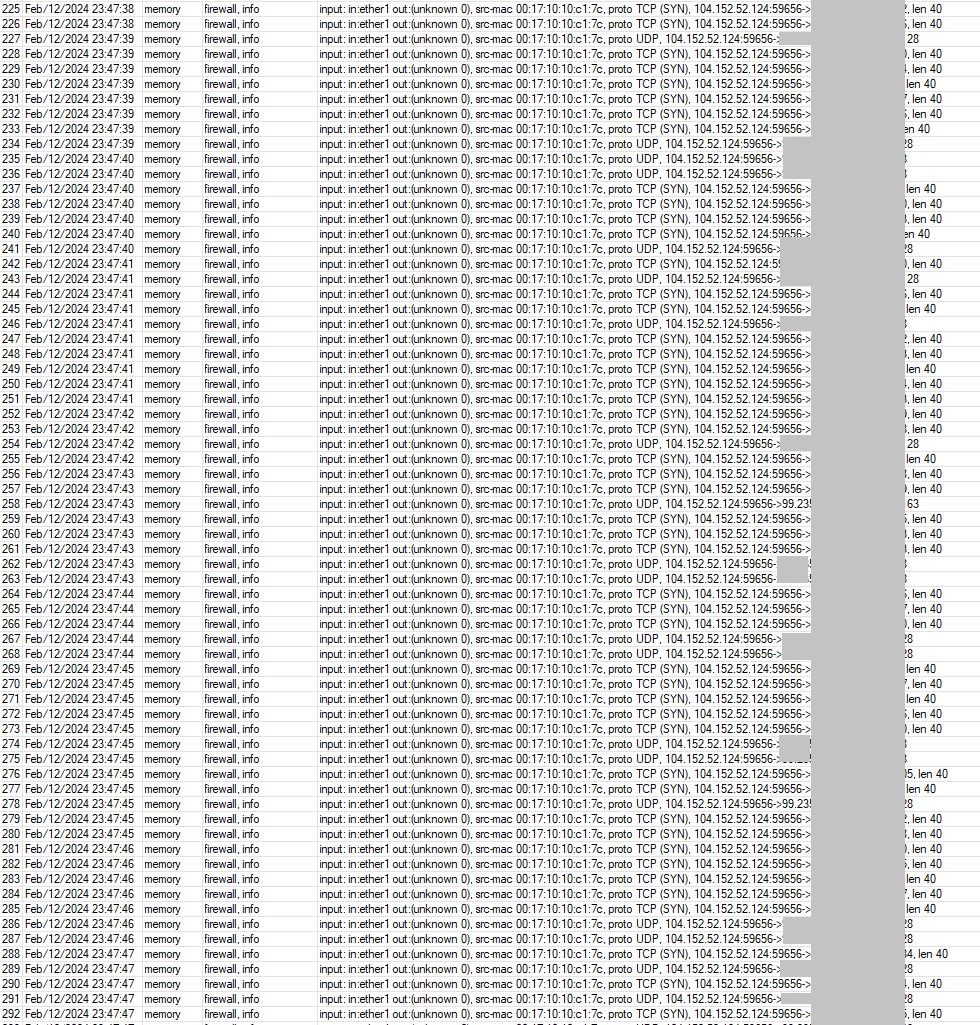
I’m getting this : input: in:ether1 out:(unknown 0), src-mac 00:17:10:10:c1:7c, proto TCP (SYN), 3.17.141.240:53606->XX.XXX.XX.XXX:3414, len 52 and I’m worried.
See snapshot
Capture 001.JPG
I want to take advantage of wireguard VPN & it’s possible in v7 only. Should I update both routers to ROS v7.XXX?
If I upgrade both to v7 - will my existing configuration including VPN will carry forward? Full tunnel VPN from B to A is my prime requirement.

Secondary questions after v7 upgrade:
At Home A (public IP available):
if I set-up wiregurad server OR back to home VPN, will it create full tunnel so that whenever family member travelling abroad can use WG vpn when less secure WIFI like motel, restaurant, etc?

At Home B (behind CGNAT - public IP NOT available): is wireguard server or back to home VPN possible? I really want my laptop to connect to home B and use home B internet access.

Thanks in advance.
Capture 002.JPG

The logs in question are due to turned on logging on some of the firewall rules, an input chain one. For the secondary questions, in theory there should be no disturbance of the IKEv2 connection and you could set Back to Home VPN server on the router with CGNAT and add your family members as clients + no need for Wireguard site-to-site because this VPN is so flexible that it could travel through the IPsec tunnel

Thanks @TheCat12 for the reply.

Who is 104.152.52.24 or 3.17.141.240? Why it generating traffic from in side to out?

I guess first I save my config on both routers & update to v7 and hope IPSEC will work as usual without hiccups. Is ir possible to reverse back yo V6 if any thing goes wrong?

for RB750Gr3 based on this http://forum.mikrotik.com/t/back-to-home-supported-router/171813/1 - BTH vpn not possible id behind CGNAT?

Given the distances you mentioned I would not try to upgrade remotely. If something fails, you’ll have no way to recover without making a trip in person.

Sorry, to answer your other questions, RoS 6 is only getting security updates at this time. Staying on the most current release should be safe. However, you won’t have features like Wireguard and I think it’s safe to assume that Mikrotik will stop supporting RoS 6 sooner than later.

If you update to RoS 7, your configuration SHOULD carry over. I emphasize SHOULD because nothing is 100% guaranteed.

If you set up Wireguard at Site A then anyone you set a connection up for should be able to connect. As for Site B, due to CG NAT, a standard Wireguard set up will not work. You need to either request/pay for a static IP, or use something like zerotier.

As for the IPs you asked about, the IP beginning with 104 belongs to Rethem Hosting LLC ( might be a CDN for streaming services) and the other belongs to Amazon.

Again, given the distances you are dealing with, I would not upgrade the remote router unless you are physically there or if there is someone technically capable of recovering your router config should the upgrade go badly. I’d also consider replacing the Hex with another 4011 or a RB5009.

@QuantumAalfa You are correct about the hEX - unfortunately the architecture of the router doesn’t support BTH VPN. But you could set it up on Router A and in theory you should be able to access Router B through the IPsec tunnel based on personal experience. As for the previous posts about ROS 6 vs. 7, it is true that nothing is 100% guaranteed to work out as planned, so it’s up to you whether you want to upgrade one/both of the routers given the great distance between them. But it is possible to downgrade a router from ROS 7 to 6 because the factory software in your case is 6.x (lesser than 7). Lastly, the unknown IP addresses you are worrying about are from Amazon AWS and an open-source project whicj scans all servers on the internet

Thanks gabacho4 & TheCat12 for quick replies. It’s good that traffic from Amazon’s project & I don’t have to worry.

Thanks for caution for physical presence of someone to update hEX. I had my family member to help with remote desktop.

I finally pulled trigger and updated both routers to ROS7. Save config before upgrade. Both upgraded first to v7.12.1 & then 7.13.4. Upgraded smoothly - no hiccups. IPSEC works same as before. That’s very very good. I’m relieved.

For RB4011 - BTH VPN option available. On cell phone, in back to home android app, it can not connect router on same wifi network. I tried many times - BTH app comes with error : Could not connect to 192.X.X.X. However, I scanned QR code in BTH app, it imported but can not connect. But, when I scanned on wireguard app, imported and it’s working. I don’t know what’s wrong with BTH app. (Note: QR code on winbox, displays partial ONLY. Need to copy & paste to Notepad & scan QR code on adnroid app)

for hEX, - BTH VPN option is not available. :frowning: . What are my options or how to get VPN on this without buying new router?

One option would be to buy another router which supports BTH VPN (any router with arm, arm64, tile as architecture, for instance hAP ax lite), although as I said earlier you should be able to access the hEX via the WG which you have already configured on the RB4001. Try to ping it and see if it’s reachable (at least to the VPN network). Maybe from there on it’s possible to add firewall rules, etc. In my case I have added a firewall rule which allows administration of the router only through IPsec (ipsec-policy=in:ipsec) which would also explain why I can’t access the LAN network so easily

The RB has a public IP, there is no need for BTH. Or another router!
Am I missing something the OP said??

Quote:" Home A :
Router : RB4011iGS+
firmware : v6.49.10
Internet : Dynamic public IP - but stays same for months unless I turn off modem for 3 - 4 days.
“unquote”


Setup the RB as a proper server for handshake wireguard router Then any client device an connect to it be it:
a. iphone
b. windows pc
c. Hex router at another location.

RB setup
wireguard IP: add address=192.168.68.1/24 interface=wireguardRB network=192.168.68.0

listening port 15445
name=wireguardRB
private key=xxxx who cares.
public key= ( this is what you use on the peer settings on all clients, on their peer setting line for the RB (aka hex and remote devices) )

Peer Setup
allowed ips= 192.168.68.2/32 interface=wireguardRB public-key=(public key issued from remote device A)
allowed ips= 192.168.68.3/32 interface=wireguardRB public-key=(public key issued from remote device B)
allowed ips= 192.168.68.3/32,HexSubnet1,HexSubnet2 etc. interface=wireguardRB public-key=(public key issued from remote HEX)

Note where a router is a client, we should add the subnets from the hex if they are involved in any traffic
a. users/admin on RB need to reach hex subnets
OR
b. users/admin on HEX needs to reach RB subnets.

TO match the hex subnet traffic the RB needs routes if applicable, as the subnets are NOT local to the RB. This allow Hex subnet users return traffic back into the tunnel.
This allows local RB users, originating traffic, a path into the tunnel to reach Hex subnets.
This allows remote users coming into the RB and needing to reach the hex subnets.

/ip route
add dst-address=HEXsubnet1 gateway=wireguardRB routing-table=main
add dst-address=HEXsubnet2 gateway=wireguardRB routing-table=main
etc.

Firewall rules.
input chain
add chain=input action=accept dst-port=15445 protocol=udp comment=“wireguard handshake”
add chain=input action=accept in-interface=wireguardRB src-address-list=Authorized.
where Authorized is a list of a IPs that are allowed to access the RB for config purposes.

  • think admin on iphone, or PC while away (remote devices connected via wireguard)
  • think admin while at the hex router physically and using an admin local IP address ( statically set from dhcp leases ).

Forward chain
add chain=forward action=accept in-interface=wireguardRB ( place valid destinations and limitations here)

etc…
You might simply have out-interface-list=LAN and thus anyone coming in wireguard can access all RB subnets.
THen you have to consider allowing traffic into the tunnel for local users who may want to reach the HEX
add chain=forward action=accept (place valid local users here) out-interface=wireguardRB

Finally, here is the neat rule, the RELAY rule. so that any remote user (iphone, laptop etc… ) can access the hex through the RB
Remember WG is peer to peer, so any user connects to the RB, exits the tunnel and is sitting parallel to the LAN level.
That traffic then needs to reenter the tunnel heading towards the Hex…
add chain=forward action=accept in-interface=wireguardRB out-interface-wireguardRB

Interface list… Common is to add wireguard to interface-list=LAN.
This allows us to make use of existing rules, allow LAN to DNS services in input chain to resolve internet requests. (PLUS).
This allows us to make use of existing LAN to WAN firewall rules, permission to use local WAN…

++++++++++++++++++++++++++++++++++++++++++++++++++++++++++++++++++++++++++++

THe HEX>…
wireguard IP: add address=192.168.68**.3**/24 interface=wireguardHEX network=192.168.68.0

listening port 13231 (doesnt matter what this is default is fine )
name=wireguardRB
private key=xxxx who cares.
public key: (This is what you use on on the RB device, when configuring the peer line for the hex )

Peer Setup
_allowed ips= 192.168.68**.0/24**,RBsubnet1,RBsubnet2 interface=wireguardHex
endpoint-address=mynetnameIPcloud(RBRouter): endpointport:15445 public-key=(public key issued from RB)
persistent-keep-alive=35s

Note where a router is a client connecting to a router server for handshake, we should add the subnets from the RB if they are involved in any traffic
a. if any RB subnet users are coming to the HEX or
b. if any RB subnets need to reached by local Hex Users…

Note: Any remote devices, iphones, laptops etc, can reach the hex due:
a. the relay rule on the RB
b. the IP routes for the hex subnets
c. they have a WIREGUARD ADDRESS 192.168.68.X which if you look at the peer setup, are already included and thus filtered and accepted by the HEX.

As per the other router, need to establish IP routes for any subnets identified in allowed Ips.
Traffic coming from or Traffic headed to those subnets.
/ip route
add dst-address=RBsubnet1 gateway=wireguardHEX routing-table=main
add dst-address=RBsubnet2 gateway=wireguardHEXrouting-table=main
etc.

Firewall rules.
input chain
add chain=input action=accept in-interface=wireguardHEX src-address-list=Authorized.
where Authorized is a list of a IPs that are allowed to access the HEX for config purposes.

  • think admin on iphone, or PC while away (remote devices connected via wireguard)
  • think admin while at the RB router physically and using an admin local IP address ( statically set from dhcp leases ).

    Forward chain
    add chain=forward action=accept in-interface=wireguardHEX ( place valid destinations and limitations here)
    add chain=forward action=accept in-interface=wireguardHEX ( place valid destinations and limitations here)
    etc…
    You might simply have out-interface-list=LAN and thus anyone coming in wireguard can access all HEX subnets.

    Finally you have to consider allowing traffic into the tunnel for local users who may want to reach the RB
    add chain=forward action=accept (place valid local users here) out-interface=wireguardHEX_

https://help.mikrotik.com/docs/display/ROS/WireGuard

This covers the road warriors ( aka single devices well, windows, ubuntu.)
https://www.youtube.com/watch?v=CH10spRyGpU&t=80s

Road warrior google play store:
https://www.youtube.com/watch?v=jcNkytR_G4g&pp=ygUZd2lyZWd1YXJkIG1pa3JvdGlrIGlwaG9uZQ%3D%3D

Road warrior smartphone
https://www.youtube.com/watch?v=vn9ky7p5ESM&t=8s

When he has already setup BTH and has an active IPsec tunnel, why bother creating a new wireguard site-to-site connection? This thing is really flexible - I’ve got a real-life situation where I have setup a cAP ax as a BTH server and that was enough to have access to:

a. the cAP ax itself
b. A RB3011, to which the AP is connected and acts as an IKEv2/IPsec client
c. Another RB3011 that is the IKEv2 server

Note: The IKEv2 client is behind CGNAT and has a dynamic IP but that doesn’t bother the BTH VPN because it can pass through it and uses relay servers. That’s what this new function of MikroTik is capable of. Also, I use it as a fallback solution in case of a crash of the IKEv2 connection so that I can still access the remote side

The hex doesnt have BTH nor needs BTH, it can connect to the RB just fine using standard wireguard setup.
Concur, great new functionalities have been added by MT to allow this punching through non-public IP addresses, when necessary.

Telling the OP they should spend money when there is a perfectly good solution is ridonkulous.

No one is saying that money should be spent - the BTH which they have already configured on the RB should be able to access the hEX without any further configuration/equipment. If that’s not the case, then @Mesquite’s configuration would be advisable. I was just giving an alternative if they really wanted a second BTH server but it’s unnecessary, I agree

Easiest (and only) solution would be to buy another router which supports BTH VPN
Complete Baloney Sandwich

Own it and move on, weaseling like a politician is unbecoming.

OK, OK, I didn’t mean to imply that this is the only and the greatest option, it was a misexpression from my side for which I sincerely apologize. I edited my comment accordingly so it doesn’t showcase the critisized option as the only one. @Mesquite is right, there is absolutely no need to buy anything

Hopefully the OP will respond soonest so the additional support can be provided. If I ever see a thread where BTH is the answer I know who to call, I am brain dead on that functionality.
What I find awkward is someone having to deal with weird BTH menus when trying to setup basic (normal) wireguard, and one has a parameter of client address in peer settings for example…

Thanks Mesquite and TheCat12 for your inputs.

I’m currently NOT planning to buy any new equipment as existing two routers were set-up by one freelancer Mikrotik certified person & now left mikrotik field and working for other company and not available for now. He did so nicely including failover, I never had any problem still today. But I’m by mine own now.

I know these routers basic networking but don’t have deep knowledge.

Mesquite, Thanks for posting light of direction. It’s too technical for me at this stage BUT I’m going to work on it. Let me first digest and understand.

I think, to setup WG server on RB4011 is not that complicated & I just watched one youtube video for that. With help of your above input and youtube video, I should be able to setup. Say, Part 1: RB4011 WG server - for road warriors (phone, laptop etc.) is solved.

Now, hEX to RB4011, already IPSEC vpn working fine & not touching that part. Ping from RB subnet user to hEX subnet user works. Also, share folder is accessible on both sides by both sides users.

So do we need to add hEX as WG client? if we add hEX as WG peer/client, WG act as another secondary tunnel if IPSEC fails?
Yes, hEX subnet 3 users only (10.10.10.51, 52 & 53) need to connect and access one RB subnet user (191.168.1.102). But no restriction from RB to hEX - ALL user on RB can access hEX.

I’m looking to add on-demand VPN full tunnel for couple of RB users to hEX internet. (simplified example netflix access of hEX country). I need access once a week only.

OP said he wanted devices to connect to a hex that is behind CGNAT for VPN purposes (i.e. Road warrior setup). There is no way to do that via a standard Wireguard config due to the CGNAT. Thus he needs a device capable or running zerotier or similar technology. At least that was one of the requirements that I understood from his initial and a subsequent posting. He wasn’t just looking to replace the IPSEC site to site. He wanted remote devices to be able to connect to site A and site B.

Thanks Gabacho1,

Home B (hEX) to Home A (RB4011) - 100% works - no issue including full tunnel by IPSEC and not planning to change unless required. As soon as hEX boots, it connects to RB4011 with IPSEC and 3 computer have access to computer and internet browsing on RB4011.

Now after ROS v7 upgrade, I want from Home A (only two users) need Home B internet browsing (on-demand - as and when required - not all the time) .

Ah ok. That’s much clearer now. I am not sure how you will do the “on demand” portion of that from A to B since B is the initiator in your setup. There’s no way for A to initiate the IPSEC connection should there be interesting traffic due to the CGNAT as site B. Furthermore I don’t think routed IPSEC supports what you are trying to do when access to the Internet is desired due to the way the routes work. You’d need VTI IPSEC (not supported in Mikrotik) or Wireguard or some other way to do policy based routing based in destination or source IP or list.