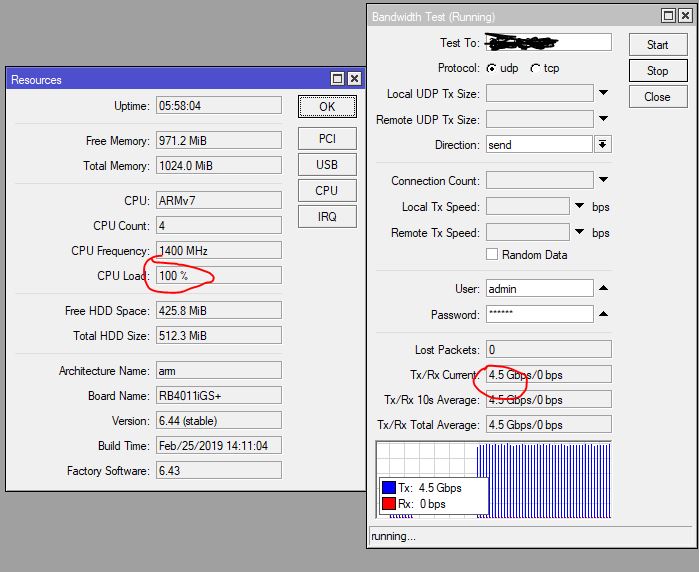
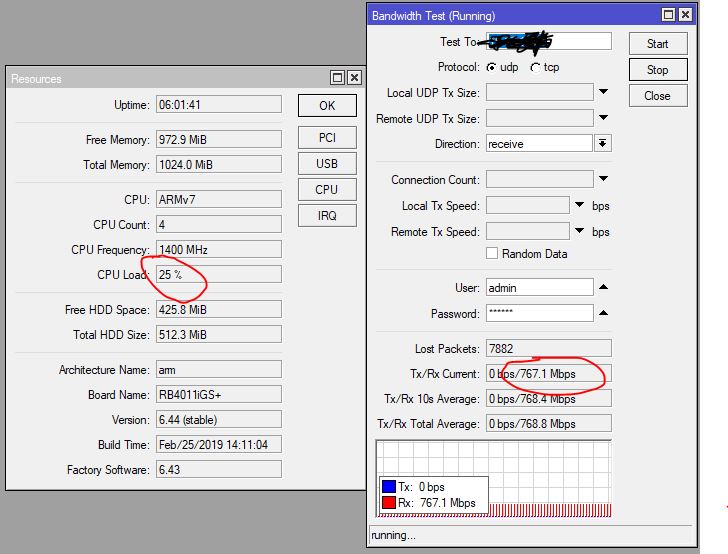
We just bought a RB4011 to be used adhoc at exhibitions as it offers many ethernet ports.
Now I am thinking of replacing my old SRX at home as well with this model.
What puzzles me is the fact that I don’t find any speed tests published from users, only those published in the Mikrotik website ( don’t even know how 9Gbps would be possible, maybe ether bonding? )
Also I see no figures about bandwith performance with mixed traffic. Juniper clearly publishes normal and mixed traffic.
Or maybe better to go for the RB1100 when > 500Mbps mixed internet traffic is needed?
Well, the processing power goes mostly by packets per second - mixing packet sizes is simply misleading towards a certain target PPS or countering a certain RAM bandwidth limit.
RB4011 has two 2.5gbps switches so you can expect 5gbps upper total, anyway, what you do with the router can reduce that by large amounts. You can expect at least 500mbps if you have a minimal optimization put into the features (like, select an tunnel encryption which can offload to hardware), but without any applied knowledge you cannot expect any bandwidth safe value.
Most bandwith is used with NNTP…used to have an APU quad core with pfsense before, but could not cope with it as BSD uses single core only for forwarding…that’s why I switched to SRX240B2 as CPU is used only for routing but not forwarding.
But my SRX shows now a degrade of the flash system and therefore causes dhcp and ipsec-key management daemons to stop
Haven’t tried ipfire yet on APU2…and there was no way to install RouterOS on APU2…
but I got convinced by the fact that the RB4011 could also connect to a IPsec server which is setup for mobile clients.
But I am still wondering where the near 10Gbps performance figure comes from as there is only one SFP+ port and you say that there are only two 2.5Gbps switch fabrics. So it is better to connect WAN on one block and LAN on the other block or both on the same?
Tell you, I have an old RB951G-2HnD MIPSBE which is not the top line of today’s MikroTik hardware.
Bridging between switches might turn into CPU bound, so it depends on how much bandwidth you need. I don’t know what exactly “HW accel” means in the router block diagram, so I can’t tell you if there is a direct link between the two switches and you have to test that in lab.
Being able to forward between all ports 10gbps is not true - the tests achieved 10gpbs SFP+ maybe by doing a packet mirror from the two switches to SFP+ (so listening to both switches while doing some packets on SFP+), meaning the SFP+ port is able to cope with its specifications without overheating.
From my own limited experience, the best real world scene, where many features are used (Queue Tree, Firewall Mangle, heavy new-connections Firewall Filter and all basic routing) is represented by (Routing 25 simple queues 64 byte) or for every 1mbps there is 10mHz of CPU usage (no VPN or IPsec, no Fasttrack), please consider that my router has the old MIPS CPU.
If you don’t use Mangle (Queues), you can expect very high bandwidth using Fasttrack, and wire-speed with switch hardware-offloading.
IPsec you might expect an real life scenario of (AES-256-CBC + SHA256) for high security, while the proportion of IPsec usage will change the packet forwarding capacity depending on how much you need processing in CPU.
Great figures…well most higher bandwidth will be used for around 10 - 20 NNTP sessions…my cable provider just sent me a letter that they will upgrade the speed a tiny little bit to 600mbps…
IPsec is no high bandwidth demand as the remote sites have lower downstream speed as I have upload speed ( <= 30mbps ;o)
Just tested quickly ipfire on my APU2D4 box…can go up/down up to wire speed (1gig)…but what I don’t like is that the system marks itself as unconnected when WAN side
is connected to a Cisco switch like WS-C3750E-24TD, where it takes a while until the switch sets the interface as up…by then ipfire has continued with 169.254/16, eventually gets a new WAN IP, but it marked the system as unconnected beforehand
Not that I will use the 3750E on the WAN side in the end, was just for testing…but shows a design flaw in the boot process of ipfire…
hope RouterOS hasn’t the same behavior during boot (o;
EoIP seems to be single-thread then, where the Kernel possibly mistakenly assimilated Btest and EoIP to the same thread - anyway, (4 - 1) threads which can go to any other feature.
He agrees. If you want to receive real values, then miktorik should not generate traffic in any way, it should pass it only through itself(himself). The CPU resources are spent for generation of traffic at what considerable.