It happened to me as well.
quitting about 160mhz; blocked 5ghz interface on a low channel, without regulatory domain and so.
i’ll return some time in the future, to find if 160mhz channel problem was solved [also, nuclear fusion and really useful electric car batteries]
Any news?
Yes, no what news. Three months have passed, and there is no solution and MT does not even think about solving this problem. Many people ask me whether to buy, I show them this problem. Draw your own conclusions.
now i’m thinking to upgrade to intel AX200NGW, but no soho ax-capable router [as of time of writing] have 10gbe; so RB4011 && CRS305-1G-4S+ && Qnap QNA-T310G1S (&& various DAC cables) solution stays…
The silence is quite ridiculous…
I have the same problem on RB4011iGS + 5HacQ2HnD-IN.
I bought it three weeks ago. I do not have so many devices with a wireless network at 5 GHz, so the problem was noticed after a week only.
Now I observe that at least once a week the 5GHz wireless card stops working. It helps me only to reboot the entire device.
The solution was found quite by accident.
thanks to the post WeWiNet - (http://forum.mikrotik.com/t/rb4011-5ghz-wifi-unstable/128255/1).
I generalise - you need to set the antenna-gain in accordance with the device specification in the description - (Antenna gain dBi for 5 GHz = 3) - https://mikrotik.com/product/rb4011igs_5hacq2hnd_in.
for capsman, it also works, in the settings interface you set antenna-gain and then add the interface to capsman. More interface does not fall.
Of course I want to get comments from experts MikroTik.
PS:
I did all the load and roaming tests on the iPhone XS, XS Max, iPad Pro 2018, Samsung S10, Windows 10 MSI Leopard, MacBook Pro, iMac - everything works stably without failures.
PS2:
iPad Pro 2018 - not for long wlan1 interface freezes when roaming iPad Pro 2018, but does not fall, ping becomes unstable - but everything is restored after a few seconds.
If it’s really the antenna gain setting, then manually lowering tx power would fix it as well. Antenna gain just limits maximum power to obey regulatory domain.
It’s not exactly the same thing. RB devices have a “Tx power backoff” kicking in at higher modulation modes (higher MCS). If you limit Tx power in a wrong way, then it will get lowered at higher MCS as well. If you set antenna gain, RB will linearize Tx power … so that there won’t be any Tx power backoff any more (if antenna gain is large enough).
So I have a customer router that’s a 4011 and I set the antenna gain to 3. One device has been connected pretty much all weekend and it’s between -70 to -83. The 5g sometimes gives a group key exchange timeout to all connected devices but other times (and here’s the interesting one) it’ll give the Mac address of the device and state XX:XX:XX:XX:XX:XX@WiFi_5g: disconnected, disabling. It then proceeds to do that on all connected wireless devices and at this point the actual interface has dropped and you can no longer see the SSID anymore.
Damn it! : D, As I have not found before? !!!
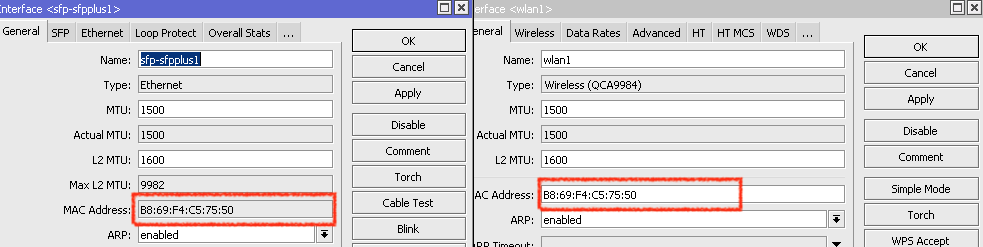
Colleagues, pay attention to the mac address sfp-sfplus1 and wlan1
they are the same! Change to sfp-sfpplus1 mac address.
It’s all about the same mac address with sfp and wlan1!
How could this happen to the manufacturer - Mikrotik?! is another question!
You are absolutely correct. I saw this even on our device. I however manually override this to what it should be on ours and the disabling is still happening. Another thing I find odd about the RB4011 is that wlan1 is 5.8 and wlan2 is 2.4 while on the hAP AC and cAP AC this is done in the reverse.
wlan1 is, probably, that one inside SOC, wlan2 being external, on pcie
No, they are both on the PCIe, saw the scheme?
https://i.mt.lv/cdn/rb_files/RB4011iGSplus5HacQ2HnD-IN-181003110132.png
I already wrote to the support that when registering with the controller RB4011 - it glows with auto-assigned mac addresses.
A mess in general.
And what the hell?! switch chip doesn’t work? is it the same as in AH1100, is there anything to hide?
What would we not see host table?
http://forum.mikrotik.com/t/rb4011-wlan1-disabling-itself/125605/1
This method does not work, today I have a 5gn interface crashed. - sadness.
$ 300 worth of device - which out of the box does not work.
I set the gain and fixed the duplicated MACs yesterday at 8pm. It’s 7:30 the day after and 5Ghz is crashed again…
I know its frustrating guys. I will say that the RB4011 router only model is very nice. The Wifi model, at the moment, is just not ready.

This should have been fixed long time ago. Bug like this just kills entire product.
Meanwhile MK is still selling RB4011 WIFI version that’s clearly flawed and part of it (5GHz WLAN) is completely unusable.
It’s easy to just say “if you don’t like it, just RMA it and you get your money back”… yeah… NO.
If you made a stupid mistake of giving RB4011 to your customers, you now have to spend your time to answer the support calls, to apologize on behalf of MK and to replace it with something else that works. This sucks and you just feel like an idiot for even buying this thing.
This entire issue is hurting MK far more then they think.
It’s impossible to even get any status update (is the fix likely? can we expect it in weeks? months? or even this year?) out of MK.
How many people are working on this issue? Probably not enough.
Usually silence means bad news and this is dragging for far too long.
Anyone buying RB4011 for SOHO use, where you want working 5GHz WIFI, abandon any hope…