Well, we now use this config for small outposts using hEXr3 or hAP AC. RB4011 is not really useful there anyway, we could use it as a replacement for our headoffice CCR1009 when that would fail, and 4G is not required there (it has 2 independent fiber connections). So my remark is more theoretical in case others face a similar situation.
Looks promising! I’d like to replace my ageing RB1100Hx2 and at the same time get sfp+ and ipsec hw acceleration. That’s what I’m looking for and right now the only MT replacement is CCR1009 which is a bit pricey for home usage. But what about the VLAN thing, will there be problems running a few VLANs via the sfp+ port and get full throughput?
It should not be a problem when routing, it only could be an issue when switching and expecting wirespeed performance without CPU loading.
The CPU in these routers is quite powerful (like the CCR) so it can do a LOT of CPU handling without overloading it.
Of course it still would not hurt to buy a separate switch when you have high requirements (probably not even a MikroTik).
That’s brave statement  Still CCR1009 has number of features that RB4011 doesn’t. It still has significantly higher routing performance, probably better cooling for continuos load, usb, screen, USR led, SD card slot, more ram and one more SFP cage. I think RB4011 will be great router for smaller companies which won’t need to support thousands of concurrent connections but with half of CCR1009 performance for 512b frames, worse IPSec performance and (probably) 2 Gbps aggregate gigabit ports bandwidth to CPU I don’t think it’s gonna completely replace CCR1009, even for half of price.
I think RB4011 is exactly what’s been missing here - CONSUMER-like 10G router. I feel like a lot of people (including me and my friend) bought CCR1009 as home router just because it was THE ONLY passively cooled 10G router out there. So if you wanted to have 10G router at home it was the only viable option. Now i think CCR1009 will go back to places for which it was designed for - core networks. For everyone who just needs bandwidth with some firewall and nothing else - RB4011 will be way to go.
Being a CCR1009 owner I can confirm - it is way overkill for home use. I ended with it only because I found one used for nearly the price of 3011.
Otherwise it makes no sense, especially now, when you can get 4011 + CRS326 for the price of 1009.
Though even home user can kill CCR1009 if you use too much stuff on it I still don’t see fasttrack as “normal” scenario. More like workaround to get more bandwidth from too weak hardware. CCR1009 can at least route full gigabit in full software with full firewall, QoS and all those features that don’t work with fasttrack enabled. I recently performed some benchmarking and came to disappointing conclusions: http://forum.mikrotik.com/t/ccr1009-low-single-tcp-tunnel-performance/122860/2 But as I stated I don’t find it misconfiguration. In this particular case I could use fasttrack but actually for all other networks I use bridging with ip-firewall enabled so in more cases than I can, I can’t use fasttrack.
Routing at >1Gbit?!
In home enviroment?!
Not just for testing but in real life?!
Seriously?
Ok. Then there is you, and there is the rest of the world for whom new 4011 will do just fine 
thats true ccr1009 passive cooled have succeed as the most powerful desktop router, its a very good device, but almost 500US at cost, far from many pockets
surely there are some scenarios where ccr1009 will show their supremacy, i like that device and their performance, ccr1009 put TILERA CPU at the reach of some scenarios where ccr1036 will be overkill
when i compare mikrotik routers for QoS implementation (firewall filter+mangle + queue-tree/simple-queue ) i have found the most real world representation of performance is the published test Routing 25 ip filter rules with 512 byte size packet i use that test as a guide line to compare devices
As a consultant I have almost none client using mikrotik as a “Pure” router without mangle an queues, because that i prefer to practically ignore the high numbers of other tests, i only keep it in mind to understand architectural limits of the router
look at this
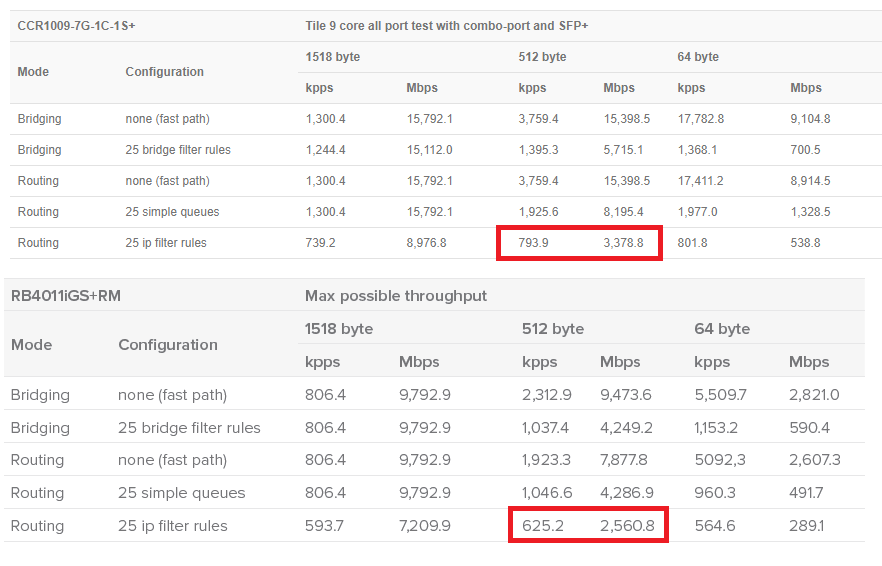
ccr1009 gives 25% more performance but cost more than double
ccr1009 gives 1600 pps x dolar (495us price tag)
rb4011RM gives 2718 pps x dolar (230us expected price tag)
RB4011 IS almost doubling the pps vs dolar ratio with less power consumption
in ipsec topic the situation goes in favor of ccr1009 between -21% and 50% of difference between rb4011 and ccr1009, rb4011 it comes out well specifically on single tunnel results in multiple tests ccr1009 shines
off course my point of view is very specific
now let’s take into account that rb4011 is only 4 core and is getting 80% the performance of 9 core ccr1009, this means that in proportion one single core of rb4011 double the performance of one single core of the tilera cpu with only 16% clock advantage
that single core performance advantage can have a very strong impact in some configurations where no matter you have 9 cores on a ccr1009 you hit a wall when some of the 9 cores reach 99% usage, regardless of whether the other 8 cores have low usage
i think tilera cpu have been a very good stage of mikrotik devices, but have been clear that the better way to scale performance is to get lest amount of more powerful cores than many more light cores (ccr1072 owners do not let me lie)
i think rb1100ahx4 and rb4011 go in that direction, less cores but more powerful cores
i think a CPU like Broadcom stingray (8 core arm cortex a 72 at 3.0ghz) can beat a a tilera 72 core CPU at 1.0 ghz (like ccr1072) because of the much better single core performance
The move toward ARM had really boosted up performance per $: hAP ac2, now RB4011.
The next logical move is to extend this further to CCR line: the new ones in 400-500$ range can turn out real beasts if this trend will persist 
That’s true for many use cases but please take into account that routers like those are in most cases used in backbone or core - they’re supposed to route thousands of connections or at least significantly more than 72 lol. In use cases for which routers like CCR1072 was made it seems to make a lot of sense. Look at AMD and Epyc CPUs - 64 cores per socket, 124 threads. So up to 256 cores, 512 threads for quad socket motherboard. For virtualization host it scales perfectly well. For playing games - not at all. But CCR1072 is not meant to interconnect 2 servers at 40 Gbps rate. It’s meant to interconnect 400 servers at 200mbps rate. I don’t think device like CCR1072 needs single core performance as much as device like RB4011 does. Like I said it’s distinction between small scale and big scale use cases. few strong cores make sense in small scale use cases. When someone looks for home router or smaller comapny with 5 servers he doesn’t want performance to connect 400 computers at 200mbps but to connect those 5 machines at 10G.
So I think that CCR1009 and RB4011 both have their place - big scale, scalable loads and small scale, less scalable loads.
Correction: 10 Gbps. Or more precisely: 12 Gbps because I use SFP+ link only for VMs networks on home hypervisor plus NAS. Other networks eg. for my laptop and phone go through dedicated LACP bonding 2G to CCR so I have total 12G pipe between CRS317+CRS326 and CCR1009. Also all other ports in CCR are occupied by some more demanding devices but they rarely saturate 1G as they don’t connect to NAS. Plus backup 3G usb dongle for zero downtime
Doesn’t look like a typical home setup
One question: why you need to push all that through the router?
Why not to switch the most part?
the comparison with server virtualization lacks of one fact: some tasks internally in the router are related between them
not like virtual machines wich run independently and can load inependently the platform
i have seen many routers reaching their limit because one only core reach 100% usage while the others are below 70 or 60%
looks like in routers having so many cores causes higher waste of resources
in this picture you can see a router very close to their performance limit, averaging at 50% cpu usage wile only 1 core are close to 100%
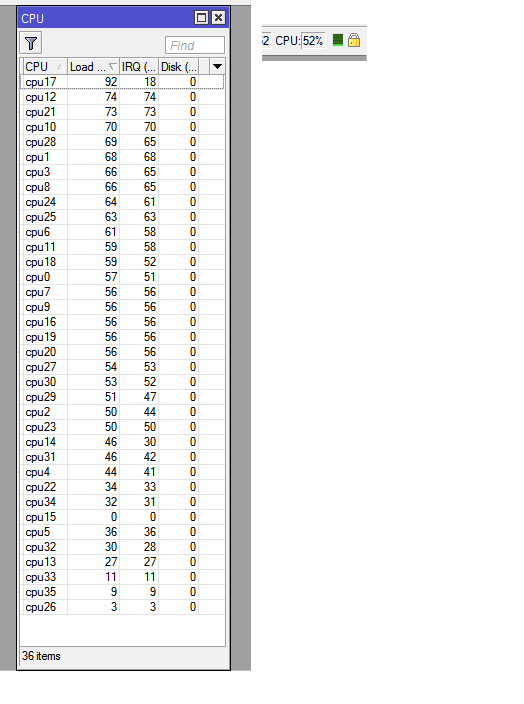
we are wasting 50% of the available cpu processing available
why??
as you said because virtualization, in the case of this routers the lack of virtualization
with virtualized servers The opposite happens, you can choose to load the core you want without restrictions, you can put 20 virtual servers on the same core or distribute them in the available cores
because that the CPU the ones you mentioned (AMD EPYC) only make sense in server environment or rendering tasks because is the only way to take advantage of that amount of cores
the most common tasks only escalate well up to 8 cores in the best cases
for example the BGP routing process in the router, it benefits from a powerful core because is single threaded
Long story short - MikroTik switches don’t support VEPA and I use VEPA. And datacenter switches that support VEPA cost more than MikroTik router that can handle 10G lol. And I want to have stateful firewall. Afaik there are no switches with stateful ACLs. Or at least they’re beyond my reach.
That’s design flaw of BGP processing implementation in routers xD Single thread is dead. Moore’s law is dead. We need to start scaling everything because we won’t go much futher in terms of single core then we already are. We won’t hit 8 Ghz anytime soon, at least with current approach of CPU design. I hope CPUs like Threadripper 2990WX or Epycs and whole new AMD line (which will soon introduce 16 core / 32 thread to mainstream CPUs) will force all programmers to finally start thinking multithread from the very beginning. Not just in places where they need more performance.
We’re entering age of megascaling - GPUs have thousands of cores. CPUs will soon have hundreds of cores. Even phones nowadays have 8 cores. Everything that won’t scale will lag behind. Whole IT is shifting direction towards horizontal scaling. It’s just matter of time and reimplementation of functionality. Hypervisors also have bottlenecks - especially memory access that is basically shared (sure there are multiple channels but still it’s bottleneck). But look at how far AMD went with horizontal scaling. They basically glued together separate CPUs into single big CPU that is recognized by OS as single computing resource. It’s essence of clustering and horizontal scaling.
Screen you just posted is not really reliable load depiction. I faced similar issue many times. What Linux refers to as CPU load doesn’t take into account memory bandwidth utilization, cache utilization, i/o utilization and many other aspects. In that thread where I discussed issues with single TCP tunnel performance - none of cores reached more than 30% of load, yet still bottlenecking occured. /system resource cpu is not reliable source of information about system resource utilization. In fact such source doesn’t exist without enabling full performance counters monitoring that would kill performance even more. Not all utilization of resources is monitored in OS at all.
It’s cool to have strong single core but we had already hit the wall. It’s time to take turn instead of bashing this wall.
The problem is that many of those protocols have been specified in pseudocode, often even as state machines, in the official standards.
Implementations usually closely follow that specification, with only small changes to implement some manufacturer-specific new option,
and even those changes cause interoperability issues.
When you want a multithread implementation it may be required to completely redesign the algorithm. And while it could be possible
to do that and have complete interoperability with the standard, there is quite some risk that when different companies each do this
independently there might be issues between those versions.
So, such a change has to be carefully coordinated and maybe fed back to the standards governing bodies (to write a new specification)
before everyone jumps on the task of re-writing.
… will force all programmers to finally start thinking multithread from the very beginning…
Most people are single threaded
I already got that from your reply in CCR1009 thread.
Well, you understand that this is outside of the needs for 99,99% of home users, right?
My intended usage are just for routing, I’m looking at getting a bunch of different VLANs to the router to be able to route them so it sounds like RB4011 could be the replacement I’m looking for. Hardware offload for ipsec is a bonus, I’m only running one gre+ipsec tunnel and even if it’s handled by cpu in the RB1100Hx2 I get around 120 Mbps which perfectly fine for me but ofc faster is better. I assume the router will be passive cooled? I would rather not have to change noisy fans as I had on the RB1100Hx2…
If you google the wireless model you get the fcc report, it has internal pictures: No Fans
Case looks Matt like the AC^2, and plastic?
The main problem for me… is I want a new router now and it’s not on sale yet!
There’s article on one site. Case is full metal. Only bottom is plastic. Case is basically integrated with hetsink so it’s cooled kind of like CCR1009.
The spec sheet lists the max operating temp as +45 C, which is much lower than most other models. I’ve seen ambient (internal) temps of 60c on my routers that are inside telecom closets etc so unless this has some active cooling, I’m worried it won’t be able to operate in the same environments as current models.