RB4011iGS Beginner Configuration incl. VLAN (intern/guests/VoIP)

(1) Add this…
/interface list member
add comment=defconf interface=ether1_WAN list=WAN
add interface=PPPoE_Out list=WAN
add interface=vlan100_intern list=LAN
add interface=vlan200_guests list=LAN
add interface=bridge list=LAN

(2) Change this from
add action=accept chain=input comment=“allow ICMP” in-interface=ether1_WAN
protocol=icmp
TO
add action=accept chain=input comment=“allow ICMP” protocol=icmp

If for some strange reason you want to block LAN to Router Ping, no reason to really it would be
add action=accept chain=input comment=“allow ICMP” protocol=icmp in-interface-list=WAN

(3) Modfy this to look like
/ip firewall nat
add action=masquerade chain=srcnat out-interface-list=WAN

(4) Modify this to look like
add action=drop chain=forward comment=
“drop access to clients behind NAT form WAN” connection-nat-state=!dstnat
connection-state=new in-interface-list=WAN

(5) Set this to none. In the clear mac not really going to be used and not secure.
/tool mac-server
set allowed-interface-list=none

(6) Not an error but something I would change is your drop all rule, why are you not dropping all Traffic including LAN to router, and not just WAN to router.
There is no need for LAN users to have full access to the router.
It should be drop all period.
But to do this USE CAUTION. You must make an allow rule for admin access FIRST!! otherwise you will lock yourself out of the router.
You must also allow DNS traffic for udp/tcp for LAN users, in-interface-list=LAN.

(7) Suggestion:. To provide you with access to the router via ether10 in case the bridge every burps on you. Just plug in a laptop, give your laptop an IP of 192.168.45.3 or .5 etc… and you will be able to access the router for configuration from winbox on the laptop. After setting it up be sure to test it.

a. Change name of ether10 TO ether10-emerg
b. Remove ether10 from the bridge
c. give ether10-emerg an IP address, lets say 192.168.45.2
d. add ether10-emerg to the LAN Interface as a member
e. add ether10-emerg to an allow to router list (if changing input chain rules to only the admin with full access)

(8) What is interesting and not related to issues is that you have NTP servers identified on your DHCP Network settings.
I do not believe they are necessary or accurate.
If you have the NTP package on the router, then under System/ NTP Client you add the servers your router will use for source (as a client).
Under NTP Server all you need to do is select the check boxes of “ENABLED” and “MANYCAST”

THen in firewall rules you have to ensure that LAN users have access to the NTP Server that the router is running, which should look like this…if you have changed from default and have a drop all else rule as the last rule in the input chain:
add action=accept chain=input comment=“Allow NTP service” connection-state=new dst-port=123 in-interface-list=LAN
protocol=udp
src-address-list=NTPserver

The source adddress list I use to narrow down access and identify only those devices that require NTP (AP or switch or Server etc…)

Thats it, there is no requirement to add NTP servers to DHCP networks from my experience.

@anav, i am sorry i didn’t see your Post before posting my answer !
I imported the Config on my RB4001 and saw the /32 addresses
After that PING will work !


Guten Morgen,

You still have a small Error in your “/IP Address” configuration.

This is the proper way to allocate your IP-Addresses

/ip address
add address=192.168.1.1/24 interface=vlan100_intern network=192.168.1.0
add address=192.168.2.1/24 interface=vlan200_guests network=192.168.2.0

After making the changes, PING will Work !

Good pickup I glossed over that part of the config.

Good morning everyone.

@Anav:
1,2,3,4,5: I have adopted these changes in full. Thank you very much!

6: It´s currently not implemented, as the deployment is in the home. I hope for less effort with the administration of the firewall. I would probably do this differently in the company. I think this is acceptable?

7: Implemented and tested. Thanks for sharing this idea!

8: Oh, I didn’t know that. Yes exactly, I just want to “provide” a trustful NTP time to the clients. Now it should be implemented, testing is pending.

@ConnyMercier
I found the error with the /24 on the IP address yesterday as well, was going to post this and then saw Anav’s long post :slight_smile:. Sorry, I thought I would include this just now, but it dragged on a bit. Now everything should be fixed and ping is also working fine.

Outstanding are now two more points:

  1. Integration of a Voip Dect station. To do this, I added ether5 to the provider’s VOIP vlan. The provider specifies DHCP, so I guess I still have to set up a DHCP client on the Fritzbox. How does it look here actually with the firewall? We added the PPPoE to the WAN list, but the PPPoE client works in vlan 10 and voip is done over vlan 20. Does the firewall interfere at this point? Here is the mentioned location:
/interface list member
add comment=defconf interface=PPPoE_Out list=WAN
  1. Currently I do not receive an IPv6 WAN address. In the future I would like to be reachable from outside via VPN. But I think this is beyond the scope of this post and is a separate topic.

The current state of the configuration is attached again. I have also adapted the overview image in the first post.

/interface bridge
add admin-mac=2C:C8:1B:B1:3A:82 auto-mac=no comment=defconf name=bridge \
    vlan-filtering=yes
/interface ethernet
set [ find default-name=ether1 ] name=ether1_WAN
set [ find default-name=ether2 ] name=ether2_intern
set [ find default-name=ether3 ] name=ether3_guests
set [ find default-name=ether4 ] name=ether4_AP
set [ find default-name=ether5 ] name=ether5_VOIP
set [ find default-name=ether10 ] name=ether10_emerg
/interface vlan
add interface=ether1_WAN name=vlan10_netcologne_data vlan-id=10
add interface=ether1_WAN name=vlan20_netcologne_voip vlan-id=20
add interface=bridge name=vlan100_intern vlan-id=100
add interface=bridge name=vlan200_guests vlan-id=200
/interface pppoe-client
add add-default-route=yes disabled=no interface=vlan10_netcologne_data name=\
    PPPoE_Out use-peer-dns=yes user=nc-myusername@autoprov.netcologne.de
/interface ethernet switch port
set 0 default-vlan-id=0
set 1 default-vlan-id=0
set 2 default-vlan-id=0
set 3 default-vlan-id=0
set 4 default-vlan-id=0
set 5 default-vlan-id=0
set 6 default-vlan-id=0
set 7 default-vlan-id=0
set 8 default-vlan-id=0
set 9 default-vlan-id=0
set 10 default-vlan-id=0
set 11 default-vlan-id=0
/interface list
add comment=defconf name=WAN
add comment=defconf name=LAN
/ip pool
add name=dhcp_intern ranges=192.168.1.100-192.168.1.200
add name=dhcp_guests ranges=192.168.2.100-192.168.2.200
/ip dhcp-server
add address-pool=dhcp_intern disabled=no interface=vlan100_intern lease-time=\
    3d name=dhcp_intern
add address-pool=dhcp_guests disabled=no interface=vlan200_guests lease-time=\
    3d name=dhcp_guests
/interface bridge port
add bridge=bridge comment=defconf interface=ether2_intern pvid=100
add bridge=bridge comment=defconf interface=ether3_guests pvid=200
add bridge=bridge comment=defconf interface=ether4_AP
add bridge=bridge comment=defconf interface=ether5_VOIP pvid=20
add bridge=bridge comment=defconf interface=ether6
add bridge=bridge comment=defconf interface=ether7
add bridge=bridge comment=defconf interface=ether8
add bridge=bridge comment=defconf interface=ether9
add bridge=bridge comment=defconf interface=sfp-sfpplus1
/ip neighbor discovery-settings
set discover-interface-list=LAN
/interface bridge vlan
add bridge=bridge tagged=bridge,sfp-sfpplus1,ether4_AP vlan-ids=100
add bridge=bridge tagged=bridge,sfp-sfpplus1,ether4_AP vlan-ids=200
/interface list member
add comment=defconf interface=PPPoE_Out list=WAN
add interface=vlan100_intern list=LAN
add interface=vlan200_guests list=LAN
add interface=bridge list=LAN
add interface=ether10_emerg list=LAN
/ip address
add address=192.168.1.1/24 interface=vlan100_intern network=192.168.1.0
add address=192.168.2.1/24 interface=vlan200_guests network=192.168.2.0
add address=192.168.10.1/24 interface=ether10_emerg network=192.168.10.0
/ip cloud
set update-time=no
/ip dhcp-server network
add address=192.168.1.0/24 dns-server=192.168.1.1 domain=home.lan gateway=\
    192.168.1.1
add address=192.168.2.0/24 dns-server=192.168.2.1 domain=home.guests gateway=\
    192.168.2.1
/ip dns
set allow-remote-requests=yes
/ip dns static
add address=192.168.1.1 name=lisa.home.lan
/ip firewall filter
add action=accept chain=input comment="accept established,related" \
    connection-state=established,related
add action=drop chain=input connection-state=invalid
add action=accept chain=input comment="allow ICMP" protocol=icmp
add action=drop chain=input comment="block everything else" \
    in-interface-list=WAN
add action=drop chain=input comment="drop guests to intern" dst-address=\
    192.168.1.0/24 src-address=192.168.2.0/24
add action=fasttrack-connection chain=forward comment=\
    "fast-track for established,related" connection-state=established,related
add action=accept chain=forward comment="accept established,related" \
    connection-state=established,related
add action=drop chain=forward connection-state=invalid
add action=drop chain=forward comment=\
    "drop access to clients behind NAT form WAN" connection-nat-state=!dstnat \
    connection-state=new in-interface-list=WAN
add action=drop chain=forward comment="drop guests to intern" dst-address=\
    192.168.1.0/24 src-address=192.168.2.0/24
/ip firewall nat
add action=masquerade chain=srcnat out-interface-list=WAN
/ip service
set telnet disabled=yes
set ftp disabled=yes
set www disabled=yes
set ssh port=2200
set api disabled=yes
set winbox address=192.168.1.0/24
/ip ssh
set strong-crypto=yes
/system clock
set time-zone-name=Europe/Berlin
/system ntp client
set enabled=yes primary-ntp=192.53.103.108 secondary-ntp=192.53.103.104
/tool bandwidth-server
set enabled=no
/tool mac-server
set allowed-interface-list=none
/tool mac-server mac-winbox
set allowed-interface-list=LAN

b9_no_sensitive.rsc (4.73 KB)

The VOIP connection and vlan provided by the ISP has noithing to do with the WAN/internet, connection at least I dont think so, they are on diff lans…

All you should need to to is carry vlan20 on eth5 and the DECT will reach out and request dhcp to the ISP voip server …

I would try first

a. removing ether5 from the bridge
b. add interface=ether5 name=vlan20_netcologne_voip vlan-id=20

and see what happens! Is this enough, what is is missing?

This is true, but my perspective is not unsuspecting innocent family members, its foreign actors that gain access to home computers due to mistakes by family members etc…)

Thanks for the suggestions. I have adopted them so far. I am looking forward to see if this will work. I still need to figure out how to configure the VOIP/Dect station (the old FrizBox for now) so that it gets an IP address from the ISP for VOIP, as well as that I have parallel access to the web interface for administrative purposes.

I decided last evening to put the setup consisting of router, switch, access points and client into operation. The whole action took about two hours, as I locked myself out of the switch in the meantime. Also the manual adding of the DNS A-entries took some time. Anyway, everything is working now. At maximum throughput to the ISP (250/50) Mbit/s the CPU usage goes up to about 3% with FastTrack enabled. So it will be time for some IPSec soon :wink:. Attached is a photo of the cable pile (I’ll make it clean in short).
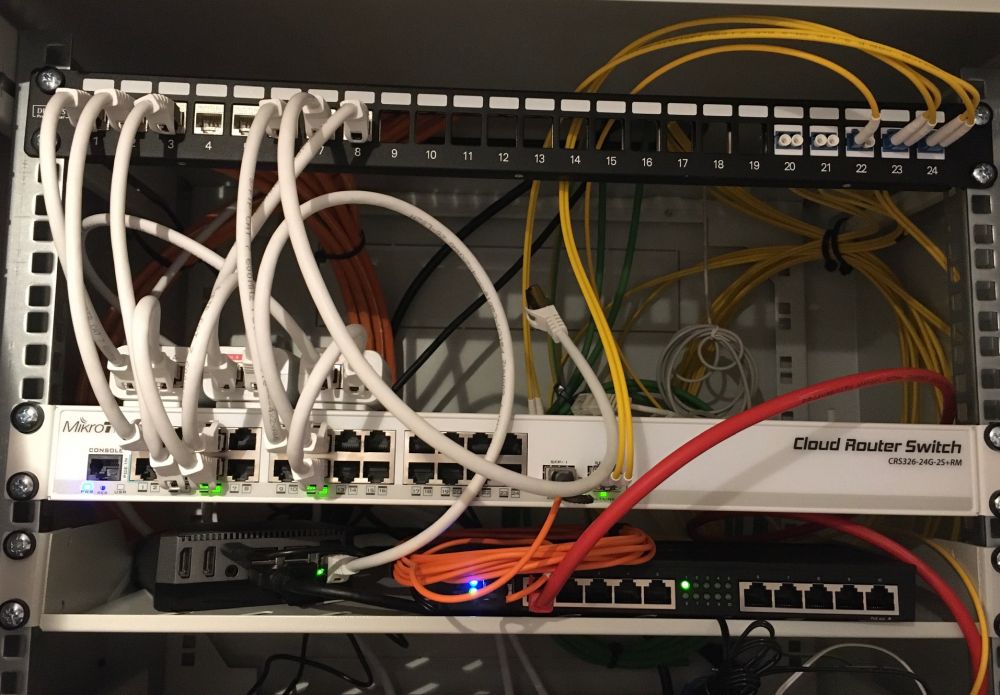
I would like to take this opportunity to thank you once again for your support. Really great here! If necessary, I can contribute something in the area of hardware. I myself come from the R&D high frequency technology and have to do there with antennas. Anyway, this thread now provides a typical example topology incl. working configuration which may help other beginners.

hardware.jpg

It’s quite a nice Home-Network Setup!

Am i correct ?
Mikrotik for Routing & Switch
Unifi for WLAN
RaspberryPi as Unifi-Cloudkey

If i am correct, its another wake-up call for mikrotik, to make better Wifi-AP =)


Possible solution for your Fritz.Box:
You could have another VLAN in your network and connect it to the LAN of the Fritz.box
This time insteed of a DHCP-Server on the VLAN you use the DHCP-Client on the RB4011.

After that you can access the fritz.box from any computer via the Web-Brower (http://192.168.178.1)**

Exemple DHCP-Client configuration:

/ip dhcp-client
add add-default-route=no disabled=no interface=bridge_vlan123 use-peer-dns=no use-peer-ntp=no

Yes, you are right :wink:.

The Raspberry PI 4 is booting from a small SSD. It contains the “hass.io” distribution with homeassistant. There are different addons running like the ubiquiti controller for the wifi APs, Zigbee Home Automation and zigbee2mqtt for my 802.15.4 zigbee network and so on. I am satisfied with it. The project is active and well maintained. The maintenance is very comfortable due to the integrated possibility of snapshops. Below are a few links. If you have any questions, please feel free to contact me :wink:.

https://www.argon40.com/argon-one-m-2-case-for-raspberry-pi-4.html
https://www.home-assistant.io/getting-started
https://community.home-assistant.io/t/home-assistant-community-add-on-unifi-controller/56297
https://www.home-assistant.io/integrations/zha/

Your suggestion with the DHCP client on the router is interesting. But the IP address range would then be that of the ISP VOIP DHCP server and not that of the Fritzbox? Alternatively, I can try to connect the FritzBox with another LAN port running a DHCP client into the internal network (VLAN 100 - untagged). Maybe it also makes sense to go to the suggested VOIP DECT station from Gigaset.

If your old Router is still working, why buy a new VOIP-DECT and throw the Fritz.Box away =)
Having sayed that,
After my Fritz.Box died, i switched to the free version of 3CX and installed it on a RaspberryPi4
VOIP DECT station from Gigaset ist great if you don’t need a classic Phone system.


Fritz.Box Setup:
I think you will need to connect the fritz.Box with 2 cables.
Connection 1: Mikrotik ↔ Ether1 on Fritz.Box for the VOIP
Connection 2: Mikrotik ↔ Ether2 on Fritz.Box for the Access

You will need to configure the Fritz.box to use Ether1 as WAN insteed of VDSL
LAN will then be restricted to ether 2,3 and 4.

Like @anav suggested,
simply bridge the WAN “VLAN20” with “Connection 1: Mikrotik ↔ Ether1 on Fritz.Box for the VOIP”
If you want you can use VLAN or like @anav posted without.
The Fritz.Box will do the rest ! (Firewall, DHCP-Client, VOIP, etc..)

Connection 2: Mikrotik ↔ Ether2 on Fritz.Box for the Access
Set a new VLAN on you mirkotik and this time insteed of a DHCP-Server on the VLAN,
use the DHCP-Client on the RB4011.

In the old setup, the Fritzbox was in PPPoE client + SIP profile mode (AVM designation: VDSL with external modem on LAN 1). At LAN2-4 the clients. In this mode, the PPPoE client would be active on LAN 1, which is no longer desired in the new setup.

Alternatively, it can be configured: Internet via LAN 1, connection type IP client (DHCP client)). I think in this mode no separate DHCP client is active for SIP anymore, which is desired. Here I must probably evaluate the configuration options of the Fritzbox further.

I like the approach with the Gigaset VOIP-DECT station a bit more, because it is a little more slim. However, the problem with the configuration in parallel operation also exists here. I find it somewhat unsatisfying to have to rely on the DHCP server from the ISP VOIP to get administrative access to the VOIP station.

I have already extended the VLAN according to your suggestions. Thank you both a lot for this!

Alternatively, I’m also eyeing the idea of replacing the DECT phone with a WLAN phone. WLAN coverage is available throughout the house, unlike DECT coverage. Unfortunately, the market for this is very limited (e.g. PHILIPS VP5500). I wonder why this is so.

PS: 3CX looks interesting, but I have to finish the site first (at least currently the phone does not work) :slight_smile:

Hello together,

a bit late, but I would like to give some feedback regarding the VoIP connection.

Unfortunately, connecting the Fritzbox with DHCP client in VLAN20 did not work right away. The phone connection did not work, I did not investigate the issue further). However, simply connecting the Fritzbox to the internal LAN worked. The Fritzbox did not have an ISP configured in this configuration (setting: Internet via existing router). In this configuration, calling and being called works without problems. The Fritzbox probably keeps a connection to the SIP server of the provider open. The advantage is that I can still access the web interface of the Fritzbox.

RouterOS - Firewall - Connections

seen reply	assured	confirmed	fasttrack	srcnat
Src. Address		192.168.1.134:5060
Dst. Address		172.17.66.118:5060
Reply Src. Address		172.17.66.118:5060
Reply Dst. Address		89.0.41.149:5060
Protocol		17 (udp)