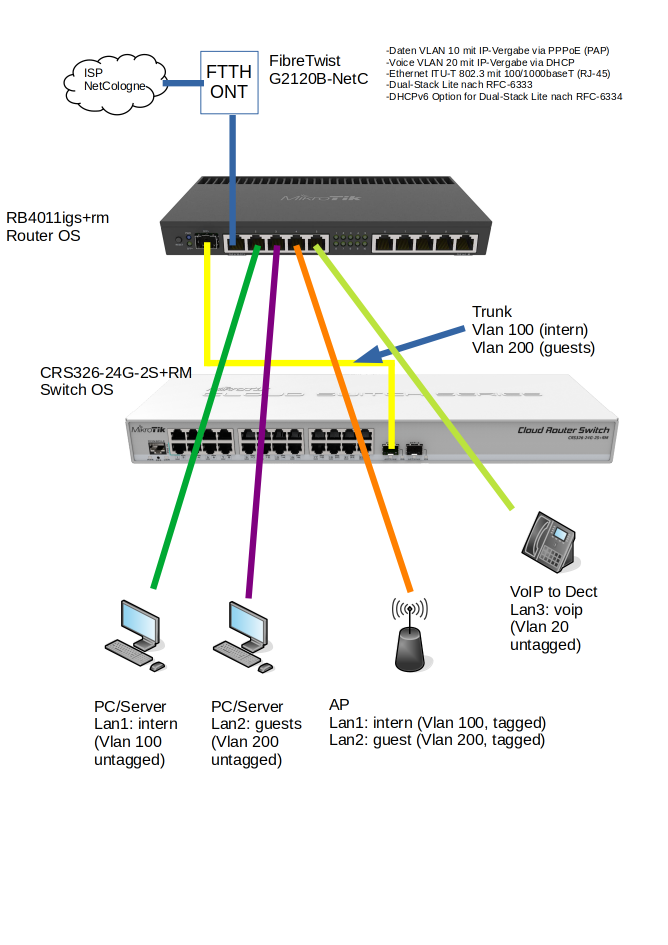
I am currently trying to replace a Fritzbox with a RB4011iGS+RM. I have managed the first hurdles so far (update, PPPoE client, etc.). Unfortunately, I’ve been stuck with the configuration of the VLANs for a while now. The goal should be to provide two networks:
network: internal 192.168.1.1/24
network: guests 192.168.2.1/24, VLAN 200
The assignment of the networks should be done for ethernet at the router/switch and for Wlan via different SSIDs. The access points are already configured so that SSID1=network 1, SSID2=network 2 is assigned. Attached is the current configuration of the router and a graphic for a better idea.
The questions that arise are: How do I set up the router accordingly? VLAN trunk with different VLANs or only one VLAN for the guest network? How do I flexibly assign the ethernet ports on the router (internal/guest)?
Another challenge for me is the integration of the VoIp phone (AVM FritzFon). Agreed: I will not miss the rest from the mother-in-law . The idea is to use a Fritzbox only as a DECT<->Ethernet “converter”. Whereby this is actually too wasteful for me energetically. Unfortunately I have no other idea. In addition, I do not know how I would have to configure the router. According to the provider, VoIP should be done via VLAN 20, but how do I set this up?
Last points would be that the router receives only one IPv4 address from the provider. Do you have a tip for me?
To move forward I have now tried to configure the VLANs as far as possible. I think it has not become so totally wrong. Unfortunately, I now can no longer access the router via the internal LAN (ether2) using winbox. Using ports 4-8 (without VLAN) the access still works.
I would be very happy if someone could take a look at the configuration. I have updated the export and concretized the graphic.
Have a look at Gigaset GO Box 100 for a more minimalistic solution, both in terms of hardware and software. It’s available for under 14€. There are also several other products around, search for voip dect base station.
First of all, thank you very much for your great support. I have now studied the linked posts and several tutorials (pascom brothers on youtube). The Vlan basics are so far clear, but I still fail to understand the implementation in RouterOS. I still don’t get IP addresses from the DHCP servers if a PC is connected to ether2_internal or ether3_guests. I have not connected the switch and AP yet, as both are currently in use. Is the problem possibly with the configuration of the bridge? I have attached the current configuration here. It would be great if someone could help me on the hint, the WAF (woman acceptance factor) is unfortunately getting orange . Thanks also for the suggestion about VOIP DECT station.
/interface bridge
add admin-mac=2C:C8:1B:B1:3A:82 auto-mac=no comment=defconf name=bridge \
    vlan-filtering=yes
/interface ethernet
set [ find default-name=ether1 ] name=ether1_WAN
set [ find default-name=ether2 ] name=ether2_intern
set [ find default-name=ether3 ] name=ether3_guests
set [ find default-name=ether4 ] name=ether4_AP
/interface vlan
add interface=ether1_WAN name=vlan10_netcologne_data vlan-id=10
add interface=ether1_WAN name=vlan20_netcologne_voip vlan-id=20
add interface=bridge name=vlan100_intern vlan-id=100
add interface=bridge name=vlan200_guests vlan-id=200
/interface pppoe-client
add add-default-route=yes disabled=no interface=vlan10_netcologne_data name=\
    PPPoE_Out use-peer-dns=yes user=myusername@autoprov.netcologne.de
/interface ethernet switch port
set 0 default-vlan-id=0
set 1 default-vlan-id=0
set 2 default-vlan-id=0
set 3 default-vlan-id=0
set 4 default-vlan-id=0
set 5 default-vlan-id=0
set 6 default-vlan-id=0
set 7 default-vlan-id=0
set 8 default-vlan-id=0
set 9 default-vlan-id=0
set 10 default-vlan-id=0
set 11 default-vlan-id=0
/interface list
add comment=defconf name=WAN
add comment=defconf name=LAN
/ip pool
add name=dhcp_intern ranges=192.168.1.100-192.168.1.200
add name=dhcp_guests ranges=192.168.2.100-192.168.2.200
/ip dhcp-server
add address-pool=dhcp_intern disabled=no interface=vlan100_intern lease-time=\
    3d name=dhcp_intern relay=192.168.1.1
add address-pool=dhcp_guests disabled=no interface=vlan200_guests lease-time=\
    3d name=dhcp_guests relay=192.168.2.1
/interface bridge port
add bridge=bridge comment=defconf interface=ether2_intern pvid=100
add bridge=bridge comment=defconf interface=ether3_guests pvid=200
add bridge=bridge comment=defconf interface=ether4_AP
add bridge=bridge comment=defconf interface=ether5
add bridge=bridge comment=defconf interface=ether6
add bridge=bridge comment=defconf interface=ether7
add bridge=bridge comment=defconf interface=ether8
add bridge=bridge comment=defconf interface=ether9
add bridge=bridge comment=defconf interface=ether10
add bridge=bridge comment=defconf interface=sfp-sfpplus1
/ip neighbor discovery-settings
set discover-interface-list=LAN
/interface bridge vlan
add bridge=bridge tagged=bridge,sfp-sfpplus1,ether4_AP untagged=ether2_intern \
    vlan-ids=100
add bridge=bridge tagged=bridge,sfp-sfpplus1,ether4_AP untagged=ether3_guests \
    vlan-ids=200
/interface list member
add comment=defconf interface=bridge list=LAN
add comment=defconf interface=ether1_WAN list=WAN
add list=WAN
/ip address
add address=192.168.1.1/24 comment=defconf interface=vlan100_intern network=\
    192.168.1.0
add address=192.168.2.1/24 interface=vlan200_guests network=192.168.2.0
/ip dhcp-client
add comment=defconf interface=ether1_WAN
/ip dhcp-server network
add address=192.168.1.0/24 comment=defconf dns-server=192.168.1.1 gateway=\
    192.168.1.1
add address=192.168.2.0/24 dns-server=192.168.2.1 gateway=192.168.2.1
/ip dns
set allow-remote-requests=yes
/ip dns static
add address=192.168.1.1 comment=defconf name=lisa.lan
add address=192.168.2.1 name=lisa.lan
/ip firewall filter
add action=accept chain=input comment=\
    "defconf: accept established,related,untracked" connection-state=\
    established,related,untracked
add action=drop chain=input comment="defconf: drop invalid" connection-state=\
    invalid
add action=accept chain=input comment="defconf: accept ICMP" protocol=icmp
add action=accept chain=input comment=\
    "defconf: accept to local loopback (for CAPsMAN)" dst-address=127.0.0.1
add action=drop chain=input comment="defconf: drop all not coming from LAN" \
    in-interface-list=!LAN
add action=accept chain=forward comment="defconf: accept in ipsec policy" \
    ipsec-policy=in,ipsec
add action=accept chain=forward comment="defconf: accept out ipsec policy" \
    ipsec-policy=out,ipsec
add action=fasttrack-connection chain=forward comment="defconf: fasttrack" \
    connection-state=established,related disabled=yes
add action=accept chain=forward comment=\
    "defconf: accept established,related, untracked" connection-state=\
    established,related,untracked
add action=drop chain=forward comment="defconf: drop invalid" \
    connection-state=invalid
add action=drop chain=forward comment=\
    "defconf: drop all from WAN not DSTNATed" connection-nat-state=!dstnat \
    connection-state=new in-interface-list=WAN
/ip firewall nat
add action=masquerade chain=srcnat out-interface-list=WAN src-address=\
    192.168.1.0/24
add action=masquerade chain=srcnat out-interface-list=WAN src-address=\
    192.168.2.0/24
/system clock
set time-zone-name=Europe/Berlin
/system identity
set name=lisa
/system ntp client
set enabled=yes primary-ntp=192.53.103.108 secondary-ntp=192.53.103.104
/tool mac-server
set allowed-interface-list=LAN
/tool mac-server mac-winbox
set allowed-interface-list=LAN
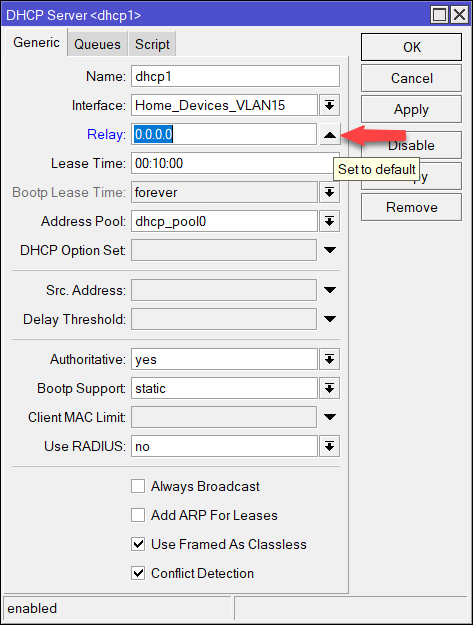
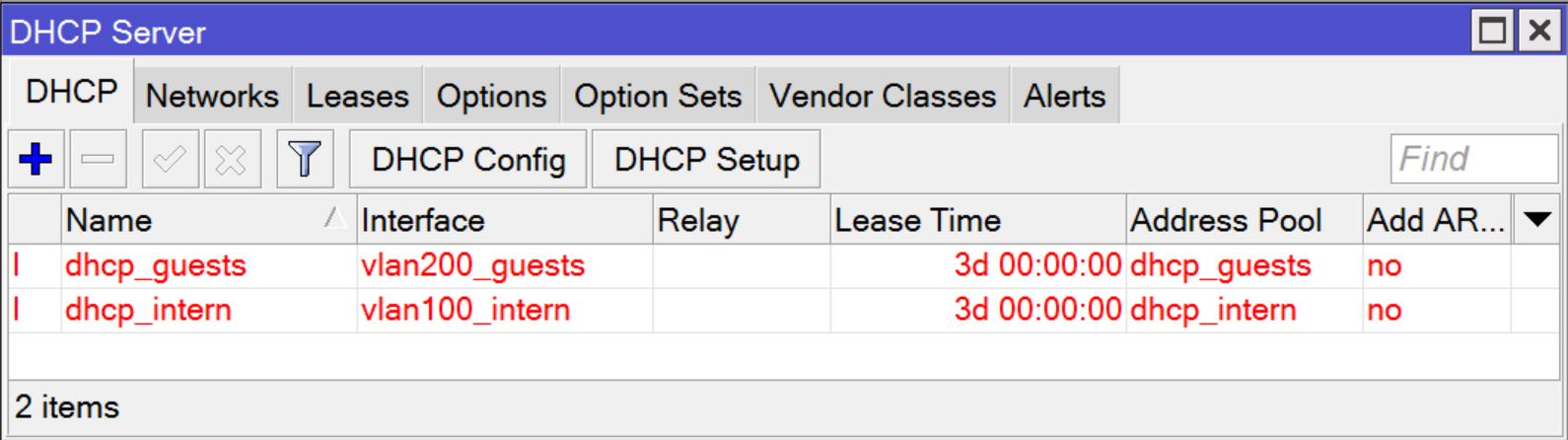
Thank you very much for the advice. I have now set the address of the relay to 0.0.0.0 (switched off, according to the doc). Unfortunately, Winbox says that the DHCP server configuration is invalid, I do not know why. Previously the configuration was once valid.
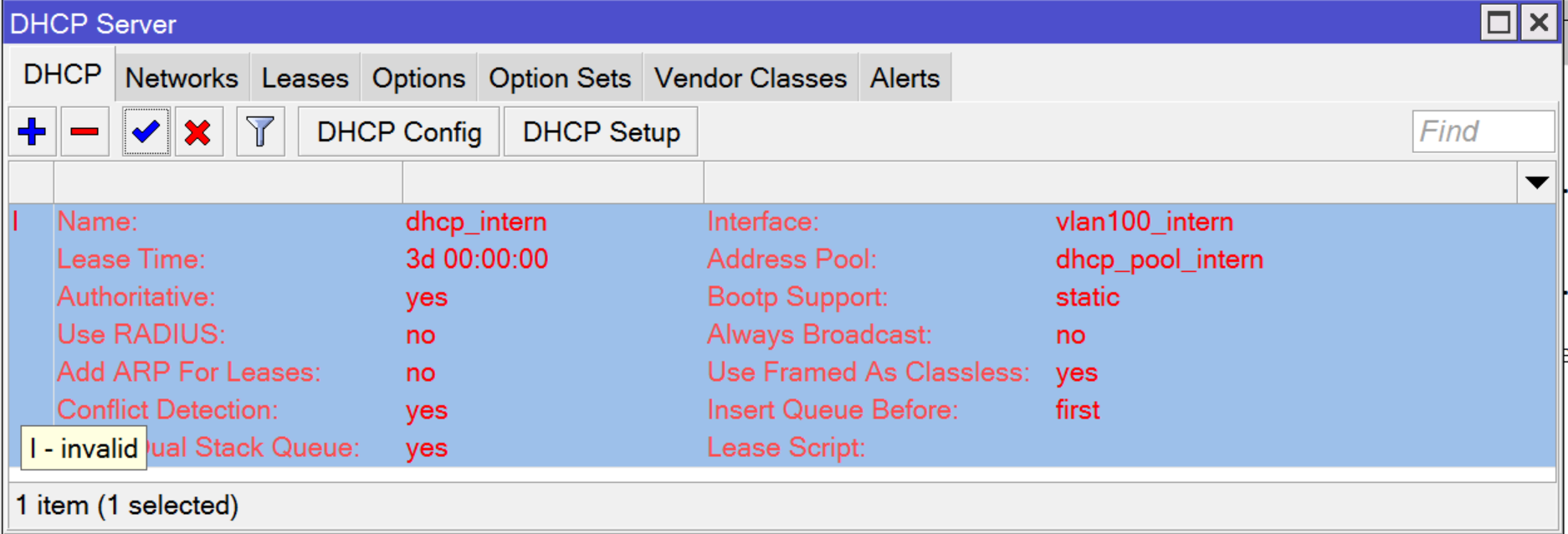
Thanks, I also tried this, also invalid configuration according to Winbox. Also adding the DHCP server again and setting it up manually (without DHCP Setup Wizard) gives the same result.
I Imported your Config in my Router (RB4011iGS+RM with ROS 6.49 (Stable))
Found a small abnormality in your Export unrelated to the problem.
/interface list member
add comment=defconf interface=bridge list=LAN
add comment=defconf interface=ether1_WAN list=WAN add list=WAN
Nevertheless,
I am able to remove the DHCP-Relay without any problems
And when I connect to the Switch I get an IP-Address from the DHCP-Server on the Router.
I don’t understand why it isn’t working on your side !
Maybe another Forum-Member can help
Wow, that’s super kind of you to make the effort. Thank you very much for that!
I just put in the above configuration again, so.
/system reset-configuration no-defaults=yes
<Setting Admin PW>
/import b4.rsc

Infos:
RouterOS 6.49 (stable)
software id = MVBS-WA5G
model = RB4011iGS+
Unfortunately, I am still not getting an IP address on the client (laptop without VLAN configuration). The DHCP server is still shown as invalid. Changing all parameters of the DHCP server even the address pools does not change this. Very interesting behavior.
Nope, but I found the reason: There was no IP-address set (IP->Adresses). Now the configuration of the DHCP-server is valid. You did not had this problem?
For some reason the DHCP-client of my laptop (ubuntu) was requesting an IP-address from previous configuration (192.168.88.1) after finished DHCP negotiation. I solved this renewing the clients DHCP IP address with the command “sudo dhclient”. Now I get correct IP-addresses in both LANs (intern/guest) and I am able to ping the router only in intern LAN.
So next steps will be to configure the switch and the access points. If the VLANs are working, this should actually be done quickly. Regardless, I owe you a beer or two .
Today I wanted to prepare the configuration so far that the router can be connected to the Internet. Here I have oriented myself to the following article (most suggestions I have taken over, but not all). https://help.mikrotik.com/docs/display/ROS/First+Time+Configuration
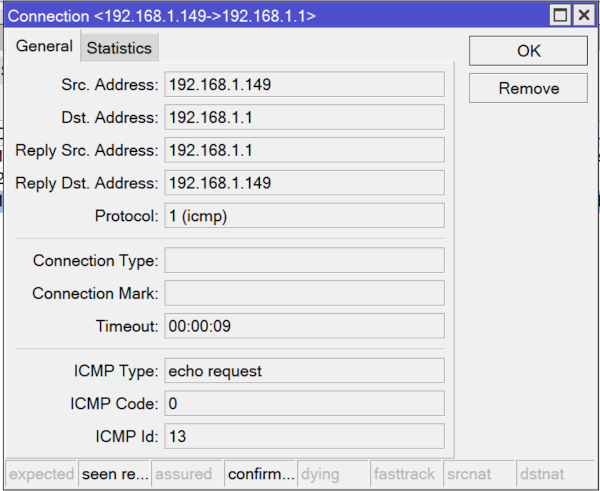
The internet connection from the router works, I can ping in with name resolution from the router. Unfortunately, I cannot ping the router itself from either ether1_internal or ether2_guests. The IP configuration and route on the client is set correctly. In the connections tab of the firewall the connection is also shown, yet I get at the client: ping: sendmsg: Netzwork is unreachable.
I’m unfortunately more so based in the Cologne area, there you can score with beer unfortunately comparatively less. But I can certainly think of something, but come over with a postal address.
/interface bridge
add admin-mac=2C:C8:1B:B1:3A:82 auto-mac=no comment=defconf name=bridge \
    vlan-filtering=yes
/interface ethernet
set [ find default-name=ether1 ] name=ether1_WAN
set [ find default-name=ether2 ] name=ether2_intern
set [ find default-name=ether3 ] name=ether3_guests
set [ find default-name=ether4 ] name=ether4_AP
/interface vlan
add interface=ether1_WAN name=vlan10_netcologne_data vlan-id=10
add interface=ether1_WAN name=vlan20_netcologne_voip vlan-id=20
add interface=bridge name=vlan100_intern vlan-id=100
add interface=bridge name=vlan200_guests vlan-id=200
/interface pppoe-client
add add-default-route=yes disabled=no interface=vlan10_netcologne_data name=\
    PPPoE_Out use-peer-dns=yes user=nc-myusername@autoprov.netcologne.de
/interface ethernet switch port
set 0 default-vlan-id=0
set 1 default-vlan-id=0
set 2 default-vlan-id=0
set 3 default-vlan-id=0
set 4 default-vlan-id=0
set 5 default-vlan-id=0
set 6 default-vlan-id=0
set 7 default-vlan-id=0
set 8 default-vlan-id=0
set 9 default-vlan-id=0
set 10 default-vlan-id=0
set 11 default-vlan-id=0
/interface list
add comment=defconf name=WAN
add comment=defconf name=LAN
/ip pool
add name=dhcp_intern ranges=192.168.1.100-192.168.1.200
add name=dhcp_guests ranges=192.168.2.100-192.168.2.200
/ip dhcp-server
add address-pool=dhcp_intern disabled=no interface=vlan100_intern name=\
    dhcp_intern
add address-pool=dhcp_guests disabled=no interface=vlan200_guests name=\
    dhcp_guests
/interface bridge port
add bridge=bridge comment=defconf interface=ether2_intern pvid=100
add bridge=bridge comment=defconf interface=ether3_guests pvid=200
add bridge=bridge comment=defconf interface=ether4_AP
add bridge=bridge comment=defconf interface=ether5
add bridge=bridge comment=defconf interface=ether6
add bridge=bridge comment=defconf interface=ether7
add bridge=bridge comment=defconf interface=ether8
add bridge=bridge comment=defconf interface=ether9
add bridge=bridge comment=defconf interface=ether10
add bridge=bridge comment=defconf interface=sfp-sfpplus1
/ip neighbor discovery-settings
set discover-interface-list=LAN
/interface bridge vlan
add bridge=bridge tagged=bridge,sfp-sfpplus1,ether4_AP untagged=ether2_intern \
    vlan-ids=100
add bridge=bridge tagged=bridge,sfp-sfpplus1,ether4_AP untagged=ether3_guests \
    vlan-ids=200
/interface list member
add comment=defconf interface=bridge list=LAN
add comment=defconf interface=ether1_WAN list=WAN
/ip address
add address=192.168.1.1 interface=vlan100_intern network=192.168.1.0
add address=192.168.2.1 interface=vlan200_guests network=192.168.2.0
/ip cloud
set update-time=no
/ip dhcp-server network
add address=192.168.1.0/24 dns-server=192.168.1.1 domain=lan gateway=\
    192.168.1.1 ntp-server=192.168.1.1
add address=192.168.2.0/24 dns-server=192.168.2.1 domain=guests gateway=\
    192.168.2.1 ntp-server=192.168.2.1
/ip firewall filter
add action=accept chain=input comment="accept established,related" \
    connection-state=established,related
add action=drop chain=input connection-state=invalid
add action=accept chain=input comment="allow ICMP" in-interface=ether1_WAN \
    protocol=icmp
add action=drop chain=input comment="block everything else" in-interface=\
    ether1_WAN
add action=fasttrack-connection chain=forward comment=\
    "fast-track for established,related" connection-state=established,related
add action=accept chain=forward comment="accept established,related" \
    connection-state=established,related
add action=drop chain=forward connection-state=invalid
add action=drop chain=forward comment=\
    "drop access to clients behind NAT form WAN" connection-nat-state=!dstnat \
    connection-state=new in-interface=ether1_WAN
/ip firewall nat
add action=masquerade chain=srcnat out-interface=ether1_WAN
/ip service
set telnet disabled=yes
set ftp disabled=yes
set www disabled=yes
set ssh port=2200
set api disabled=yes
set winbox address=192.168.1.0/24
/ip ssh
set strong-crypto=yes
/system clock
set time-zone-name=Europe/Berlin
/tool bandwidth-server
set enabled=no
/tool mac-server
set allowed-interface-list=LAN
/tool mac-server mac-winbox
set allowed-interface-list=LAN
Also suggest that you adjust setup so. I cannot remember the reason offhand though, sigh getting old.
/interface list member
add comment=defconf interface=bridge list=LAN (optional in this case - only necessary when bridge is also handling dhcp etc…I think?) add interface=vlan100_intern list=LAN
add interface=vlan200_guests list=LAN
add comment=defconf interface=ether1_WAN list=WAN
Thanks for the tips, I have adopted the configuration accordingly. Unfortunately, I still can not reach the router via IP address (e.g. via Winbox IP/ ICMP Ping). WinBox Mac on the other hand works. In the firewall of the router the connection is still shown. I suspect a problem with the vlan configuration or the firewall, but have not been able to find it yet. Attached is the current configuration from also the terminal output from the client to ether2_internal. Any ideas?
/interface bridge
add admin-mac=2C:C8:1B:B1:3A:82 auto-mac=no comment=defconf name=bridge \
vlan-filtering=yes
/interface ethernet
set [ find default-name=ether1 ] name=ether1_WAN
set [ find default-name=ether2 ] name=ether2_intern
set [ find default-name=ether3 ] name=ether3_guests
set [ find default-name=ether4 ] name=ether4_AP
/interface vlan
add interface=ether1_WAN name=vlan10_netcologne_data vlan-id=10
add interface=ether1_WAN name=vlan20_netcologne_voip vlan-id=20
add interface=bridge name=vlan100_intern vlan-id=100
add interface=bridge name=vlan200_guests vlan-id=200
/interface pppoe-client
add add-default-route=yes disabled=no interface=vlan10_netcologne_data name=\
PPPoE_Out use-peer-dns=yes user=nc-myusername@autoprov.netcologne.de
/interface ethernet switch port
set 0 default-vlan-id=0
set 1 default-vlan-id=0
set 2 default-vlan-id=0
set 3 default-vlan-id=0
set 4 default-vlan-id=0
set 5 default-vlan-id=0
set 6 default-vlan-id=0
set 7 default-vlan-id=0
set 8 default-vlan-id=0
set 9 default-vlan-id=0
set 10 default-vlan-id=0
set 11 default-vlan-id=0
/interface list
add comment=defconf name=WAN
add comment=defconf name=LAN
/ip pool
add name=dhcp_intern ranges=192.168.1.100-192.168.1.200
add name=dhcp_guests ranges=192.168.2.100-192.168.2.200
/ip dhcp-server
add address-pool=dhcp_intern disabled=no interface=vlan100_intern lease-time=\
3d name=dhcp_intern
add address-pool=dhcp_guests disabled=no interface=vlan200_guests lease-time=\
3d name=dhcp_guests
/interface bridge port
add bridge=bridge comment=defconf interface=ether2_intern pvid=100
add bridge=bridge comment=defconf interface=ether3_guests pvid=200
add bridge=bridge comment=defconf interface=ether4_AP
add bridge=bridge comment=defconf interface=ether5
add bridge=bridge comment=defconf interface=ether6
add bridge=bridge comment=defconf interface=ether7
add bridge=bridge comment=defconf interface=ether8
add bridge=bridge comment=defconf interface=ether9
add bridge=bridge comment=defconf interface=ether10
add bridge=bridge comment=defconf interface=sfp-sfpplus1
/ip neighbor discovery-settings
set discover-interface-list=LAN
/interface bridge vlan
add bridge=bridge tagged=bridge,sfp-sfpplus1,ether4_AP untagged=ether2_intern \
vlan-ids=100
add bridge=bridge tagged=bridge,sfp-sfpplus1,ether4_AP untagged=ether3_guests \
vlan-ids=200
/interface list member
add comment=defconf interface=ether1_WAN list=WAN
add interface=vlan100_intern list=LAN
add interface=vlan200_guests list=LAN
add interface=bridge list=LAN
/ip address
add address=192.168.1.1 interface=vlan100_intern network=192.168.1.0
add address=192.168.2.1 interface=vlan200_guests network=192.168.2.0
/ip cloud
set update-time=no
/ip dhcp-server network
add address=192.168.1.0/24 dns-server=192.168.1.1 domain=lan gateway=\
192.168.1.1 ntp-server=192.168.1.1
add address=192.168.2.0/24 dns-server=192.168.2.1 domain=guests gateway=\
192.168.2.1 ntp-server=192.168.2.1
/ip dns
set allow-remote-requests=yes
/ip firewall filter
add action=accept chain=input comment="accept established,related" \
connection-state=established,related
add action=drop chain=input connection-state=invalid
add action=accept chain=input comment="allow ICMP" in-interface=ether1_WAN \
protocol=icmp
add action=drop chain=input comment="block everything else" in-interface=\
ether1_WAN
add action=fasttrack-connection chain=forward comment=\
"fast-track for established,related" connection-state=established,related
add action=accept chain=forward comment="accept established,related" \
connection-state=established,related
add action=drop chain=forward connection-state=invalid
add action=drop chain=forward comment=\
"drop access to clients behind NAT form WAN" connection-nat-state=!dstnat \
connection-state=new in-interface=ether1_WAN
/ip firewall nat
add action=masquerade chain=srcnat out-interface=ether1_WAN
/ip service
set telnet disabled=yes
set ftp disabled=yes
set www disabled=yes
set ssh port=2200
set api disabled=yes
set winbox address=192.168.1.0/24
/ip ssh
set strong-crypto=yes
/system clock
set time-zone-name=Europe/Berlin
/tool bandwidth-server
set enabled=no
/tool mac-server
set allowed-interface-list=LAN
/tool mac-server mac-winbox
set allowed-interface-list=LAN
 . The idea is to use a Fritzbox only as a DECT<->Ethernet “converter”. Whereby this is actually too wasteful for me energetically. Unfortunately I have no other idea. In addition, I do not know how I would have to configure the router. According to the provider, VoIP should be done via VLAN 20, but how do I set this up?