Hi all.
Few days ago our Draytek & Mikrotik have broken down in the same day, so we bought new ones, the same models.
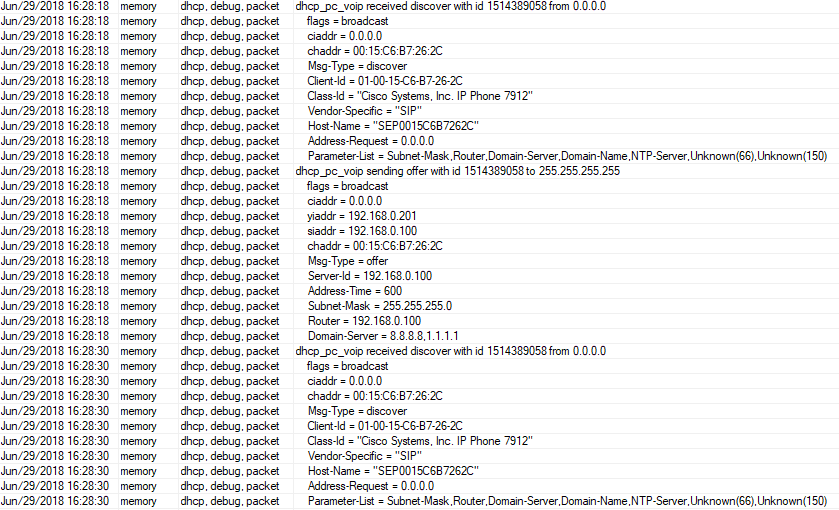
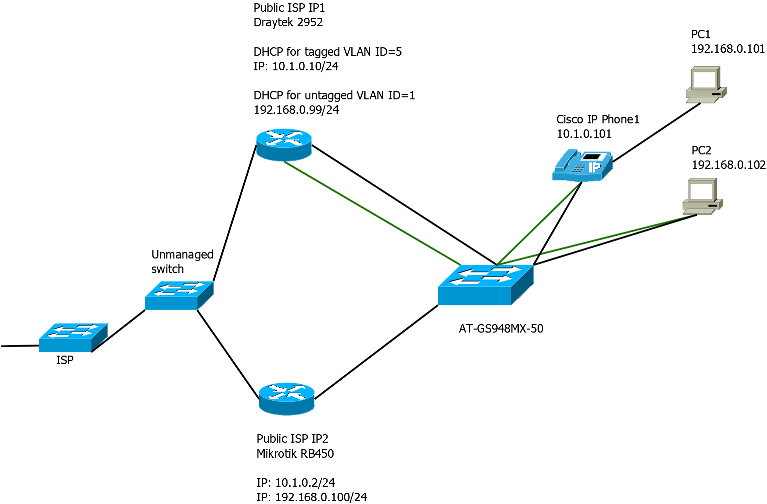
What I did for the moment was the putting all network traffic through Draytek router which was ultra easy. You can see it on attached image (green line represents only tagged vlan 5).
Our primary network is 192.168.0.0/24 and 10.1.0.0/24 is reserved for Cisco IP phones where VLAN ID=5 is declared manually (on phones).
All phones has switch where PC is connected.
All I wanna do is to back to previous setting before routers crash, where our Mikrotik had much bigger role than standalone gateway for servers and other devices - i want to move DHCP server from Draytek to Mikrotik.
Previous setting on Mikrotik RB450 was assuming that:
WAN was on ETH1
LAN with tagged (VLAN ID=5) and untagged traffic was on the same port ETH5 (my primary goal).
Gateway for untagged traffic was 192.168.0.99
Gateway for tagged traffic (Cisco IP phones, vlan id=5) was 10.1.0.10
The reason why i am posting this is that i didn’t find out any solutions on this forum and to be honest i don’t have any idea to make this work on Mikrotik after many tries in last days. I’m giving up.
With one network it’s super easy, but when you need two networks on the same port… it starts to be too complicated for me.
I have tried:
two vlans (vlan5 was tagged) attached to eth5
bridge with ports: eth5, vlan1, vlan5
IP addresses attached to vlans
dhcp server attached on bridge with extended pool (192.168.0.200-192.168.0.230 & 10.1.0.200-10.1.0.230)
setting (Switch>Ports) VLAN ID=1 and VLAN ID=5 on ETH5
PC is not reciving an address and network is unavaible after change ip to static.
Could someone guide me step by step in words, what should I do or what i am doing wrong?
(RouterOS = 6.42.4)
/interface bridge
add admin-mac=CC:2D:E0:36:7C:9B auto-mac=no name=bridge protocol-mode=mstp vlan-filtering=yes
/interface ethernet
set [ find default-name=ether2 ] name=ether2-master
/interface vlan
add interface=ether5 name=vlan1 vlan-id=1
add interface=ether5 name=vlan5 use-service-tag=yes vlan-id=5
/interface list
add exclude=dynamic name=discover
add name=mactel
add name=mac-winbox
/interface wireless security-profiles
set [ find default=yes ] supplicant-identity=MikroTik
/ip pool
add name=default_dhcp ranges=192.168.88.10-192.168.88.254
add name=dhcp_pool_voip ranges=10.1.0.200-10.1.0.230
add name=dhcp_pool_pc ranges=192.168.0.200-192.168.0.230
add name=dhcp_pool_pc-voip ranges=192.168.0.200-192.168.0.230,10.1.0.200-10.1.0.230
/ip dhcp-server
add add-arp=yes address-pool=dhcp_pool_pc-voip disabled=no interface=bridge name=dhcp_pc_voip
/snmp community
set [ find default=yes ] addresses=0.0.0.0/0
/interface bridge port
add bridge=bridge hw=no interface=ether5
add bridge=bridge interface=vlan1
add bridge=bridge interface=vlan5 pvid=5
/interface bridge settings
set use-ip-firewall-for-vlan=yes
/interface bridge vlan
add bridge=bridge tagged=vlan5 untagged=vlan1 vlan-ids=1,5
/interface list member
add interface=ether1 list=discover
add interface=ether3 list=discover
add interface=ether4 list=discover
add interface=ether5 list=discover
add list=mactel
add list=mac-winbox
/ip address
add address=xxx.xxx.xxx.xxx/29 interface=ether1 network=xxx.xxx.xxx.xxx
add address=192.168.0.100/24 interface=vlan1 network=192.168.0.0
add address=10.1.0.2/24 interface=vlan5 network=10.1.0.0
/ip dhcp-server network
add address=10.1.0.0/24 dns-server=8.8.8.8,1.1.1.1 gateway=10.1.0.2
add address=192.168.0.0/24 dns-server=8.8.8.8,1.1.1.1 gateway=192.168.0.100
/ip dns
set allow-remote-requests=yes servers=194.204.159.1,8.8.8.8,1.1.1.1
/ip dns static
add address=192.168.88.1 name=router
/ip firewall filter
add action=accept chain=input dst-port=8291 protocol=tcp
add action=accept chain=input comment="defconf: accept ICMP" protocol=icmp
add action=accept chain=input comment="defconf: accept established,related" connection-state=established,related
add action=drop chain=input comment="defconf: drop all from WAN" in-interface=ether1
add action=fasttrack-connection chain=forward comment="defconf: fasttrack" connection-state=established,related
add action=accept chain=forward comment="defconf: accept established,related" connection-state=established,related
add action=drop chain=forward comment="defconf: drop invalid" connection-state=invalid
add action=drop chain=forward comment="defconf:  drop all from WAN not DSTNATed" connection-nat-state=!dstnat connection-state=new in-interface=ether1
/ip firewall nat
add action=masquerade chain=srcnat comment="defconf: masquerade" out-interface=ether1
/ip route
add distance=1 gateway=xxx.xxx.xxx.xxx
/system clock
set time-zone-name=Europe/Warsaw
/system routerboard settings
set silent-boot=no
/tool mac-server
set allowed-interface-list=mactel
/tool mac-server mac-winbox
set allowed-interface-list=mac-winbox
[admin@MikroTik] >
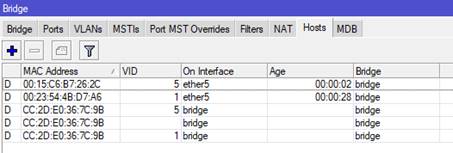
With this config, PC connected directly to ETH5 is able to get IP address from dhcp server with proper settings related to VLAN1 (this PC is visible on Bridge/Hosts list with VID=1) Everything is fine, PC has access to internet etc.
When I connect CiscoIP Phone and then PC to this Phone, the end result is quite different.
PC and Phone are visible on Bridge/Hosts list with adequate VIDs.
Phone (forced manually to work on VLAN=5) has some problems with getting IP address = 10.1.0.230 (status: offered).
PC is getting 192.168.0.200 (status: bound) but ipconfig/all shows that IP of DHCP server for PC is 10.1.0.2 which is not nice. PC has no access to the internet.
Is it related somehow to “forwarding native vlan in tagged frame”?
Ps. I do not know exactly what I just said but I learn quickly.
I am no expert in this, so take with a pinch of salt.
What it looks like is you are trying to do QinQ vlan tunneling with the Cisco IP Phone, and I do not think that is going to work with the combination of Mikrotik and Cisco IP Phone.
With a Cisco switch, you can configure “Voice Vlan” which sends Cisco Discovery Protocol (CDP) packets that instruct an attached phone to send voice traffic to the switch with a Layer 2 CoS priority value and uses this CoS priority to prioritize Voice Vlan over Data vlan of pc connected behind the phone.
As far as I know the phone passes the data from the PC connected to it directly without any modifications
Hoping someone with more knowledge will chip in, will be interesting to learn more on this

 but I learn quickly.