RB5009+ 2x hAP ax2 as access Point

Hi all.
bought RB5009 in order to use the container für DNS/IP filter lists…
bought the hAP ax2 because i thought they are simple working APs.
not only they were released on the same time … even hAP …the AP sounds like simple APs.
but a hAP ax2 is a full router with common features…

furter i thought is for sure possible … if the RB5009 has a POE out …
the hAP ax2 is PoE feedable…
for sure this would work.

all this seems to be only on my mind - problems over problems until now.
the hAP ax2 is not feedable from the PoE out - incompatible at least - what a mess.

i bought between the firmare change from the wifi drivers - wifi com and so on …

and if someone thinks that a firmware update is an evulution…you are wrong.

The youtube videos and websites are looking good…but who can configure all this without beeing fulltime traffic engineer ?

I bought the eqip because i want to have the rb5000 container thing - and the fast transition on the hAP ax²…

configure an huge farm of linux vm/lxs is nothing against to get the MT stuff working,
i think it would be easier to set router/sw/aps on altern. firmware compatible equips from scratch.

a) the basic setup from winbox dont fit to my needs … e.g. VLANs …not easy to configure.,…
b) new software - ne mess
c) orchestra umbrella (called dude ) - i cannot get warm with this - lack support - curuios problems - i stuck.
d) Capsman - oh my god - the only thing working on my setup is : capsman on rb5009 , and the 2x hAP ax² as client
----> but what about management ? I provision the radios trough the capsman on rb5009 , but all the statistics are only shown on the APs… ?
even tried capsman on one of the APs ax2 … another story…common problems…
e) from day to day wifi problem here or there … actally all clients get only 10MB/S … nothing touched , nothing chanced… befor i hat a 250MB conn to inet , even if the wifi links were quiet thicker.
reboot here , uploading conig of the bevor working conf there … same prob.

I ask myselfe if all this is a social testing - when s.o. freaking out…

@all does someone have a working config for my setup : RB5009 + 2x hAP ax²

@forum guru commenting like
: “its working everywhere elese” → rofl
“you have to spend some time” → ok , but not years
“its carrier grade - not for dump users” → a carrier will be broke if a) try to engineer working config , b) get broke because customers are gone.
----> so please : dont comment my thread.


If there is a FT roaming possibility without capsman - please comment.
If there is a working solution to avoid reconnection of clients betwenn the APs without a “umbrella” (like capsman) please comment

And for sure folks - if you have my setup in production please contact me …

First a reality check:
After reading all you posted, it looks like you are looking for a cooky cutter solution.
Well, if you know how to configure Linux farms, I guess that doesn’t come on a silver plate either.
You need to learn, spend some time with ROS.

Newsflash: if you are versed in Linux, it doesn’t take years.

With that closing statement, no comments will come. Just pointing out the obvious.
Because capsman IS needed for what you want.

As for your equipment:
I assume RB5009 version you have is the POE version ? (you did not clearly mention it)
If you had read the specifications upfront, you would have noticed POE out on RB5009PR = 802.3af/at.
Power brick on RB5009 is 48V so that POE out will also be 48V.

POE in on AX2 is PASSIVE POE, range from 18v to 28V. See the problem there ?
You can work around that later, if you want.

Now some assistance:
what you need is RB5009 as capsman and those 2 AX2 device in CAPs mode (can be done using button or from system / reset config / caps mode (check Keep Users !).

Now the good news: there is a nice tutorial available explaining just that.
https://help.mikrotik.com/docs/spaces/ROS/pages/224559120/WiFi#WiFi-CAPsMAN-CAPVLANconfigurationexample:

Read, digest, apply, fail, read again, learn.
When you have a config which is more or less inline with that example, post your config here for review clearly indicating what you already did, what doesn’t work yet.

@all does someone have a working config for my setup : RB5009 + 2x hAP ax²

Hello, have the same setup. To supply the hAP ax2 with power over Ethernet, I took the power supply from the hAP ax2 for the RB5009.
Now supply my two hAP ax2 via POE from the RB5009. The problem was solved.

What statistics are you referring to?
Can you explain functionally what you are trying to accomplish?

I don’t think it’s a good idea to power RB5009 and two ax2 with a power adapter from ax2… I think that power adapter with more power is needed here.

@OP so if you don’t want to waste your time with RouterOS then why don’t you use more user friendlier UniFi ? Or TP-Link ?

Concur I am in the market for a used RB5009, I can at least cover postage. :slight_smile:

@JhnMtrx
The ax2 power supply is 24V 1.2 A, so 28.8 W.

RB5009UPr+S+IN 16 W
Ax2 12 W
Ax2 12 W
that makes a round 40W.

Even if devices in reality use much less power than specs, it doesn’t sound like a safe setup.
you want a 24V 2A power supply. or at least a 24V 1.5A one.

Ok, I’ll have to look at that. So far, it runs smoothly with two hAP ax2

@JhnMtrx: You’re at about 20W with adding in the rb5009. During bootup the devices consume about +50% for about 10-20s. That puts you quite near the limit. I ran such a setup (I was aware that I’m on the edge), and it worked quite well for approx. 2 years. Then incidentally when doing a software upgrade, the power supply wouldn’t boot things up anymore. (Of course my first thought was a software problem with the upgrade - that was a fun 30 minutes of troubleshooting :slight_smile: So be prepared that the setup will eventually fail, and probably do so at reboot/bootup.

On reading your post I would have suggested the same as jaclaz: 1.5A at the minimum, 2A much preferred.

(Disclaimer: only you know how important reliable operation is/how quickly/easily you can source parts (maybe with having bought two ax2’s you have another one of the same power supply in a box somewhere if needed…) etc. - my comment was just meant as a friendly reminder.)

@jaclaz: Are you an EE by any chance? We seem to think quite alike on power matters.

Sure :slight_smile: , I don’t think that you are running with 100% CPU on the three devices, of course It should be measured in total, but I would not be surprised if your real power needs are around 50-60% of the max specced. So 20-24W, below the 28.8W of the Power supply.
From your screenshot, the two ax2’s use 13.3 W, so around 55% of the theoretical 12+12=24W.
If we use this 55%, the 40W becomes real 22W, and your power supply is running at 22/28.8=76% of its capabilities.
In these kind of devices (no spinning disk) the boot time increase will likely be in the 20%-30% ballpark, and it’s not like they are booted/rebooted often.
What will happen if there are peaks?
Let’s imagine that for some reason a device stucks the CPU(s) at 100%.
Probably nothing, if they are short enough and not too high, if they are short when they exceed the total power available at the most they will shutdown protectively (this depends on which kind of protections the power supply has built in).
If they are prolonged they may well cause the power supply to fry or however age prematurely.
Usually the power supplies are dimensioned so that they normally work around 50% (and up to 60%) of their rated output, so for your constant 22W, a 44W.
A 24V 1.5A, 36W, would work at 22/36=61% that Is still fine.

@lurker888
Naah, or at least not a qualified one, but I know some basics, and have some experience, electricity is not a matter particularly open to very different opinions anyway

Thank you very much for the detailed information. I didn’t think about that at all. I will now get a power supply with the data 24V 3.75A 90W. I shouldn’t have any problems with that in the future. Do I see this correctly?

Well, that is definitely “too much” power, not that it will make any problem, but a 2.75 A / 90 W power supply will run mostly at 22/90=24.5% which is outside the usual optimization range for efficiency (in other words you will consume slightly more electricity than needed).
How much more is hard to say, as it depends a lot on the specific power supply.
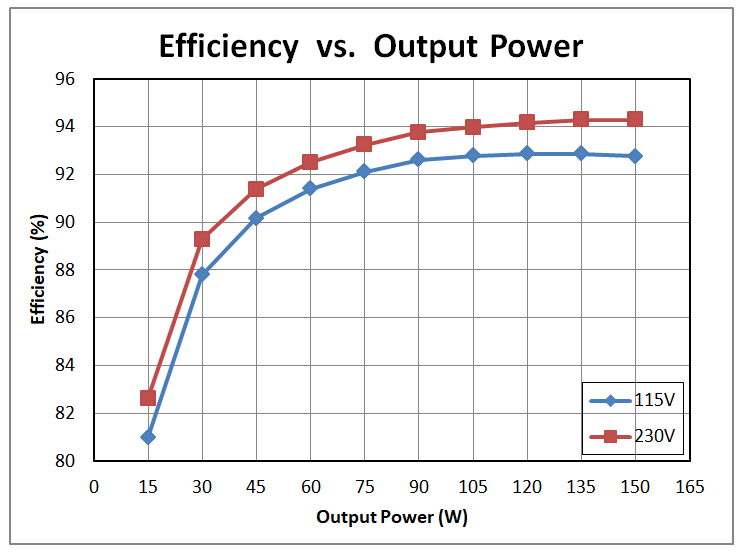
If you look at the efficiency curve of a power supply as function of power output (only an example, this is for a 150W power supply, but the overall shape of the curve is the same):
https://www.ti.com/document-viewer/lit/html/SSZT505

You will see that at low output power corresponds a reduction in efficiency.
If we use this diagram as a reference, at 25% load (150*.25=37.5 W),efficiency is around 90%, whilst in the 50%+ range (150*0.50=75W) is roughly 93% (the max being around 94%).

OK, I’ve now connected my power supply from my old Edgerouter X SFP. I think it’s suitable with 24 V DC, 2.5 A. Thanks for the good explanation. I’m sure that many users of the RB5009 can use this.

WOW …
to small PWR supply on the “bigger” RB5009 (?)
Whats wrong here on MT side ?
I mean , how can it be that the supply is not demensioned to power my APs ?
or lets say , how can the power supply of my hAPax² (degraded to AP) is able to power the RB5009 with the two hAPax² ?
i only get forum theards where it is hust “incompatible” because of PoE “version”…

Never ever , i wlould a) look up the power supplys spec rather check the consomption…

@JhnMtrx would you please explain how you setup it all ?
better :
short insttruction how to start from ścratch…

Did you set the APs realy to AP Mode ?
Or did you just delete and config it buy your own ?
can you share your 2-3 configs to me please …

Funny post…Omada i tried - working good - but some features i need are not availible…
Unifi the same thing at the end…
One wireguard yes, one openvnp…
one cloudy - what wheter needed nor wanted.
here IDS only cloud and so on and so on.

i case you run an orchestrot software like omada - lets say 25% of the device featured are gone…
sold as bussiness product - but all SDN stuff is community bssed …letzt say a harvested banana …riprns on customer side - maybe…
but there is a lack of support …and speed of support…
e.g. you want to user a DDNS service …they dont have in there list - no prob to add… if you get an answer you will be lucky.
and for sure it would be no work to add it … or wrf the dont leave it only with wildcards…
@unify wasnt a option because in past the only hat the dream machine thing and they have 0 performance.

so i can to MT .
but here i am confronted with new problems…
here ONE cli/gui is used for everythiing…
here you have to check at fist the Hardware sheets… which ports realted to which chip … for sure NOBODY would think about this presale.
The CLI is better than cisco, adva, nokia… its realy good …
but then winbox , webcfg comes…just easier for most users.
failure here, problem there … because it seams to be a button isnt a native command (?)
i dont want to start with the FW updates… omg.
on thing solved , two starved.
to be honest : this is the problem no1 .,…
letzt say you have a sec hole in sw 1.0. (a customer thinks - cool in a stable release)
then there is a fix …(if someone would ever install it)
and then you see in the relase after the fix that you get some new sec vuln.
however…

i got 5 of the mentioned setups lying around … and i realy would like to see one working…
i understand , that MT hat a lack of support for lets say home customers…
but on the other hand there should be MUCH more working configs availible …
Because NO - not everyoe is a fckn traffic engineer …
e.g. capsman - the princiuple is clear … i set up the “man” on my rb5009 …and provisioned the caps then.
even after hours i count not find an explaination therefor, that the APs a registered, i see client … but why cant is see traffic stats on the RB ?
its only showing the connecteed radios and so on…rx/tx zero.

Maybe even a simpple config error… maybe i am boarn to stupid…or for sure have a special setup , where this or that is needed to be known/installed/configured…

to make it short :
I times of mini PCs with several NICs… i realy have to ask : why not install opensense/ipfire or s-th. elase instead of stress myselfe ?
and yes, for sure i bought MT even because of the price … and not meraki .


at minimum delete all you videos - dont name a router with “AP” , dont call it s.th .like “charlet” and so on…
and from discord to forum there is a common upptiy : answers like : “rtfm” , “you bought it -spend some time” " its nothing for stupid windows users" and so on…

but please back to topic..

Hi Anvas,
i would even sell it to you.
maybe you are interested in some omada setup ?

without joking : I now your signature better than from real buddies.
and yes you are áble to do confs from scratch and you are able to correct much .
even if it ends mostly on a 100 pages thread.

but maybe it would be an opötion to fill out your profile in order to get the possibilty the ask s.th. OR make you an financel over to help out ?
actually you are not reachable- only fake entrys.
so maybe you are a mean of private means ; only a bad seller of your knowledge ; or someone how just lilke to tell other what to do
:slight_smile:
i am sure that every new grey hair is realated to MT :slight_smile:
So if i could turn back time ---- i would spent some $.

If one is willing to do teamviewer or anydesk sessions, assistance can be rendered gratis, depends upon how much free time I get… in any case can always look me up on discord… anav_ds.
I was joking about 5009, its a very good router certainly nothing wrong with it unless you need a 10GIG router