Hi all,
I'm trying to understand whether this behavior is expected on an RB5009 with an external USB SSD, or whether there is some RouterOS / USB / filesystem bottleneck I can tune.
Setup
- Router: MikroTik RB5009
- Storage: external SSD connected over USB
- WAN: dual WAN, both 1 Gbit/s flat
- Filesystem / disk speed: does not look like the limiting factor
- I have tried multiple SSDs, and the behavior is basically the same on all of them
What I see
Whenever I write to the SSD through the router for example:
-
downloading directly on the router with
/tool fetch -
writing to the SSD over SMB
-
other access paths that still write through RouterOS
-
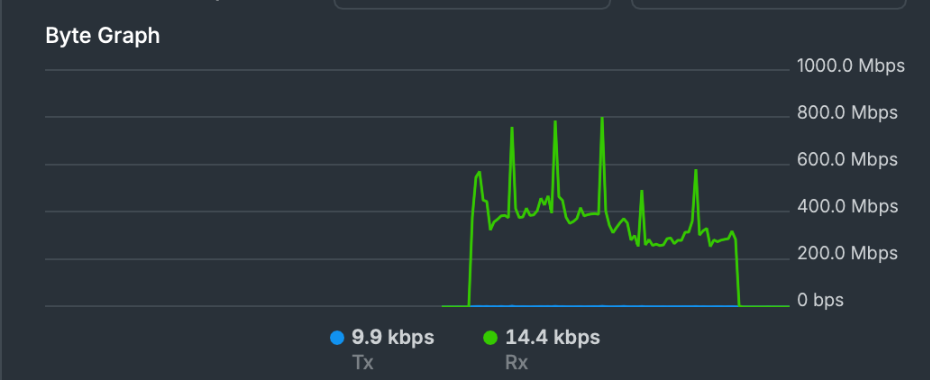
I get a very spiky throughput graph instead of a flat line.
In practice, the write speed seems to sit roughly around ~400 Mbps, with bursts above that, but it does not stay sustained.
My internet connection does not appear to be the issue. When I test WAN speed separately, I do not see this kind of behavior.
Throughput graph
Attached screenshot shows the typical pattern: bursty / spiky RX instead of a steady stream.
Disk test result
This is the RouterOS filesystem write test on the same disk:
[admin@RB5009UPr] > /disk test disk=usb1-part2 pattern=sequential type=filesystem thread-count=4 block-size=4K direction=write
Flags: R - RUNNING
Columns: SEQ, RATE, IOPS, BYTES, DISK, THREAD, TYPE, PATTERN, DIR, BSIZE, STATE
  SEQ  RATE         IOPS  BYTES      DISK        THREAD  TYPE        PATTERN     DIR    BSIZE  STATE
  19   636.9Mbps  19 437  75.9MiB    usb1-part2  0       filesystem  sequential  write   4096
  19   613.2Mbps  18 715  73.1MiB    usb1-part2  1       filesystem  sequential  write   4096
  19   584.3Mbps  17 832  69.7MiB    usb1-part2  2       filesystem  sequential  write   4096
  19   624.3Mbps  19 054  74.4MiB    usb1-part2  3       filesystem  sequential  write   4096
  19   2.4Gbps    75 038  293.1MiB   usb1-part2  TOT     filesystem  sequential  write   4096
  20   592.8Mbps  18 092  70.7MiB    usb1-part2  0       filesystem  sequential  write   4096
  20   567.4Mbps  17 316  67.6MiB    usb1-part2  1       filesystem  sequential  write   4096
  20   575.8Mbps  17 573  68.6MiB    usb1-part2  2       filesystem  sequential  write   4096
  20   607.1Mbps  18 528  72.4MiB    usb1-part2  3       filesystem  sequential  write   4096
  20   2.3Gbps    71 509  279.3MiB   usb1-part2  TOT     filesystem  sequential  write   4096
  21   589.4Mbps  17 989  70.3MiB    usb1-part2  0       filesystem  sequential  write   4096
  21   606.9Mbps  18 523  72.4MiB    usb1-part2  1       filesystem  sequential  write   4096
  21   596.8Mbps  18 214  71.1MiB    usb1-part2  2       filesystem  sequential  write   4096
  21   604.0Mbps  18 433  72.0MiB    usb1-part2  3       filesystem  sequential  write   4096
  21   2.3Gbps    73 159  285.8MiB   usb1-part2  TOT     filesystem  sequential  write   4096
R TOT  616.6Mbps  18 818  1617.2MiB  usb1-part2  0       filesystem  sequential  write   4096  run
R TOT  610.2Mbps  18 622  1600.4MiB  usb1-part2  1       filesystem  sequential  write   4096  run
R TOT  610.7Mbps  18 638  1601.8MiB  usb1-part2  2       filesystem  sequential  write   4096  run
R TOT  618.1Mbps  18 863  1621.1MiB  usb1-part2  3       filesystem  sequential  write   4096  run
  TOT  2.4Gbps    74 943  6.3GiB     usb1-part2  TOT     filesystem  sequential  write   4096
Real download test
And here is a real write-to-disk test using fetch:
[admin@RB5009UPr] > /tool fetch dst-path="usb1-part2/ubuntu.iso" mode=https url="https://cz.releases.ubuntu.com/releases/24.04.4/ubuntu-24.04.4-live-server-amd64.iso"
      status: finished
        code: 200
  downloaded: 3325654KiB
       total: 3325654KiB
    duration: 1m13s
That is about 3.17 GiB in 73 seconds, so roughly 43–46 MiB/s, which is around 350–380 Mbps sustained in a real-world transfer.
My questions
- Is this spiky pattern normal for SSD writes through RouterOS on RB5009?
- Is there any write buffer / cache / queue in RouterOS that can be tuned?
- Could this be a limitation of:
- USB stack
- SMB implementation
- filesystem layer
- single-threaded parts of
fetch - CPU-to-I/O pipeline inside RouterOS
- Has anyone managed to get consistently flat / sustained write throughput to USB SSD on RB5009 closer to gigabit speeds?
- Is there any recommended combination of:
- filesystem
- partitioning
- mount options
- USB enclosure / SSD type
- RouterOS version
that improves this?
Main point
What confuses me is this:
- the disk benchmark itself looks much faster
- WAN is not the bottleneck
- multiple SSDs show the same pattern
- but actual writes through the router still end up bursty and much slower
So I'm wondering whether RouterOS is buffering in small chunks, flushing intermittently, or simply cannot sustain higher end-to-end write throughput to USB storage.
Any real-world numbers from other RB5009 + USB SSD users would be very helpful.
Thanks.