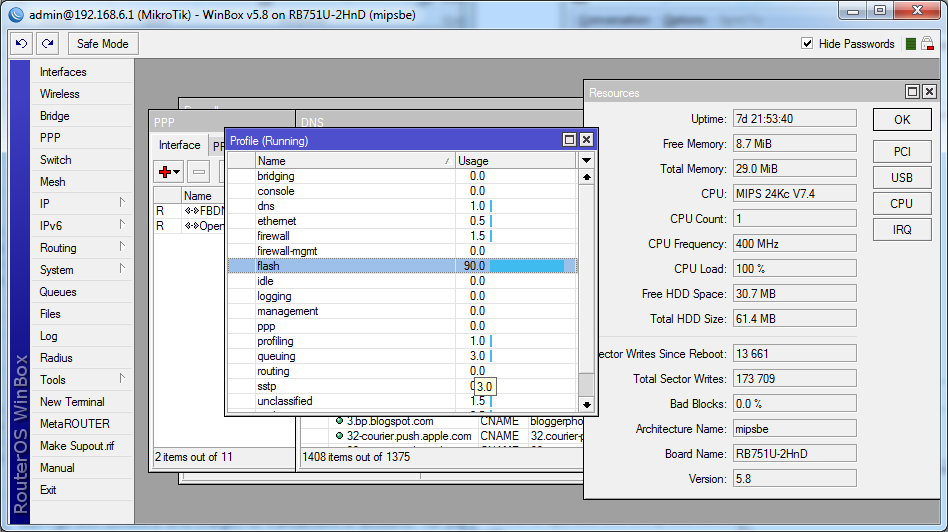
I seem to have a problem with my RB751-U-2nHD where it will spike to 100% CPU usage and sit there for several minutes making it almost totally unresponsive, if watchdog is enabled it will then eventually reboot itself.
I do have an SSTP tunnel established, however I don’t think it’s encryption causing the CPU spikes as there shouldn’t have been any significant traffic on that interface, infact Cacti shows 100Bits/s which is presumably is just background traffic to keep the link up, but may have missed some polls due my RB being unresponsive at the time.
The RB is connected to 2 ADSL2+ connections and is doing PPPoE for one of them but again there wasn’t much throughput on either of them at the time as far as I can tell.
Is there a way to find out whats causing the sudden high load?
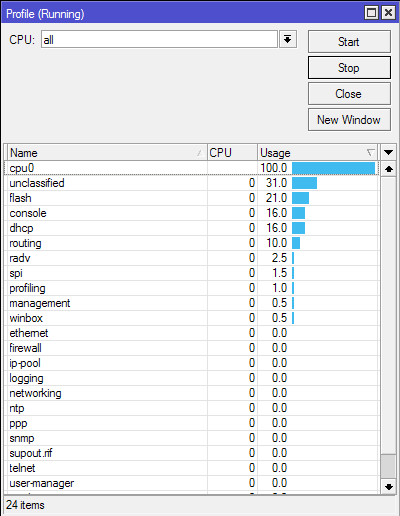
we need more information to figure out what causes this. If anyone has the same issue, please look in the “/tool profile” to see what consumes the CPU. If possible, and if the device is accessible, make a supout.rif file when this happens.
I couldn’t get a sup-out as I got kicked out of winbox before I could run one, watchdog was disabled so it wouldn’t have run one and in the end had to give up and powercycle the RB.
However I did manage to screencap this before It threw me out.
Edit:
Turned watchdog back on (I had turned it off when I was playing at one point and never re-enabled it) and set it up to autosupout and hopefully to also email me a copy of it.
If we’re lucky it will generate a dump just before rebooting itself.
just quick question guys… when hotspot service is enabled, did proxy service also automatically enabled? although when we disabled it before?.
i have the same issue 100% on flash too… makes the connection errors to my clients..
i have hotspot service enabled.. but not proxy… it show that when i check with " / ip proxy print " the result is " enabled : no "
BUT… when i cek my log…
it show that the proxy is active!!!..
are this the “cause” of 100% flash?
if not… / or
anybody using firewall filter rule to block connection to certain address?
I seem to have a problem with my RB751-U-2nHD where it will spike to 100% CPU usage and sit there for several minutes making it almost totally unresponsive, if watchdog is enabled it will then eventually reboot itself.