Looking over the specs on the new RDS2216 I can think of a number of interesting use cases, but one constraint that jumps out is that the 20 NMVe slots are all 7mm (half-height) ones and almost all of the current crop of enterprise U.2 SSDs on the market are 15mm. In fact it’s getting really hard to find 7mm models anywhere and they generally top out at 1TB
Does anyone know if I could use a 15mm U.2 drive and physically occupy two vertical slots, reducing the usable count to 10? (which is still not bad at 150TB raw with 15TB SSDs…) Noting that there’s pretty much nothing else on the market with 10 U.2 NVMe slots under $2K.
@antonsb - thanks for the link. I’m checking again, but on the Micron 7400 series for example, it’s only the 960GB model that is 7mm. As soon as I go up to the 1.92TB I’m at 15mm.
Better luck with the Samsung 9A3/983 series which appear to go all the way up to 7.68 in 7mm.
I was originally looking mostly at Kioxia & Intel which are like the Micron and go to 15mm once you get bigger than 960GB.
I guess Samsung’s getting my money (and Mikrotik of course)
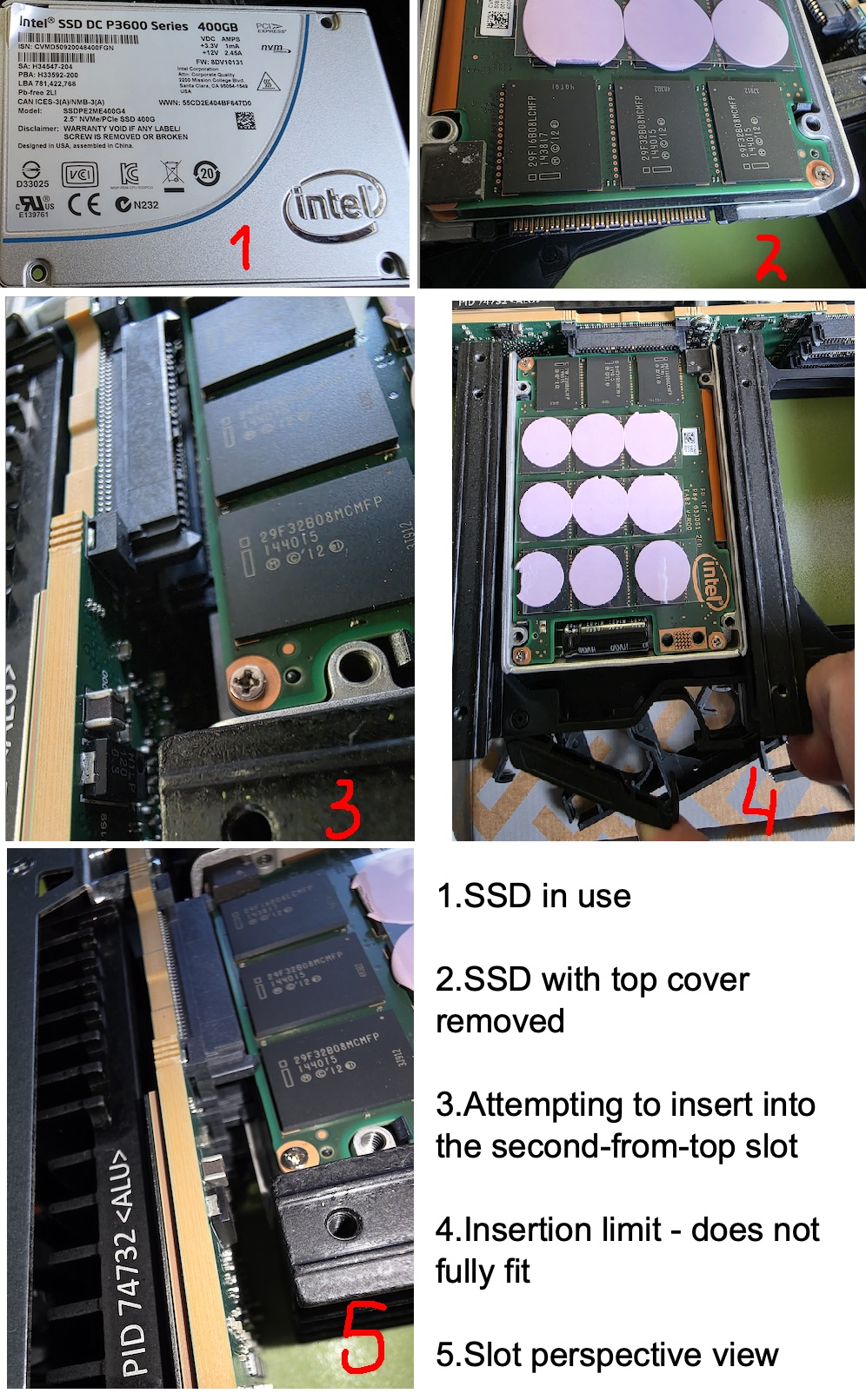
Can anyone check if I can squeeze a 15mm model into two slots by removing the top caddy? Asking for the many others with the same question…
I don’t think that can physically work, the connector for the top one would block you inserting the drive far enough to engage the connector on the bottom one.
Interesting to see where this product line will go, I think a version supporting 10x 15mm drives with twice the PCIe bandwidth to each drive (4 lanes instead of two) would make a ton of sense and demand very little engineering effort. But I totally get why they wouldn’t want to launch with two versions, the market for this is small enough as it is.
If this device can outperform regular intel xeon based box on mdraid performance + iSCSI - it will be a hit as inexpensive network flash datastore for virtualization. And if this device will support NVMEoF (NVME over RDMA) … Anyways we try to buy one and test as a networked iSCSI / NVMEoTCP datastore. But 7mm height is indeed a concern for future.
I was able to use OWC’s M.2/U.2’s adapter, they’re 9mm tall. You do sacrifice the slot above the adapter, but they fit, and in our lab setting we don’t need all 20 slots to be populated anyway.
In other words, 15mm should work as well, but you will likely have to sacrifice 2 slots for each disk you install.
Edit: after thinking about it, I think other commenters are correct, you will likely hit the U.2 connector right above your drive with a 15mm drive. I can only vouch for up to 9mm.
Edit 2: I can confirm 9mm is the max height. See pic.
I finally had some time to experiment with my fresh RDS:
Can anyone check if I can squeeze a 15mm model into two slots by removing the top caddy? Asking for the many others with the same question…
Unfortunately, the short answer is no.
I tested it with an Intel P4610, and I’m quite confident that other 15mm drives will behave the same way. (Please see the attached images.)
Smart! Time to dig out the modeling software... Out of curiosity can you tell if it gets very hot in there? Just thinking about whether I should be printing in PETG or ABS to avoid deformation (for my future RDS - still not in the budget)
Yeah, this is a real concern. I want to order one of these for use in my homelab running a single PE R7415 for PVE and Nextcloud running in a container on the RDS for private cloud storage and local backups, but I can’t find any 7mm U.2’s in the US, currently. Seems like there’s going to be a continued shortage here; anyone know is Mikrotik is planning to do anything about that? I could maybe get 9mm drives to work and only use 10x, but it seems like this would be great if it could run 15mm drives, even if it ended up being 2U….
I have just ordered some U.2 SFF-8639 extenders -- hoping to make it work with my "old" 155mm drives in the RDS2216 Did you by any chance have success with 3d-printing some tray substitute to make it work with these extenders? Are you willing to share the 3d model for printing? Any help will be greatly appreciated!
I'm a little bit wondering if someone could make an adapter with two SMD male connectors and one SMD female connectors, to combine the lanes back to x4 rather than x2 for 15mm drives, if the PCIe switch would accept that.
I was just thinking about buying a Rose, but realising it's limited to 7/9mm drives puts me off right now. I am not sure I want to go looking for more drives when I have 10*P4600 drives purchased last year.
And thinking more on that idea, it wouldn't be hard to make a simple metal/3d printed tray support to attach to that PCB and the SSD.

 Did you by any chance have success with 3d-printing some tray substitute to make it work with these extenders? Are you willing to share the 3d model for printing? Any help will be greatly appreciated!