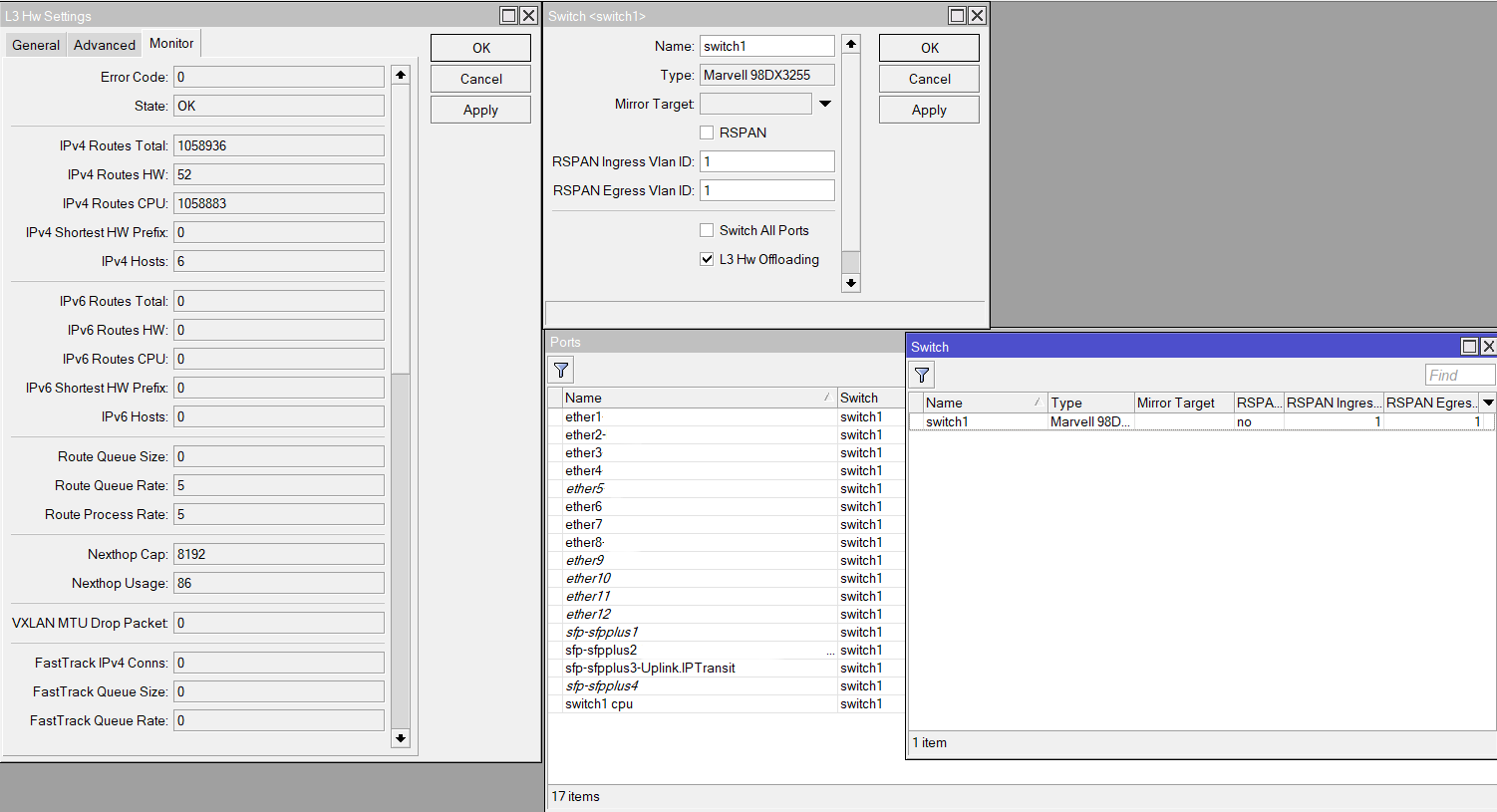
We are using CCR2116-12G-4S+ running RouterOS version 7.20.8 (long-term).
We configured the Router as a Border with peering to 2 Transits
1 Transit with around 1 million+ prefix count
1 Transit with around 200k+ prefix count
Interface configuration using vlan interfaces under sfpplus interface below.
And then we configure L3HW enabled on Switch > Settings. We enabled the L3HW Features so that we can maximize Switch Chip on traffic forwarding and minimalize overall CPU load. Right now we are at 20-35% average CPU load.
What is the best use case for our scenario using CCR2116 as a Border Router with L3HW enabled ?
Why is IPv4 Routes using more CPU instead of HW in L3HW Monitor Status? because I read at the documentation, CCR2xx Switch Chip can hold up to 36K routes.
I do not pretend to know exactly how this works - I am only just about to start down this rabbit hole but from what I understand of L3 Hardware Offloading :
If you have too many routes - it will process smaller subnets (/30, /29, /28 etc) until there is no space available for the next "entire" subnet.
As most Transits generally only provide /24 and larger subnets - and there is likely too many routes for the "next" subnet - It may be that all are dropped.
Again, I'm just interpreting - but if suspect if you have 10k "/24", 20k "/22" and 20k "/20", and 36K total for H/W Offload, all /24 and /22 will be processed, but anything more will be handed to CPU, as it would exceed 36k total...
You may be able to trick some of the routes to run over hardware with Route Filters - transforming, or splitting out Specific AS's to be processed via L3HW (again, if I am interpreting the information correctly). The above article also links to Route Selection and Filters to suggest examples - I suspect by suppressing the bulk with "suppress-hw-offload" - while "pre accepting" specific others.
Please, If I am wrong - feel free to correct me - but I suspect that your "/24" is already too many to handle with L3HW, so they have all been handed to CPU.
Are you able to report on performance thus far.
I have 2216's to replace 1016's that supplement our 1072's (and was looking to move them to Primary over the 1072's). are your 2116's performing OK?
If this does help - please let me know so I can bear it in mind for my build... If I am way off - also - appreciate the heads up.
Personally I’ve found it does little to no good to load the whole routing table, unless both of your providers are so optimized that you really need/want the routes from each one. It pays to understand how your providers are interconnected with other upstream connections. At some point, both of your providers merge or peer with other companies, and those companies carry the routes the rest of the way.
What I do is filter the number of routes that I “accept” (or that the router will insert into the routing table) to somewhere around 2-3 AS’s away. That ensures that I get the shortest paths for directly-connected clients of my peers, while filtering out stuff that’s so far away (other continents) that it doesn’t matter.
With a smaller subset of routes being accepted, I then get a higher rate of routes ending up in hardware. Particularly, you want your own IPs to be in hardware, since the vast majority of the traffic is inbound to your network/customers.
You can use rules like “set suppress-hw-offload [yes/no]” on your route filters to encourage certain routes to be in/out of L3HW offload. Networks that receive little traffic from you (i.e. out-of-country or out-of-continent) would be good to keep out of hw-offload, while highly-trafficked subnets (such as your own) should definitely be loaded.
I don’t remember the command line you can run, but it’s been discussed in several other posts on the forum. Look for posts by @raimondsp who seems to be the L3HW offload guru.
The documentation page says "up to 36k", not exactly 36k. The short explanation below the table states that:
Depends on the complexity of the routing table. Whole-byte IP prefixes (/8, /16, /24, etc.) occupy less HW space than others (e.g., /22). When the Routing HW table gets full, only routes with longer subnet prefixes are offloaded (/30, /29, /28, etc.) while the CPU processes the shorter prefixes. Users can fine-tune what routes to offload via routing filters (for dynamic routes) or suppressing hardware offload per switch port, static route or VLAN. IPv4 and IPv6 routing tables share the same hardware memory.
Partial Offloading was implemented as a workaround for cases where the routing table slightly exceeds the hardware capacity. Otherwise, adding just a few more routes would redirect all traffic to the CPU because the entire routing table cannot be stored in hardware memory.
Partial Offload is an emergency function, not an everyday feature to rely on.
Users are encouraged to limit the number of routes for hw-offload (e.g., via Route Filters) to avoid partial offloading. In a recent RouterOS version, we even added a warning to L3HW Monitor when Partial Offload is applied.
And for routes to be offloaded, you need to use correct configuration. Your screenshot suggest that VLANs are created directly on Ethernet, which currently does not support L3HW.
For L3HW VLAN routing, you need to add those VLAN interfaces on bridge with vlan-filtering=yes:
Thank you for your insight, it may be make a sense because 52 Routes processed viia HW is more likely coming from our downlinks that advertise more prefixes below /24 (/30, /29, etc) .
Because mostly that 1 mill+ prefixes that we received from Transits will likely a larger prefix (/24, /23, etc).
As for this, we recently use this 2116 as border router (before we use CCR1036, but sadly we partly encountered kernel error when the throughput going up suddenly) into production about 43d ago and just performing fine, with daily throughput around ~10G .
Yeah, before we migrate to CCR 2116 we filtered the prefixes we only want to accept.
But for some reason and analytical use we want all the prefixes is processed in Routing Table..
Maybe I will use that supress-hw-offload feature to prefixes I want to process via HW/Sw Chip, on our prefixes likely.
If we want to use this fine-tune, we could use supress-hw-offload at the Routing Filter rights? and then we can filter what prefixes that will processed via HW..
So maybe I will go through this, and filter our prefixes to offload and then the prefixes coming from Transit will just processed via CPU.