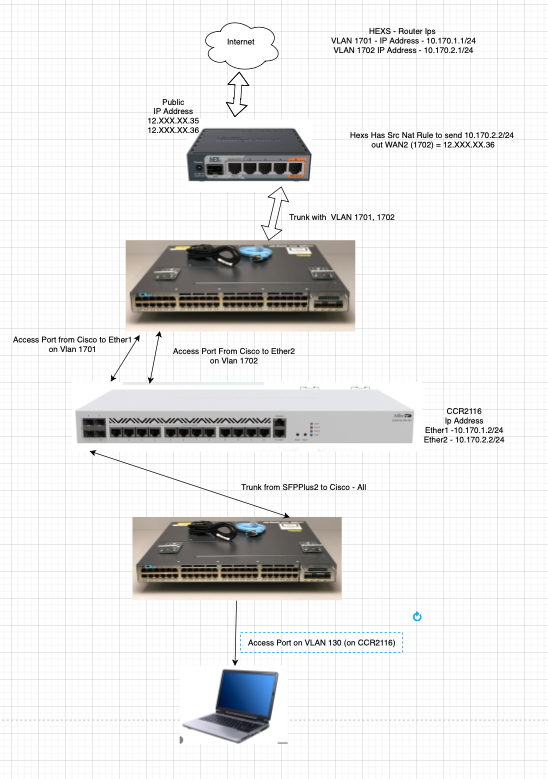
So I have a mikrotik router at my office that has 2 publics on it at the moment
ANd im using it to practice on a 2116 below
One office router I created 2 vlans that im using to throw down to a switch and then uplink the 2116 on 2 different ports with those two vlans
1701(wan1) and 1702(wan2)
On the Office mikrotik I create a Src nat rule so that the 1702 vlan uses the 2nd public. and when I use that on its face it works just fine. everything goes out the 2nd up I have assigned to vlan 1702
WAN 1 - 10.170.1.1/24 and WAN 2 10.170.2.1/24
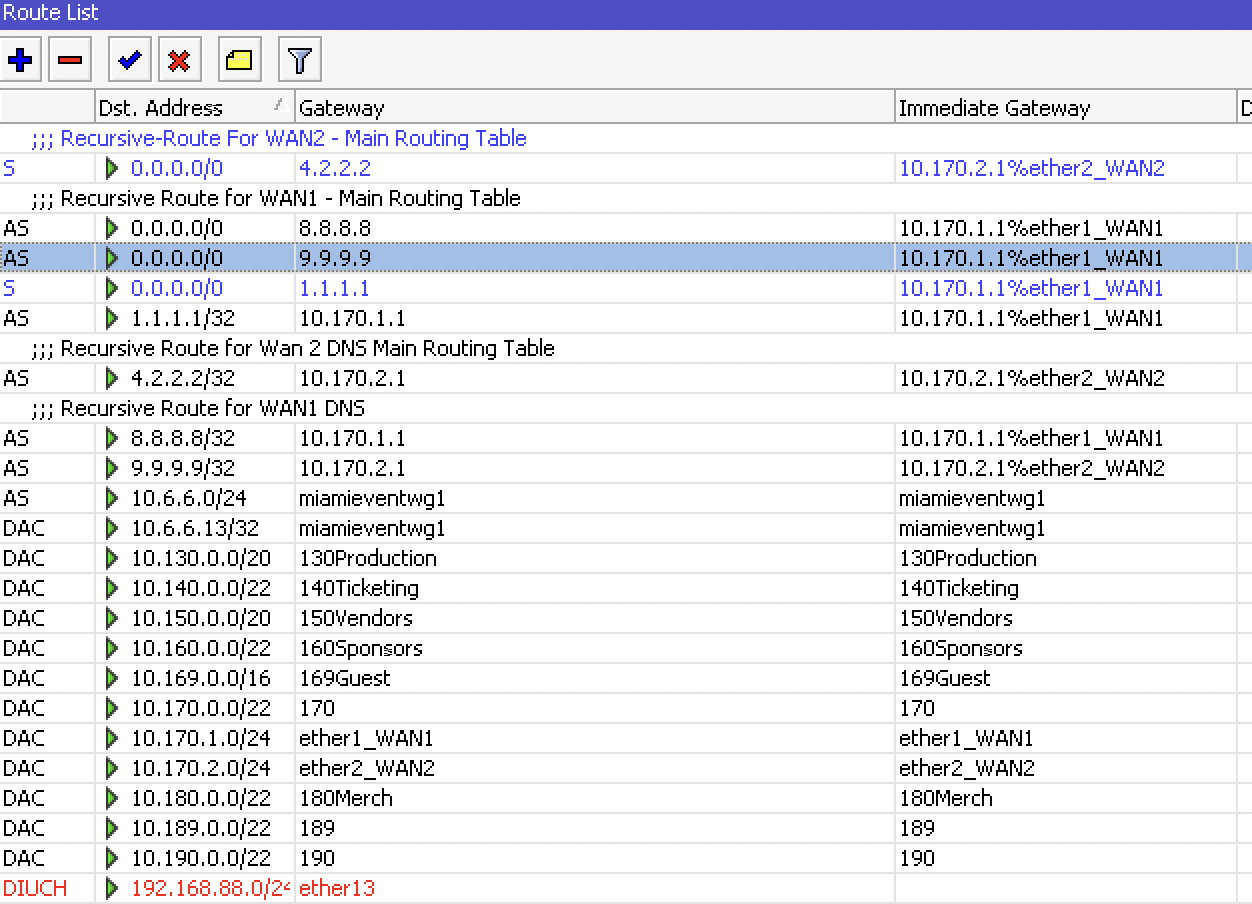
But now on the 2116 when I create the recursive routes and try and set them up for my Routing table WAN21 I cant get the Mangel rules to work. and in the routing table it keeps using my ether1(1701) interface as the immediate gateway even tho I have my recursive routes for that routing table set to WAN2, by adjusting the distances. I was hoping someone could look at my config and tell me what im doing wrong.
I posted about this before today but maybe I just over explained and wrote it bad.. Let me try and do this in parts cause I think this could be a factor to my problem. I have 2nd routing table and its not going to the internet using the route I intended it too..
using my wan2 gateway to get to 9.9.9.9, and then 0.0.0.0 → to 9.9.9.9.. but for some reason for that 2nd routing table it chooses to go to 0.0.0.0 on ether1 (not my wan 2)
When I use normal static routes ( not recursive) the src nat rules work just fine on the hex – so the hex is setup fine.. it justs gets weird on the ccr2116 with the 2nd routing table (WAN21) where the immediate gateway just never choses the right routes..
Well I dont understand the setup probably because its too complex. I dont see why the hex is doing any routing because you have the 2116.
I would do something like this on the hex.
Assumptions:
Two internet ( non-tagged ) connections come into the hex on ports1 and 2
The Managment/Trusted subnet on the network is 192.168.80.0/24 and the static IP of the hex is 192.168.80.80
/interface bridge
add ingress-filtering=no name=bridgehex vlan-filtering=yes
/interface ethernet
set [ find default-name=ether5 ] name=emergaccess
/interface vlan
add interface=bridgehex name=MG-vlan80 vlan-id=80  { mandatory, management vlan must be identified in /interface vlan - do not put any other vlans here!! }
/interface list
add name=management
/interface bridge port
add bridge=bridgehex ingress-filtering=yes frame-types=admit-only-untagged-and-priority-tagged interface=ether1  pvid=1701
add bridge=bridgehex ingress filtering=yes frame-types=admit-only-untagged-and-priority-tagged interface=ether2  pvid=1702
add bridge=bridgehex ingress-filtering=yes frame-types=admit-only-vlan-tagged interface=ether3 comment="trunk to cisco"
add bridge=bridgehex ingress filtering=yes frame-types=admit-only-untagged-and-priority-tagged interface=ether4  pvid=80 comment="management or spare port"
/ip neighbor discovery-settings
set discover-interface-list=management
/interface bridge vlan
add bridge=bridgehex tagged=ether3,bridgehex  untagged=ether4 vlan-ids=80
add bridge=bridgehex tagged=ether3  untagged=ether1 vlan-ids=1701
add bridge=bridgehex tagged=ether3  untagged=ether2 vlan-ids=1702
/interface list member
add interface=homeVlan list=management
add interface=emergaccess list=management
/ip address
add address=192.168.80.80/24 interface=MG-vlan80 network=192.168.80.0  comment="IP of hex on trusted subnet"
add address=192.168.36.1/24 interface=emergaccess network=192.168.36.0 comment="ether2 access off bridge"
/ip dns
set allow-remote-requests=yes servers=192.168.80.1  { Note: Done so all dns requests use trusted subnet }
/ip route
add disabled=no dst-address=0.0.0.0/0 gateway=192.168.80.1 comment="ensures route avail through trusted subnet gateway"
/system ntp client
set enabled=yes
/system ntp client servers
add address=192.168.80.1
/tool mac-server
set allowed-interface-list=none
/tool mac-server mac-winbox
set allowed-interface-list=management
Thus the CR2116 is the only router in the mix, the HEX is simply used to capture the incoming traffic from two modems for example and through switches terminate the incoming wan traffic at the 2116, the hex does not provide routing. No weird NAT rules required etc…
Trunk port from hex to cisco, trunk port from cisco to CCR2116.
Im preparing for an event in 3 weeks. At that event I’ll have two totally different circuits for my internet handoff. So 2 different blocks of Public IPS. Since I have 2 publics on my office router but on the same block. What I was going for was to try and simulate the conditions of the internet ill be handed in the upcoming event. When not using recursive routes at all, I can make the 2116 work as intended. It is only when trying to create a 2nd routing table with recursive routes, that the immediate gateway just never works as id want them too.
I.e.
WAN1 - 10.170.1.2
WAN2 - 10.170.2.1
Main Routing table
8.8.8.8>10.170.1.1 - immediategw=10.170.1.1 Looks good
0.0.0.0>8.8.8.8 - immediategw=10.170.1.1 Distance=1- look good
4.2.2.2>10.170.2.1 - immediategw=10.170.2.1 - looks good
0.0.0.0>4.2.2.2 - immediategw=10.170.2.1 Distance=2 looks good
WAN21 Routing Table
9.9.9.9>10.170.2.1 Distance=1 immediategw=10.170.2.1 -looks good
0.0.0.0>9.9.9.9 Distance=1 immedategw=10.170.1.1. <—THIS IS WHERE I WOULD LOSE MY MINE!! Why is the gateway not the 10.170.2.1 - there is a route for it
9.9.9.10>10.170.1.1 Distance=2 immediategw=10.170.1.1
0.0.0.0>10.170.1.1 Disance=2 immediategw=10.170.1.1
– NEWS Just IN –
Just messing around now trying to re added the routes to my WAN21 Routing table and messing with the scope/traget scopes.. completely not understand it by the way, just playing around.. it seems to have worked as I intended.
8   s   ;;; WAN21- Using Default Route to Internet with Wan1
         dst-address=0.0.0.0/0 routing-table=WAN21 pref-src="" gateway=9.9.9.10 immediate-gw=10.170.1.1%ether1_WAN1 check-gateway=ping distance=2 scope=30
         target-scope=31 suppress-hw-offload=no

 9  As + ;;; WAN21- Using Default Route to Internet with Wan2
         dst-address=0.0.0.0/0 routing-table=WAN21 pref-src="" gateway=9.9.9.9 immediate-gw=10.170.2.1%ether2_WAN2 check-gateway=ping distance=1 scope=20
         target-scope=22 suppress-hw-offload=no

10   s   ;;; WAN21 - 2
         dst-address=0.0.0.0/0 routing-table=WAN21 pref-src="" gateway=10.170.1.1 immediate-gw=10.170.1.1%ether1_WAN1 check-gateway=ping distance=2 scope=30
         target-scope=10 suppress-hw-offload=no

11  As + ;;; WAN21 - 1
         dst-address=0.0.0.0/0 routing-table=WAN21 pref-src="" gateway=10.170.2.1 immediate-gw=10.170.2.1%ether2_WAN2 check-gateway=ping distance=1 scope=30
         target-scope=10 suppress-hw-offload=no

12  As   dst-address=9.9.9.10/32 routing-table=WAN21 pref-src="" gateway=10.170.1.1 immediate-gw=10.170.1.1%ether1_WAN1 distance=2 scope=10 target-scope=10
         suppress-hw-offload=no
I am not comprehending how to use the scope/target scopes apparently ?
I understand Primary and Failover.
The other requirements seem vague to me.
Can you provide more clarification and without any config talk .
a. identify user(s)/device(s) or groups of users/devices
b. identify what traffic they need to accomplish.
In a perfect world I want all clients on all networks to just using the main routing table. All devices. All Networks.. Phones, Computers, POS devices Management Devices.. whatever.. If for any reason the bandwidth looks to be getting close to being congested or maxed out, Id want to be able to move subnets over to use the 2nd connection as the its Primary want to then use both connections to split the traffic. And of course regardless of which ever connection they are on, if either goes out for any reason in both WAN configurations, all the networks would be able to fail over.
Hope im making myself clear. I process everything 10X slower then the slowest human
Not a a problem but why not use PCC then and the traffic will always be shared more or less equally between both ISPs, no monitoring or making changes on the fly necessary.
Logic works, whimsy does not LOL.
Knowing all the rules and/or limitations beforehand is essential to a good working config.
For example you whimsically want all users to use WAN1 most of the time… WHY what is the logic, when you have two available?
Maybe im coming off my old situation where my connections were different.
The event previous to this I have AN AMAZING SUPER SOLID in a data center 10 gig Internet connection and another that was just 1, so I defaulted to always using WAN for everything. Im willing to adapt to a better config.. not a doubt..
Now part of me just wants to understand what the hell is up these pesky immediategw not making any sense to me.
Sounds like PCC is the way to go.
A. do you have any external originating traffic heading to the router or the network ( aka to config the router, or to port forward to devices )?
B. Will all the users/subnets on the router be subject to PCC, ( are there some subnets or users that have no option but to go out a certain WAN )
Why do you have three WANs? set [ find default-name=ether1 ] comment=WAN1 name=ether1WAN1
set [ find default-name=ether2 ] comment=WAN2 name=ether2_WAN2
set [ find default-name=sfp-sfpplus1 ] name=sfp-sfpplus1_WAN_
I mean as long as things are going to work, the pos networks and merchant networks are the ones I would have worried about the connections being blocked or not accept because they are originating from different sources. As far as port porward I dont suspect anything anything.
My thing would be that, at these events.. the needs change in a moments notice. Ive watch a few videos on PCC and I kind of get it, but I dont know if im ready to jump in really on the start changing things in the chaos of a festival network. I mean im definitely willing to get a lab going and challenge myself.
Those mangle rules with 2 different routing tables worked so nice tho… lol I really want to understand these damn scopes or whatever it was that finally get my immediategw’s to work properly..