Recursive Routes in RoS 7.x

Hi,
I saw it reported elsewhere that recursive routes and gateway tracking don’t work in RoS 7.x, and I can see a thread here where someone is having the same issue with no actual fix reported. Is this still an issue? At the moment I rely on this feature on my RB4011 to fail over between ADSL on a Zyxel router, and LTE on a Mikrotik SXT.

Thanks, Tony S

Interested in an answer since I use recursive routes to manage failover between 2 links.

In ROS 7 “target scope > target scope resolving route” . This is not checked in ROS 6.

http://forum.mikrotik.com/t/recursive-routes/147430/6

Thanks. Can I just be clear as I’m not sure which is which, but it looks like the target scope needed to be at least equal in RoS 6, but now needs to be greater. Could you give a concrete example, for example in my network ..
(1) Remote gateway has scope=10 and target-scope=10
(2) Route via that gateway has scope=10 and target-scope=30

If I understand correctly one of those 10 figures needs to be 11, but I’m not quite clear which. The description "In ROS 7 “target scope > target scope resolving route” doesn’t quite make sense, and in my example the target-scope of the route (30) is already greater than the target-scope of the gateway (10).

Again if I understand correctly, in RoS 6 the match is between target-scope of the gateway, and scope (not target-scope) of the route.

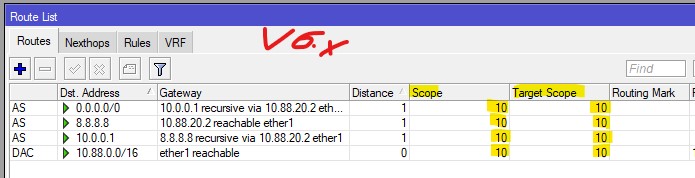
In ROSv6, everythig was easy and logical:
Screenshot 2022-01-08 153040.jpg
Now, MT came up with V7 and made everything overly complicated…
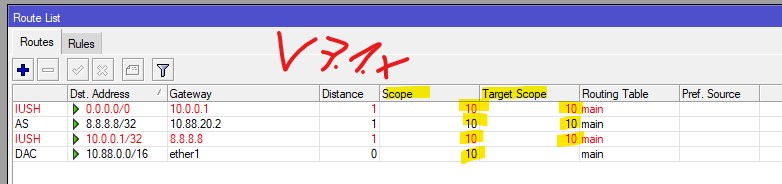
The same config doesnt work anymore:
Screenshot 2022-01-08 153109.jpg
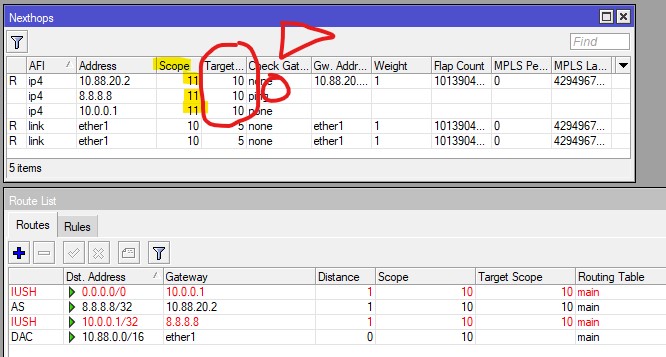
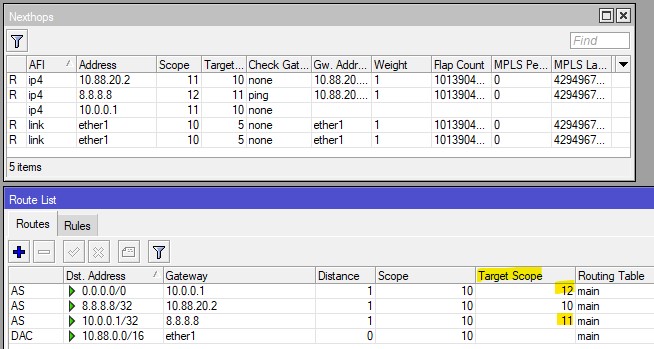
Thats because they invented a hidden +1 for each recursive route, you can see this under Route->Nexthop, the 11:
Screenshot 2022-01-08 153407.jpg
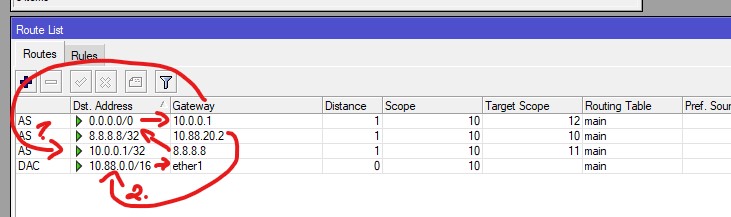
This means you have to go from the point of the exit-interface back to the 0.0.0.0/0 route and add alway +1:
Screenshot 2022-01-08 153618.jpg
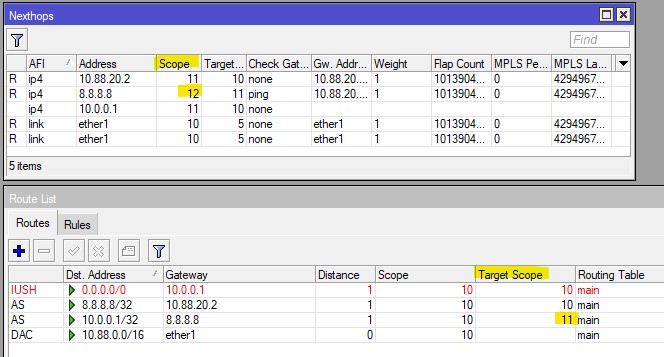
The next route got now a 12, so we have to define a 12 for the next route:
Screenshot 2022-01-08 153718.jpg
This makes it clearer (or not):
Screenshot 2022-01-08 154015.jpg
0.0.0.0/0 goes through 10.0.0.1 = +1 (10+2 or 10+1+1)
10.0.0.1 goes through 8.8.8.8 = +1 (10+1)
8.8.8.8 goes through 10.88.20.2 = base (10)


PS: I cant express my feeling in words how much I hate MT for doing such s*it!! For not saying a single word, for not documenting such essential things and for even have the (not automatically refreshing) Nexthop-window now separated from the Route-Window. And over all, WHY DO NOT SIMPLY IMPLEMENT A WAN CHECK LIKE ANY OTHER VENDOR? Just my 5ct…

They already started with something, see https://help.mikrotik.com/docs/display/ROS/Detect+Internet. Only so far it doesn’t seem to be very useful. It can sort interfaces and add them to interface lists, but what use is that?

The RoS gateway tracking and recursive route function is miles more useful. For example I have some traffic routed to ADSL as first choice, some routes via LTE, and both will fail over if either of those Internet connections goes down. You can’t do anything remotely like that with Detect Internet.

Cisco’s IP SLA and Object Tracking is better still, with inherent support for multiple and/or targets and configurable polling, failover and fail back timing. I had hoped that Mikrotik might have added some of these into RoS 7.x

I’ve just done some testing with a CHR in GNS3 using 7.1.1 and I must say it doesn’t work or look like your screenshots. In fact it appears to work exactly the same as in RoS 6, gateway has Scope=10 and Target-Scope=10. And the default route relying on the gateway has the default values of 10 and 30.

There’s no Next Hop tab on the gui, nor can it be accessed from the terminal.

Route failover does work, the only issue being the display where in normal mode the active default route is flagged “AS” and the failover is flagged “S” and shown in blue. In failover, when the gateway is unreachable the preferred default route changes from “AS” to “IUSH” and shows in red. The failover route which is now in service still shows “S” and in blue.

A change from 7.1 to 7.1.1 maybe?

Or is it platform dependant, so what works on the CHR may not work for say RB4011 or Hap AC.

Regardless can I make the changes now on my version 6, without detrimental effects so when I switch to 7.12 etc. It will keep working? In other words no harming in adding greater values for Target Scope on vers6?

I’m actually wondering is Guscht’s example is a bit more complex as has three layers. To put it simply in my case I have two ..
Gateway 8.8.8.8 routes via a local next hop
Route 0.0.0.0 routes via 8.8.8.8

He has three layers …
Gateway 8.8.8.8 routes via local next hop
Gateway 10.0.0.1 routes via 8.8.8.8
Route 0.0.0.0/0 routes via 10.0.0.1

It’s not clear to my why not have 0.0.0.0/0 via 8.8.8.8 and cut out the middleman, or to put it another way what does 10.0.0.1 add to the mix. He’s also set Target Scope to 10 for everything, where I have only set that for the gateways.

Route failover does work, the only issue being the display where in normal mode the active default route is flagged “AS” and the failover is flagged “S” and shown in blue. In failover, when the gateway is unreachable the preferred default route changes from “AS” to “IUSH” and shows in red. The failover route which is now in service still shows “S” and in blue.

The route flags seem to be just a glitch in Winbox not refreshing the display. If you switch away and then back the failover route is flagged “AS” and is no longer blue.

Hello,

I followed this guide to setup wan failover https://help.mikrotik.com/docs/pages/viewpage.action?pageId=26476608

but my recursive routes are invalid for some reason. Can someone help me figure out what is going on? At ROS6 didn’t had problems with mangle and static routing.

what is wrong with my setup?

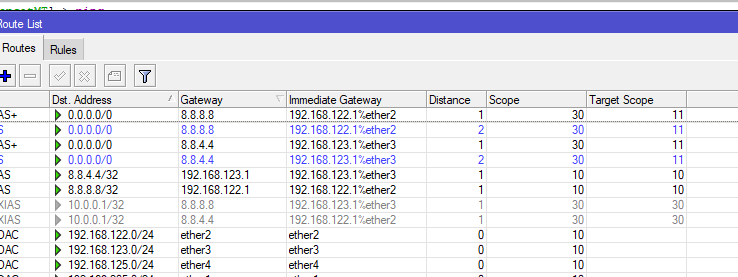
In my opinion it is buggy in 7.1.1 in that the values needed for Scope and Target Scope seem inconsistent between one configuration and another. Just simulating your routing, the routes can up when I changed Target Scope on all four 0.0.0.0/0 routes to be 11 rather than 10.

Whether that will achieve what you want is another matter. I can’t understand why you don’t just have one route via 8.8.8.8 and one via 8.8.4.4
Routes Screenshot_60.png

Recursive routing from ros 6 to ros7.
I’ve made some changes in scope and target scope for this to work. It is working now but every 2-3 minutes I have a small lost of internet connection, maybe a second or two, but enough to stop my streaming…

Can someone check the rules and advise?

/ip route
add check-gateway=ping disabled=no distance=1 dst-address=1.1.1.1/32 gateway=80.106.125.100 pref-src="" routing-table=main scope=10 suppress-hw-offload=no target-scope=10
add check-gateway=ping disabled=no distance=1 dst-address=1.0.0.1/32 gateway=192.168.9.1 pref-src=0.0.0.0 routing-table=main scope=10 suppress-hw-offload=no target-scope=11
add check-gateway=ping disabled=no distance=1 dst-address=0.0.0.0/0 gateway=1.1.1.1 pref-src="" routing-table=main scope=30 suppress-hw-offload=no target-scope=11
add disabled=no distance=2 dst-address=0.0.0.0/0 gateway=1.0.0.1 pref-src=0.0.0.0 routing-table=main scope=30 suppress-hw-offload=no target-scope=12
add disabled=yes distance=1 dst-address=0.0.0.0/0 gateway=192.168.9.1 pref-src="" routing-table=main scope=30 suppress-hw-offload=no target-scope=10

I have 2 WAN, 1 DSL line and 1 LTE. I want failover only, if the DSL is down then route at internet from LTE.

I tried both setups with scopes 11, they are valid but i don’t have internet at all. Also tried only routes from 8.8.8.8 and 8.8.4.4 but still no internet. Now I left 1 route 0.0.0.0/0 with the gateway from the DSL it works, internet connectivity is up.

I can’t understand what is going on…

Can you describe your network in a bit more detail? Your screenshot shows two next-hop gateways, one 91.138.169.236 via ether5, is that your DSL gateway. And one 192.168.88.1 via ether1, is that LTE via a separate router?

Once you changed the scope settings, and all your routes were up then if it worked the same as my test you would have had two default routes live, with the same preference, one via 91.138.169.236 and one via 192.168.88.1. So it would have been sending packets indiscriminately via or either of those paths. It doesn’t sound as if that’s what you want. What you should have is your 0.0.0.0/0 route via 8.8.8.8 set as distance=1, and the route via 8.8.4.4 as distance=2. You only need one of each.

add check-gateway=ping disabled=no distance=1 dst-address=0.0.0.0/0 gateway=8.8.8.8 routing-table=main scope=30 suppress-hw-offload=no target-scope=11
add check-gateway=ping disabled=no distance=2 dst-address=0.0.0.0/0 gateway=8.8.4.4 routing-table=main scope=30 suppress-hw-offload=no target-scope=11

Alternatively, if your LTE is purely a backup then there’s no need to test whether it’s up or not. You will be sending data there only if your DSL is down and there is no other option. So just add the route as a normal static route with a higher distance.

add check-gateway=ping disabled=no distance=1 dst-address=0.0.0.0/0 gateway=8.8.8.8 routing-table=main scope=30 suppress-hw-offload=no target-scope=11
add check-gateway=ping disabled=no distance=2 dst-address=0.0.0.0/0 gateway=192.168.88.1 routing-table=main scope=30 suppress-hw-offload=no target-scope=10

Just as a matter of good practice I wouldn’t use 8.8.8.8 or 8.8.4.4 as recursive gateways, for a couple of reasons. (1) Google’s DNS servers are known to deprioritise ping replies, so you may get some false alarms. (2) In your case you are forcing 8.8.8.8 over DSL only, so it will be inaccessible if the DSL is down, meaning it can’t be used for DNS during failover. Instead I suggest using something specific to your DSL provider, that you don’t mind losing access to if the DSL is down. For example their own DNS, or NTP server or a gateway or something.

You are right, one gateway is the DSL and the 192.168.88.1 via ether1 is a seperate LTE router (WAP LTE)

This is my routes now with the distances, you are right about Google DNS, i will change them with my ISPs DNS for checking.

As you see, I don’t have internet but i don’t know what is wrong with the distances. Every route has 2 DNS checks, 8.8.8.8 and 8.8.4.4.

Please advice

So you have an active route to each ISP, both with Distance=1, and a standby route also to each ISP both with Distance=2. No wonder your router is confused!

And I didn’t notice, or maybe you didn’t say, that you are also using separate routing tables. Are you marking or classifying your traffic so that it knows when to use “to_ISP1” or “to_ISP2” rather than “main”? Can you describe the function that you are trying to achieve? Earlier you said “I have 2 WAN, 1 DSL line and 1 LTE. I want failover only, if the DSL is down then route at internet from LTE.” but separate routing tables look like you’re trying to steer some traffic preferentially to ISP1 and some to ISP2.

I also note your comment “Every route has 2 DNS checks, 8.8.8.8 and 8.8.4.4” again that is not correct for failover. If either of the two checks pass then both routes will be active, if they both fail then both routes will go down. That is not a failover configuration, what you want is one route to stay up if the check(s) pass, and the other to take its place if the checks fail.

Can you paste your full configuration, so we can see if there are any other funnies lurking?

Yes you are right, the config is wrong, i copied an old config with load balancing (PCC) that I had 2 route checks concurrently.

I have 2 route table tables and i use mangle rules, is that wrong?

My concept is to have the LTE as hot standby, when ADSL goes down the traffic is routed to LTE.

These are the mangle rules :

these are the 2 route tables:

Is there any simpler way to achive a simple wan failover?

this is my config:

/interface bridge
add admin-mac=48:8F:5A:AC:D6:EB arp=proxy-arp auto-mac=no comment=defconf \
    name=bridge
/interface wireless
set [ find default-name=wlan1 ] band=2ghz-b/g/n country=greece disabled=no \
    distance=indoors frequency=2462 installation=indoor mode=ap-bridge ssid=\
    XXXX wireless-protocol=802.11 wps-mode=disabled
set [ find default-name=wlan2 ] band=5ghz-a/n/ac channel-width=\
    20/40/80mhz-XXXX country=greece disabled=no distance=indoors frequency=\
    5220 installation=indoor mode=ap-bridge ssid=XXXX \
    wireless-protocol=802.11 wps-mode=disabled
/interface vlan
add interface=ether1 name=vlan100_managment vlan-id=100
/interface list
add comment=defconf name=WAN
add comment=defconf name=LAN
/interface lte apn
set [ find default=yes ] ip-type=ipv4
/interface wireless security-profiles
set [ find default=yes ] authentication-types=wpa2-psk eap-methods="" \
    group-ciphers=tkip,aes-ccm mode=dynamic-keys supplicant-identity=MikroTik \
    unicast-ciphers=tkip,aes-ccm
/ip ipsec peer
# This entry is unreachable
add name=l2tp passive=yes
/ip ipsec profile
set [ find default=yes ] dh-group=modp1024 enc-algorithm=aes-256,3des
/ip ipsec proposal
set [ find default=yes ] enc-algorithms=aes-256-cbc,3des pfs-group=none
/ip pool
add name=dhcp_pool0 ranges=10.0.0.100-10.0.0.199
/ip dhcp-server
add address-pool=dhcp_pool0 interface=bridge name=dhcp1
/ppp profile
add bridge=bridge dns-server=1.1.1.1,1.0.0.1 local-address=10.0.0.1 name=\
    ipsec_vpn remote-address=dhcp_pool0 use-encryption=required use-mpls=yes
/queue type
set 0 kind=sfq
add kind=sfq name=qos
/queue tree
add bucket-size=0.01 max-limit=9M name=DOWN parent=bridge queue=default
add name="1. VOIP" packet-mark=VOIP parent=DOWN priority=1 queue=default
add name="2. DNS" packet-mark=DNS parent=DOWN priority=2 queue=default
add name="3. ACK" packet-mark=ACK parent=DOWN priority=3 queue=default
add name="4. UDP" packet-mark=UDP parent=DOWN priority=3 queue=default
add name="5. ICMP" packet-mark=ICMP parent=DOWN priority=4 queue=default
add name="6. HTTP" packet-mark=HTTP parent=DOWN priority=5 queue=default
add name="7. HTTP_BIG" packet-mark=HTTP_BIG parent=DOWN priority=6 queue=\
    default
add name="8. QUIC" packet-mark=QUIC parent=DOWN priority=7 queue=default
add name="9. OTHER" packet-mark=OTHER parent=DOWN queue=default
add bucket-size=0.01 max-limit=700k name=UP parent=ether5 queue=default
add name="1. VOIP_" packet-mark=VOIP parent=UP priority=1 queue=default
add name="2. DNS_" packet-mark=DNS parent=UP priority=2 queue=default
add name="3. ACK_" packet-mark=ACK parent=UP priority=3 queue=default
add name="4. UDP_" packet-mark=UDP parent=UP priority=3 queue=default
add name="5. ICMP_" packet-mark=ICMP parent=UP priority=4 queue=default
add name="6. HTTP_" packet-mark=HTTP parent=UP priority=5 queue=default
add name="7. HTTP_BIG_" packet-mark=HTTP_BIG parent=UP priority=6 queue=\
    default
add name="8. QUIC_" packet-mark=QUIC parent=UP priority=7 queue=default
add name="9. OTHER_" packet-mark=OTHER parent=UP queue=default
/routing bgp template
set default as=65530 disabled=no name=default output.network=bgp-networks
/routing ospf instance
add name=default-v2
/routing ospf area
add disabled=yes instance=default-v2 name=backbone-v2
/routing table
add fib name=to_ISP1
add fib name=to_ISP2
/interface bridge port
add bridge=bridge comment=defconf ingress-filtering=no interface=ether2
add bridge=bridge comment=defconf ingress-filtering=no interface=ether3
add bridge=bridge comment=defconf ingress-filtering=no interface=wlan1
add bridge=bridge comment=defconf ingress-filtering=no interface=wlan2
add bridge=bridge ingress-filtering=no interface=vlan100_managment
/ip neighbor discovery-settings
set discover-interface-list=LAN
/ipv6 settings
set disable-ipv6=yes max-neighbor-entries=8192
/interface l2tp-server server
set authentication=mschap2 default-profile=ipsec_vpn enabled=yes use-ipsec=\
    required
/interface list member
add interface=bridge list=LAN
add interface=vlan100_managment list=LAN
add interface=ether5 list=WAN
add interface=ether4 list=WAN
/ip address
add address=10.0.0.1/24 comment=defconf interface=bridge network=10.0.0.0
add address=91.138.169.238/30 interface=ether5 network=91.138.169.236
add address=192.168.88.100/24 interface=ether4 network=192.168.88.0
/ip cloud
set ddns-enabled=yes ddns-update-interval=1m
/ip dhcp-client
add disabled=yes interface=ether4
/ip dhcp-server lease
add address=10.0.0.200 client-id=1:0:15:5d:1:fa:0 mac-address=\
    00:15:5D:01:FA:00 server=dhcp1
add address=10.0.0.210 client-id=1:0:11:32:c9:17:5f mac-address=\
    00:11:32:C9:17:5F server=dhcp1
add address=10.0.0.211 client-id=1:0:25:36:51:ac:c3 mac-address=\
    00:25:36:51:AC:C3 server=dhcp1
add address=10.0.0.250 client-id=1:4c:cc:6a:96:c8:35 mac-address=\
    4C:CC:6A:96:C8:35 server=dhcp1
add address=10.0.0.212 client-id=1:b0:e8:92:f8:c:11 mac-address=\
    B0:E8:92:F8:0C:11 server=dhcp1
add address=10.0.0.201 client-id=1:24:28:fd:8d:eb:e7 mac-address=\
    24:28:FD:8D:EB:E7 server=dhcp1
add address=10.0.0.202 client-id=1:24:28:fd:81:7b:e9 mac-address=\
    24:28:FD:81:7B:E9 server=dhcp1
add address=10.0.0.249 client-id=\
    ff:d5:35:1e:44:0:2:0:0:ab:11:ba:e:80:ca:af:32:5c:a4 mac-address=\
    00:15:5D:01:FA:05 server=dhcp1
/ip dhcp-server network
add address=10.0.0.0/24 dns-server=1.1.1.1,1.0.0.1 gateway=10.0.0.1
/ip dns
set allow-remote-requests=yes servers=1.1.1.1,1.0.0.1
/ip dns static
add address=192.168.88.1 comment=defconf name=router.lan
/ip firewall address-list
add address=voips.modulus.gr list="Modulus SIP"
/ip firewall filter
add action=accept chain=input dst-port=8291 in-interface-list=WAN protocol=\
    tcp
add action=accept chain=input dst-port=1701 protocol=udp
add action=accept chain=input dst-port=4500 protocol=udp
add action=accept chain=input dst-port=500 protocol=udp
add action=accept chain=input protocol=ipsec-esp
add action=accept chain=forward disabled=yes dst-address=192.168.2.0/28 \
    src-address=10.0.0.0/24
add action=accept chain=forward disabled=yes dst-address=10.0.0.0/24 \
    src-address=192.168.2.0/28
add action=accept chain=input comment=\
    "defconf: accept established,related,untracked" connection-state=\
    established,related,untracked
add action=drop chain=input comment="defconf: drop invalid" connection-state=\
    invalid
add action=accept chain=input comment="defconf: accept ICMP" protocol=icmp
add action=accept chain=input comment=\
    "defconf: accept to local loopback (for CAPsMAN)" dst-address=127.0.0.1
add action=drop chain=input comment="defconf: drop all not coming from LAN" \
    in-interface-list=!LAN
add action=accept chain=forward comment="defconf: accept in ipsec policy" \
    ipsec-policy=in,ipsec
add action=accept chain=forward comment="defconf: accept out ipsec policy" \
    ipsec-policy=out,ipsec
add action=accept chain=forward comment=\
    "defconf: accept established,related, untracked" connection-state=\
    established,related,untracked
add action=drop chain=forward comment="defconf: drop invalid" \
    connection-state=invalid
add action=drop chain=forward comment=\
    "defconf: drop all from WAN not DSTNATed" connection-nat-state=!dstnat \
    connection-state=new in-interface-list=WAN
/ip firewall mangle
add action=mark-connection chain=prerouting comment=DNS connection-state=new \
    new-connection-mark=DNS passthrough=yes port=53 protocol=udp
add action=mark-packet chain=prerouting connection-mark=DNS new-packet-mark=\
    DNS passthrough=no
add action=mark-connection chain=postrouting connection-state=new \
    new-connection-mark=DNS passthrough=yes port=53 protocol=udp
add action=mark-packet chain=postrouting connection-mark=DNS new-packet-mark=\
    DNS passthrough=no
add action=mark-connection chain=prerouting comment="VOIP GW" \
    new-connection-mark=VOIP passthrough=yes src-address-list="Modulus SIP"
add action=mark-connection chain=prerouting comment=VOIP new-connection-mark=\
    VOIP passthrough=yes port=\
    6050,5090,5060-5062,50000-50019,50020-50039,50040-50059,9000-10999 \
    protocol=udp
add action=mark-packet chain=prerouting connection-mark=VOIP new-packet-mark=\
    VOIP passthrough=no
add action=mark-packet chain=prerouting comment="MARK DSCP 46" disabled=yes \
    dscp=46 new-packet-mark=VOIP packet-mark=VOIP passthrough=no
add action=change-dscp chain=postrouting comment=\
    "VOIP mark DSCP  for our VOIP gateways" dst-address-list="Modulus SIP" \
    new-dscp=46 packet-mark=VOIP passthrough=yes
add action=mark-connection chain=prerouting comment=QUIC connection-state=new \
    new-connection-mark=QUIC passthrough=yes port=80,443 protocol=udp
add action=mark-packet chain=prerouting connection-mark=QUIC new-packet-mark=\
    QUIC passthrough=no
add action=mark-connection chain=prerouting comment=UDP connection-state=new \
    new-connection-mark=UDP passthrough=yes protocol=udp
add action=mark-packet chain=prerouting connection-mark=UDP new-packet-mark=\
    UDP passthrough=no
add action=mark-connection chain=prerouting comment=ICMP connection-state=new \
    new-connection-mark=ICMP passthrough=yes protocol=icmp
add action=mark-packet chain=prerouting connection-mark=ICMP new-packet-mark=\
    ICMP passthrough=no
add action=mark-connection chain=postrouting connection-state=new \
    new-connection-mark=ICMP passthrough=yes protocol=icmp
add action=mark-packet chain=postrouting connection-mark=ICMP \
    new-packet-mark=ICMP passthrough=no
add action=mark-packet chain=postrouting comment=ACK new-packet-mark=ACK \
    packet-size=0-123 passthrough=no protocol=tcp tcp-flags=ack
add action=mark-packet chain=prerouting new-packet-mark=ACK packet-size=0-123 \
    passthrough=no protocol=tcp tcp-flags=ack
add action=mark-connection chain=prerouting comment=HTTP connection-mark=\
    no-mark connection-state=new new-connection-mark=HTTP passthrough=yes \
    port=80,443 protocol=tcp
add action=mark-connection chain=prerouting connection-bytes=5000000-0 \
    connection-mark=HTTP connection-rate=2M-100M new-connection-mark=HTTP_BIG \
    passthrough=yes protocol=tcp
add action=mark-packet chain=prerouting connection-mark=HTTP_BIG \
    new-packet-mark=HTTP_BIG passthrough=no
add action=mark-packet chain=prerouting connection-mark=HTTP new-packet-mark=\
    HTTP passthrough=no
add action=mark-connection chain=prerouting comment=OTHER connection-state=\
    new new-connection-mark=POP3 passthrough=yes port=995,465,587 protocol=\
    tcp
add action=mark-packet chain=prerouting connection-mark=POP3 new-packet-mark=\
    OTHER passthrough=no
add action=mark-connection chain=prerouting connection-mark=no-mark \
    new-connection-mark=OTHER passthrough=yes
add action=mark-packet chain=prerouting connection-mark=OTHER \
    new-packet-mark=OTHER passthrough=no
add action=mark-connection chain=output connection-mark=no-mark \
    connection-state=new new-connection-mark=ISP1_conn out-interface=ether5 \
    passthrough=yes
add action=mark-routing chain=output connection-mark=ISP1_conn \
    new-routing-mark=to_ISP1 out-interface=ether5 passthrough=yes
add action=mark-connection chain=output connection-mark=no-mark \
    connection-state=new new-connection-mark=ISP2_conn out-interface=ether1
add action=mark-routing chain=output connection-mark=ISP2_conn \
    new-routing-mark=to_ISP2 out-interface=ether1
/ip firewall nat
add action=masquerade chain=srcnat comment="defconf: masquerade" \
    ipsec-policy=out,none out-interface-list=WAN
add action=masquerade chain=srcnat disabled=yes dst-address=192.168.2.0/28 \
    src-address=10.0.0.0/24
add action=masquerade chain=srcnat disabled=yes dst-address=10.0.0.0/24 \
    src-address=192.168.2.0/28
add action=dst-nat chain=dstnat disabled=yes dst-port=30000-35000 \
    in-interface-list=WAN protocol=udp to-addresses=10.0.0.220 to-ports=\
    30000-35000
add action=dst-nat chain=dstnat dst-port=5001 in-interface-list=WAN protocol=\
    tcp to-addresses=10.0.0.220 to-ports=5001
add action=dst-nat chain=dstnat dst-port=5090 in-interface-list=WAN protocol=\
    tcp to-addresses=10.0.0.220 to-ports=5090
add action=dst-nat chain=dstnat dst-port=5090 in-interface-list=WAN protocol=\
    udp to-addresses=10.0.0.220 to-ports=5090
add action=dst-nat chain=dstnat dst-port=5060 in-interface-list=WAN protocol=\
    udp to-addresses=10.0.0.220 to-ports=5060
add action=dst-nat chain=dstnat dst-port=5060-5061 in-interface-list=WAN \
    protocol=tcp to-addresses=10.0.0.220 to-ports=5060-5061
add action=dst-nat chain=dstnat dst-port=9000-10999 in-interface-list=WAN \
    protocol=udp to-addresses=10.0.0.220 to-ports=9000-10999
/ip firewall service-port
set sip disabled=yes ports=5060,5061,6050
/ip ipsec identity
add generate-policy=port-override peer=l2tp
/ip route
add disabled=yes distance=1 dst-address=8.8.8.8/32 gateway=91.138.169.237 \
    pref-src="" routing-table=main scope=10 suppress-hw-offload=no \
    target-scope=10
add disabled=yes distance=1 dst-address=8.8.4.4/32 gateway=192.168.88.1 \
    pref-src="" routing-table=main scope=10 suppress-hw-offload=no \
    target-scope=10
add check-gateway=ping disabled=yes distance=1 dst-address=0.0.0.0/0 gateway=\
    8.8.8.8 pref-src=0.0.0.0 routing-table=to_ISP2 scope=30 \
    suppress-hw-offload=no target-scope=11
add check-gateway=ping disabled=yes distance=2 dst-address=0.0.0.0/0 gateway=\
    8.8.4.4 pref-src=0.0.0.0 routing-table=to_ISP2 scope=30 \
    suppress-hw-offload=no target-scope=11
add check-gateway=ping disabled=yes distance=1 dst-address=0.0.0.0/0 gateway=\
    8.8.4.4 pref-src=0.0.0.0 routing-table=to_ISP1 scope=30 \
    suppress-hw-offload=no target-scope=11
add check-gateway=ping disabled=yes distance=2 dst-address=0.0.0.0/0 gateway=\
    8.8.8.8 pref-src=0.0.0.0 routing-table=to_ISP1 scope=30 \
    suppress-hw-offload=no target-scope=11
add check-gateway=ping disabled=no distance=2 dst-address=0.0.0.0/0 gateway=\
    91.138.169.237 pref-src="" routing-table=main scope=30 \
    suppress-hw-offload=no target-scope=10
/ip service
set telnet disabled=yes
set ftp disabled=yes
set www disabled=yes
set ssh disabled=yes
set api disabled=yes
set api-ssl disabled=yes
/ppp secret
add name=haris profile=ipsec_vpn service=l2tp
add name=spyros profile=ipsec_vpn service=l2tp
/system clock
set time-zone-name=Europe/Athens
/system identity
set name=CoreRouter
/system leds
set 0 disabled=yes interface=wlan1 leds=led1,led2,led3,led4,led5 type=\
    wireless-signal-strength
set 1 leds=poe-led type=poe-out
set 2 interface=ether1 leds=led1 type=interface-status
set 3 interface=ether2 leds=led2 type=interface-status
set 4 interface=ether3 leds=led3 type=interface-status
add interface=ether4 leds=led4 type=interface-status
add interface=ether5 leds=led5 type=interface-status
/system logging
add disabled=yes topics=l2tp
add disabled=yes topics=ipsec
/system routerboard settings
set cpu-frequency=auto
/tool mac-server
set allowed-interface-list=LAN
/tool mac-server mac-winbox
set allowed-interface-list=LAN

I suspect those mangle rules are not doing anything very useful. The egress interface is not determined until after the routing decision has been made, to use ADSL or LTE So a mangle rule matching on egress interface is effectively too late. I can’t see what action you have set for those rules either. You are matching “chain=output” which is packets originating from the router, not packets passing through it.

You don’t need them for routing failover in any case. All you need are the two routes as I showed before, plus the route for your chosen remote gateway via ADSL.