Hello all:
We’ve a hotspot up and running and I was curious if there’s a method to redirect to a page after the user has successfully logged in?
Thanks as always!
Hello all:
We’ve a hotspot up and running and I was curious if there’s a method to redirect to a page after the user has successfully logged in?
Thanks as always!
Anyone???
I know there is a redirect file in hotspot but have never border trying to edit it. If you know about script well, you may try editing it to your specific url in stead of loading browser default.
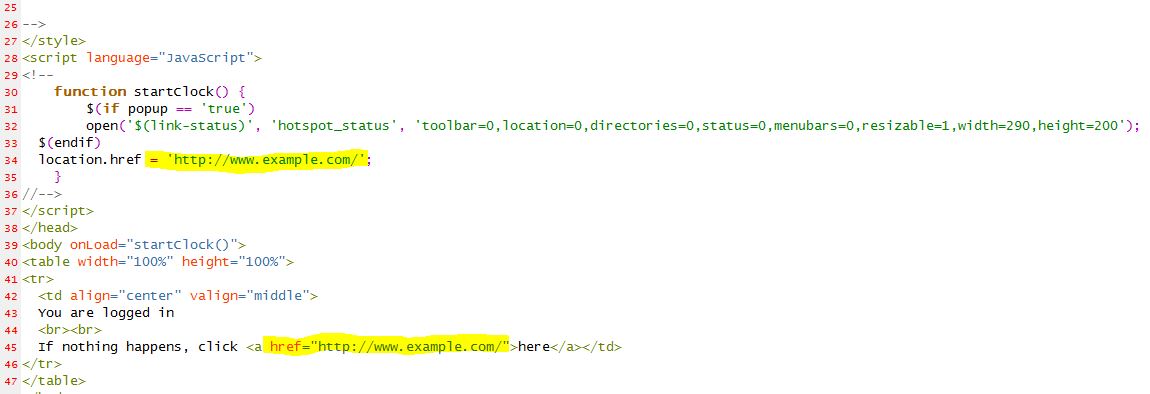
I think so, but haven’t tried it. In the hotspot/login.html file there is a line in a couple places like this:
First, save the original. Did I mention saving the original?
Change “$(link-orig)” to “http://www.yourdomain.com/welcome.html”
i think hotspot/redirect also have this “0; url=$(link-redirect)”, try replacing this and see if it works.
I could be wrong but I believe it is alogin.html you need to modify (short for after login maybe?) The other option is login.html as was said above.
are you using radius?
if yes, you can use WISPr-Redirection-URL in rad-reply
Here is what I found on 2.9.51:
The first part seems to be to get them to the remote server (editing the login.htm)
An another example is making HotSpot to authenticate on a remote server (which may, for example, perform creditcard charging):
• Allow direct access to the external server in walled-garden (either HTTP-based, or IP-based)
• Modify login page of the HotSpot servlet to redirect to the external authentication server. The external server should modify RADIUS database as needed
Here is an example of such a login page to put on the HotSpot router (it is redirecting to https://auth.example.com/login.php, replace with the actual address of an external authentication server):
<html>
<title>...</title>
<body>
<form name="redirect" action="https://auth.example.com/login.php" method="post">
<input type="hidden" name="mac" value="$(mac)">
<input type="hidden" name="ip" value="$(ip)">
<input type="hidden" name="user" value="$(username)">
<input type="hidden" name="link-login" value="$(link-login)">
<input type="hidden" name="link-orig" value="$(link-orig)">
<input type="hidden" name="error" value="$(error)">
</form>
<script language="JavaScript">
<!--
	document.redirect.submit();
//-->
</script>
</body>
</html>
As for the remote back to the mikrotik here is what I found:
• The external server can log in a HotSpot client by redirecting it back to the original HotSpot servlet login page, specifying the correct username and password
Here is an example of such a page (it is redirecting to https://hotspot.example.com/login, replace with the actual address of a HotSpot router; also, it is displaying http://www.mikrotik.com after successful login, replace with what needed):
<html>
<title>Hotspot login page</title>
<body>
<form name="login" action="https://hotspot.example.com/login" method="post">
<input type="text" name="username" value="demo">
<input type="password" name="password" value="none">
<input type="hidden" name="domain" value="">
<input type="hidden" name="dst" value="http://www.mikrotik.com/">
<input type="submit" name="login" value="log in">
</form>
</body>
</html>
Not sure if this helps at all, but I think the
<input type="hidden" name="dst" value="http://www.mikrotik.com/">
Could just be that you need to change it to your desired web destination. I think it could also be done with the variable link-orig in the first code snippet.
Kevin
Edit in alogin.html file. Might helpful for others.