Previously, on devices with NAND flash memory, the Software ID was generated from three serial numbers: the SPI chip’s serial number, the NAND chip’s serial number, and the device’s serial number. Replacing any of these components results in the loss of the license. There is information indicating that replacing the NAND flash with an AX2 does not result in the loss of the license.
It's possible that updating the device's bootloader might resolve the issue, but you'll need a dump from a brand-new 5009 device.
The device's serial number does not change if you dump the original flash memory. Therefore, everything in the cloud continues to operate using the same identifier.
New license has serial number (on mikrotik site) or not?
My new license has only Software-ID (SN is empty)…
Yes, the serial number is same (old), but cloud not working…
On second AC2 (with 16M factory flash) cloud services worked well..
Does your Software ID persist after a reboot? I had a problem where the flash drive's ID couldn't be read, and a new Software ID appeared every time I rebooted.
I have the 2011 version on hand with a replaced flash drive; the serial number is listed in the license
Yes, Software-Id after reboot (power off-on) is same before… The new license has been issued with this Software-Id and device working well..
Serial number on mikrotik support site?
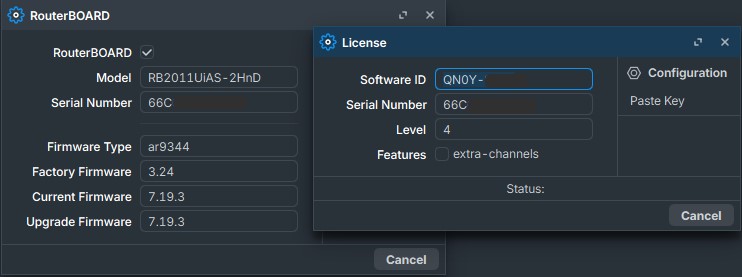
Previously, tech support told me that replacing flash memory is not supported by the company. So, you'll have to figure it out yourself.
And yet, what is the problem?
You replaced the flash drive. Did you flash the device using Net Install? If the Software ID doesn't change after a reboot, you can flash the device using Net Install and purchase a license.
What OS version is it? All my routers are on long-term.
I spoke with support when I activated the Level 4 license I purchased. The factory license for 2011 was Level 5.
7.21.3 and 7.22
All steps is done… device (AC2) works perfectly with 32Mb flash and new license, but only cloud services (DDNS, backup) not working (status updating…)…
I see UDP packet exchange between routers WAN IP and Mikrotik Cloud server IP’s on ports 30000 and 15252…
On this page i found only license with old Software-Id and SN: