Hello,
Just deployed a Chateau LTE12 with v7.11.2.
DNS resolution do not work.
NTP client do not work.
Doing a packet capture I can see the NTP server answering correctly.
I think there is a firmware bug here ..
Hello,
Just deployed a Chateau LTE12 with v7.11.2.
DNS resolution do not work.
NTP client do not work.
Doing a packet capture I can see the NTP server answering correctly.
I think there is a firmware bug here ..
What exactely do you mean by “do not work”?
Could this be Audience or config related?
DNS client (configured with 1.1.1.1 / 8.8.8.8 ) : “Error could not resolve dns name” (same for NTP client and package updates..)
NTP client : stay at status “waiting” (configured with @IP and not DNS name) even if packet capture show that the NTP server answer with actual time.
Standard config always working but here not.
See attachment.
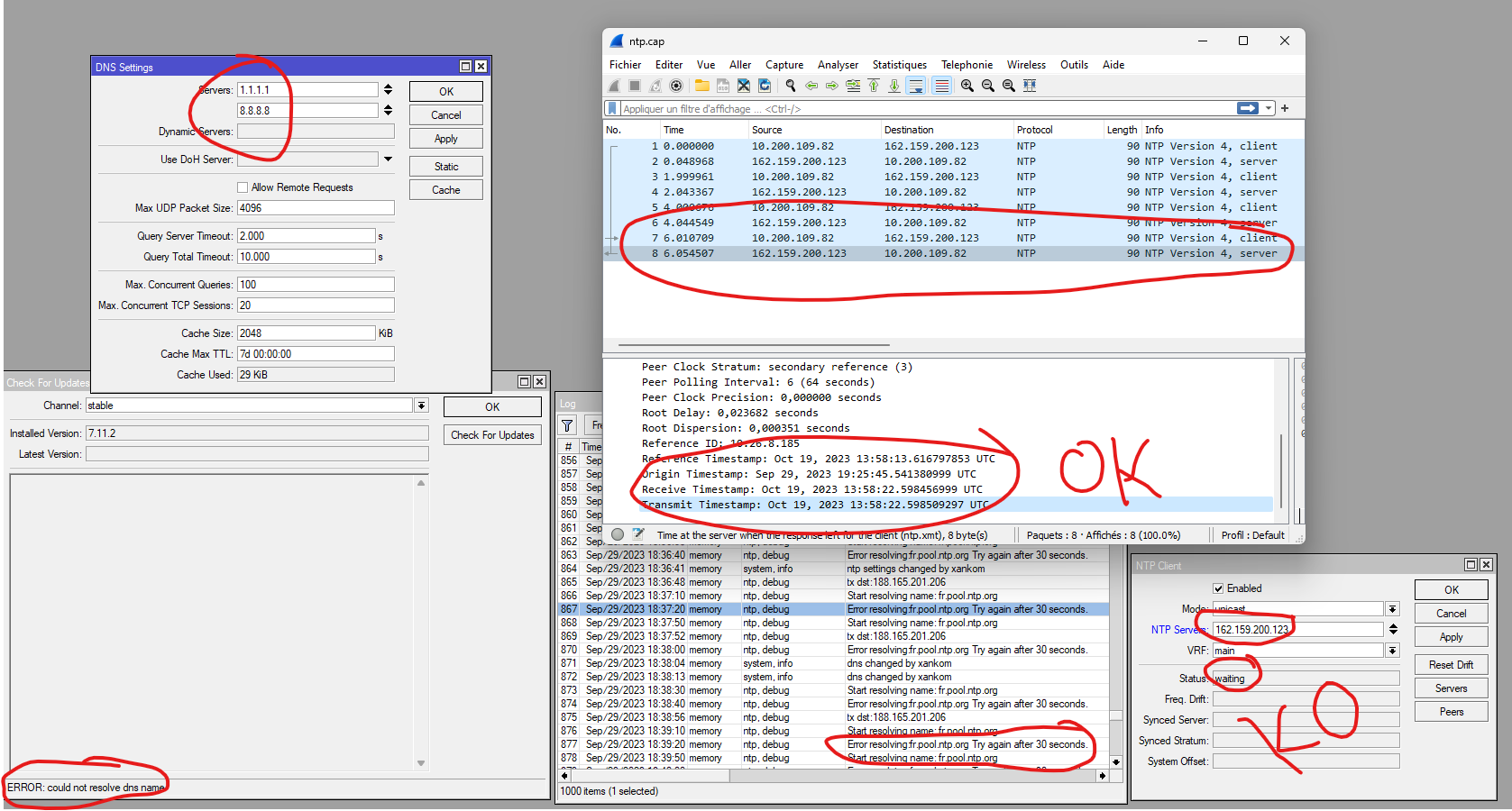
Nothing wrong here
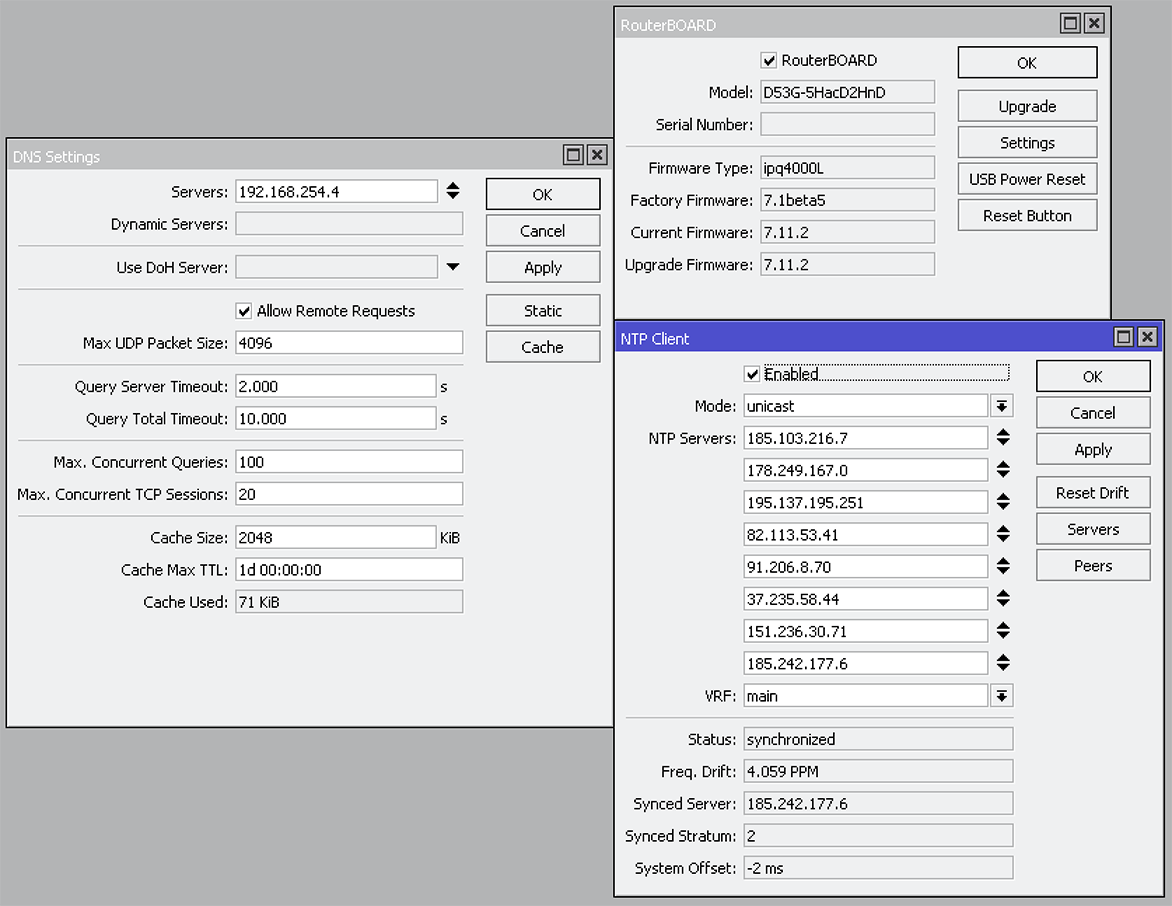
Proof is in the pudding.
/export file=anynameyouwish ( minus router serial number and any public WANIP information )
Typically its admin error, not hardware!
We have 300 mikrotiks, it’s first time I see this. No firewall (only input rules).
DNS resolution also does not work with LTE dynamic DNS servers.
Just found another bug, NAT rule masquerade showing an option to-addresses 
Attached the config, very basic ..
mikrotikbug.txt (2.99 KB)
FALSE
There is nothing of the default configuration, you altered all.
NTP & DNS clients broken v7.11.2
???
Another post with a shitty title because the user is incompetent, and obviously instead of realizing that he is not able to configure the device correctly,
or at least ask first “what’s MY problem” he says that the one that everyone has been using for months and has not caused any problems in this regard,
is everything broken.
For me, what is broken is the brain of the user who writes a similar title.
Last edited by holvoetn on 2023-10-20 11:03:32, edited 1 time in total. Reason: No need to shout…
then also change the font of the title of the topic, I’m not shouting, it’s just reporting the title as it is written…
P.S.:
For completeness to the previous post, it could also be that, as here in Italy, the LTE provider inhibits the use of non-proprietary DNS.
Same sentiments here.
@Whitehawk29FR
You show screenshots which are NOT in accordance with your config (date in there is 30/9, we are already 3 weeks further. What happened in between ?).
Also on export is
/ip firewall address-list
#HIDDEN
But are shown (probably not all) on the screenshot…
and also on to-address=… on shot, broken all communications if the IP is not right…
Edit: sorry, no NTP works. Maybe something else then. Just post your config.
Who knows why he deleted the default configuration which works perfectly as a basis for starting…
(this post is removed, is useless)
Flash again (not reset) you’ll get the default config. It’s impossible to say anything about condition of the device you get, does it have some kind of broken firmware or not. Default FW config is pretty similar among different models and these devices do not have any problems with DNS NTP etc.
Whois shows it is telecom from France.
Yes, is recently buyed, checked on RIPE. But I prefer to remove the post with the IP, since is open to the world.....................
Also the screenshot reveal some personal user info, like is working at XANKOM, and previously is CELYA...
on your LTE settings you specify this:
use-peer-dns=yes
But you use your own DNS settings:
/ip dns
set servers=1.1.1.1,8.8.8.8
I set use-peer-dns on my LTE devices to no.
Anyhow …
Complete reset might be advisable.
Since you’re really not at default config, not even near.
Not a problem, the first bot scanner will penetrate any public IP in first five minutes. Also, it is LTE so probably CG NAT with firewall.
Yep we have an input firewall, only ping is open to world ..
I tried with and without peer-dns, no change.
Something just does not work as it should, probably have to reset the device but it is located on an island so not very possible ..
Then how the router can accept DNS NTP answers if you block all traffic except ping?