Can anyone please tell me what should I do to make my router resolve local dns host names?
I have Allow remote connections option enabled and I set Primary DNS server to my ISP’s DNS server and the secondary to my local DNS server - that doesn’t work.
Strictly speaking my question should be “How can I configure router’s dns CLIENT - for example if I don’t want to enable DNS caching server at all and my sole goal is to be able to ping my local hosts by name in ghe router’s console.. "?
Part of DHCP is setting the DNS server. This setting is to configure DHCP clients (like all your smartphones/pc's/etc.). Here an example of how to set the dns server:
suppose I use neither router’s DNS (cache) server nor DHCP server - I just need Mikrotik to be able to resolve my local hosts’ names - that’s all!
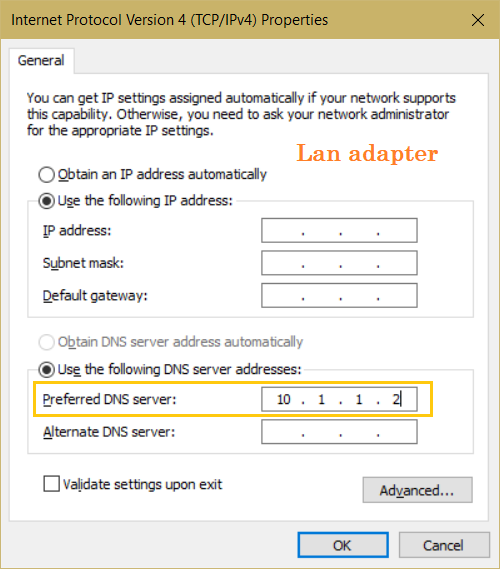
For example, all I need to do for any OS (Windows, Linux, FreeBSD) to make them resolve LAN’s host names is to configure the ip of the local DNS server in the network adapter’s properties.
When I configure Mikrotik’s LAN bridge properties I see only IP/subnet field - there’s no DNS entry as that in Windows or Linux - is there' a way just “tell” Mikrotik which local DNS server should be used for local name resolution?
So, for example, is there a Windows Server with a DNS server role in the LAN? Then it should be sufficient to set the IP address of this Windows server in IP -> DNS. Of course, the Windows server must not query MikroTik.
Otherwise, I don't quite understand the question.
Regarding this: “Setup another server that resolve local host names... etc.” - I have already AD-based DNS servers in my LAN so where in Mikrotik can configure this server?
As far as I understand in the DNS server settings I must configure DNS servers for external queries - the ones that the Mikrotik’s caching DNS SERVER will be using. I need to configure the CLIENT settings for the Mikrotik LAN interface (mostly the bridge interface), something like this:
Suppose I don’t enable Mikrotik DNS and DHCP servers - is it possible???
Regarding adding static DNS entries : it’s completely useless as hostname-IP mappings are dynamic - it means I цould need to constantly check if a given IP address still belongs to a host or if it has already changed
People in this thread has told you multiple times already, you set it under IP -> DNS.
When the router itself needs to resolve domain names, it uses the configuration under IP -> DNS. Here you can see multiple places to specify the upstream resolver.
Servers is where you provide a static list of upstream DNS servers, similar the entry in your Windows screenshot above. Put the addresses of your Active Directory DNS servers here.
Dynamic Servers lists the servers provided by sources like DHCP or PPPoE (with the router acting as client) if you've ticked "Use Peer DNS" in the DHCP client or PPPoE client setting. In your case, this is probably not what you want, so you should leave "Use Peer DNS" unchecked so that Dynamic Servers stays empty.
Then you have the ability to use upstream DNS over HTTPS server. Do do that put the URL in Use DoH Server. This is probably not what you want, so leave this field empty.
In short, turn off "Use Peer DNS" and put your AD servers in the IP -> DNS -> Servers field.
Please note that you should not mix the AD DNS servers and public DNS servers (such as 8.8.8.8 or 1.1.1.1) in these entries. If your AD servers has the ability to resolve internet domains too, then only use them as upstream DNS server for the router, do not add the public servers.
But if your local DNS server is unable to resolve public internet domains, then you'll need to forget what I wrote above, and instead:
Put public DNS servers in the IP -> DNS -> Servers field (or enable Use Peer DNS in DHCP Client / PPPoE Client).
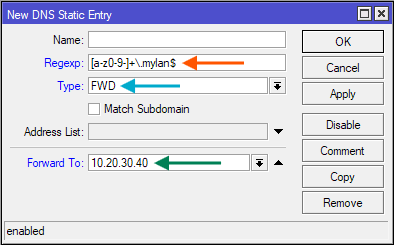
This will cause all DNS queries for anything.and.everything.mylan to be forwarded to the DNS server at 10.20.30.40. Adjust mylan and 10.20.30.40 accordingly. Any other domains and subdomains (not ending with .mylan) will be resolved using the public DNS servers (such as 8.8.8.8) or DNS server provided by DHCP/PPPoE.
“People in this thread has told you multiple times already, you set it under IP -> DNS.“ - yes, and I multiple times tried to explain that manually adding hostname\ip mappings is not what I need.
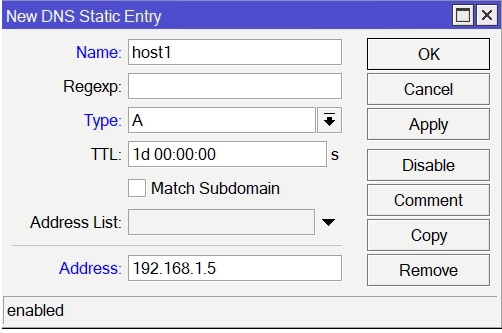
According to google adding static DNS entry should be done in the following way:
“To add a static DNS entry in MikroTik, navigate to IP > DNS in WinBox, click Static, then click + to add a new Name (e.g., nas.local) and Address (e.g., 192.168.88.10). Ensure "Allow Remote Requests" is enabled in the DNS settings so clients can use the router for lookup.
Method 1: WinBox (GUI)
Go to IP -> DNS.
Click the Static button.
Click the + (Add) button.
Name: Enter the domain/hostname (e.g., mydevice.lan).
Address: Enter the IP address (e.g., 192.168.88.50).
In other words I must add all my local host names one by one while I just need to redirect queries for ALL local names to my internal DNS server. As you picture shows that can be done in the same IP-DNS window but with the different type = FWD and this was never mentioned here before. Thank you for the explanation.