Hi All.
I have a RB4011 and have setup L2TP based VPN access for all my workers out in the field. This works well except for one issue.
When I set Windows to NOT 'use default gateway on remote network" (aka Split Tunnel) I cannot see my whole network.
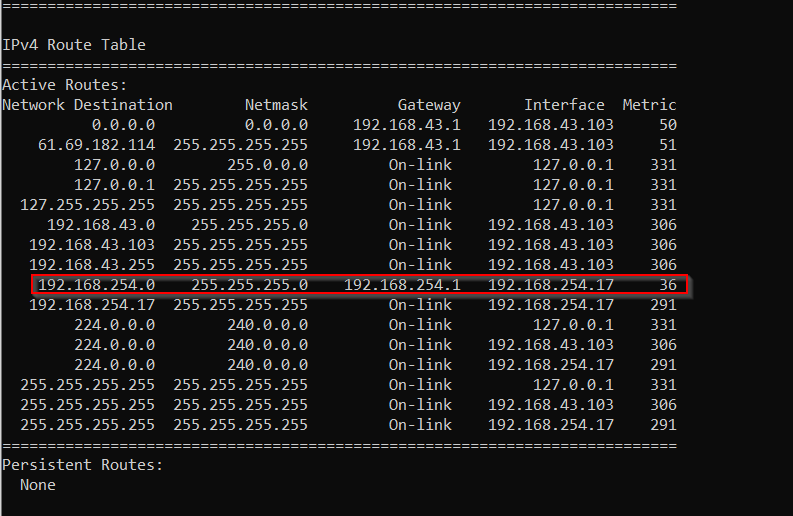
When this option is selected, the following route is added to the route table.
The problem is that the netmask portion is wrong for my network and effectively cuts off routing to half of my subnet.
Questions: Where is this route generated from? Does Windows make this up? Is this information passed from the VPN itself? Does Mikrotik have a config I need to be looking at?
I simply dont know where/how this route is generated in order to find a way to correct it.
My old VPN solution did not have this problem. Same network. Same subnet. Same Configuration. But using PPTP on different hardware.
Thanks.
So, with no responses. I was able to figure out a solution myself.
The answer is, that Windows is the device the comes up with the route and inserts it into the routing table. This involves a little know setting called “class based route addition” which can be turned on/off. Windows assumes you will be working within your network class and address the route accordingly.
this is an example, but you can figure it out. once this has been added, it effectively creates a route just for the VPN. This fixes the issue and routing starts working.
in case you are wondering, Mac has an equivalent line of code
I think it is now possible to set the proper routes to be added to such a VPN via a DHCP server.
How this is to be done exactly, I still have to research.
AFAIK it’s supported only for IKEv2, where it takes routes from split-include and if client (Windows do that) sends DHCP requests, it will get these routes in I don’t know which DHCP option. But I wasn’t able to make it work, I see DHCP request being sent, but router sends nothing back. It’s on my TODO list, to check if it’s perhaps my mistake.
Yes due to current crisis we have some Windows L2TP/IPsec VPN and I see them make a DHCP request just after connection because it is dropped in the firewall.
However I did not yet try to get a DHCP server respond to them, that probably requires some trickery if it is at all possible.
I also started with IKEv2 but I do not want to use certificates, but only a username/password as in L2TP. Not yet sure how to do that.
It’s not there yet for other protocols, my guess is that IKEv2 got it first, because there was already existing list of subnets/routes in mode config. Other VPNs would need new UI for it. Or maybe not, you could create needed option manually, even if it wouldn’t be user friendly. But so far you can’t configure DHCP server to respond to requests from VPN clients.
IKEv2 without certificates should be possible, but you need RADIUS and not the one in current User Manager. If I understand it correctly, beta v7 should be able to do it, but it’s probably not the best idea to use it in production.
Is there some documentation on how to setup a config like L2TP/IPsec with PSK but instead using IKEv2? It is not clear to me where the “username/password” would go. The example uses certificates but it is a lot of hassle to make it working in random clients.
For L2TP/IPsec I have an empty bridge interface as loopback interface for the subnet where the clients are (it is a routed network, no proxy-arp tricks). As I can see the following in firewall:
reject input: in: out:(unknown 0), proto UDP, (client_ip):68->255.255.255.255:67
I would hope to be able to direct that to a DHCP server listening on the bridge. But there likely is some reason that will not work.
I don’t know about any documentation, but client should be switched from machine certificate to EAP (EAP-MSCHAPv2 for user/pass), and RouterOS server needs RADIUS where it will forward this, because it doesn’t directly support it. I never tried it, because RADIUS is external component which I’m not familiar with. And not very practical, because in most places I don’t have suitable machine for it. I’m waiting for all-MikroTik solution.
I’m not sure about L2TP and bridge. I know there’s something, but I only vaguely remember that there may be some catch, I’m not sure.
Ok thanks, I see I can select “eap radius” in IPsec identities. RADIUS server is no problem, I already have it for switch port authentication (not using MikroTik switches).
Will see if I can get this working…
Well, that was an interesting experience… as usual, when trying to use standards-based VPN in a slightly more complex setting.
At first, I configured RADIUS but I wasn’t sure what attributes the RADIUS server exactly would have to provide (e.g. how is the IPsec key determined? is that retrieved from RADIUS?)
So I decided to start a tshark and give it a go.
However, the first device I tried did not support IKEv2 with EAP auth at all… bummer! I should have checked that first.
Ok, back to the drawingboard. It supports IKEv2 with PSK and ID. So I configured an identity with remote-ID and a PSK. In fact, this is mostly what I wanted: simple config for each user with only a “username” and a “password”, no difficult certificate stuff that always causes issues (problems with client date/time, problems with expiration, problems with installing client certificate, problems with installing CA certificate, well you know…)
Surprisingly, this worked first time! Well, the client only received the SECOND specified DNS server, the other one is ignored. Not a real problem.
Then, I considered setting a split-include. However, I need two subnets to be routed. So I specified 2 split-include subnets and the client receives only the first (I already read a warning about that).
Without that, the client effectively sets the default route to the VPN (the server-side has network 0.0.0.0/0) similar to what L2TP/IPsec does when “set default route via VPN”.
Oh well, the whole thing is still mostly in the sad state it was 10 years ago. Not really a MikroTik problem of course. No wonder that everyone wants OpenVPN and other non-standard solutions that WORK.
Yep, that’s why so many people fell in love with OpenVPN. It had everything and there were no interoperability problems. I mean until MikroTik joined in with their implementation.