Yes, this is not a surprise, I have many old wAP ac mipsbe models out there running 6.48.6 and 6.49.2 with no issues. These problems are new in v7.
I would like thank you for this discussion but i’ve got a question to vendor. Are you going to resolve this problem and modify firmware 7.x series for models with mipsbe chip or not?
I’ve tested v7.1 v7.2rc2 and v7.2rc3 with wAP - each of them have the same 5GHz WiFi upload problem with capsman. The devices used in tests RouterBOARD wAP G-5HacT2HnD
Same problem reported here with a 5Km ptp link and 921UAGS-5SHPacD NetMetal mipsbe. Uprading to 7.1.1 the data rate was poor and unstable with continuous interruptions. Downgrading to 6.49.2 the data rate is perfectly stable again.
Mauro
Does anybody cheked the 7.1.2 version?
A bit scared to do it, since it reads…
*) chr - temporarily suspended downgrade to RouterOS v6;
… and there are no hints that it should be fixed.
Disconnection under heavy could be due to the AP’s beacons are held off by the medium being busy for too long; you can do an air capture to confirm this. If more than a few beacons aren’t received, say for 400ms, the client will disconnect.
For the throughput issues, it would be useful to see the output of “/system resource cpu print interval=1s without-paging” on one of the APs during when issues are experienced on RouterOS v7.1.2+ vs v6. Some throughput will be lost if any single processor core is above 70% usage.
If and when /system/routerboard/settings cpu-frequency is set to auto, the transition to a high frequency takes a bit of time (the order of 100us I guess), but it allows a higher max frequency on some devices (eg 896MHz on cAP ac vs 716MHz fixed). It’s worthwhile testing auto, the nominal and max processor frequencies to see if the problem relates to processor load.
Dan
The same.
When U start a high speed upload, the Wap AC’s Rx Speed would decrese to a very low class, and the transmit speed woud drop to zero or disconnect from the Wap AC.
[quote=earlembodo post_id=913816 time=1645145928 user_id=115653]
Just here to add to this issue. I have a hAP AC and while downloading is fine (around 225 Mbps), uploading starts normal but then drops to zero within seconds. Connection then hangs and I get disconnected from Winbox. I monitored the AP’s system resources and the CPU maxes out until it hangs and I get disconnected. The AP is managed by Capsman. I’ve only noticed this after ROS 7.x.x upgrade. I’m on 7.1.2 now. I’ve busted out my old Asus AC66U router to temporarily remedy the issue. Hopefully, Mikrotik is aware of this and has a fix.
[/quote]
Yes, I see this same behavior when my iPhone connects to my hAP ac and I do a speedtest.
I’ve temporarily reverted my hap ac lite back to v6 as it is in station-bridge connecting my home entertainment center back to my RB4011 wifi (running v7). Got sick of connectivity dropping off every 10-20 minutes while watching Netflix.
FYI,
From my testing this issue seems to be gone from 7.2rc4, although there are no changes in the changelog mentioning this at all. Can others confirm?
Confirmed. I would even say improved over 6.4x - at least to what I can read from a few repeated iperf3 measurements.
Also, issue is still present in 7.1.3 - checked it before upgrading to 7.2rc4.
I will testdrive 7.2rc4 for a while - I have the feeling that over time, latency increases when heavy upload is going on from about 6-12ms to 60-120ms - which was not the case in 6.4x. - but this is only a feeling and not confirmed by any thorough measurements.
I had this issue with hAP AC with Hex S on the edge as Capsman after upgrading both to 7.x.x. Nothing fixed the CPU usage and disconnection issues even upgrading to the latest 7.1.3. I’ll have to resign to the fact that ROS 7 might be best for newer multi-core CPU/ARM devices only. I’m still getting around 340 Mbps stable after downgrading to ROS 6.49.4 and turning it into an AP bridge. Keeping hAP AC on ROS 6 release stream.
You need to compare with 7.2rc4.
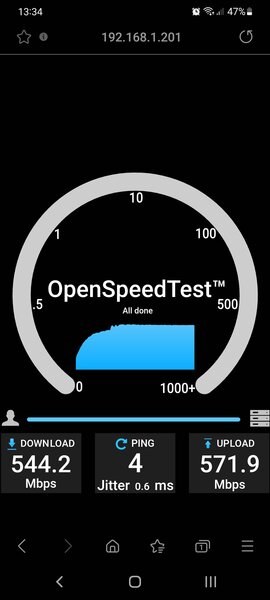
I can get easily over 400Mbps on hAP AC2 and AC3.
Using 7.1.3 I couldn’t get there (mostly around 300Mbps).
As indicated above by mducharme, “something” was done w.r.t. wifi in 7.2rc4.
Whats funny i got better speeds with 7.2rc4. and old wave driver than new wave2 drivers on HAP AC3, this is ideal conditions 2m from AP, S21 Ultra, pretty amazing if you ask me.
I initially wanted to add that comment as well but didn’t because I thought it was irrelevant. But now you mention it …
My findings were prior to installing wifiwave2 on my hAP AC3. And I have to admit I am NOT that impressed after installing.
Mind you, it’s certainly not underperforming but from all the noise that has been made about it, I was expecting a lot more.
On 2GH it is DEFINITELY a remarkable improvement. I’ve seen speeds regularly reaching +100Mbps were before it was 70-80 max.
On 5GHz however it is more or less the same. Again, that’s what I see.
I’m not making a big deal out of it anyhow since my ISP only gives me 200/20. Who cares then if that 5GHz connection hovers around 400-450Mbps ? 
The better half of yours trying to stream all the movie series you have on your DLNA server to her iPAD … all at the same time?
The hacker outside your window who hacked into your wireless and is now trying to get into your NAS/gaming server/whatever valuable?

Quick update:
6.49.5 - good, no issues
7.1.5 - bad, issue persists
7.2rc5 - good, no issues
So far found no evidence of wifi parameter changes to explain the better 7.2rc4 performance.
Compared 7.1.3 with 7.2rc4 and the beacon content is absolute totally identical. (Expected bigger A-MSDU, but no, still 3839 bytes)
inSIDDer only captures beacons, no other managament or control packets.
So needed better sniffer to see what’s going on. Windows10 64bit on my laptop did not allow me to start a full packet sniffer.
After looking for proper hardware and software, and ordering: Now I can start, with a Edimax AC1750 Wi-Fi USB Adapter and “CommView for Wifi” (free trial).
Capturing A-MSDU is piece of cake. Capturing A-MPDU is not straightforward, as the disassembly already happens in hardware.
It’s counting packets between block-ack control packets. https://wifiwiki.wordpress.com/2019/11/19/understanding-a-mpdu-block-ack-through-wireless-captures/
So far I only used hAP ac Lite as modified AP, which has only one stream in 5GHz.
Some interesting first observations … (load was only with smartphone and Fast.com or Speedtest.net)
MT AP sends typical 3072byte A-MSDU. Under load this went up to 11 packets for every block-ack. So throughput is limited by 113072 byte A-MPDU size. (I just guessed 83839 before)
http://forum.mikrotik.com/t/two-issues-with-rb500/2664/1
No major difference with 7.2rc4 but sometimes there was 163072. (To be verified under heavier load conditions)
While testing, also did setup the hAP ac Lite as “CAPsMAN on CAP” , and measured 1440byte packets, the number varied but it went up to 11 between block-ack. CAPsMAN throughput was limited by 11 (maybe can even be 16) or 111440 A-MPDU size. (My guess was 8*2048 for CAPsMAN) But it seems CAPsMAN never used A-MSDU aggregation, just using the original packet size.
In theory A-MPDU can collect up to 64 packets. So CAPsMAN could give higher speed if that would happen. But with this captured information if confirmed, it is clear CAPsMAN would be severely handicapped in potential maximum data rate. A-MSDU as single 1440 packet size could be because 2 packets don’t fit in 2048.
EDIT: with higher dual stream interface rates and heavy load the number of MPDU in A-MPDU goes up till 32 for non-CAPsMAN. (At least the A-MSDU sequence number jumps by 32 in the sniffer, which only displays the first MPDU in an A-MPDU at these high speeds). But still the A-MSDU size is sometimes 3088 sometimes 1544 for no apparent reason between different HW setups (hAP ac2, wAP ac, SXTsq ac, PC) or ROS versions when using Btest. This is giving corresponding net data rates. (CAPsMAN was not tested here). A-MSDU size apparently depends on both sides HW and ROS version.
For reference (AMSDU/MPDU - AMPDU) max sizes for HT 802.11n and VHT 802.11ac as seen in beacon.
Mikrotik HT (3839 - 65535) , VHT (3895 - 262143)
OpenWRT HT (7935 - 65535) , VHT (11434 - 1048575)
max AMPDU=64*MPDU packets. AMPDU size defines max throughput % for a given interface rate.
Quick update:
7.2rc5 - ok (avg. 289MB/s over 10 iperf3 runs)
7.2rc6 - ok (avg. 270MB/s over 10 iperf3 runs)
7.2rc7 - ok (avg. 281MB/s over 10 iperf3 runs)
Qupdate:
7.2 - ok (avg. 302MB/s over 10 iperf3 runs)