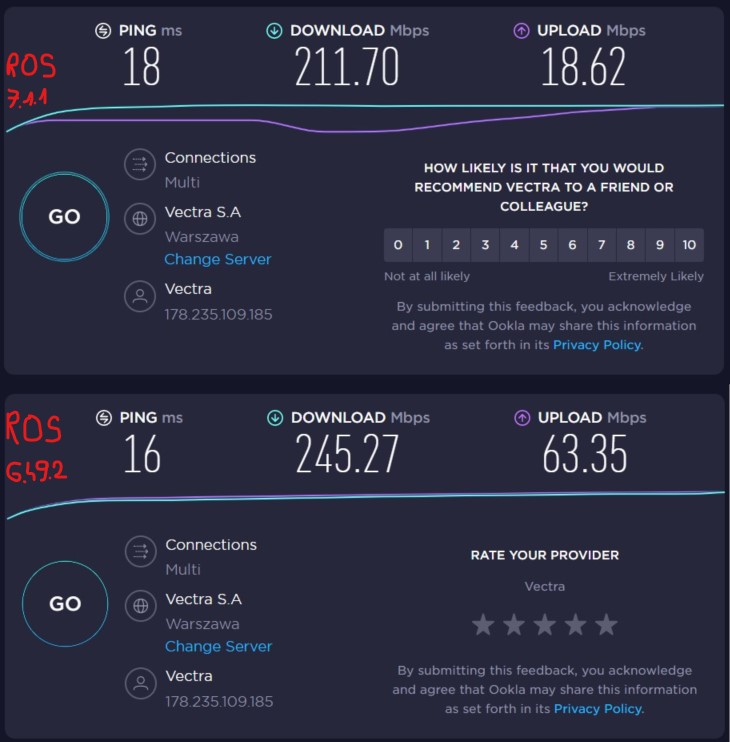
I have a problem with ROS version 7.1.1. on wAP ac old devices (RBwAPG-5HacT2HnD on mipsbe). The problem mainly concerns 5G WiFi and is manifested by a decrease in speed towards the upload. The problem does not occur on wAP ac new (RBwAPG-5HacD2HnD on arm). I did not observe the problem on hAP ac3 (RBD53iG-5HacHnD on arm). After downgrading to 6.49.2 the problem disappears and even wAP ac new (RBwAPG-5HacD2HnD on arm) and hAP ac3 (RBD53iG-5HacHnD on arm) work better (more efficiently). The screenshot shows an example of 5G WiFi transfer for a 600/60 Mbps Internet connection. The same problem is in the internal network, e.g. when copying files via WiFi to a NAS in the LAN network (even the WiFi connection is broken / disconnected).
ROS 6.45.9 stay on that one…
… and the “config + registration table values + status & counters” of the 5GHz WLAN interface are … what???
Measuring the outcome is one thing, finding the root cause needs much more information!
It seems to me that if something works on an older version but doesn’t work on the new one, the software is the problem.
More in-depth diagnostics is fun when you have knowledge and time.
MT engineers may need to check this with the LAB and make recommendations or improve the software - that’s their job.
I indicated the specific MT models with which there is a problem with the new software.
Not only do I have these symptoms after updating these MT models.
The reason for this information question is that MT out of the box uses some “auto” selection mechanisms.
The most disturbing one is the auto wifi channel selection, which is unpredictable and has a major impact on the performance.
Even two identical softwares could give total different performances at different times.
Is the 7.1.1 different from the 6.49.2 in this selection? Who knows? Out-of-the-box MT is set for FCC regulatory domain = USA, not for Poland.
It’s like rolling dices, the red one gives 1 the blue one gives 6, the color of the dice is the problem … ?
Do you have this RBwAPG-5HacT2HnD available in your arsenal?
@sstybel,
Can you please post screenshots of both devices/firmwares using this speed test https://www.waveform.com/tools/bufferbloat ?
I have the same problem here on ROS 7.1.1 (also on 7.2rc3). CCR1036-12G-4S with RBwAPG-5HacT2HnD access points via capsman in local forwarding mode. UM5 is running on the router, doing EAP-PEAP for the wireless clients. And there is virtually no other networks around, since this is in a solid swiss bunker basement 
Checking the 2G connection if it behaves the same…
When I run the bufferbloat test (for example), download part works perfectly fine, upload part repeatedly kills the connection (not every time, but most of the time). More sporadically this also happens on Teams sessions. It is just more reliably reproducable with the bufferbloat test.
I did netinstall of 7.1.1 on all devices, reconfigured the router manually from scratch. Frankly, I don’t know what to do anylonger…
Opening a terminal seems to indicate “large” time adjustments, which I did not have before:
feb/01/2022 13:38:44 system,critical,info ntp change time Feb/01/2022 13:38:09 => Feb/01/2022 13:38:44
feb/01/2022 14:29:15 system,critical,info ntp change time Feb/01/2022 14:28:39 => Feb/01/2022 14:29:15
feb/01/2022 14:51:38 system,critical,info ntp change time Feb/01/2022 14:51:01 => Feb/01/2022 14:51:38
Attaching supout and config (hide-sensitive).
Any ideas what could be the problem? This started with 6.49 (or so) and keeps being an issue ever since…
supout.7z (510 KB)
config.rsc (806 KB)
Downgraded all wAP ac devices to long-term 6.48.6 - keeping CCR1036 on 7.1.1 (for UM5 EAP-PEAP).
This seems to work a lot better - Bufferbloat does not kill the connection anymore (at least not the 10 times I tried now). Experienced only one short Teams reconnect. Wireless speeds in download are about 20% less, whereas in upload they are 20% more. Not that it really matters…the connections are a lot more stable. Still not perfect…
If you think it´s an bug within the firmware I´d suggest to write an email to mikrotik support and provide detailled information about your setup including all configurations files in order to get it fixed in a future release.
Thanks for this topic.
I can also confirm that 7.1.* works very bad with old WAP AC. Download speed is OK unless you start huge data upload and than transmission in both sides just freezes.
Rollback of AP to 6.49.2 fixes issues.
I’m suffering from this issue as well on RouterOS v7.1.1. I have RB4011 as capsman and RBwAPG-5HacT2HnD as caps. When uploading occurs, the client freezes. You can reproduce it easily with iperf.
I tried clean setup the capsman and caps. It doesn’t help. I tried literally every channel/extensional channels, not helping.I tried to use RBwAPG-5HacT2HnD as the fat ap, it works as expected. I guess it’s the issue of capsman.
I have sent a email to the MT support. Hope they will fix it soon.
This small comment is very underrated ! I had a lot of problems on a large multifloor building using a lot of cap ac’s and hap ac’s (6.48.x) managed by capsman (6.48.x) with 40 Mhz channels like: wireless speed dropping to <10 Mbits on some devices after a lot of traffic or days online, speeds under 100Mbits even if channel is clear, about 5 cap ac’s constantly locking wireless clients from the bridge ( accepting wireless clients but no traffic). I read the config on the devices with problems 2-3 times and everything was correctly configured : vlans, tx power, acl’s etc.
I installed in half of them 6.45.6 software, including all the ap’s with problems and all the nuissances are gone. I have a month now without restarting the ap’s who had problems in the past, download is allways about 200 Mbits/s, upload 100-200 Mbits (speedtest, 5ghz band, 40 Mhz channels, clients with decent laptop hardware and 2 channel wifi). I can even compare them now with ubiquity’s/openwrt in the term of speed and reliability.
ROS 6.45.9 stay on that one…
This small comment is very underrated !
I have very good results on 6.45.6 (the LT 6.45.8 was not at that level), 6.45.9 may be good again, but not fully tested.
On small MT (SMIPS) the performance degardation is clear. Does it happen on the stronger units, and at what version?
http://forum.mikrotik.com/t/hap-lite-as-an-access-point/155253/1
All the devices with problems are ARM based : cap ac and hap ac2, flashed with the long term firmware as soon as was available, all doing a lot of traffic because of a badly programmed software (500 GB to 2TB dw / 200-300 GB up transfer / month). Also one MIPSBE, after i verified. I don’t know for sure at what long term version these devices started to become a real problem as i extended the number of ap’s more and more and sometimes problems where missconfigurations during deployment. One thing for sure is that at 6.47 version i stopped deployments the configs was reverified, played with some settings found on mikrotik forums like disabling hardware offlload for interfaces on bridges, enabling/disabling adaptive noise on the wireless interfacess and problems still appeared.
I tested only one device with 6.45.9 and one with 6.45.6 and they seem better at speedtest and stable for 3 days. After i read your comment on a previous topic regarding to your good experience with 6.45.6, i followed your advice, downgraded to 6.45.6 on half of them, configured few wireless settings like antena gain, indoor install on the wireless interfaces (the settings i changed are loaded even if i join capsman ?!) and problems are gone (at least for a month now). I have now the opportunity to say Thank you!
Thank you for high lighting this comment, I rolled back all of my wap-ac(RBwAPG-5HacT2HnD,mipsbe based) to 6.45.9, but keep the my router(as capsman, RB4011,arm based) at 7.1.1. The wireless glitches are magically gone. The wifi in the house is as smooth as butter.
+1 have huge issues with 5Ghz and smaller ones for 2.4Ghz for my 1st gen HAP ac after upgrade to 7.1. Reset to defaults didn’t help at all.
But instead of bad performance what I see is jsut 100% package loss under “load” until re-connect to AP (which is only recover method).
So seems like some generic flaw in packages for old wireless package…
I am having this problem with the hAP ac and hAP ac lite. It is easily reproducible by doing a speedtest. During the upload test, the device will stop communicating on wireless completely. When this happens if you kick the device from the Wireless->Registrations tab it will immediately reconnect and start communicating again like everything was normal. Otherwise there will be a 30 second or so delay until the device times out and drops offline by itself and then reconnects.
RB4011 and Audience seem fine, so the issue appears to be mipsbe related. It doesn’t seem to happen with any 6.x version so it is specific to v7. Again, once the traffic hits a certain level, the device appears to “freeze” on wireless, and then it is a zombie where it can’t receive or transmit everything but thinks it is still connected. It takes some time to realize that it is a zombie and disconnect, and upon reconnect everything is fine again.
Upon the disconnect of the zombie client, the AP log shows things like this: wlan1: disconnected, received deauth: authentication not valid (2), signal strength -47
It doesn’t appear to matter whether the device is acting as the AP or the station, it happens either way.
Error (2) is clear: 2 Previous authentication no longer valid Client has associated but is not authorised. https://aboutcher.co.uk/2012/07/linux-wifi-deauthenticated-reason-codes/
Device is still connected but lost authentication. (?)
Question is where did the deauthentication request come from? “received deauth”. Self induced? Management protection? Time-out in re-authentication (distance=dynamic?)?
But there is no authentication error. No re-authentication attempt? Client unaware of the de-authentication ?
It becomes hard to find the “good” ROS releases. For hAP Lite the last good performer seems to be 6.47.9. For hAP ac Lite, wAP ac, hAP ac2 it seems to go with higher version numbers.
ARM devices only started to work good after 6.44.
Looking for the “Highest version, still capable ROS” (we already design for the “Most important, Least Capable Device”  )
)
Interim report. The “old” wAP ac (MIPSBE) devices on 6.48.6 are solid for days now, no issues, at least nothing a user can “feel”. Router on 7.1.1. Capsman tested with local forwarding on and off.