I have a cAP ac running 7.3.1. I am attempting to set up DoH via Quad9 DNS and after removing all old static DNS entries and setting it all up and testing it reverts all settings on reboot.
I found an old thread about DNS settings reverting due to DHCP client but I have no DHCP client configured.
Seems extreme to save a settings worth bytes of data. Never had to save a backup and restore / import settings on any router I have ever owned because of storage space. Just insane.
Just a suggestion, your choice to apply it or not.
But I have seen reports where devices being upgraded from ROS6-something to various ROS7 versions ultimately had to be netinstalled and using the EXACT same config, all worked.
Even had to do it myself once on a Hex …
Export backup to rsc, retrieve to PC, netinstall, reapply rsc-backup.
Can not be more then 10 minutes, 15 minutes tops.
You can set “try ethernet once then nand” in system->routerboard->settings and then do a system->reboot.
Then it will enter the netinstall mode once without having to press the button.
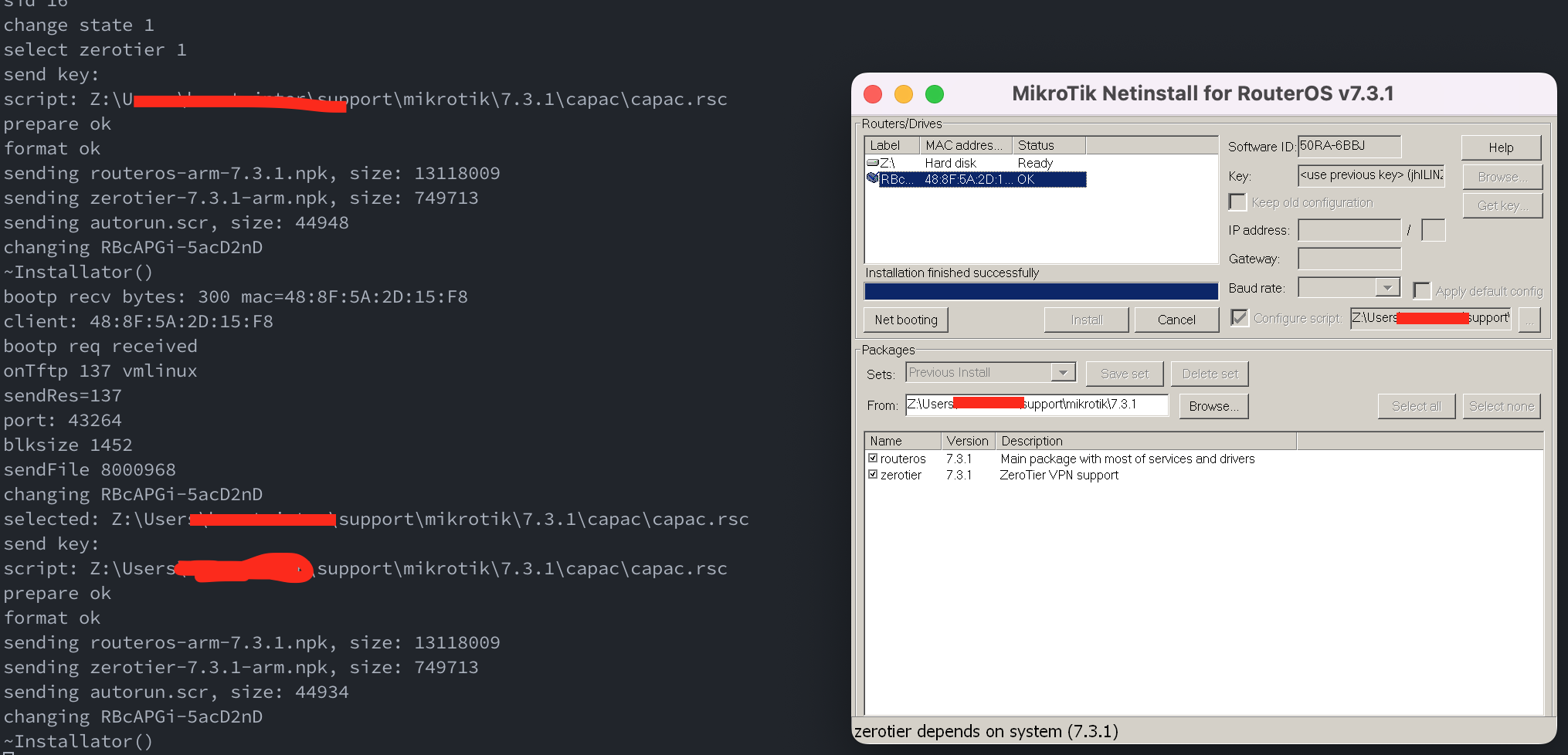
So this is where I am at… netinstalled, selected configure script from export I took before. It looks like it has re-deployed routerOS and zerotier but when I winbox to the device it is a blank slate.
Should there have been more output after “~Installator()”
A thread on these forums (from 2006) shows people ‘learning the hard way’ that there are undocumented issues in the length of the backup script that can be deployed via the netinstall process.
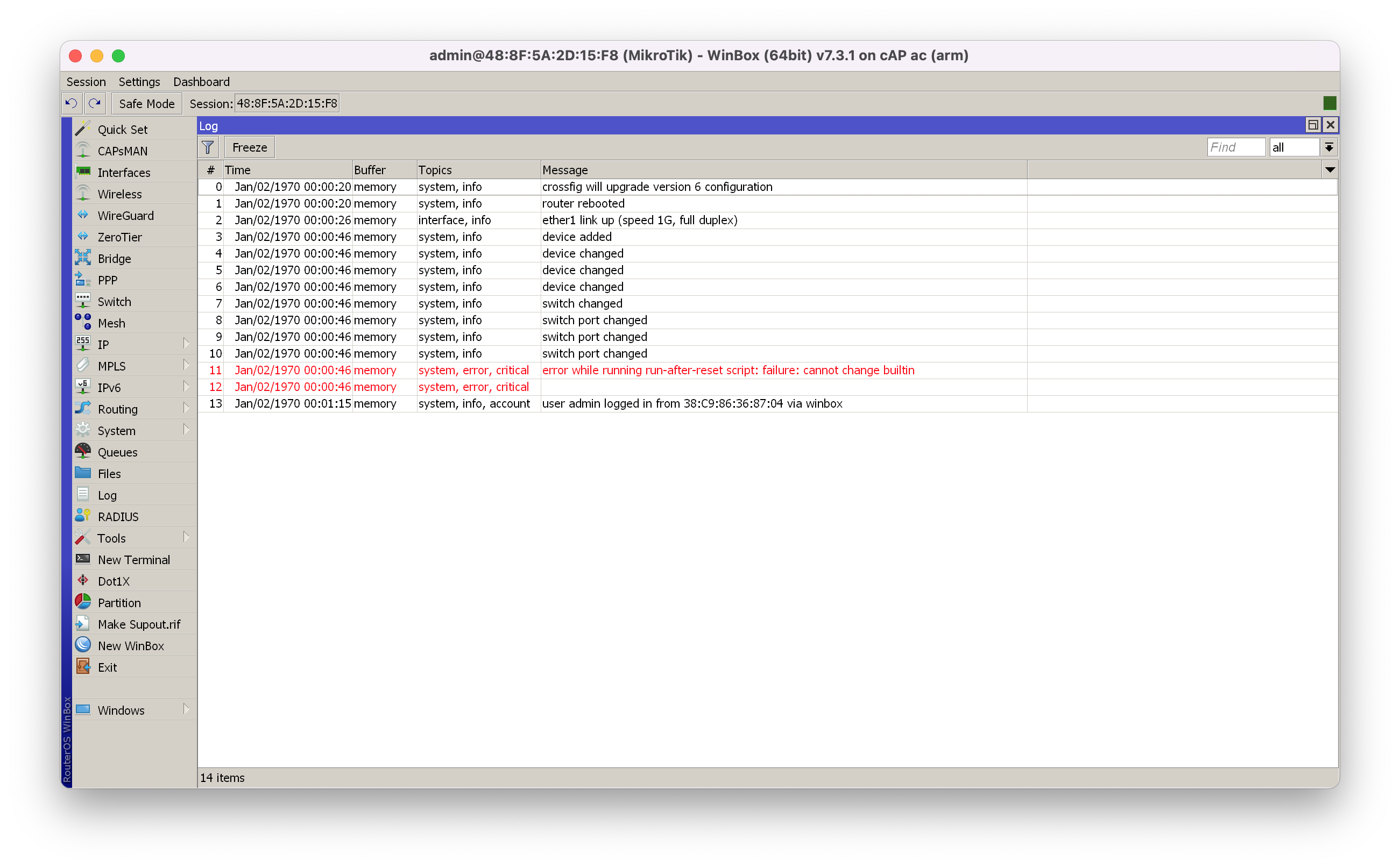
Tried doing reset and set ‘run after reset’ script. It also fails with this message in log:
error while running run-after-reset script: failure: cannot change builtin
Out of ideas and patience. Whats the point of an ‘export’ file if it can’t be re-imported?
I’ve been at this for 6hrs now… trying to make a simple DNS change to a ceiling mounted AP. I am usually 800km away from this device and will never be comfortable remotely trying to change a setting.
I agree that it sucks. I told you to connect via MAC address and then reset the config.
After that you upload the export file and run an import command from the terminal:
/import verbose=yes filename
Should it issue some minor error message you can skip that line by adding from-line=1234 (for example) to the import command.
MikroTik does not respond to requests to make the import facility more sturdy. Not a priority, apparently.
After another few hours I have the cAP ac back on the roof and its working but I can no longer SSH to the device. I could before it was ‘recovered’. My RSA keys that were configured previously can no longer be imported to the device, when I attempt to import them I get a message about raising a support case with a supout file. The device is on the exact same routerOS version 7.3.1 and I’m trying the same keys. I also tried enabling password login and that fails as well.
ssh -vvv cAPac
OpenSSH_9.0p1, OpenSSL 1.1.1p  21 Jun 2022
debug1: Reading configuration data /Users/xxx/.ssh/config
debug3: /Users/xxx/.ssh/config line 1: Including file /Users/xxx/.ssh/fp_config depth 0
debug1: Reading configuration data /Users/xxx/.ssh/fp_config
debug3: kex names ok: [diffie-hellman-group1-sha1]
debug3: kex names ok: [diffie-hellman-group1-sha1]
debug3: kex names ok: [diffie-hellman-group1-sha1]
debug3: kex names ok: [diffie-hellman-group1-sha1]
debug3: kex names ok: [diffie-hellman-group1-sha1]
debug3: kex names ok: [diffie-hellman-group1-sha1]
debug1: /Users/xxx/.ssh/config line 53: Applying options for cAPac
debug3: kex names ok: [diffie-hellman-group1-sha1]
debug1: /Users/xxx/.ssh/config line 74: Applying options for *
debug1: Reading configuration data /usr/local/etc/ssh/ssh_config
debug2: resolve_canonicalize: hostname 192.168.120.2 is address
debug3: ssh_connect_direct: entering
debug1: Connecting to 192.168.120.2 [192.168.120.2] port 22.
debug3: set_sock_tos: set socket 3 IP_TOS 0x48
debug1: Connection established.
debug1: identity file /Users/xxx/support/rsa_keys/xxx_id_rsa type 0
debug1: identity file /Users/xxx/support/rsa_keys/xxx_id_rsa-cert type -1
debug1: Local version string SSH-2.0-OpenSSH_9.0
kex_exchange_identification: Connection closed by remote host
Connection closed by 192.168.120.2 port 22