ROS 7.9 IPSec defect

Hi, community and Mikrotik staff.

There is a defect in 7.9 related to certificates. Most possibly due to the “*) ipsec - refactor X.509 implementation;”

In my setup, I have ROS 7.8 connected to ROS 6.49.6 via IKE2:

auth: digital signature
My Type ID: auto
remote type ID: auto
Match by: remote id

(the same config on both sides)

The setup worked well until I upgrade the 7.8 to 7.9. After the upgrade:

ROS 6.49.6 floods with: got fatal error: AUTHENTICATION_FAILED
ROS 7.9 floods with: can’t verify peer’s certificate from store

Immediately re-checked the certificates: found them valid on both sides.

How to fix?
Regards.


Update: re-checked all other combinations of my ID/remote ID on both sides - nothing works. Again re-checked certificates on both sides - all certificates are correct and valid including CA (the same CA was used to issue end-point certs. It actually looks like a defect in ROS7.9 - it worked perfectly until the v7.9

BTW, is there a way to roll-back to the previous version?

Manually download v7.8 from download archive … make sure you get all the package files, consult the list of currently installed packages under /system/packages .
Place those npk files to whatever root storage on device (so they are seen in /file/print in root space and not in some subdirectory).
Execute /system/package/downgrade

At this point router will reboot (possibly prompting you for consent) and after it comes back, it should be running ROS v7.8.

Also, when you have a router that allows it (sufficient storage), always make 2 partitions and copy your running partition to the other one before the upgrade.
Then, whenever an upgrade is not what you like it to be, you can just activate the other partition and reboot, and you are back to exactly what you had before.
(and you still have the upgraded version at hand in case you later want to do some more tests)

Of course this is not possible on devices with 16MB flash.

It may not be possible also with devices with larger flash, but that depends on size of necessary packages and disk space required for running ROS. E.g. Audience with 128MB flash can not be partitioned, packages get downloaded onto flash disk (not RAM disk), but wifiwave2 package is huge … everything doesn’t fit in 64MB partition.

In recent versions you can have a user-defined RAMdisk. But I do not know if you can upgrade from packages stored there.
And of course it would not work with the built-in upgrade commands, as I don’t think you can set the download location, it is always .download in the root.
(well, maybe you could define a RAMdisk named .download)

Thank you folks for your advises.

Fortunately, the affected ROS instance was CHR, I restored it from backup.

I set up a separate CHR instance with ROS 7.9 configured it from scratch and re-tested the issue. So yes, the described behavior was reproduced. IPsec between ROS 6.49.[6,7] and ROS 7.9 with IKE2/certs doesn’t work. Considering the defect confirmed.

2Mikrotik staff: is it actually as expected? Don’t you need to fix it urgently?

Regards.

Just a vote to confirm it.
IKEv2 with X.509 certificates is completely broken. I

Please, contact us directly by support@mikrotik.com, we would like to see your “problematic” configuration.

I have this problem with ProtonVPN. It worked before on 7.8 but not after upgrade to 7.9 on a hAP AX2. Now something has changed, but it looks to me like I need to have the whole certificate chain:

From https://wiki.mikrotik.com/wiki/Manual:IP/IPsec:

All EAP methods requires whole certificate chain including intermediate and root CA certificates to be present in System/Certificates menu.

and

http://forum.mikrotik.com/t/ipsec-certificate-chain-of-trust/116568/1

Sadly, Proton want me to downgrade rather than provide the intermediate certificate to verify if that fixes the problem.


21:13:39 ipsec ID_R (ADDR4): 92.119.179.82 
21:13:39 ipsec processing payload: AUTH 
21:13:39 ipsec processing payloads: CERT 
21:13:39 ipsec Certificate: 
21:13:39 ipsec   serialNr:  7c:2b 
21:13:39 ipsec   issuer:    <C=CH, O=ProtonVPN AG, CN=ProtonVPN Intermediate CA 1> 
21:13:39 ipsec   subject:   <CN=node-nl-52.protonvpn.net> 
21:13:39 ipsec   notBefore: Tue Apr 18 11:01:43 2023 
21:13:39 ipsec   notAfter:  Wed Apr 17 11:02:13 2024 
21:13:39 ipsec   selfSigned:0 
21:13:39 ipsec   extensions: 
21:13:39 ipsec     key usage: digital-signature, key-encipherment 
21:13:39 ipsec     extended key usage: tls-server, tls-client 
21:13:39 ipsec     basic constraints: isCa: FALSE 
21:13:39 ipsec     authority key id:25:b6:93:59:c2:01:e2:de:44:4e:fb:e1:53:2e:7f:c9:0a:aa:1a:33 
21:13:39 ipsec     subject alternative name:  
21:13:39 ipsec       DNS: nl-free-27.protonvpn.net 
21:13:39 ipsec       DNS: node-nl-52.protonvpn.net 
21:13:39 ipsec       DNS: 92.119.179.82 
21:13:39 ipsec       IP: 92.119.179.82 
21:13:39 ipsec   signed with: 1.2.840.113549.1.1.11 (SHA256+RSA) 
21:13:39 ipsec [RSA-PUBLIC] 
21:13:39 ipsec modulus: c37c5427.0ed3764c.338b46c8.482eabd1.9542fbf4.677a673b.648051f1.63a0343a.8882df9e.5ce78ec2.7af4eac6.a37ce370.437e5c21.ac194cf8.cf2ac40a.89ba73ea.2935c2f8.0e4cfe15.67c4aeef.44008ea8.48b8d7f4.d63d33d7.86f0cf7b.6dddeab7.40e72a55.378f5488.fc8d2753.807052ce.3872c084.fdf064b4.8fbaeb70.5fad8836.bdd02bcf.6884c548.ca231f7c.8d284523.be8cdeac.e1ddacc9.4854d5c0.447bf429.87c2d0e1.8dfd92dc.63aae9e3.b5ccfecd.50da1d70.dece0cea.343df21d.8678e1ba.7b11fda1.c6120c2b.a9a70d6b.5c7da6ef.7b20d7b6.49a6821a.5b349f38.e847eb18.717f9ec0.c75c56a8.42bb16a1.a7af9345.a3dd7c3b.1155e0ac.d37b8adf.46022103.df5ce0a3.fb887969.47ccf396.5d3449df.d5f6e5e6.e6e8e3d2.4efd070f.984a7260.a3c59525.d1ac1ec9.928d3dd4.0a65f263.e8d19658.6306f087.8ad29ca3.3f536dc0.d70cdb83.2c1c9094.be3083d4.f0a09211.a40aa4a5.bfbb7983.e248a745.d3e09ceb.f0e34f25.ab3d97fb.eb692a3f.7204ed91.1b0862a0.6d98f991.34ec320d.31b32de3.8730d3fd.ca8c6125.fe7323ca.0f4bd742.e71383c6.244bf6db.29a5947d.dcc8d9cb.9711e528.f657cb79.4ce9f79d.ff61a9ba.74b3e4f7.c573b710.c9a05f9f.ede3 
21:13:39 ipsec 7eb0.32776f63.d6da84e7.250a6f1f.53be6a90.3c3da59f.70b0a056.fdbe6333.f68a965c.3a8c80a8.5c1d6880.4683adad.8669b64b.66c88749.d59fc781.5b333e24.c5481e91 
21:13:39 ipsec publicExponent: 00010001 
21:13:39 ipsec Certificate: 
21:13:39 ipsec   serialNr:  06 
21:13:39 ipsec   issuer:    <C=CH, O=ProtonVPN AG, CN=ProtonVPN Root CA> 
21:13:39 ipsec   subject:   <C=CH, O=ProtonVPN AG, CN=ProtonVPN Intermediate CA 1> 
21:13:39 ipsec   notBefore: Wed Feb 15 15:17:00 2017 
21:13:39 ipsec   notAfter:  Mon Feb 15 14:38:00 2027 
21:13:39 ipsec   selfSigned:0 
21:13:39 ipsec   extensions: 
21:13:39 ipsec     key usage: key-cert-sign, crl-sign 
21:13:39 ipsec     basic constraints: isCa: TRUE 
21:13:39 ipsec     subject key id:  25:b6:93:59:c2:01:e2:de:44:4e:fb:e1:53:2e:7f:c9:0a:aa:1a:33 
21:13:39 ipsec     authority key id:83:90:86:98:84:b5:59:4f:0c:8b:35:37:ad:34:1d:aa:57:48:24:54 
21:13:39 ipsec   signed with: 1.2.840.113549.1.1.13 (1.2.840.113549.1.1.13) 
21:13:39 ipsec [RSA-PUBLIC] 
21:13:39 ipsec modulus: dbf7bb04.0c16360e.c7be2d6b.169d85cc.cb6e3093.b93ef78c.ccf4f44a.8536fece.ed47ac5d.f609ea44.20615f58.c84f3ace.73f8c5bb.2cc0d519.621f9775.95293a83.fa66eded.47f8a262.2bb38ba8.d562b27a.e86f3d9c.fa92da69.b9767f05.6dbf0245.6909ca09.bc01d958.903c1836.57610d4a.c446541d.0910c6b1.8620ffdf.1d75e77e.e695e748.6f18ffe8.ae2ccebf.61886451.541e09fa.b52fa5e0.b92c2ef0.2baf2632.238c4d4f.a6d5076b.71dcded1.b3895c9d.96d2b29f.15a5a9bd.5d26a8a7.18a88166.f627a225.789a8b69.158c2173.759dd3d2.4b3f37a8.6e10f620.06767af4.9ab6290c.5838a780.4bf51095.e923e57f.13600adf.11ca4a48.70f98671.f7db4dc4.288ebb75.3904502b.7994778f.66276735.f59c4bfd.a74d8819.a5b3cd82.4f3440f4.cd23b6c3.4eeeb614.a629cc40.dfd553be.cf75969b.5b715ed5.4f1a0963.4484ac72.1e552dd2.72b9ebed.6be8393b.aedccdd2.091a9eea.823da096.4c39d7cd.b1c78176.f1beaa5a.4e1480a8.0633b9dd.6e012bc2.9a8734dd.fcf5a505.18952775.15bfcc57.c140c0fa.8f7cdf80.d7540a1b.6801d742.d33d8cda.1ba93f7c.15785992.d8ce4040.3650e44b.e7cd593f.17ca7872.d1720589.e5d98fb0.3046cbf2.fafea5bf.cab9ba0d.40c0 
21:13:39 ipsec 74de.7eab8d7e.8123448c.d0632c12.50154983.93797a43.18aed2e1.0343df28.16f18793.9512d8a6.e3d0e02a.d51a620e.31dc8bfe.77eb2b9a.f6b4c2f9.cc5e9133.366ac757 
21:13:39 ipsec publicExponent: 00010001 
21:13:39 ipsec requested auth method: RSA 
21:13:39 ipsec trust chain:  
21:13:39 ipsec 0:   AKID: 25:b6:93:59:c2:01:e2:de:44:4e:fb:e1:53:2e:7f:c9:0a:aa:1a:33 
21:13:39 ipsec 1: SKID: 25:b6:93:59:c2:01:e2:de:44:4e:fb:e1:53:2e:7f:c9:0a:aa:1a:33 
21:13:39 ipsec    AKID: 83:90:86:98:84:b5:59:4f:0c:8b:35:37:ad:34:1d:aa:57:48:24:54 
21:13:39 ipsec 2: SKID: 83:90:86:98:84:b5:59:4f:0c:8b:35:37:ad:34:1d:aa:57:48:24:54 
21:13:39 ipsec    AKID: 83:90:86:98:84:b5:59:4f:0c:8b:35:37:ad:34:1d:aa:57:48:24:54 
21:13:39 ipsec,error can't verify peer's certificate from store

Any solution except using ROS v7.8?
(I have same issue with combination ROS 7.9 + ProtonVPN)

Me too, I still version 7.8 because dosent work on 7.9 :frowning:

  1. Just curious:
    Was that response via support ticket or in public discussion(Redit & etc)?

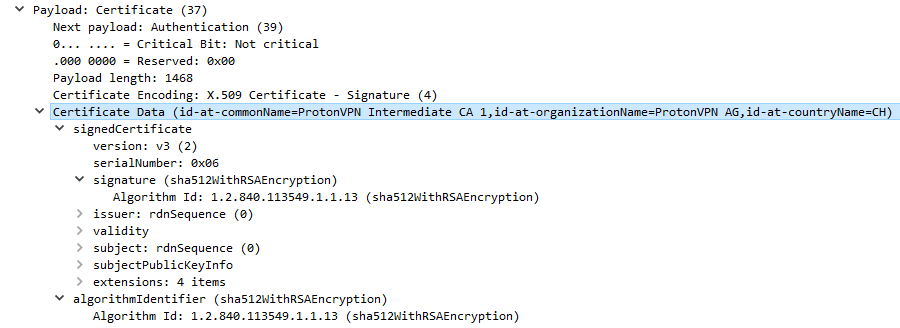
  2. I extracted Intermediate CA certificate from IPsec ISAKMP phase (IPsec debug output from RouterOS + Wireshark :smiley: )
    IPsec_ISAKMP_Decryption_Cert.png
    Here is certificate in DER and PEM encoding:
    ProtonVPN_IKE_Intermediate_CA_1.tar (6 KB)
    Right now I don’t have time to conduct a test, so maybe one of the users will have time to do it before I get my hands on it myself :slight_smile:

P.S.
It should be borne in mind that if this works, then this is only a temporary solution, since:

  1. The intermediate certificate can be replaced at any time by ProtonVPN
  2. It is necessary to ensure that the problem of certificate chain verification is solved.
    Сlient DOES NOT HAVE to have the entire chain of certificates on its side in order to build correct certificate chain.
    Client only needs to have a root certificate to verify entire chain, provided that the server provides all intermediate certificates.

Successfully tested on 7.9.1 with 2 installed certificates(IKE_Root_CA + IKE_Intermediate_CA_1) on ProtonVPN.
At least as temporal solution :slight_smile:

7.10RC1 Still have issues with ProtonVPN IPSec…

it works, nice extraction :smiley:
thank you

ROS 7.10 release is also still affected by this issue.

There is no issues found when importing proton certs.

Can’t say about the Proton certs. I mean the initial problem this topic is about.

Import of certificates is not(and never was) a problem, but is how RouterOS validate certificate chain.
Previously, validation worked correctly: if there is a root certificate in system store, and the server to which the connection takes place transmits an intermediate certificate, then the certificate chain was correctly validated.
After version 7.9, this logic was broken, and now it is required to import not only root certificates into the system store, but also ALL intermediate ones.
PKI should not work that way.

Could you please contact us through support portal, we have fix available for this. Thanks