I am new to ROS7 and formerly was on 6.49.18. I am using a L009 now with the default configuration on 7.19.6.
I modified Network-Settings to my LAN what is 192.168.179/0. Router is 192.168.179.3, DNS is 192.168.179.20 (PiHole & PiVPN)
Everything works fine so far. Portforwardings to second and third RPI (Asterisk-PBX & XMPP prosody-Server) are working.
Wireguard on the PiHole is also working.
I found out that under IP-DNS-static "router.lan" there was still an entry for 192.168.88.1. I changed that to the Router-IP. Was that correct?
Here comes my question:
I want to block TIKTOK with mangle rules on my Network but can´t get it working.
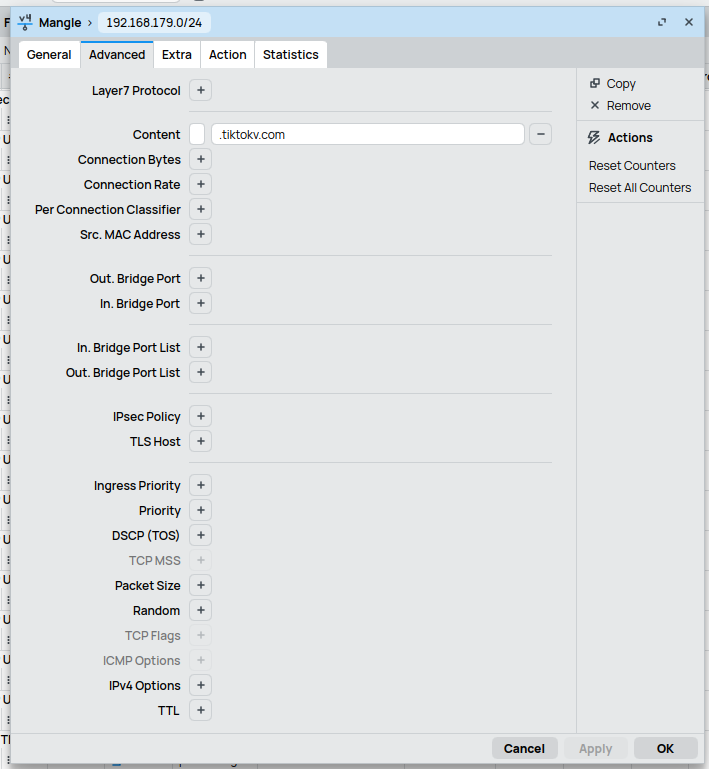
I tried the following what worked on 6.49.18 (please look at the mangle rules):
The "TIKTOK"-List is created, but no TikToK-Addresses are added to the list.
I also had mangle rules for "SIP-USER-Agents" (SipVicious and others) but I read that everything incoming to WAN is blocked by default except portforwardings ind default-configuration. So I did not added them.
I have it corrected and tested, still no addresses are added to the list. That's exactly what I need help for.
I watched this video: https://www.youtube.com/watch?v=9kOouo5goxA.
Mikrotik devices are not designed to block specific applications. You will need a high end router with a subscription service that can intercept/look at https type traffic.
That means this will not work? On my RB2011 it worked on ROS 6. How do I block Websites / Social Media except Layer 7? Or do I have to use Firewall Rules to build firewall address-lists?
Sorry, I just don´t understand that. What about WebProxy?
Not a matter of RoS, its a matter of how sophisticated applications/websites have become in terms of defeating any attempts at blocking of straight IPs or other methods.
There is an option to block on IP addresses. There are lots of lists on the net that can be used for this purpose. It's not bulletproof (far from) and you have to trust the creator.
But that is, in my experience, a way to block this traffic.
Even the "RAW"-Solution Normis is showing here https://www.youtube.com/watch?v=T2CQyN-D4u4 does not work for me. No traffic is shown in the Raw Rule. Does it have to do with that I am on the default-configuration?
What cannot be done Is creating an address list with mangle base on contents of the packet, and as well tls-host won't be a valid matcher in most cases.
The point Is now how accurate and extensive Is your address list, how long those addresses will be used, how many new addresses will be used tomorrow or next week, etc., in other words how this manually made list will be maintained.
If you are able to force all client devices to use the router as DNS server then it might be achievable.
The router will then use the PiHole as upstream DNS server.
You'll need to catch all DNS53 traffic from LAN (except traffic from PiHole) and redirect it to the router (with two action=redirect chain=dstnat rules).
You'll need to block outgoing traffic to TCP/UDP port 853 (block DoT & DoQ).
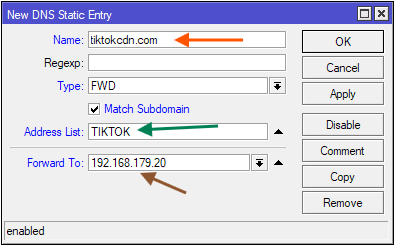
Once you've made sure that all clients have to use the router as DNS resolver. The next step is to add static DNS record of type FWD for each of the domains you want to block, for example (192.168.179.20 is the address of PiHole):
/ip dns static
add address-list=TIKTOK forward-to=192.168.179.20 \
    match-subdomain=yes type=FWD name=tiktokcdn.com
Eventually, also set IP -> DNS -> Address List Extra Time to some positive value, for example 1 minute:
/ip dns
set address-list-extra-time=1m
Once you've done adding the static DNS FWD records, each time the clients in the network queries for the domains, the TIKTOK address list will populated with the correct corresponding IP addresses. Because the clients have to resolve the domain before making the connections, you only need a drop rule in the FW for dst-address-list=TIKTOK.
This is much more efficient than looking into each packet for the Layer 7 content. The check only needs to be performed on the DNS requests.
But the above is usually only needed if you don't have PiHole. If you already have PiHole then just redirect all DNS queries to it (plus block DoH/DoT/DoQ) and configure PiHole to black list those domains.
@CGGXANNX@jaclaz Thank you again for your help. I found a really large PiHole-List for TIKTOK on the Internet and am now using it. But anyway - you again helped me out a lot!
Regards
Remember to add all the free and well-known VPNs in the world to avoid bypassing any blockade with a single click...
And don't permanently add addresses to the list...
Those IPs are a CDN, and one day you might need something other than TikTok and find yourself blocked.
Oh, and don't forget IPv6, in case you hadn't thought of that...