ROSE - "NVME over tcp" to proxomx failing on 4K LBA drives

I’ve recently posted about the excellent rose storage server and how great it was working for me.. but I’ve broken my environment since then because I formatted the disks from 512 to 4k LBA (I believe is the root cause).

My personal problem is the server is in an entirely different city… so I need to fly back to and collect the disks, format them back to 512 and reinstall them…. so hopefully we can find a software solution I can fix remotely. :sweat_smile:

A support ticket has been raised (SUP-206829), but I’m hoping the community might be able to validate and find a work around with me.


Hello team,

I’ve got a NVME over TCP setup on my proxmox cluster. connected to a RAID6 cluster of disks on a ROSE.. this is going to be a long one.

  1. I have a ROSE running testing 7.21rc2

  2. it is filled with 2 groups of disks
    10 x SAMSUNG MZQLB960HBJR-00W07
    9 x SAMSUNG MZQLB960HAJR-00007

  3. These disks have all been formated with LBA1 (4kn) over the 512b (I think this might be the first problem and Rose doesn’t support 4k? maybe?)

  4. they are setup in a RAID6 with 9 disks

  5. they are both setup with NVME over TCP

    add nvme-tcp-export=yes nvme-tcp-server-nqn=nqn.2000-02.com.mikrotik:raidPM983 raid-device-count=9 raid-type=6 slot=raidPM983 type=raid
    add nvme-tcp-export=yes nvme-tcp-server-nqn=nqn.2000-02.com.mikrotik:raidPM983a raid-device-count=9 raid-type=6 slot=raidPM983a type=raid
    set nvme1 raid-master=raidPM983a raid-role=0
    set nvme2 raid-master=raidPM983a raid-role=1
    set nvme3 raid-master=raidPM983a raid-role=2
    set nvme4 raid-master=raidPM983a raid-role=3
    set nvme5 raid-master=raidPM983a raid-role=4
    set nvme6 raid-master=raidPM983a raid-role=5
    set nvme7 raid-master=raidPM983a raid-role=6
    set nvme8 raid-master=raidPM983a raid-role=7
    set nvme9 raid-master=raidPM983a raid-role=8
    set nvme10 raid-master=raidPM983a raid-role=spare
    set nvme11 raid-master=raidPM983 raid-role=0
    set nvme12 raid-master=raidPM983 raid-role=1
    set nvme13 raid-master=raidPM983 raid-role=2
    set nvme14 raid-master=raidPM983 raid-role=3
    set nvme15 raid-master=raidPM983 raid-role=4
    set nvme16 raid-master=raidPM983 raid-role=5
    set nvme17 raid-master=raidPM983 raid-role=6
    set nvme18 raid-master=raidPM983 raid-role=7
    set nvme19 raid-master=raidPM983 raid-role=8
    
  6. they are both connected to 2 proxmox nodes in a cluster

MAJOR ISSUE:
When I try to migrate to the VM from local storage to the nvme over tcp disks which is formated with LVM:

this happens on both nvme4n1 (/dev/vg-rose-raidPM983) and nvme5n1 (/dev/vg-rose-raidPM983a)

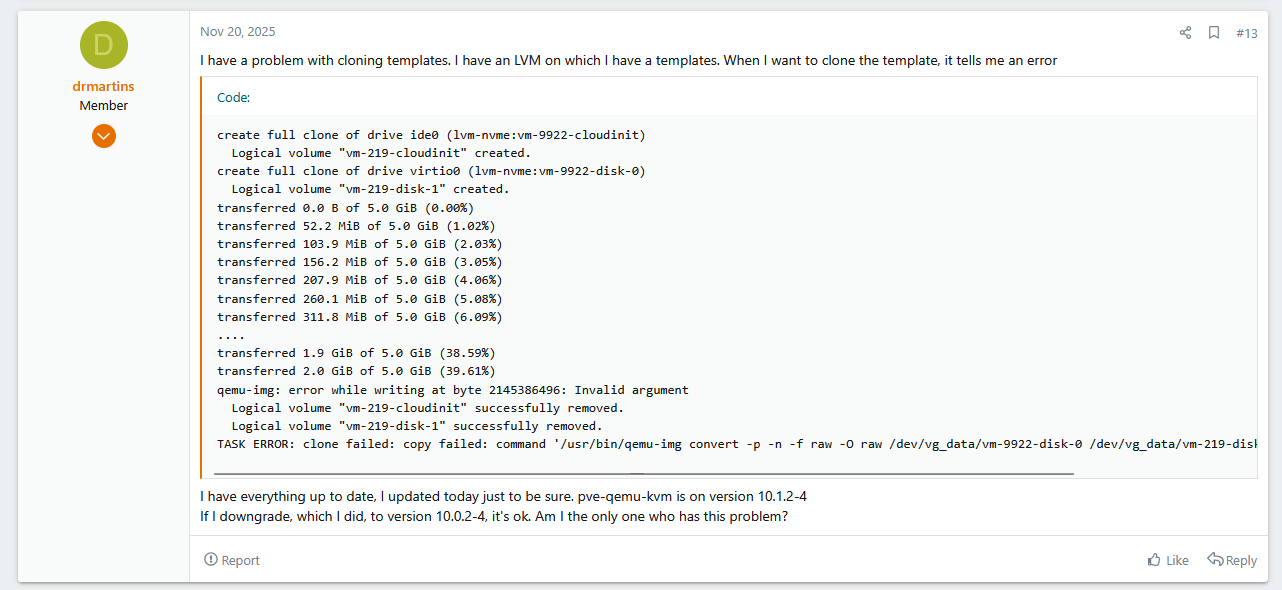
and failed at the exact same byte qemu-img: error while writing at byte 2145386496: Invalid argument on both NVME.

  Wiping PMBR signature on /dev/vg-rose-raidPM983/vm-123-disk-2.
  Logical volume "vm-123-disk-2" created.
transferred 0.0 B of 50.0 GiB (0.00%)
transferred 512.0 MiB of 50.0 GiB (1.00%)
transferred 1.0 GiB of 50.0 GiB (2.01%)
transferred 1.5 GiB of 50.0 GiB (3.01%)
transferred 2.0 GiB of 50.0 GiB (4.02%)
qemu-img: error while writing at byte 2145386496: Invalid argument
  Logical volume "vm-123-disk-2" successfully removed.
storage migration failed: copy failed: command '/usr/bin/qemu-img convert -p -n -T none -f raw -O raw /dev/zvol/SSD/vm-123-disk-1 /dev/vg-rose-raidPM983/vm-123-disk-2' failed: exit code 1
  1. The raw storage device information gives me

Device: nvme4n1
max_hw_sectors_kb : 2147483644
max_sectors_kb : 7168
logical_block_size : 4096
physical_block_size : 4096
minimum_io_size : 4096
optimal_io_size : 7340032
discard_max_bytes : 2199023255040
discard_granularity : 4096
write_cache : write back
nr_requests : N/A
rotational : 0
alignment_offset : N/A

Device: nvme5n1
max_hw_sectors_kb : 2147483644
max_sectors_kb : 7168
logical_block_size : 4096
physical_block_size : 4096
minimum_io_size : 4096
optimal_io_size : 7340032
discard_max_bytes : 2199023255040
discard_granularity : 4096
write_cache : write back
nr_requests : N/A
rotational : 0
alignment_offset : N/A

According to the basic docs..
max_sectors_kb defaults to 512
max_hw_sectors_kb defaults to 512… looks like it’s currently an signed 32bit value?!

optimal_io_size defaults to 0…

https://docs.redhat.com/en/documentation/red_hat_enterprise_linux/8/html/monitoring_and_managing_system_status_and_performance/factors-affecting-i-o-and-file-system-performance_monitoring-and-managing-system-status-and-performance

I hope this helps you diagnose the issue… I will leave the disks in the Rose and travel back home… happy to test debug firmware because nothing will use it.

More information

https://www.kernel.org/pub/linux/utils/util-linux/v2.23/libblkid-docs/libblkid-Topology-information.html
OPTIMAL_IO_SIZE: usually the stripe width for RAID or zero. For RAID arrays it is usually the stripe width or the internal track size.

”raid-chunk-size” is 1mb and there are 7 data disks + 2 parity disk in both of my raids.. so I think that value is actually correct?

I don’t have any way to format the NVME disks back to 512b LBA and test them… giving that ability via the command line would be nice.
nvme format /dev/nvme0n1 --lbaf=0 on the cli or similar would be nice.

Right now. I have a very expensive paperweight until I find a solution.

If anybody has a ROSE and a few spare disks.. please feel free to test LBA 512 vs 4k for me.
because max_hw_sectors_kb = 2,147,483,644 KB is currently advertising 2 terabytes per request!!

I’ve started reading up on the NVME MDTS (Maximum Data Transfer Size) for my Samsung PM983 likely MDTS 7-9~ (I cannot test right now)

MDTS = 7 → (1 << 7) * 4096 = 128 KiB
MDTS = 8 → (1 << 8) * 4096 = 256 KiB
MDTS = 9 → (1 << 8) * 4096 = 512 KiB

max_hw_sectors_kb should be calculated using those values.. but it current matches max_sectors_kb = 7168 KB (≈ 7 MiB)

Bug: Currently the size of the optimal_io_size?

in the linux kernel.. it seems to be calculated in drivers/nvme/host/core.c

https://github.com/torvalds/linux/blob/dd9b004b7ff3289fb7bae35130c0a5c0537266af/drivers/nvme/host/core.c#L3349

max_hw_sectors = (1 << (MDTS + page_shift - 9))

Resolution: max_hw_sectors_kb = 2048 for MDTS 9… and max_sectors_kb to something sane

ref: https://superuser.com/questions/1818245/smartctl-nvme-ssd-what-is-maximum-data-transfer-size?utm_source=chatgpt.com

$ nvme show-regs -H /dev/nvme0 | grep MPSMIN
Memory Page Size Minimum         (MPSMIN): 4096 bytes

$ smartctl -c /dev/nvme0 | grep 'Maximum Data Transfer Size'
Maximum Data Transfer Size:         512 Pages 
(or MDTS9)

So generally… 512 × 4096 = 2MiB
with the 4kb page size mentioned above

max_hw_sectors_kb

MDTS 0 : max_hw_sectors_kb = 4
MDTS 1 : max_hw_sectors_kb = 8
MDTS 2 : max_hw_sectors_kb = 16
MDTS 3 : max_hw_sectors_kb = 32
MDTS 4 : max_hw_sectors_kb = 64
MDTS 5 : max_hw_sectors_kb = 128
MDTS 6 : max_hw_sectors_kb = 256
MDTS 7 : max_hw_sectors_kb = 512
MDTS 8 : max_hw_sectors_kb = 1024
MDTS 9 : max_hw_sectors_kb = 2048
MDTS 10 : max_hw_sectors_kb = 4096
MDTS 11 : max_hw_sectors_kb ctors_kb = 8192

BUT you also need to calculate the MPSMIN (page size)
sudo nvme show-regs /dev/nvme0 | grep CAP
eg "cap : 0x0040fcff00001fff" ((cap >> 16) & 0xf) = 0

0 = 4 KiB pages
1 = 8 KiB pages
2 = 16 KiB pages

you double or triple your max_sectors_kb

MDTS 9 with 4 KiB pages (default) : max_hw_sectors_kb = 2048
MDTS 9 with 8 KiB pages : max_hw_sectors_kb ctors_kb = 4096
MDTS 9 with 16 KiB pages : max_hw_sectors_kb = 8192

max_sectors_kb = 1024 is likely the correct MAX response due to the the RAID and NVME over TCP setup offered…

so something similar to

max_hw_sectors_kb = hw_limit_kb
max_sectors_kb    = min(hw_limit_kb, 1024)

So… max_sectors_kb could be 4, 8, 16 , 32, 64, 128, 256, 512, 1024

Sadly I cannot override these settings easily on the client side and there seems to be no way to handle it on the ROSE side…

I’ve tried to restore/resolve this on my side, but I am stuck and currently have a very expensive paperweight.

I’m going to enjoy the holiday break, and hopefully the team can help me in the near year…

The plot thickens… I was causally scrolling the proxmox forum and saw this!

ref: https://forum.proxmox.com/threads/qemu-10-1-available-on-pve-test-and-pve-no-subscription-as-of-now.175350/post-817968

Same bug. Same byte?…. so it might be a proxmox/qemu bug

I’m not going to place blame on Mikrotik or proxmox exclusively. I might have found two separate bugs…

root@unit0:~# lvdisplay /dev/vg-rose-raidPM983a/dummy
  --- Logical volume ---
  LV Path                /dev/vg-rose-raidPM983a/dummy
  LV Name                dummy
  VG Name                vg-rose-raidPM983a
  LV UUID                m0sk0O-uped-yeML-cuR5-D0Nk-n06G-U31uLV
  LV Write Access        read/write
  LV Creation host, time unit0, 2025-12-31 12:31:53 +1100
  LV Status              available
  # open                 0
  LV Size                50.00 GiB
  Current LE             12800
  Segments               1
  Allocation             inherit
  Read ahead sectors     auto
  - currently set to     28672
  Block device           252:3


blockdev --getsize64 /dev/zvol/SSD/vm-129-disk-2
53687091200
blockdev --getsize64 /dev/vg-rose-raidPM983a/dummy
53687091200
 
# sector size
blockdev --getss /dev/zvol/SSD/vm-129-disk-2
512
blockdev --getss /dev/vg-rose-raidPM983a/dummy
4096

# physical block size
blockdev --getpbsz /dev/zvol/SSD/vm-129-disk-2
16384
blockdev --getpbsz /dev/vg-rose-raidPM983a/dummy
4096

this is just for debug… but looks to confirm the previous details

block size of 16k for zfs is weird to see but I believe that’s correct.

Proxmox's default volblocksize for ZFS pools meant to store VM disks is 16k

This is looking more and more like the issue might be on the qemu and proxmox side… but it’s still very annoying - migrating from 512 to 4K LBA disks really shouldn’t be a major problem

Must be a regression?

plus I think I’ve caught at least a small bug on the rose side… but likely wasn’t the root cause. so I’ll let mikrotik explore

Root cause: likely a regression in qemu

1767451263.183051 fallocate(8</dev/dm-3<block 252:3>>, FALLOC_FL_KEEP_SIZE|FALLOC_FL_PUNCH_HOLE, 2105540608, 2097152) = 0 <0.004543>
1767451263.187637 write(7<{eventfd-count=0, eventfd-id=803, eventfd-semaphore=0}>, "\1\0\0\0\0\0\0\0", 8) = 8 <0.000020>
1767451263.204195 fallocate(8</dev/dm-3<block 252:3>>, FALLOC_FL_KEEP_SIZE|FALLOC_FL_PUNCH_HOLE, 2116026368, 2097152) = 0 <0.003597>
1767451263.207834 write(7<{eventfd-count=0, eventfd-id=803, eventfd-semaphore=0}>, "\1\0\0\0\0\0\0\0", 8) = 8 <0.000054>
1767451263.225862 fallocate(8</dev/dm-3<block 252:3>>, FALLOC_FL_KEEP_SIZE|FALLOC_FL_PUNCH_HOLE, 2126512128, 2097152) = 0 <0.002620>
1767451263.228756 write(7<{eventfd-count=0, eventfd-id=803, eventfd-semaphore=0}>, "\1\0\0\0\0\0\0\0", 8) = 8 <0.000027>
1767451263.245782 fallocate(8</dev/dm-3<block 252:3>>, FALLOC_FL_KEEP_SIZE|FALLOC_FL_PUNCH_HOLE, 2136997888, 2097152) = 0 <0.003657>
1767451263.249490 write(7<{eventfd-count=0, eventfd-id=803, eventfd-semaphore=0}>, "\1\0\0\0\0\0\0\0", 8) = 8 <0.000031>
1767451263.264920 fallocate(8</dev/dm-3<block 252:3>>, FALLOC_FL_KEEP_SIZE|FALLOC_FL_PUNCH_HOLE, 2147479552, 3584) = -1 EINVAL (Invalid argument) <0.000015>
1767451263.264986 ioctl(8</dev/dm-3<block 252:3>>, BLKZEROOUT, [2147479552, 3584]) = -1 EINVAL (Invalid argument) <0.000014>
1767451263.265051 write(7<{eventfd-count=0, eventfd-id=803, eventfd-semaphore=0}>, "\1\0\0\0\0\0\0\0", 8) = 8 <0.000011>
1767451263.570552 +++ exited with 1 +++

Successful FALLOC_FL_PUNCH_HOLEs
The successfully offset 2147479552 and lengths 2097152 are 4K aligned.

Failing FALLOC_FL_PUNCH_HOLE and BLKZEROOUT
The offset 2147479552 is 4K-aligned. The 3584 is not a typical block size multiple (it is 7 × 512, but not 4K aligned).

qemu-img appears to try hole punching first, then falls back to BLKZEROOUT. On your device, both fail, so the conversion fails.”

So the issue seems to be that qemu is sending a weird BLKZEROOUT length…