I hope you’ll be able to help me here.
I’ve CCR1009-7G-1C-1S+ with quite simple setup.
In this scenario there is a LAN subnet 192.168.0.0/24 where I also have a QNAP NAS which is responsible to provide remote access to main site via OpenVPN 10.8.0.0/24
On top of that there is working IPSec Site2Site connectivity between main (192.168.0.0/24) and remote (192.168.5.0/24) site.
The challenge I have now is how to setup a routing so remote warrior (10.8.0.0/24) can access services available on remote (192.168.5.0/24) subnet.
Any help highly appreciated!
Hi, I think you need to add a route on your MikroTik CCR1009 router that directs traffic from the OpenVPN subnet to the remote subnet. Here are the steps to do that:
Log into the MikroTik router using Winbox or the web interface.
Go to “IP” → “Routes” and click the “+” button to add a new route.
In the “New Route” window, enter the following information:
Address: Enter the network address of the remote subnet (192.168.5.0/24).
Gateway: Enter the IP address of the IPSec tunnel endpoint on the remote site.
Distance: Set the distance to a lower value than the existing default route (for example, 1).
Routing-mark: Leave this field blank.
Click “OK” to save the new route.
Once the new route is added, traffic from the OpenVPN subnet (10.8.0.0/24) should be able to reach the remote subnet (192.168.5.0/24) via the IPSec tunnel. However, you may also need to configure firewall rules on the MikroTik router to allow traffic to reach the remote subnet. You can create firewall rules under “IP” → “Firewall” to allow traffic from the OpenVPN subnet to the remote subnet.
There isn’t really any issue you just need IP routes both way thru the transits.
You need will need statics in each router
I can see the QNAP NAS is 192.168.0.20 but you haven’t told us what the IP is for the router so I will assume
it is 192.168.0.1
Static route in QNAP NAS
192.168.5.0/24 next-hop 192.168.0.1
Static route in Router
10.8.0.0/24 next-hop 192.168.0.20
Static route On the External Router
10.8.0.0/24 next-hop 192.168.0.1
So now imagine the road warrior trying to ping a machine on 192.168.5.xxx
The road warrior sends a packet to a machine target (192.168.5.xxx) from it’s src IP 10.8.0.xxx
The QNAP NAS sees target is 192.168.5.xxx and passes it to next hop being 192.168.0.1
The router pass the packet thru the IPSEC tunnel rules to the machine at 192.168.5.xxx
The machine then sends the packet back target is 10.8.0.xxx src source IP is 192.168.5.xxx
The external router sees the target is 10.8.0.xxx and uses route rule to pass the packet to 192.168.0.1 on the “router”
The router see the target is 10.8.0.xxx and uses it route rule to send the packet to 192.168.1.20 on “QNAP NAS”
The QNAP NAS then sends the packet back to the road warrior
Good afternoon friend.
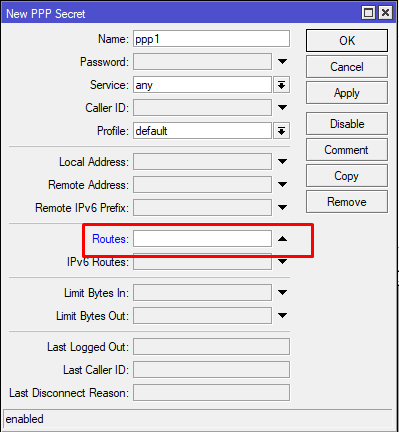
I have a similar problem, I put the Lan address of my Remote/Client Router inside the OpenVPN Profile
PPP>secrets>Routes
This way, the RB will create an automatic route to the Remote Router’s Lan every time you connect to the VPN through the OpenVPN client
But I still don’t know if it’s the best way to solve your problem.