Greetings to all, my name is Frank. I am a beginner when it comes to Mikrotik and have a somewhat basic question.
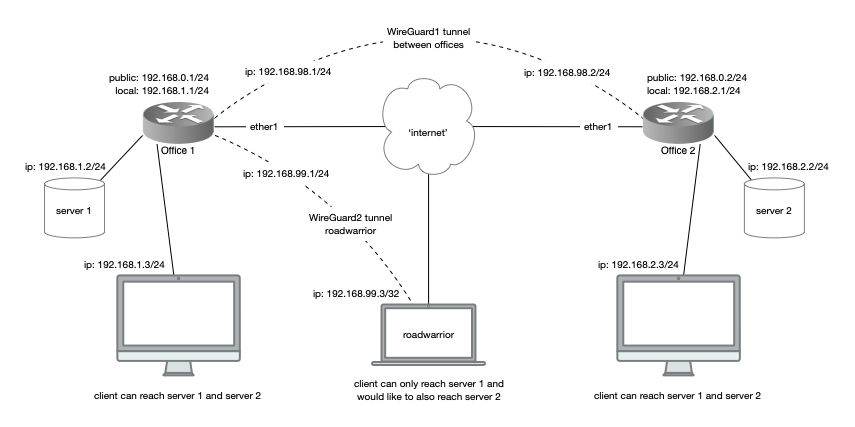
In my homelab I have two offices and one roadwarrior, which is me! There are two working WireGuard tunnels. Clients in office 1 can reach the server in office 1 and 2 and the other way around.
The roadwarrior connects to the router in office 1 and can access the server in office 1. However I would also like to access the server in office 2, but I can not get this to work. Somehow the traffic is not routing from the interface wireguard2 to interface wireguard1.
A diagram that shows the homelab setup:
A collection of my commands:
# create WG interfaces on router Office 1
/interface wireguard add name=wireguard1 mtu=1420 listen-port=13231
/interface wireguard add name=wireguard2 mtu=1420 listen-port=13232

# create WG interface on router Office 2
/interface wireguard add name=wireguard1 mtu=1420 listen-port=13231

# add WG peers on router Office 1
/interface wireguard peers add name="WG Office" interface=wireguard1 endpoint-address=192.168.0.2 endpoint-port=13231
	allowed-address=192.192.168.98.2/32,192.168.2.0/24 public-key="[Office 2 - wireguard1]" is-responder=yes
/interface wireguard peers add name="roadwarrior" interface=wireguard2
	allowed-address=192.192.168.99.3/32,192.168.1.0/24,192.168.2.0/24 public-key="[roadwarrior]" is-responder=yes

# add WG peer on router Office 2
/interface wireguard peers add name="WG Office" interface=wireguard1 endpoint-address=192.168.0.1 endpoint-port=13231
	allowed-address=192.192.168.98.1/32,192.168.1.0/24 public-key="[Office 1 - wireguard1]"

# add IPv4 addresses on router Office 1
/ip address add comment="WG Office 1" interface=wireguard1 address=192.168.98.1/24 network=192.168.98.0
/ip address add comment="WG roadwarrior" interface=wireguard2 address=192.168.99.1/24 network=192.168.99.0

# add IPv4 address on router Office 2
/ip address add comment="WG Office 2" interface=wireguard1 address=192.168.98.2/24 network=192.168.98.0

# add IP route on router Office 1
/ip route add comment="Office 2" dst-address=192.168.2.0/24 gateway=192.168.98.2 distance=1 routing-table=main

# add IP route on router Office 2
/ip route add comment="Office 1" dst-address=192.168.1.0/24 gateway=192.168.98.1 distance=1 routing-table=main

# add firewall filter on router Office 1
/ip firewall filter add comment="allow WG roadwarrior" chain=input protocol=udp dst-port=13232 action=accept place-before=3
The roadwarrior WG client is set to Allowed IP’s: 0.0.0.0/0 so all traffic is routed through the router of office 1.
Any help is appreciated. My feeling is that I need to add a ‘/routing rule’ but am not quite sure how this works.