Hello guys i’m real new to mikrotik, just configured my main router and found out our isp actually blocks certain resource i wanna access, fortunately i have a friend with mikrotik router and this certain resource is accessible on his side.
His router does can access internet with eth0 (ping, tracert to google.com works), connected devices with dhcp to it work aswell
i got his router connected as client and gave it a static ip 172.20.20.241. ( via winbox PPP->secrets->REMOTE ADRESS)
from now on i configured my router. added this to the workin configuration:
#**routing table to Friend**
/routing table set to_Friend disabled=no fib name=to_Friend
#**ip route to the static client ip, routing table to_Friend**
/ip route set *8000000F disabled=no distance=1 dst-address=0.0.0.0/0 gateway=172.20.20.241 routing-table=to_Friend scope=30 suppress-hw-offload=no target-scope=10; /routing route set *8000000F disabled=no
#**certain resource list:**
/ip firewall address-list set *8C address=RESOURCE.COM disabled=no list=through_Friend)
#**the rule:**
/ip firewall mangle set *5B action=mark-routing chain=prerouting disabled=no dst-address-list=through_Friend log=no log-prefix="" new-routing-mark=to_Friend passthrough=yes)
whatever i did it worked. connected to my main router for a few hours this certain resource was accessible (whatever my friend configured on his side somehow worked too)
he did it in safe mode btw. he forgot to disable it and it is goners.
well i did not cry tho, friend tried configuring everything back but was futile and he dropped an entire configuration alltogether and just gave me an access to the winbox via his machine running anydesk.
whatever i do i cant make his router send the traffic back. i clearly see my configuration works, sends him TX , his router receives RX, actually sends it to the resource, but there is ZERO (0) TX data back to me.
#i configured on his side this: (172.20.20.0/24 net for l2tp users, i connect to it from my pc as a client too)
#i dunno why tho, his firewall was empy and i just populated it with something
/ip firewall filter action=accept chain=forward disabled=no log=no log-prefix="" src-address=172.20.20.0/24
/ip firewall filter action=accept chain=input disabled=no log=no log-prefix="" src-address-list=172.20.20.0/24
#route dunno why it is empty, i selected the interface in gateway , tried with 172.20.20.254 too
 /ip route add disabled=no dst-address=172.20.20.0/24 gateway="" routing-table=main suppress-hw-offload=no
if i try to do traceroute(tracert) as a client of my router
i get this:
7 8 ms 7 ms 8 ms 172.20.20.254
8 12 ms 10 ms 54 ms 172.20.20.241
9 * * *
10 14 ms 12 ms 16 ms 172.20.20.254
11 14 ms 15 ms 16 ms 172.20.20.241
12 * * *
13 14 ms 12 ms 13 ms 172.20.20.254
14 18 ms 18 ms 16 ms 172.20.20.241
whatever i wanna do looks like this:
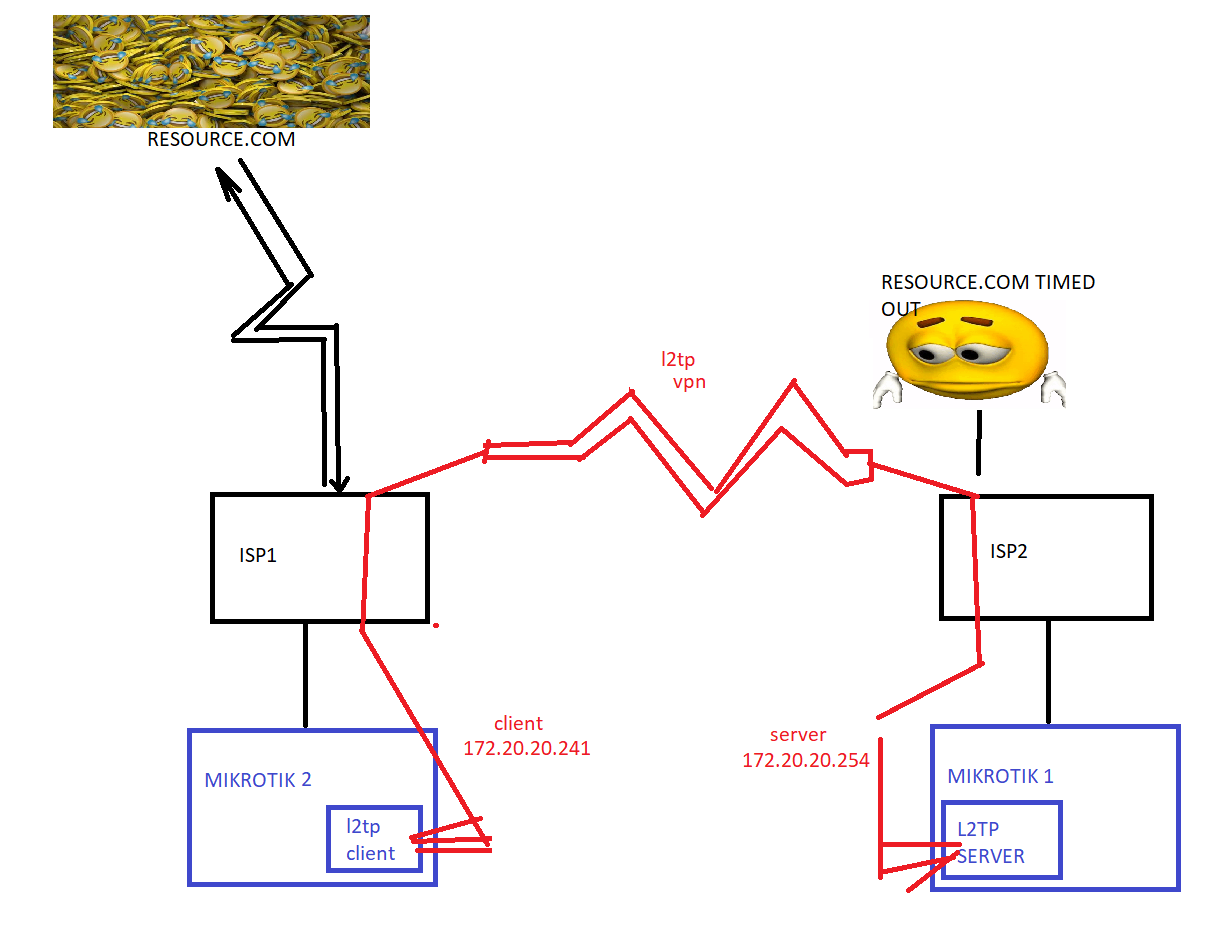
i have no idea whatever am i missing, NAT? well i dont think so. the issue certainly is my Friend router config but i have no idea whatever it is