Route traffic through a Raspberry Pi

Hello,
I have a Raspberry Pi connected to my MikroTik router, I want all the traffic received from clients be routed through this raspberry pi first and after Raspberry Pi forwards the traffic out, it would be routed to Internet router by my Mikrotik router.
Seems easy, But I am not able to make it work.
Here is my network diagram :

What I have done is that I have set the default route of the mikrotik to my Raspberry Pi :

/ip route add distance=50 gateway=192.168.101.1

Then marking all of the packets coming out of Raspberry Pi in Mangle Table and routing them to Internet gateway :

/ip firewall mangle add action=mark-routing chain=prerouting dst-address=!192.168.0.0/16 in-interface=ether2-RPi new-routing-mark="RPi Port" passthrough=no
/ip route add distance=1 gateway=192.168.1.1 routing-mark="RPi Port"

Surprisingly I have Internet access inside my Raspberry Pi, but clients have no Internet access.
Here is my complete configuration :

# may/20/2016 12:18:20 by RouterOS 6.35.2
# software id = 3BKE-E0GT
#
/interface bridge
add admin-mac=4C:5E:0C:46:56:B4 auto-mac=no name=bridge-local
/interface ethernet
set [ find default-name=ether1 ] name=ether1-gateway
set [ find default-name=ether2 ] name=ether2-RPi
set [ find default-name=ether3 ] name=ether3-slave-local
set [ find default-name=ether4 ] name=ether4-slave-local
set [ find default-name=ether5 ] name=ether5-slave-local
set [ find default-name=ether6 ] name=ether6-master-local
set [ find default-name=ether7 ] master-port=ether6-master-local name=ether7-slave-local
set [ find default-name=ether8 ] master-port=ether6-master-local name=ether8-slave-local
set [ find default-name=ether9 ] master-port=ether6-master-local name=ether9-slave-local
set [ find default-name=ether10 ] master-port=ether6-master-local name=ether10-slave-local
/interface wireless
set [ find default-name=wlan1 ] band=2ghz-b/g/n channel-width=20/40mhz-Ce disabled=no distance=indoors frequency=auto mode=ap-bridge ssid=MikroTik-4656BD wireless-protocol=802.11
/ip neighbor discovery
set ether1-gateway discover=no
/ip pool
add name=default-dhcp ranges=192.168.88.10-192.168.88.254
/ip dhcp-server
add address-pool=default-dhcp disabled=no interface=bridge-local name=default
/tool user-manager customer
set admin access=own-routers,own-users,own-profiles,own-limits,config-payment-gw
/interface bridge port
add bridge=bridge-local interface=ether6-master-local
add bridge=bridge-local interface=sfp1
add bridge=bridge-local interface=wlan1
/ip address
add address=192.168.2.1/24 comment="default configuration" interface=bridge-local network=192.168.2.0
add address=192.168.1.180/24 interface=ether1-gateway network=192.168.1.0
add address=192.168.101.2/30 interface=ether2-RPi network=192.168.101.0
/ip dhcp-server network
add address=192.168.88.0/24 comment="default configuration" gateway=192.168.88.1
/ip dns
set allow-remote-requests=yes servers=8.8.8.8
/ip firewall filter
add chain=input comment="default configuration" protocol=icmp
add chain=input comment="default configuration" connection-state=established,related
add action=drop chain=input comment="default configuration" disabled=yes in-interface=ether1-gateway
add action=fasttrack-connection chain=forward comment="default configuration" connection-state=established,related disabled=yes
add chain=forward comment="default configuration" connection-state=established,related
add action=drop chain=forward comment="default configuration" connection-nat-state=!dstnat connection-state=new in-interface=ether1-gateway
/ip firewall mangle
add action=mark-routing chain=prerouting dst-address=!192.168.0.0/16 in-interface=ether2-RPi log-prefix="m3 " new-routing-mark="RPi Port" passthrough=no
/ip firewall nat
add action=masquerade chain=srcnat comment="default configuration" log=yes log-prefix=nat1 out-interface=ether1-gateway to-addresses=192.168.1.180
/ip route
add distance=1 gateway=192.168.1.1 routing-mark="RPi Port"
add distance=50 gateway=192.168.101.1
/system clock
set time-zone-name=Asia/Tehran
/tool mac-server
set [ find default=yes ] disabled=yes
add interface=ether2-RPi
add interface=ether3-slave-local
add interface=ether4-slave-local
add interface=ether5-slave-local
add interface=ether6-master-local
add interface=ether7-slave-local
add interface=ether8-slave-local
add interface=ether9-slave-local
add interface=ether10-slave-local
add interface=sfp1
add interface=wlan1
add interface=bridge-local
/tool mac-server mac-winbox
set [ find default=yes ] disabled=yes
add interface=ether2-RPi
add interface=ether3-slave-local
add interface=ether4-slave-local
add interface=ether5-slave-local
add interface=ether6-master-local
add interface=ether7-slave-local
add interface=ether8-slave-local
add interface=ether9-slave-local
add interface=ether10-slave-local
add interface=sfp1
add interface=wlan1

What am I doing wrong ?
I would appreciate your help.

Your NAT rule is wrong. It should have out-interface set to the Raspberry Pi.

I tried changing NAT to out interface of RPi but still doesnt work. Although it didnt make sense in my opinion.
As I said I have Internet access inside my Raspberry Pi, showing packets coming out of raspberry pi are being marked successfully and routed properly. why dont I have Internet access on clients is a mystery to me.

Then you will need to debug it step by step, using methods such as “log” option on rules, “packet sniffer”, etc.

I tried the Torch and log on rules. They show packets are being marked and routed to Internet gateway, but I cant find where is the culprit. unfortunately I dont have sniffering available on my Internet router so I can not see what exactly is sent out to Internet router. it seems a very easy setup, but cant fix it for 2 days.

Your MikroTik router includes a packet sniffer!
This can do both sniffing to an in-memory buffer and basic display, and to a file which you can examine in wireshark.

Why not just put the Pi between the clients and the Mikrotik? Then you wouldn’t need all of this complicated plumbing in your configuration…
(Mad science is definitely a valid answer, of course)

I can understand why he is doing it this way… a Pi has only a single ethernet interface.
Of course it can be solved using a VLAN switch but then the solution is close to what it is with the router.

Still, it should be possible what he is trying, there is just a mistake somewhere and by tracing the traffic it should
be possible to find it.

I guess I should’ve realized that, but since I’ve never had a Pi to mess with, I’ll forgive myself for not knowing it only had one interface. :wink:

Have you enabled IP forwarding on the RPi?

http://www.ducea.com/2006/08/01/how-to-enable-ip-forwarding-in-linux/

I already had IP forwarding enabled on my RPi.
I guess I found the problem, I noticed client packets do not get masqueraded at all before being sent out to Internet, It seems because packets are forwarded once for RPi and received again are not considered NEW and are not traversed through NAT table.
When I masqueraded the packets inside RPi which changes the src IP to RPi IP, the problem was resolved.
Does it make sense ?

The reason wasn’t state but routing. If the Pi doesn’t masquerade then the arc IP of outbound packets is the original host so the replies are being mid-directed.

Can you explain this please ? I still cant understand why it could be a routing problem and packet sniffer showed client packets were being routed to Internet properly but not being source nated.

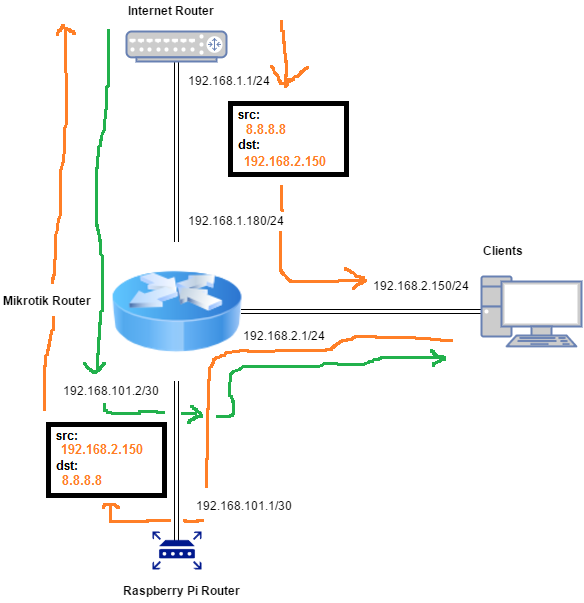
bMH95F5.png
If the Pi doesn’t do any NAT then the packets follow the orange path - note that as the packet leaves the Pi, the src IP will still be the Client’s IP, and not the Pi’s IP.

When the reply comes back from the Internet, the destination IP will be the Client’s IP, not the Pi’s address. I’m not sure what process is being done by the Pi, but if it needs to be un-done by the Pi on replies in order for things to work, then this scenario would break.

The green path represents the path that packets take when the Pi is doing srcnat on the traffic. I didn’t have room to add the sample packet headers to the green path, but the dst IP will be 192.168.101.1 and the src will be 8.8.8.8, which is what is needed for the Mikrotik to foward them to the Pi.

Thank you for your reply, the path that you have illustrated is absolutely correct if there no NAT on RPi, but at the time I was testing RPi was a simple forwarding router, no process was being done on packets and packet sniffer showed packets are being sent out to Internet without being masqueraded on Mikrotik while I had a working masquerade rule. so the packets were being dropped on next router because their source IP was invalid.
I still believe it had something to do with state of packets in Mikrotik connection tracking since they were routed twice through the same router (MTik->RPi->MTik) and I was expecting it to be NATed at second time which obviously was not performed.

post your NAT tables configuration.

/ip firewall nat export

(sanitize public IPs of course)